Short answer: BuddyNext is the strongest starting point for a new WordPress community because it ships the whole stack, feed, Spaces, profiles, messaging, and native moderation, free, without needing bbPress, a separate membership plugin, or a media add-on bolted on to feel complete. BuddyPress is still the most-installed option and a fine choice if you want the largest ecosystem of themes and add-ons and don’t mind assembling the rest yourself. Everything else on this list earns its spot for a specific reason.
Community plugins get compared on feature lists more than almost any other WordPress category, which is misleading, because the feature list has looked roughly the same for a decade: activity feed, groups, profiles, messaging. What actually differs between these plugins in 2026 is how much of that you get without installing three more plugins, and how modern the result feels to an actual member using it on their phone. This list covers six options that all still get real updates and real support, ranked by what they actually include rather than what their marketing pages claim.
On this page
- Quick comparison
- What to actually look for in a WordPress community plugin
- The real cost of an assembled community stack
- Why run a community on WordPress instead of Circle, Skool, or Discord
- 1. BuddyNext
- 2. BuddyPress
- 3. BuddyBoss Platform
- 4. PeepSo
- 5. Youzify
- 6. Ultimate Member
- Feature comparison: the top three
- Frequently asked questions
- Which one should you actually pick
Quick comparison
Plugin | Best for | Starting price | Free tier |
|---|---|---|---|
BuddyNext | Full community OS out of the box | Free, Pro from $149/yr | Yes, full core |
BuddyPress | Largest ecosystem, zero cost | Free | Yes, no Pro tier |
BuddyBoss Platform | Native mobile app, LMS pairing | Free plugin, paid app/theme bundle | Yes, limited |
PeepSo | Lightweight, modern UI on a budget | Free, paid modules | Yes |
Youzify | Restyling an existing BuddyPress site | Paid, requires BuddyPress | No meaningful free tier |
Ultimate Member | Member directories and profiles first | Free, paid addons | Yes |
What to actually look for in a WordPress community plugin
Every plugin on this list can show you a feed, a profile, and a groups page in a demo video. The differences show up once real members log in every day. Four things to check before you commit:
- What’s actually included versus what you’ll need to add. Some plugins ship a feed and profiles, then expect you to bring your own forum plugin, messaging plugin, and membership plugin. Others ship the whole thing. Neither approach is wrong, but the sticker price only means something once you count what else you’ll be installing.
- Moderation, from day one. Reports, strikes, bans, and banned-word filters matter the moment your community is bigger than your friend group. Plugins that treat moderation as a paid add-on are asking you to grow first and get protected second.
- What the free tier actually gates. A free community plugin that gates search, messaging, or moderation behind Pro is a different product than one that keeps the core experience complete and charges for monetization or analytics instead.
- How it feels on a phone. Most community traffic in 2026 is mobile. A plugin built on a decade-old jQuery UI reads differently to a new member than one built on blocks and the Interactivity API, even if the feature list is identical on paper.
- How locked in you’ll be. A restyling layer like Youzify only makes sense on top of BuddyPress specifically. A full platform switch means re-creating groups, profiles, and activity history by hand in most cases, since there’s rarely a clean importer between two different community plugins. Pick the platform you actually want to be running in three years, not just the one that’s easiest to install this afternoon.
The real cost of an assembled community stack
This is the comparison most roundups skip. BuddyPress itself is free, but a BuddyPress site that actually competes with a modern community platform usually means BuddyPress plus bbPress for forums, plus a media plugin for anything beyond basic photo uploads, plus MemberPress or Paid Memberships Pro if you ever want to charge for access, plus a theme built to make all of that look coherent together. Each of those is a separate plugin to update, a separate settings screen, and a separate point of failure when one of them ships a breaking change.
That’s not a criticism of BuddyPress specifically, it’s the trade-off of a modular ecosystem: you only install what you need, but you are the one who has to know what you need and keep it all working together. A platform like BuddyNext makes the opposite trade: less modularity, but the core experience (feed, groups, profiles, messaging, moderation) works together on day one because one team built it as one product.
Put a number on it and the gap gets clearer. A BuddyPress site with real forums, real media handling, and a paid membership tier is commonly five separate paid or free plugins working together: BuddyPress itself, bbPress, a media add-on, a membership plugin, and a compatible theme. Each one ships its own updates on its own schedule, and a breaking change in any single one can quietly break a feature in another. A platform-first approach collapses that into one update cycle for the core experience, with companion apps added only for the specific capabilities you actually need.
Why run a community on WordPress instead of Circle, Skool, or Discord
This is worth answering directly rather than assuming a WordPress community plugin is the obvious choice. Hosted platforms like Circle and Skool genuinely reduce setup time to almost nothing, and they can be the right call for a short-lived cohort or a community that’s secondary to the business. What you give up is ownership: your member data lives on their infrastructure, your monthly cost scales with the platform’s pricing changes rather than your own hosting bill, and if you ever want to leave, migrating a real community’s history off a closed platform is rarely clean.
A WordPress community plugin flips that trade. Setup takes longer and you’re responsible for hosting and updates, but the data is in your own database, the cost is mostly fixed regardless of how many members you have, and every profile and activity post is a page on a domain you control. For a community that’s core to the business rather than a side channel, that difference compounds over years, not weeks.
1. BuddyNext
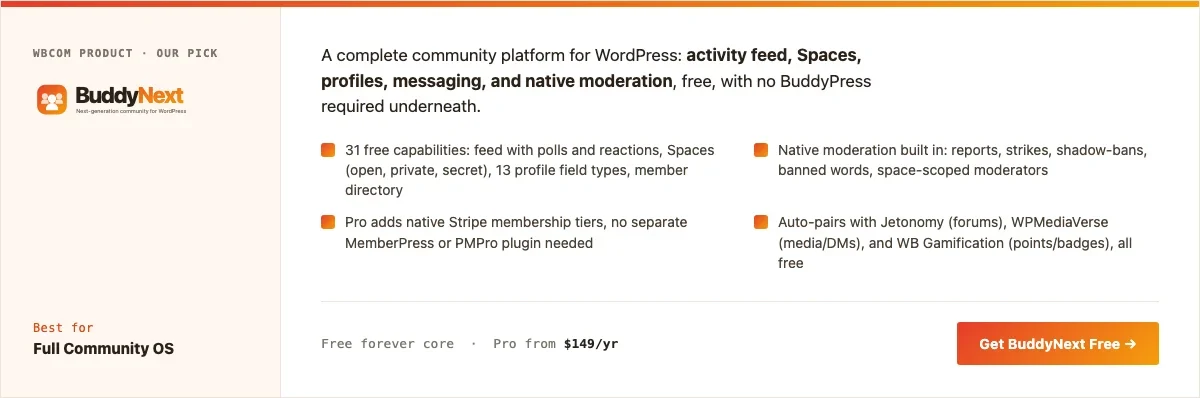
Disclosure: BuddyNext is built by Wbcom Designs, who we work with. We’re listing it here because the free tier genuinely covers what most sites need without add-ons, not because of that relationship, and the screenshot below is from a real install, not a mockup.
BuddyNext positions itself as a standalone community platform, not a BuddyPress add-on, and the free tier backs that up: an activity feed with polls and reactions, Spaces (open, private, and secret groups), member profiles with 13 field types, a directory, private messaging, and native moderation, all included with no companion plugin required. Like BuddyPress, it stores this data in its own tables rather than stretching a custom post type to do the job, the same architectural pattern we go deeper on in our piece on custom tables versus CPTs.
That last part is the actual news here. Reports, strikes, shadow-bans, and banned-word filters usually show up as a paid extension on other platforms; BuddyNext ships them in core.
Here’s a real BuddyNext Spaces directory from a live install, not a design mockup:
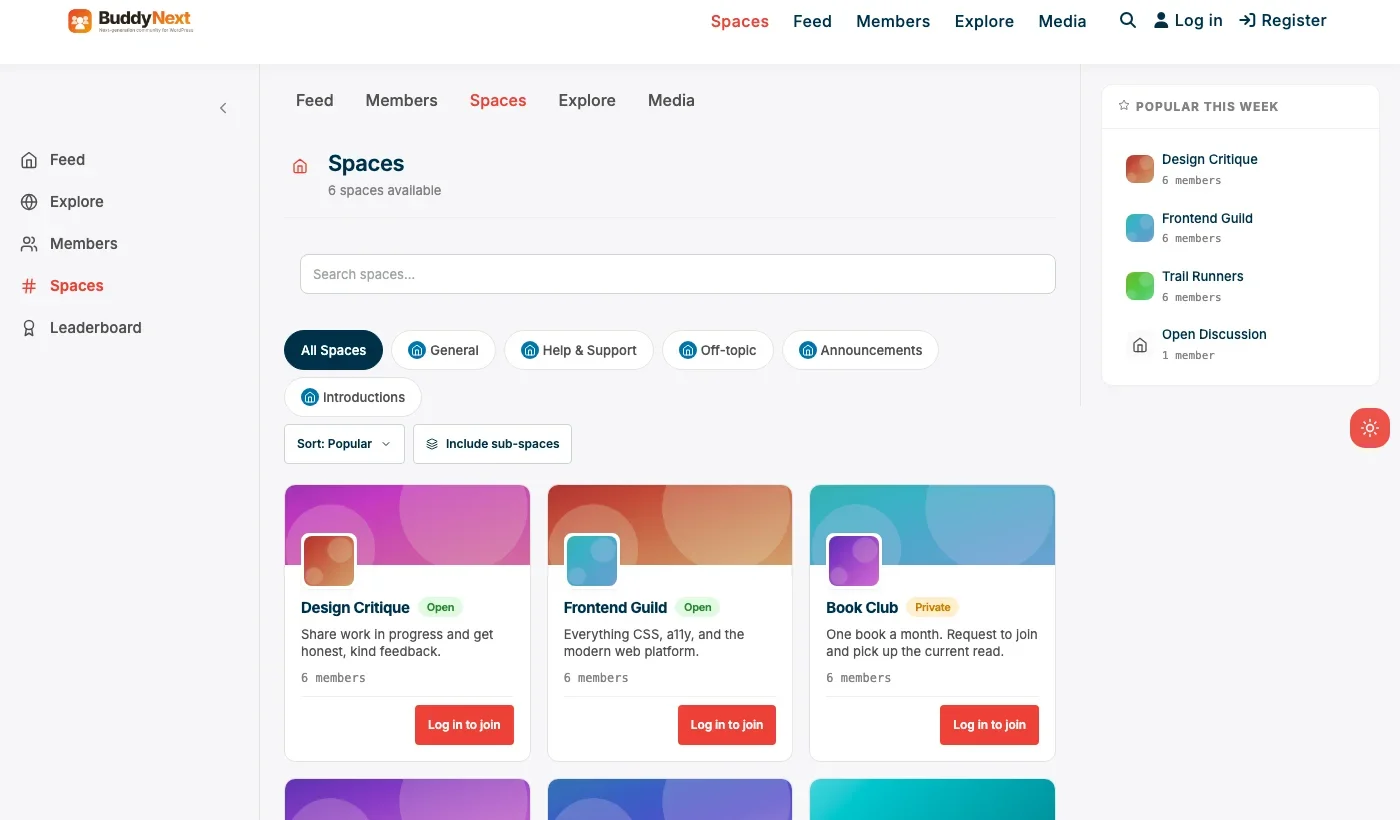
Six real spaces, open and private, each with real member counts and a working join flow. The sidebar’s Feed, Explore, Members, and Leaderboard links are fully wired, not placeholder navigation.
Architecture note: BuddyNext’s most interesting decision is what it doesn’t try to do alone. Rather than building its own forum system, media pipeline, and gamification layer from scratch, it pairs with Jetonomy for forums (we covered that pairing in our WordPress forum plugin roundup), WPMediaVerse for messaging attachments and media posting, and WB Gamification for points and badges, and the integration between them is automatic rather than something you configure by hand.
It’s a different shape of ecosystem than BuddyPress’s plugin-and-theme marketplace: fewer total options, but the ones that exist are built by the same team to work together.
The other headline feature is what Pro adds: native Stripe membership tiers, meaning a paid community doesn’t need MemberPress or Paid Memberships Pro bolted on top. Gated Spaces, content locks, and a customer portal come from the same plugin that runs your feed.
What we like: the free tier is genuinely complete, not a trial. Native moderation from day one. Modern, block-based admin and front end. Companion apps (forums, media, gamification) integrate automatically instead of requiring manual setup.
Could be improved: smaller theme and third-party plugin ecosystem than BuddyPress, simply because BuddyPress has a decade’s head start. Some documented capabilities (like private-space visibility rules) have varied slightly across BuddyNext’s own pages, so verify specific edge cases against current docs rather than marketing copy.
Pricing: free core forever. Pro starts at $149/yr (Personal, 1 site), with Professional and Agency tiers above that.
2. BuddyPress
BuddyPress is the plugin that defined this category, and it’s still free, still maintained, and still the most-installed way to turn WordPress into a social network. It ships as a set of components (Activity, Groups, Members, Messages, Notifications, Friends) you can turn on individually, backed by its own database tables rather than a custom post type for everything, so it holds up reasonably well at scale on its own terms.
The trade-off is the one described above: BuddyPress alone gets you feed, groups, and profiles. Forums, real-time messaging with attachments, and monetization are each a separate plugin, and the default BuddyPress front end looks and feels dated next to newer entrants unless you pair it with a theme built specifically for it.
What we like: zero cost forever, huge ecosystem of themes and add-ons, own-table architecture for its core components, deep community knowledge and documentation after more than a decade in the wild.
Could be improved: feels incomplete out of the box compared to newer all-in-one platforms. No native moderation suite. Default UI needs a compatible theme to feel current.
Pricing: free, always.
3. BuddyBoss Platform
BuddyBoss Platform is built on top of BuddyPress and is the closest thing on this list to an all-in-one competitor to BuddyNext, with the addition of a genuinely strong native mobile app story and deep pairing with BuddyBoss’s own LMS. If you want members to have a branded app in the App Store and Play Store, this is the most established way to get there from WordPress.
The Platform plugin itself is free, but the real cost is the wider BuddyBoss bundle (app, theme, and add-ons) most sites actually need to get the experience shown in BuddyBoss’s own marketing, priced as an annual package.
What we like: strong native mobile app option, tight LMS integration if you’re selling courses alongside community, mature and actively developed.
Could be improved: real cost is the full bundle, not just the free plugin. Heavier stack than a site that only needs web-based community features.
Pricing: Platform plugin free, full BuddyBoss bundle priced annually (confirm current tiers directly).
4. PeepSo
PeepSo built its reputation as the lighter, more modern-feeling alternative to BuddyPress, with a free core (feed, groups, profiles) that doesn’t require a companion theme to look current, and paid modules for specific features like photo albums or video rather than one big Pro bundle.
That per-module pricing is worth budgeting for honestly. PeepSo’s free core is genuinely usable, but the modules most communities end up wanting (richer media, points, invitations) add up module by module rather than in one predictable upgrade.
What we like: clean, modern UI without needing a special theme. Lightweight compared to BuddyPress plus a full add-on stack. Active development and responsive support.
Could be improved: per-module pricing makes total cost less predictable than a flat Pro tier. No native monetization as complete as BuddyNext Pro’s Stripe tiers.
Pricing: free core, individual modules priced separately.
5. Youzify
Youzify isn’t a standalone community plugin, it’s a BuddyPress restyling and extension layer: install it on top of an existing BuddyPress site and it modernizes the profile pages, adds social-network conveniences like stories and reactions, and generally closes the visual gap between stock BuddyPress and something like BuddyBoss.
That makes it a genuinely useful pick in exactly one situation: you already have BuddyPress running and don’t want to migrate, but the default look is holding the site back. It’s the wrong starting point for a brand-new community with no existing investment to protect.
What we like: meaningfully modernizes an existing BuddyPress site without a full platform migration. Deep feature set built specifically to extend BuddyPress rather than replace it.
Could be improved: requires BuddyPress underneath, so it inherits every architectural trade-off discussed above. No real free tier to evaluate first.
Pricing: paid, requires an active BuddyPress install. Confirm current pricing directly.
6. Ultimate Member
Ultimate Member approaches this category from a different angle entirely: it’s a member-directory and profile-and-registration plugin first, with social-activity features available through add-ons rather than baked into the core. If what you actually need is polished frontend user profiles, custom registration forms, and a searchable member directory, rather than a full activity feed and groups, it’s a more direct fit than any full social platform on this list.
Trying to build a full BuddyPress-style community out of Ultimate Member plus its social add-ons is possible, but it’s assembling a community platform from parts designed around membership and profiles first, not the other way around. It’s the right tool when the job is “gate this content behind a nice-looking account system,” and the wrong tool when the job is “build a place people hang out.”
What we like: best-in-class profile and registration form builder. Large, active user base and extension ecosystem. Works well as a lighter-weight member directory without full social features.
Could be improved: not a full community platform out of the box. Social features (activity, groups) are add-ons rather than core, so the total cost climbs quickly if that’s your actual goal.
Pricing: free core, paid addon bundles for extended functionality.
Feature comparison: the top three
Feature | BuddyNext | BuddyPress | BuddyBoss Platform |
|---|---|---|---|
Native moderation suite | Yes, free | No | Basic, deeper tools paid |
Native membership monetization | Yes, Pro (Stripe tiers) | No, needs separate plugin | Via bundle/add-ons |
Forums | Via Jetonomy, auto-integrated | Via bbPress, manual setup | Via bbPress, bundled |
Native mobile app path | Not native | No | Yes, strong |
Free tier completeness | Full core free | Full core free, but core is narrower | Plugin free, bundle paid |
Ecosystem size | Smaller, same-team apps | Largest, third-party | Medium, BuddyBoss-specific |
Frequently asked questions
Is BuddyPress still worth using in 2026?
Yes, if you value the largest available ecosystem and don’t mind assembling forums, media, and monetization from separate plugins yourself. If you’d rather have that experience unified from one team, BuddyNext or BuddyBoss Platform are more direct paths to the same destination.
What’s the actual difference between BuddyNext and BuddyPress?
Both use their own database tables rather than stretching a custom post type, so the difference isn’t storage architecture. It’s completeness and integration: BuddyNext ships moderation, and its companion apps for forums, media, and gamification integrate automatically, while BuddyPress ships the social core and leaves forums, rich media, and monetization to separate plugins you configure yourself.
Do I need BuddyPress to use BuddyNext?
No. BuddyNext is a standalone platform, not a BuddyPress add-on. It doesn’t require BuddyPress to be installed or active.
Can Youzify work without BuddyPress?
No. Youzify is built specifically to extend an active BuddyPress install. If you don’t already have BuddyPress running, it isn’t the right starting point.
Which of these is the cheapest way to get a real community running?
BuddyPress costs nothing but your own setup time for the rest of the stack. BuddyNext, PeepSo, and Ultimate Member all have genuinely usable free cores if you don’t need paid membership tiers yet. The real cost comparison should include what you’ll need to add to each to reach feature parity, not just the sticker price.
What does BuddyNext’s Pro tier actually add over the free core?
Mainly monetization and growth tooling: native Stripe membership tiers, gated Spaces and content locks, email campaigns and drip sequences, AI-assisted moderation, real-time presence features, and deeper analytics. The free core’s feed, Spaces, profiles, messaging, and moderation stay fully functional without it.
Is a self-hosted community actually cheaper than Circle or Skool over time?
Usually. Hosted platforms typically run $39 to $199 a month regardless of member count, forever. A WordPress community’s cost is mostly upfront, hosting you likely already pay for plus an optional Pro license, and several options on this list, including BuddyPress and BuddyNext’s core, have no recurring plugin cost at all. You take on hosting, backups, and updates yourself in exchange, which is a real time cost even when it isn’t a dollar cost.
Can I migrate an existing BuddyPress community to BuddyNext later if I start with BuddyPress?
There’s no one-click importer between the two today, since they store activity and group data differently. Treat the choice as a real decision up front rather than a “start anywhere, switch later for free” situation, and if you’re unsure, start with whichever plugin’s free tier already covers what you need on day one.
Which one should you actually pick
If you’re starting a community from nothing today, start with BuddyNext. The free tier is complete enough to launch on, and if you need forums, richer media, or a monetized membership tier later, the path is a companion app rather than a plugin-and-theme scavenger hunt. If you specifically want the biggest third-party ecosystem and don’t mind doing that assembly yourself, BuddyPress remains the standard the rest of this category still gets measured against.
Reach for BuddyBoss Platform if a branded mobile app is a real requirement, PeepSo if you want a lighter modern feel and don’t mind modular pricing, Youzify if you already have BuddyPress and just need it to look current, and Ultimate Member if profiles and a member directory were the actual goal all along.
Explore the full series
This roundup is the general starting point for a much larger series covering specific community niches, use cases, and adjacent categories. A few places to go next depending on what you’re actually building:
- Best WordPress Membership Plugins, for a community built around paid access rather than open participation
- Best WordPress Nonprofit Community Plugins, volunteer coordination and donor engagement on a tight budget
- Best WordPress Professional Networking Plugins, directory-first communities built around career and industry connections
- Best WordPress Coaching Community Plugins, cohort-based paid programs with a coach-client relationship at the center
- Best WordPress Gaming Community Plugins, clans, guilds, and esports communities that need more than Discord offers
- Best WordPress Fitness Community Plugins, challenge-based accountability groups with streaks and progress tracking
- Best WordPress Online Course Plugins, structured learning content, a different problem than open community
- Best WordPress Business Directory Plugins, listings and search for local businesses, not member profiles
- Best WordPress Job Board Plugins, employer-posted listings for a niche audience or association
- Best WordPress Event RSVP Plugins, free headcount tracking for meetups and community gatherings
- Best WordPress Gamification Plugins, points, badges, and leaderboards that layer onto almost any community
- Best Free WordPress Community Plugins, the full free-tier-only comparison for a zero-budget launch
Last reviewed: September 2026.




No comments yet