
Short answer: if you’re starting a new forum today, Jetonomy is the strongest pick because it stores everything in custom database tables instead of stretching wp_posts to do a job it wasn’t built for, and it stays fast well past the point where most WordPress forums start choking. If you want the most battle-tested free option with zero lock-in, bbPress is still a reasonable floor. Everything in between depends on how much you value polish, add-ons, or an existing BuddyBoss investment.
Forums are one of the few WordPress use cases where the underlying database design actually matters to the person running the site, not just the developer who built it. A forum with 500 topics behaves the same on almost any plugin. A forum with 50,000 topics and years of replies exposes exactly how each plugin stores its data, and that’s where most of the picks on this list start to separate.
On this page
- Quick comparison
- What to actually look for in a WordPress forum plugin
- Why run a forum on WordPress instead of Discord
- 1. Jetonomy
- 2. bbPress
- 3. wpForo
- 4. Asgaros Forum
- 5. BuddyBoss Platform
- 6. Simple:Press
- 7. DW Question & Answer
- Feature comparison: the top three
- Frequently asked questions
- Which one should you actually pick
Quick comparison
Plugin | Best for | Starting price | Free tier |
|---|---|---|---|
Jetonomy | Architecture and scale | Free, Pro tiers available | Yes, full core |
bbPress | Barebones, official, zero cost | Free | Yes, no Pro tier |
wpForo | Feature depth out of the box | Free, paid add-ons | Yes |
Asgaros Forum | Lightweight, low-resource sites | Free | Yes, no Pro tier |
BuddyBoss Platform | Sites already on BuddyBoss | Free plugin, paid app/theme bundle | Yes, limited |
Simple:Press | Legacy installs, established forums | Paid | No meaningful free tier |
DW Question & Answer | Q&A instead of open discussion | Free, Pro add-ons | Yes |
What to actually look for in a WordPress forum plugin
Most roundups compare feature checklists. Checklists don’t tell you what happens at year two, when the forum has real history and real members. Four things do:
- Where the data lives. Some forum plugins register a custom post type for every topic and reply. That’s the fastest way to ship a forum plugin, and it’s also the reason so many WordPress forums slow down as they grow:
wp_postswasn’t designed for threaded, high-write, constantly-queried content at forum scale. Plugins that use their own tables sidestep this entirely. - Self-moderation. A forum that requires an admin to approve every post doesn’t survive past a few hundred members. Trust-level systems, where members earn posting and moderation privileges over time, are the difference between a forum you have to babysit and one that runs itself.
- Migration path. If you’re moving off bbPress, wpForo, or Asgaros, you want a plugin that preserves your URLs. Losing every forum thread’s SEO equity on migration day is a bad trade even for a better platform.
- What happens when you outgrow the free tier. Some plugins gate basic functionality (search, moderation, even replying) behind a paywall. Others keep the entire core free and charge only for genuinely optional extensions. Read the free/Pro split before you build on top of it, not after.
Why run a forum on WordPress instead of Discord or a hosted community tool
This comes up in almost every conversation about starting a forum, so it’s worth answering directly instead of assuming the choice is obvious. A Discord server is fast to set up and free, and for a fast-moving, chat-first community it’s genuinely a better fit than a forum. But Discord content is not indexable by search engines, it disappears from view the moment a message scrolls past, and you don’t own the platform your community lives on. A well-organized WordPress forum is the opposite on all three counts: every thread is a page Google can rank, old answers stay useful for years instead of scrolling into the void, and if you ever want to move hosts, change themes, or export your data, it’s yours to move.
The trade-off is real, too. A forum takes more setup than pasting an invite link, and it asks more of your members up front (an account, sometimes an approval step) than dropping into a chat. For a support community, a product community, or anything where the content itself has long-term value, that trade-off tends to favor the forum. For a fast, ephemeral, chat-heavy group, it doesn’t. Know which one you’re building before you pick a plugin.
1. Jetonomy
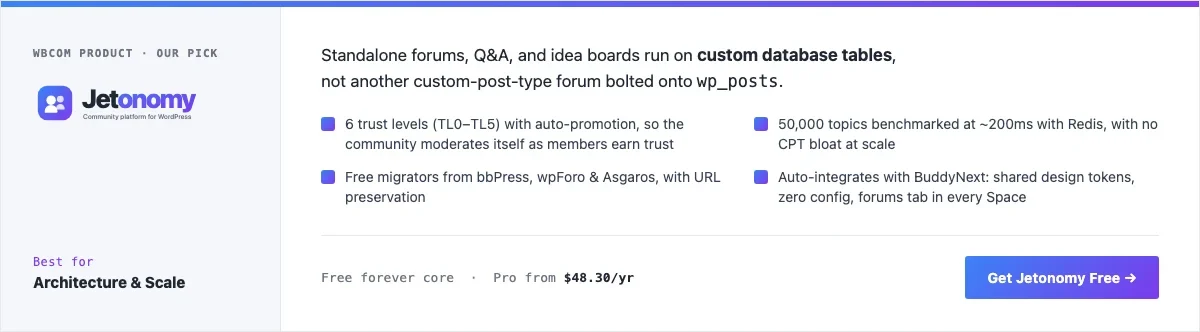
Disclosure: Jetonomy is built by Wbcom Designs, who we work with. We’re listing it here because it earns the spot on its own architecture, not because of that relationship, and we’ve backed every claim below with a real install rather than marketing copy.
Jetonomy is a standalone discussion platform: forums, Q&A with accepted answers, and idea boards with a Planned-to-Shipped workflow, all running on its own wp_jt_* tables instead of a custom post type. That single decision is what separates it from most of the rest of this list. We’ve written before about why custom tables beat CPTs at scale, and Jetonomy is a clean example of the pattern: sortable fields as real indexed columns, cursor-based pagination instead of an expensive OFFSET scan, and denormalized counters so a topic list doesn’t have to compute reply counts on every page load.
The number that matters here is the one in Jetonomy’s own docs: 50,000 topics benchmarked at roughly 200ms with Redis in front of it. That’s not a small forum’s numbers. It’s the kind of benchmark you only bother publishing if you built the schema around it from day one.
The other piece worth calling out is trust levels. Members start at TL0 and move up to TL5 as they participate, with posting limits, link permissions, and moderation ability unlocking automatically along the way. It’s the same idea Discourse popularized, applied to a plugin you install on your own WordPress site instead of running a second server for. If you’ve ever run a forum and spent your evenings approving first-time-poster comments by hand, this is the feature that gets your evenings back.
To see it in practice, here’s a real Jetonomy community running on a local install, seeded with genuine spaces, members, and topics rather than placeholder text:
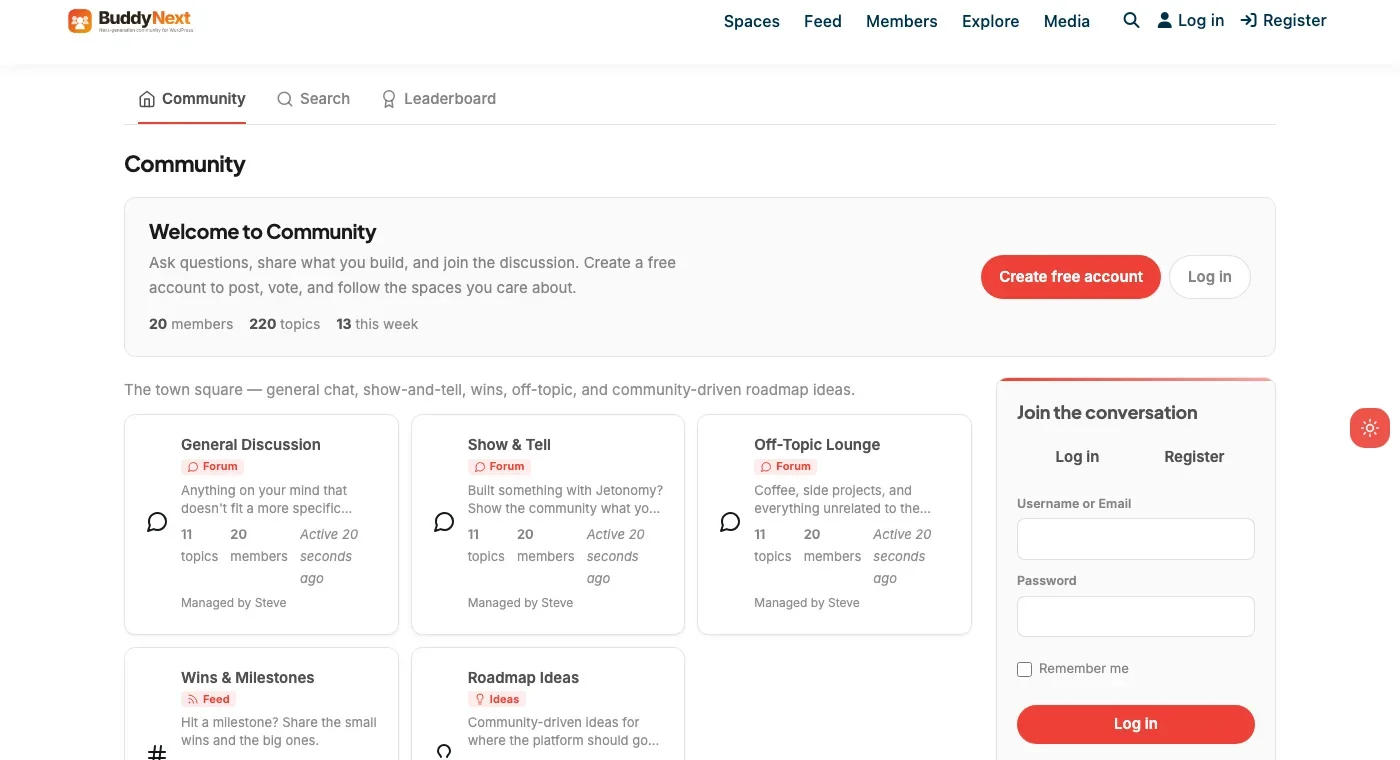
That’s five active spaces (General Discussion, Show & Tell, Off-Topic Lounge, Wins & Milestones, and a Roadmap Ideas board using the Ideas post type) with 20 members and 220 real topics distributed across them, not a design mockup.
Architecture note: Jetonomy’s free/Pro split is also worth understanding before you commit, because it’s structured differently than most WordPress plugins that fork a table or duplicate a class between tiers. We covered that general pattern in our piece on coupling free and Pro plugins without copying code. Jetonomy’s Pro tier ships as 15 separate modular extensions (AI Assist, reactions, polls, private messaging, webhooks, analytics, custom badges, and more) rather than a parallel codebase, which means the free core doesn’t get artificially hobbled to make the Pro tier look better.
If you’re already running BuddyNext, the integration is automatic: the two share design tokens and BuddyNext owns the page header and navigation, no configuration required. If you’re not running BuddyNext, Jetonomy works exactly the same as a fully standalone install.
What we like: custom-table architecture that holds up at real scale, trust levels that reduce moderation to almost nothing, free migrators from bbPress, wpForo, and Asgaros with URL preservation, and a Pro tier that adds features instead of gating the basics.
Could be improved: it’s a newer plugin than bbPress or wpForo, so the plugin ecosystem and third-party integrations around it are still growing. REST endpoint counts have also drifted across different doc pages (we’ve seen 48, 68, 90, and 127 cited), so treat any specific number as approximate until you check the current docs.
Pricing: free core forever. Pro tiers (Personal, Developer, and Agency) unlock the 15 modular add-ons; check the current Jetonomy pricing page for exact costs, since we don’t want to quote a number here that may be out of date.
2. bbPress
bbPress is the plugin most WordPress forums have run at some point, because it’s maintained by Automattic, it’s completely free with no Pro tier to upsell you into, and it does exactly what it says: topics, replies, and forums, nothing more. It’s built on a custom post type architecture (each topic and reply is a post), which is simple to reason about and easy for other plugins to hook into, at the cost of the scaling ceiling discussed above.
For a small support forum, a hobby community, or anything under a few thousand topics, that ceiling won’t matter. For anything bigger, it’s worth knowing it’s there before you build three years of content on top of it.
What we like: zero cost forever, official Automattic maintenance, huge base of themes and extensions built to work with it, minimal learning curve.
Could be improved: no built-in trust levels or self-moderation, so growth means more admin overhead. No native Q&A or idea-board modes. CPT-based storage means performance work is on you as the forum grows.
Pricing: free, always.
3. wpForo
wpForo is the plugin to reach for if you want forum features that usually live behind a paywall elsewhere, like a built-in Q&A layout, private messaging, and social login, included in the free version. It uses its own database tables rather than the post type approach, which puts it in the same architectural camp as Jetonomy rather than bbPress.
The trade-off is that wpForo’s most useful extensions (SSO, certain integrations, some styling options) are sold as individual paid add-ons rather than one Pro bundle, so the real cost of a fully-featured wpForo install can add up faster than the “free” headline suggests. It’s still a legitimate choice, especially if you already know exactly which one or two add-ons you need.
What we like: genuinely feature-rich free tier, own-table architecture, active development, good multilingual support out of the box.
Could be improved: per-feature add-on pricing model means costs are less predictable than a flat Pro tier. Admin UI feels dated next to newer entrants on this list.
Pricing: free core, individual add-ons priced separately.
4. Asgaros Forum
Asgaros is the plugin for people who want a forum and nothing else: no upsells, no Pro tier, no account required to check pricing pages. It’s lightweight by design, which makes it a sensible choice on modest hosting or for a site owner who wants forum functionality without adding much weight to the stack.
The trade-off is that it’s genuinely minimal. There’s no trust-level system, no Q&A mode, and customization options are limited compared to wpForo or Jetonomy. It does what it does reliably, and doesn’t try to do more.
What we like: small footprint, no paywall anywhere in the plugin, simple enough to set up in minutes, actively maintained.
Could be improved: thin feature set if you want anything beyond basic threaded discussion. No self-moderation tooling, so it inherits the same admin-overhead problem as bbPress once a community grows.
Pricing: free, no Pro version.
5. BuddyBoss Platform
BuddyBoss Platform isn’t a forum plugin first, it’s a full community platform (built on top of BuddyPress) that includes discussion functionality, typically layered with bbPress under the hood for the forum piece specifically. The reason it’s on this list at all is that a lot of site owners already running BuddyBoss for groups, profiles, and activity feeds will reasonably ask whether they need a separate forum plugin, and the answer is usually no.
If you’re not already invested in BuddyBoss’s ecosystem, it’s a heavy way to get a forum. The Platform plugin itself is free, but the app, themes, and the rest of the BuddyBoss bundle that make it worth choosing are a paid annual package.
What we like: forums integrate natively with groups, profiles, and the rest of a BuddyBoss community rather than sitting as a separate module. Strong mobile app story if you need one.
Could be improved: real cost is the full BuddyBoss bundle, not just the free platform plugin. Overkill if a standalone forum is all you actually need.
Pricing: Platform plugin free, full BuddyBoss bundle priced annually (check current tiers, they change with feature packaging).
6. Simple:Press
Simple:Press has been around long enough that a meaningful number of older WordPress forums still run on it. It’s a capable, established forum plugin with the kind of feature depth you’d expect from a product that’s had years to mature: permission groups, theming options, and a genuinely large existing user base to draw support from.
It’s also one of the few plugins on this list without a meaningful free tier, which puts it in a different buying decision than everything else here. If you’re evaluating it, price it against Jetonomy or wpForo’s free cores before assuming it’s the safer, more established choice.
What we like: mature codebase, granular permission system, long support history.
Could be improved: no real free tier to test-drive before buying. Feels dated next to plugins built around modern WordPress patterns like block editor support and REST-first architecture.
Pricing: paid, no meaningful free tier. Confirm current pricing directly, as it’s changed structure more than once.
7. DW Question & Answer
DW Question & Answer is worth including because not every community actually wants an open-discussion forum. If what you’re really building is a support knowledge base where one accepted answer should win and the rest of the noise should sort itself below it, a dedicated Q&A plugin models that intent more directly than a general forum does.
Jetonomy covers this same use case as one of its space types, so if you want Q&A and general discussion in the same community, that’s worth weighing against running two separate plugins.
What we like: purpose-built Q&A UX (voting, accepted answers, reputation) rather than a forum repurposed to look like one. Free core with optional paid extensions.
Could be improved: narrower use case than a general forum plugin. If you need open discussion spaces too, you’re either stretching this plugin past its design or running it alongside something else.
Pricing: free core, Pro extensions available separately.
Feature comparison: the top three
Feature | Jetonomy | bbPress | wpForo |
|---|---|---|---|
Storage model | Custom tables | Custom post type | Custom tables |
Trust levels / self-moderation | Yes, TL0–TL5 auto-promotion | No | Basic roles only |
Q&A mode built in | Yes, with accepted answers | No | Yes |
Idea boards / roadmap | Yes, Planned to Shipped | No | No |
Migration tools | bbPress, wpForo, Asgaros importers | N/A | bbPress importer |
Free tier ceiling | Full core, Pro is 15 add-on modules | No ceiling, no Pro tier exists | Core is generous, add-ons priced individually |
Benchmark cited | 50k topics at ~200ms with Redis | Not published | Not published |
Frequently asked questions
Is bbPress still a good choice in 2026?
For a small, simple forum, yes. It’s free forever, well-maintained, and has the largest ecosystem of themes and integrations of anything on this list. Where it falls short is scale and self-moderation. If you expect real growth, weigh that against a custom-table plugin before you commit.
What’s the actual difference between custom tables and a custom post type for a forum?
A custom post type stores every topic and reply as a row in wp_posts, alongside every page and blog post on the site, then relies on postmeta for anything structured. A custom-table plugin gives forum data its own schema: proper indexes, sortable columns, and queries that don’t have to filter a general-purpose table down to just forum content. The difference is invisible at 500 topics and very visible at 50,000.
Can I migrate from bbPress to Jetonomy without losing my URLs?
Jetonomy ships a bbPress importer built specifically to preserve URLs during migration, along with importers for wpForo and Asgaros. Run it on a staging copy first and spot-check permalinks before pointing it at production.
Do I need BuddyNext to use Jetonomy?
No. Jetonomy is fully standalone and works on any WordPress site. If BuddyNext is active alongside it, the two integrate automatically with shared design tokens, but that’s a bonus, not a requirement.
What does a trust-level system actually save me from doing?
Manually approving new members’ first posts, manually promoting reliable members to moderator, and manually policing basic spam and off-topic posting. A trust-level system automates all three by giving members more posting freedom and light moderation ability as they build a track record, instead of putting that entirely on you.
Is a free forum plugin missing anything important compared to a paid one?
It depends which plugin. Some free tiers are genuinely complete (Jetonomy’s core, bbPress, Asgaros) and the paid tier only adds optional extras like analytics or AI features. Others gate basic functionality like search or moderation behind a paywall. Check exactly what’s excluded from the free tier before assuming “free” and “Pro” differ only in extras.
Which of these plugins works best for a support-focused community instead of general discussion?
DW Question & Answer if you want a dedicated Q&A experience only. Jetonomy if you want Q&A and general discussion spaces in the same community without running two plugins.
Is a self-hosted forum actually cheaper than Circle, Skool, or a hosted community tool?
Usually, yes, once you look past year one. Hosted platforms typically run $39 to $199 a month regardless of how many members you have, and that cost never goes away. A WordPress forum plugin’s cost is mostly upfront (hosting you likely already pay for, plus an optional Pro license), and several of the plugins on this list, including Jetonomy’s core, bbPress, and Asgaros, have no recurring plugin cost at all. The trade-off is that you’re responsible for hosting, backups, and updates yourself instead of a vendor handling them, which is a real cost in time even when it isn’t a cost in money.
Which one should you actually pick
If you’re building a new forum today and there’s any realistic chance it grows past a few thousand topics, start with Jetonomy. The custom-table architecture and trust-level system solve the two problems that actually kill WordPress forums over time: database strain and admin burnout. If your forum genuinely will stay small and you want the safest, most-tested free option with the largest ecosystem behind it, bbPress remains a reasonable floor. Everything else on this list earns its place for a specific situation: wpForo if you want maximum free features and don’t mind buying add-ons individually, Asgaros if you want the smallest possible footprint, BuddyBoss if you’re already committed to that ecosystem, Simple:Press if you’re maintaining a forum that’s run on it for years, and DW Question & Answer if open discussion was never really the goal.
Related WordPress plugin guides
- Best WordPress Q&A Plugins, a different mechanic than open discussion, votes and accepted answers instead of threads
- Best WordPress Community Forum Plugins, for when the forum is one piece of a broader BuddyNext community, not the whole site
- Best WordPress Developer Community Plugins, pairs forum-style discussion with structured Q&A for technical audiences
- Best WordPress Community Plugins, the broader community-platform comparison if a forum alone isn’t the whole picture
Last reviewed: September 2026.




No comments yet