Short answer: a developer community needs two things a single plugin rarely does well at once, so pair BuddyNext (profiles, Spaces for language or framework sub-groups, feed) with Jetonomy (structured Q&A with voting, best-answer marking, and reputation). Together they cover both the networking layer and the Stack-Overflow-style question flow developers actually expect. BuddyPress plus CM Answers is the free DIY route to roughly the same result. Discourse is the well-known non-WordPress alternative, genuinely excellent forum software, but it lives outside WordPress and doesn’t share your existing user accounts, content, or SEO.
Developers are a specific, demanding audience: they expect code to render properly, they expect reputation to mean something, and they expect a real answer to surface above the noise instead of getting buried in a linear comment thread. Most general community plugins handle the social side fine and fall apart the moment someone pastes a fifteen-line function and asks what’s wrong with it. This roundup is written from inside that exact niche, since attowp.com is itself a technical WordPress development site, so the needs described here aren’t abstract.
On this page
- Quick comparison
- What a developer community actually needs
- Why one plugin rarely covers both layers
- 1. BuddyNext + Jetonomy
- 2. BuddyPress + CM Answers
- 3. Discourse (non-WordPress alternative)
- 4. PeepSo
- Feature comparison
- Frequently asked questions
- Which one should you actually pick
- Designing reputation that actually means something
Quick comparison
| Option | Best for | Starting price | Stays in WordPress |
|---|---|---|---|
| BuddyNext + Jetonomy | Full networking plus structured Q&A | Both free core | Yes |
| BuddyPress + CM Answers | Free DIY combination | Free | Yes |
| Discourse | Purpose-built forum software | Free self-hosted, paid hosted | No, separate platform |
| PeepSo | Lightweight community feel, light Q&A | Free, paid modules | Yes |
What a developer community actually needs
- Code that actually renders. A pasted code block needs to keep its formatting and indentation, not collapse into a single unreadable line the way a lot of generic comment systems handle multi-line text.
- Reputation that reflects real contribution. Points for logging in are noise. Points for a marked best answer, an accepted fix, or genuinely helpful votes from other developers are a real trust signal worth building around.
- Tagging by language, framework, or stack. A developer community without real tags becomes a flat, unsearchable pile within a few months. Filtering by “PHP” or “React” or “WooCommerce” is what makes a growing archive stay useful.
- A profile that means something professionally. Developers often treat community reputation as a quiet portfolio signal, worth linking from a resume or a GitHub bio. A profile that shows real answer history and reputation supports that.
- A path from “question” to “resolved,” not an endless thread. Structured Q&A with a marked best answer respects everyone’s time far better than a long, unordered comment thread where the actual fix is buried on page three.
Why one plugin rarely covers both layers
It’s worth being honest about why this comparison recommends a pairing instead of a single winner. A pure Q&A tool, built purely around question and answer mechanics, tends to have a thin or nonexistent profile and networking layer: no real feed, no way to follow another developer’s activity, no sense of who else is active in the community beyond a leaderboard. A pure community tool, built around a feed and groups, tends to flatten every post into the same undifferentiated stream, with no voting, no accepted-answer marking, and no structured way to surface the single correct fix among ten replies.
Developers specifically notice this gap because they’ve used Stack Overflow, GitHub Discussions, and Discord all in the same week and know exactly what each one does well. A WordPress-based developer community competing for their attention needs to cover both halves credibly, not just pick the easier one to build.
It’s worth naming what each half is actually for, since conflating them is where a lot of developer communities go wrong from the start. The networking layer answers “who else is here, and what are they working on,” the kind of ambient awareness that makes a community feel alive between questions. The Q&A layer answers a narrower, more urgent question: “does this specific thing work, and if not, why.” A member checking the feed on a slow Tuesday and a member frantically searching for a fix to a production bug at 11pm are using the same platform for genuinely different reasons, and a plugin combination that serves both moods well outperforms one that only thought through one of them.
Who actually runs a WordPress developer community
This is a narrower use case than a general community, worth being specific about. Plugin and theme companies running a support-and-showcase community for their own customer developers. Agencies building an internal or client-facing knowledge base that doubles as a lightweight community. Open-source WordPress projects that have outgrown a GitHub Issues thread but don’t want the overhead of a fully separate Discourse instance. Educational platforms teaching WordPress development that want a Q&A layer attached to their course content, so a student’s question during lesson four becomes a searchable resource for the next cohort instead of disappearing into a private support inbox.
Each of these has a slightly different emphasis on which half, networking or Q&A, matters more on day one, but all of them eventually want both, which is exactly why the pairing recommended here tends to outlast a single-purpose tool chosen for short-term convenience.
1. BuddyNext + Jetonomy
Disclosure: BuddyNext and Jetonomy are both built by Wbcom Designs, who we work with. We’re recommending this pairing because it genuinely covers both layers a developer community needs, not because of that relationship.
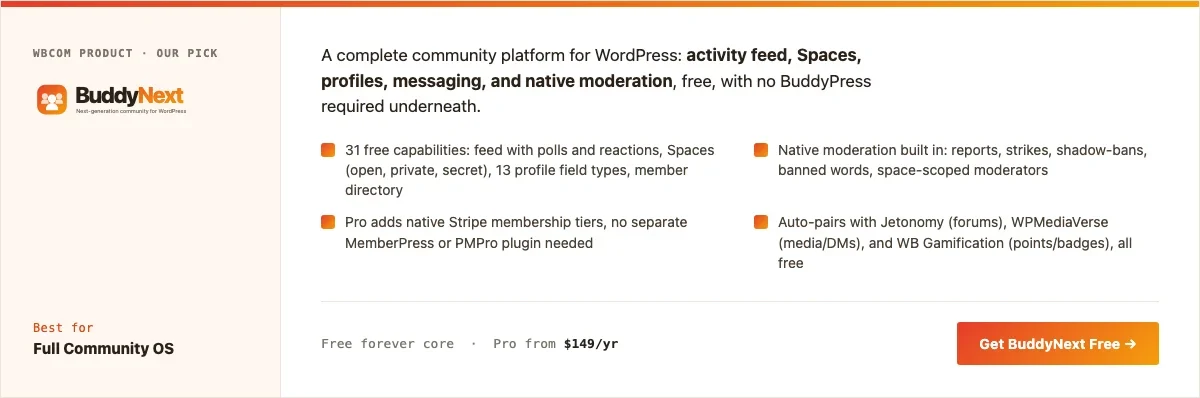
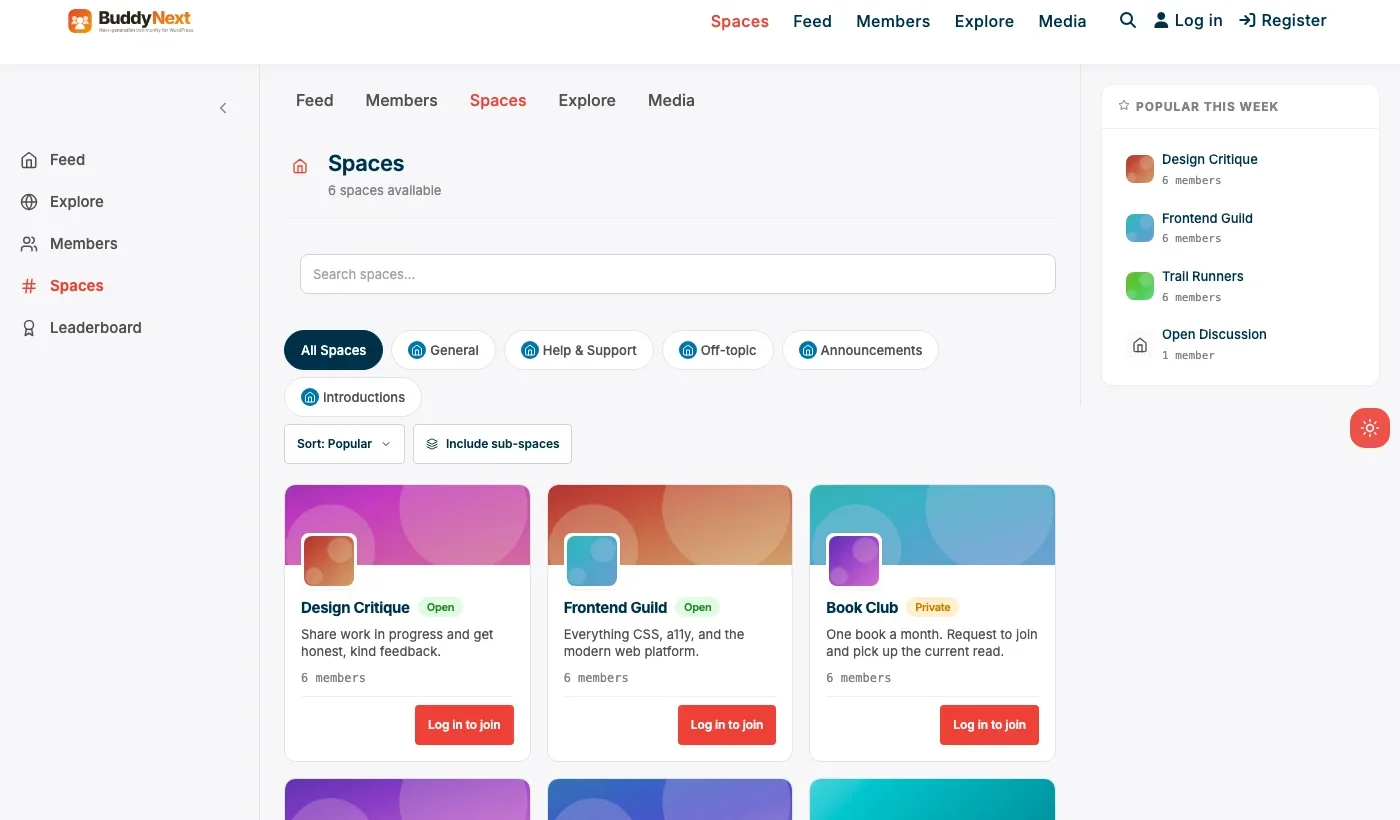
BuddyNext handles the networking half: member profiles, Spaces that can map to a specific language, framework, or plugin ecosystem, an activity feed, and native moderation, all in the free core. Jetonomy handles the Q&A half: structured questions and answers, voting, best-answer marking, and reputation that accrues from real contribution rather than login streaks.
Here’s a real BuddyNext Spaces setup from a live install, the same mechanism a developer community would use per language or framework:
Architecture note: the two plugins share the same WordPress user base, so a developer’s Jetonomy reputation and their BuddyNext profile are the same account, not two disconnected systems a member has to log into separately. We covered BuddyNext’s general community positioning in our WordPress community plugin roundup. What’s specific to a developer audience is pairing that networking layer with genuine structured Q&A rather than treating a feed alone as sufficient.
What we like: covers both layers without stitching together three separate plugins. Both products free at the core. Shared WordPress accounts mean one identity across networking and Q&A.
Could be improved: running two plugins means two admin surfaces to configure, more setup time than a single all-in-one tool. Neither product has built-in code-execution sandboxing.
Pricing: BuddyNext free core forever, Pro from $149/yr. Jetonomy free core, check current pricing for advanced Q&A features.
2. BuddyPress + CM Answers
The free, DIY version of the same idea: BuddyPress for the networking layer, CM Answers (a genuinely popular free WordPress Q&A plugin with voting and best-answer marking) for the structured question flow. Both are free, and BuddyPress’s large theme ecosystem is a real asset if visual customization matters. Nothing auto-integrates between the two beyond shared WordPress accounts, so expect more manual setup time connecting reputation display to community profiles if that matters to you.
What we like: completely free combination. CM Answers has real voting and best-answer mechanics, not a stripped-down comment system pretending to be Q&A.
Could be improved: no native moderation suite in BuddyPress itself. More manual integration work than a pairing built by one vendor.
Pricing: both free.
3. Discourse (non-WordPress alternative)
Discourse deserves an honest mention because it’s genuinely excellent, purpose-built forum and Q&A software that a huge number of developer communities run on. Its trust-level system, spam handling, and moderation tooling are mature and well-regarded.
The real trade-off: Discourse is a separate platform, not a WordPress plugin. It doesn’t share your WordPress user accounts, your existing content, or your site’s SEO equity the way a WordPress-native plugin combination does. Running Discourse means running and maintaining a second system alongside WordPress, with its own hosting, its own login flow (SSO can bridge this, with setup work), and its own separate domain or subdomain in most setups.
What we like: mature, purpose-built, widely trusted by real developer communities. Excellent moderation and trust-level tooling.
Could be improved: separate platform from WordPress, meaning separate accounts, separate SEO, separate maintenance surface.
Pricing: free self-hosted, paid hosted plans available.
4. PeepSo
PeepSo’s lightweight feed and profile system, paired with its Q&A module, covers a lighter version of both layers without BuddyPress’s setup overhead. It fits a smaller developer community that wants a modern look without needing the full depth of a dedicated Q&A platform.
What we like: modern feed and profile experience out of the box. Lighter weight than a full BuddyPress stack.
Could be improved: Q&A module is lighter than a dedicated tool like Jetonomy or CM Answers; best-answer and reputation mechanics are less developed.
Pricing: free core, individual modules priced separately.
Feature comparison
| Feature | BuddyNext + Jetonomy | BuddyPress + CM Answers | Discourse |
|---|---|---|---|
| Structured Q&A with voting | Yes, Jetonomy | Yes, CM Answers | Yes, native |
| Networking/profile layer | Yes, BuddyNext | Yes, BuddyPress | Basic profiles only |
| Shares WordPress accounts | Yes | Yes | No, needs SSO setup |
| Native moderation | Yes, free | No, BuddyPress lacks it | Yes, mature |
| Cost | Free core, both | Free, both | Free self-hosted |
Frequently asked questions
Do I really need two plugins, or can one do the whole job?
A few all-in-one plugins claim to do both, but in practice the Q&A mechanics or the networking layer end up shallow in most single-plugin options we’ve evaluated. Pairing two purpose-built tools with shared WordPress accounts tends to outperform a single plugin trying to do everything reasonably well.
Will code blocks actually format correctly in Jetonomy or CM Answers?
Both handle basic code formatting, but for anything beyond short snippets, embedding a GitHub Gist inside the post or answer is the more reliable approach, since raw inline code blocks in WordPress can occasionally lose formatting depending on theme and editor settings.
Can reputation from Jetonomy show up on a BuddyNext profile?
Since both share the same WordPress user account, a member’s Jetonomy activity and reputation are tied to the same identity as their BuddyNext profile, even without deep custom integration work connecting the two visually.
Is Discourse actually better than a WordPress-based option?
For a community that’s purely a Q&A forum with no other content, Discourse’s polish is hard to beat. For a business or blog that wants the community to feel like a native part of an existing WordPress site, sharing accounts, SEO, and content, a WordPress-native pairing is usually the better fit despite Discourse’s individual feature strength.
How do you stop a developer community from becoming a support queue?
Tagging and categorization matter here: separating “general discussion” Spaces from “help/support” questions keeps the community from feeling like nothing but a ticket queue, and gives members a reason to visit even when they don’t currently have a problem to solve.
What’s the fastest way to launch a basic developer community this month?
BuddyNext’s free core plus Jetonomy’s free core: a couple of language or framework Spaces, and Q&A enabled. No paid tier is required to have something real and usable on day one.
Which one should you actually pick
If you want both layers covered credibly without stitching together unrelated tools, start with BuddyNext plus Jetonomy. If budget is the only constraint and some manual setup time is available, BuddyPress plus CM Answers gets most of the way there for free. Choose Discourse specifically when the community is a pure Q&A forum with no need to feel native to an existing WordPress site, and PeepSo fits a smaller community that wants a lighter touch on both layers.
Designing reputation that actually means something
A reputation system is easy to set up and surprisingly easy to get wrong. The most common mistake: awarding points for low-effort actions at the same rate as points for genuinely helpful contributions. When that happens, the leaderboard fills with people who post often rather than people who actually help, and the signal reputation was supposed to provide quietly stops meaning anything.
The fix is usually simple: weight marked best answers and genuine upvotes from other members far higher than participation alone, and consider decaying or capping points from low-effort actions entirely. A developer community’s reputation system is only as trustworthy as the incentive structure behind it, and getting this right early is much easier than trying to rebalance an established leaderboard that members have already built an identity around.
Seeding the Q&A archive before launch
A common mistake worth naming directly: launching a developer community’s Q&A section completely empty and hoping members will start posting questions on their own. An empty question archive gives a first-time visitor nothing to search for, nothing to browse, and no evidence the community actually has useful answers in it, which makes them far less likely to post their own question into what looks like a ghost town.
A better launch sequence seeds the archive with a genuine set of real, commonly-asked questions before opening it publicly. Pull from actual support tickets, actual comments on existing blog posts, actual questions team members have answered informally over email or chat. Writing these up as real Q&A entries, with a marked best answer, gives the archive immediate substance and gives new visitors a concrete sense of what kind of questions belong there.
Moderating a community with a technical bar to entry
Moderation in a developer community looks different from moderation in a general social community. The main risks aren’t spam or harassment alone, they’re low-effort or duplicate questions that could have been answered by a quick search, and answers that are confidently wrong, which is arguably worse than no answer at all since a wrong fix can send someone down a broken path with false confidence.
A few practical patterns help here. Encouraging a search-before-posting habit keeps the archive from filling with near-duplicate questions. Giving trusted, high-reputation members some lightweight moderation ability distributes the moderation workload the same way Stack Overflow’s trust-level system does, rather than leaving every judgment call to a single admin who eventually becomes a bottleneck as the community grows.
Onboarding a new developer into an existing community
A developer arriving at an established community faces a different onboarding problem than a general social community member does. They’re not just deciding whether to post, they’re trying to figure out whether the archive already has the answer to whatever brought them there in the first place, and whether the people active in a given Space actually know the specific stack they’re working with. A profile that surfaces a member’s reputation, their top-answered tags, and which Spaces they’re actually active in, does real work here, since it lets a new arrival quickly judge whether this is a community worth investing time in for their specific problem.
A practical onboarding pattern worth building deliberately rather than leaving to chance: a pinned “start here” post in each language or framework Space linking to the most-referenced questions in that specific area, updated periodically as new high-value answers accumulate. This gives a developer landing in, say, a WooCommerce Space for the first time an immediate sense of what’s already been solved there, rather than forcing them to search blindly or, worse, post a question that’s already been answered three times before.
What a healthy developer community actually looks like month to month
It’s worth being specific about what to actually watch, since raw post count is a misleading signal on its own. A community where the same five staff members answer every question is not healthy, even if activity looks busy on a dashboard, since it means the community hasn’t yet built the peer-to-peer answering dynamic that makes this model worth the setup effort in the first place. A more useful metric is the ratio of staff-authored answers to member-authored answers over time, and whether that ratio is shifting toward members as the reputation system does its job.
Response time on new questions matters more early on than it might seem. A question that sits unanswered for a week in a young community teaches new members that posting isn’t worth the effort, which is a hard reputation to shake once it sets in. Staff presence in the first few months, actively answering and modeling good behavior, is what typically gets a developer community past that fragile early period into genuine self-sustaining peer activity.
A closing thought worth stating plainly: the two-layer pairing recommended throughout this guide is not a permanent commitment carved in stone at launch. A community that starts with just Jetonomy for Q&A can add BuddyNext’s networking layer later once the archive has real traction, and the reverse works too. Starting with whichever layer solves the more urgent problem today, and adding the other once real usage data justifies the extra setup time, is a perfectly reasonable way to sequence this rather than trying to launch both halves perfectly on day one.
Related WordPress plugin guides
- Best WordPress Q&A Plugins, a closer look at Jetonomy’s Q&A mechanics on their own, outside the developer-community pairing
- Best WordPress Help Desk Community Plugins, the same Q&A engine applied to customer support instead of developer discussion
- Best WordPress Idea Board Plugins, for a developer audience that also wants to vote on what gets built next
- Best WordPress Community Forum Plugins, the same BuddyNext plus Jetonomy pairing framed around integrated forums specifically
A short onboarding checklist for new members
A developer community’s onboarding moment matters more than most other community types, since a new member’s first impression is often shaped by whether they can immediately tell what’s expected of them: is this a place to ask beginner questions, or does that get downvoted into oblivion? A brief, visible welcome post pinned at the top of the feed, spelling out what kinds of questions are welcome and pointing to the Q&A archive for anything that’s likely already been answered, does real work here. Pair that with a lightweight tagging convention (by language, framework, or skill level) from day one, since retrofitting a tagging system onto years of untagged content is far more painful than starting with a small, sensible set of tags and letting the list grow only as real need shows up.
Last reviewed: September 2026.




No comments yet