Every WordPress developer building something data-heavy hits the same fork. Model it as a custom post type and inherit the whole ecosystem for free, or build custom tables and inherit nothing.
The default answer is CPT, and for most features it is the right one. When we built Jetonomy’s discussion platform we went the other way and used custom tables, and the reasoning generalises well past forums - it applies to any feature where rows grow without bound and get sorted by something that is not a date.
If you have read our wpdb best practices guide, this is the architectural decision that sits one level above it: not how to write the query safely, but whether the table you are querying should have existed in the first place.
This is the architecture write-up, with the tradeoffs stated honestly rather than as a pitch.
What breaks when a forum lives in wp_posts
Most WordPress forum plugins, bbPress included, store every topic and reply as a row in wpposts with metadata in wppostmeta. That works fine at small scale, and it fails in three specific ways as the data grows.
Table bloat is not local. Ten thousand topics with fifty thousand replies means sixty thousand extra rows in wp_posts. That table is not just yours - it is where posts, pages, revisions, menu items and attachments live. Slowing it down slows every query on the site, including the ones that have nothing to do with your feature.
Meta queries are the wrong tool for hot data. Vote counts, view counts and sticky status all end up in wppostmeta, which means fetching them requires a JOIN. metaquery is one of the slowest patterns in WordPress, and sorting by a meta value at scale is worse - the database cannot use an index the way it would on a real column.
The indexes do not exist. wp_posts was designed for blog posts. Its indexes suit “recent posts by type and status”, which is exactly the wrong shape for “topics in this space, sorted by vote score”. You are asking a table to answer a question it was not built for.
None of that matters at a hundred topics. All of it matters at fifty thousand.
What we did instead
Twenty tables with a wpjt prefix, each with purpose-built columns and indexes.
The important part is not the count. It is which values became columns rather than meta:
votescore,replycount,viewcountandlastreplyatare real columns on the posts table. Sorting by popularity isORDER BY votescore DESCwith an index hit, not a JOIN and a filesort.- The replies table is indexed on
postidandparentid, so loading a threaded conversation is a direct index lookup. - The votes table carries a combined index on who voted and what they voted on, so “has this member already voted?” is one fast lookup rather than a scan.
And wp_posts stays the size it was.
The rule of thumb we settled on: if you sort or filter by it, it is a column. If you only ever read it alongside the row, meta is fine. Most CPT-based designs get into trouble by putting sortable values in meta and discovering the cost two years later, when the fix is a migration rather than an index.
Cursor pagination, and why OFFSET is a trap
This is the change that surprises people most, because LIMIT/OFFSET looks like it should be free.
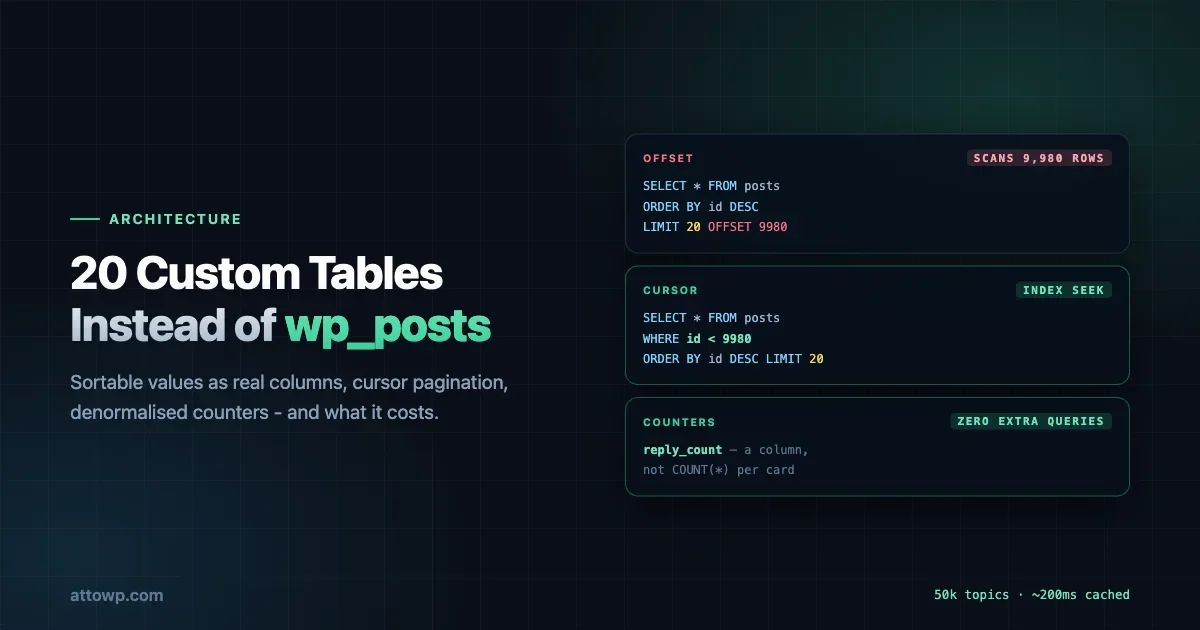
It is not. On page 500 of a 10,000-topic space, LIMIT 20 OFFSET 9980 asks the database to scan and discard 9,980 rows before returning anything. The work grows linearly with page depth, so the deeper someone goes the slower it gets - and the pages nobody visits are the cheapest while the ones people actually browse to get progressively worse.
Cursor pagination asks a different question: give me 20 topics after ID 9980. The database uses the primary key index to jump straight there. Page 500 costs what page 1 costs.
-- Offset: scans and discards 9,980 rows first
SELECT * FROM wp_jt_posts WHERE space_id = 12
ORDER BY id DESC LIMIT 20 OFFSET 9980;

-- Cursor: index seek, then read 20
SELECT * FROM wp_jt_posts WHERE space_id = 12 AND id < 9980
ORDER BY id DESC LIMIT 20;
The cost is real and worth naming. Cursor pagination gives up random page access - you cannot jump to “page 47” because there is no page 47, only “after this row”. For a forum that is an acceptable trade, because people scroll and follow links rather than typing page numbers. For an admin table where someone genuinely needs to jump around, offset may still be correct.
That is the general lesson: cursor pagination is not strictly better, it is better for feeds. Match the pagination model to how people actually move through the data.
Loading 400 replies without loading 400 replies
A long topic is its own problem. Fetching every reply on a thread with 400 of them is slow to query, slow to render and slow to paint, and almost nobody reads the middle.
We load the first ten and the last ten, with a gap in between. Members see how the conversation opened and where it currently is - which is what they actually came for. Clicking the gap fetches only the missing range.
The general principle is worth stealing even if you never build a forum: the ends of a long list carry most of the value. First and last are where context and recency live. The middle is where completeness lives, and completeness is usually the thing you can defer.
Denormalised counters, and the COUNT(*) habit
Showing “42 replies” on twenty topic cards should not cost twenty queries.
reply_count is a column, incremented when a reply is created and decremented when one is deleted. Rendering a listing page with accurate counts costs zero extra queries.
This is the single most common performance mistake we see in WordPress code, and it usually looks harmless:
// Wrong: loads every row to count them.
$count = count( Replies::list_all( $post_id ) );

// Better: asks the database for a number.
$count = Replies::count( $post_id );

// Best for list views: read the column you already fetched.
$count = $post->reply_count;
The first version is fine with three replies and catastrophic with three thousand, and the code looks identical either way. That is what makes it dangerous - it passes review, passes tests on seeded data, and fails in production eighteen months later.
The cost of denormalising is that counters can drift if a write path forgets to update them. That is a real risk and the mitigation is boring: every create and delete goes through one model method rather than being written in several places, and there is a reconciliation path for when something goes wrong anyway.
What the numbers look like
Topic listing pages, 20 topics per page, on a 2 CPU / 4GB RAM SSD VPS running Jetonomy 1.5 with PHP 8.2 and MySQL 8:
Community size | No cache | With Redis |
|---|---|---|
100 topics, 500 replies | ~120ms | ~80ms |
1,000 topics, 5,000 replies | ~180ms | ~100ms |
10,000 topics, 50,000 replies | ~350ms | ~150ms |
50,000 topics, 200,000 replies | ~500ms | ~200ms |
Treat those as a relative guide rather than a promise. They were measured on the default theme with no other plugins active, and your host, theme and plugin stack will move them. What matters is the shape: a 500x increase in data produces roughly a 4x increase in page time, and with an object cache roughly 2.5x. That curve is the thing custom tables buy you.
The honest caveat: those numbers come from our own measurement, on our own stack. Anyone claiming a guaranteed figure for your site is guessing.
What this costs
Custom tables are not free, and the write-ups that pretend otherwise are marketing.
You inherit nothing. No WPQuery. No getposts(). No revisions, no autosave, no trash behaviour, no metabox ecosystem. Everything a CPT gives you for free, you write.
Other plugins cannot see your data. An SEO plugin will not index it, a backup plugin may skip your tables unless it takes the whole database, and an import/export tool will not know they exist. You end up writing your own integrations for things CPTs get automatically.
Migrations are yours. Schema changes need a versioned upgrade routine you write and test, including the case where it fails halfway.
The REST API is yours. Routes, permission callbacks, schema. All of it.
That is a substantial amount of work, and it is only worth it when the scale problem is real. For a feature that will hold a few hundred rows, a CPT is the correct answer and custom tables are over-engineering.
When to choose which
The test we use:
Use a CPT when rows are bounded by human effort - pages, portfolio items, testimonials, anything a person creates one at a time. Editorial ecosystem integration is worth more than query performance, and you will never have enough rows for the performance to matter.
Use custom tables when rows are generated by user activity rather than editorial work, when you sort or filter by values that would otherwise be meta, and when the volume has no natural ceiling. Votes, replies, activity records, log entries, analytics.
The signal that usually settles it: if you can imagine a meta_query with an ORDER BY on a meta value in your future, you want a table. That query is the one that will be slow, and no amount of caching in front of it fixes the underlying shape.
The migration nobody plans for
One more cost, and it is the one that catches teams who choose CPTs first and change their minds later.
Moving from wp_posts to custom tables after you have production data is not a schema change. It is a data migration with three hard parts: the rows themselves, every ID reference anywhere else in the system, and the URLs that already exist and are already indexed by search engines.
The rows are the easy part. The references are where it hurts - anything storing a post ID, any hook consumer, any third-party integration somebody built against your CPT. And permalinks are worse, because a CPT gets WordPress rewrite handling for free and custom tables do not. You are now responsible for routing, canonical URLs and redirects from the old structure.
This is the practical reason to make the call early rather than deferring it. The decision looks reversible when the table is empty and stops being reversible somewhere around the point it starts mattering.
If you are already on the wrong side of that and cannot migrate, the pragmatic middle path is to keep the CPT as the record of truth and add a narrow companion table for the hot sortable values - counts, scores, timestamps - kept in sync on write. Less clean than starting properly, and it fixes the specific query shape that is hurting without a full migration.
What we would tell a developer starting now
Three things, in order of how often we have seen them go wrong.
Decide the sortable fields before you decide the storage. The question is not “CPT or table”, it is “what will this be sorted and filtered by”. Answer that and the storage decision usually makes itself.
Do not put a cache in front of a bad query and call it solved. Caching hides the cost until a cold cache, a purge or a logged-in user meets the real thing. Fix the query shape first; cache what remains - the same ordering our performance optimisation guide argues for at the site level applies inside a plugin.
Write the counter update in exactly one place. Denormalised counters are the right call and they are also the thing that drifts. One model method for create, one for delete, and no direct writes anywhere else.
None of this is specific to forums. It is what happens to any WordPress feature where the row count is driven by how much your members do rather than how much you publish - and that is a category most plugin developers end up in eventually, usually without having planned for it.


No comments yet