WP-CLI is the command line for WordPress, and about twenty-five WP-CLI commands cover almost everything you do on a site day to day: check versions, preview updates, verify files, change a domain, clear stuck jobs, audit admins. In 2026 it is also the main way AI coding agents touch a WordPress install, because an agent with a shell can run wp and read the text that comes back. That is useful and a little alarming in equal measure, so this guide covers both halves: the commands worth knowing, and the rules that keep an agent from doing damage with them.
Everything below was run on WP-CLI 2.12.0, WordPress 7.1.3 and PHP 8.5 against a local development site. Where a command needs a tool our test machine lacks (mysqldump, for example) or would change a live system, we say it was not run, and take the behaviour from the WP-CLI documentation instead.
What is WP-CLI, and why do AI agents use it?
WP-CLI runs WordPress from the terminal, so you can use the site’s own code without a browser. An agent likes it for four plain reasons.
- It needs no screen. The agent types a command and reads the output. No login form, no clicking.
- Output can be machine-readable. Most list commands accept
--format=json,csv,idsorcount. - It documents itself.
wp help plugin updateprints the options on the spot, so an agent can look up a flag instead of guessing it. - It reports success or failure. Commands end with a
Success:orError:line and a matching exit code.
There is a second route that avoids shell access altogether. The official MCP Adapter, which exposes WordPress abilities to AI clients, can serve over STDIO through WP-CLI. Its CLI usage guide gives the command wp mcp-adapter serve with a --user option, and states that without a user the server runs unauthenticated with limited capabilities. Abilities are private by default there: you set meta.public to true to expose one. We compared the connection options in Four Ways to Connect an AI Agent to WordPress, and the ability side is shown in Add Abilities to Your Plugin.
So there are two models. An agent that runs wp commands has the full command surface, which is why this article spends so long on guard rails. An agent that talks to the MCP Adapter has only the abilities you registered. Pick the second when you can. Use the first when you need the breadth, and fence it in.
How do I set up WP-CLI so commands hit the right site?
Symptom: a command ran against the wrong install, returned “This is not a multisite installation”, or printed nothing useful. Check: confirm what WP-CLI is looking at before you run anything that writes.
wp --info                      # PHP version, binary paths, config files in use
wp cli check-update            # Success: WP-CLI is at the latest version.
wp core version                # 7.1.3 on our test site
wp option get siteurl          # which site is this, really?
The global flags that matter most:
--path=/var/www/sitepoints at the WordPress root, so you can run from anywhere.--url=https://example.testpicks one site on a multisite network.--user=adminruns the command as that WordPress user, so capability checks apply to them.--skip-pluginsand--skip-themesload WordPress without them, which rescues a site where a plugin fatal blocks every command. The WP-CLI reference notes that must-use plugins still load.--allow-rootoverrides the refusal to run as root. Use it in a throwaway container, not on a server.
One trap with the skip flags: they change what you see. On our test site, wp rewrite list with plugins skipped printed “Some rewrite rules may be missing because plugins and themes weren’t loaded by WP-CLI.” The tool told us its own output was incomplete. An agent that skips plugins and then reports a rewrite problem is reporting a gap it created.
Put the target in a config file, not in your head
WP-CLI reads a wp-cli.yml in the project directory or above. It also supports aliases for other installs, and an alias can carry user, url, path and ssh. The format comes from the WP-CLI config reference.
# wp-cli.yml
path: public

@staging:
  ssh: deploy@staging.example.com/var/www/staging
  user: agent-readonly

@production:
  ssh: deploy@example.com:2222/var/www/example
  user: admin
Then wp @staging plugin list runs on the staging server over SSH. The remote commands guide documents the general form as --ssh=[<scheme>:][<user>@]<host>[:<port>][<path>], where the scheme defaults to ssh and can also be docker, docker-compose or vagrant. Naming staging in the command makes a mistake visible in the text of the command, which matters when the typist is a model.
Which WP-CLI commands are worth knowing?
Here are the WP-CLI commands we reach for most, grouped by the question you are trying to answer. The right-hand column marks what each can do: read only, preview only with a flag, or write.
Question | Command | Effect |
|---|---|---|
What am I running? |
| Read |
Is anything out of date? |
| Read |
What would an update change? |
| Preview |
Are the files what wordpress.org shipped? |
| Read |
Who can log in as admin? |
| Read |
Throw everyone out |
| Write |
Any app passwords out there? |
| Read |
How big is the database? |
| Read |
Take a copy before changes |
| Writes a file |
Change a domain |
| Preview, then write |
What fires on a schedule? |
| Read |
Run overdue jobs now |
| Write |
Clear expired cache entries |
| Write |
What is bloating the options table? |
| Read |
Why do URLs 404? |
| Read, then write |
List content |
| Read |
Run a PHP snippet |
| Anything PHP can do |
Is WP-CLI itself current? |
| Read |
Two of those deserve a warning before we go further. wp eval runs arbitrary PHP inside WordPress, so it has no limits at all. And wp db query, which we left out of the table, sends raw SQL to the database. Neither belongs in an agent’s allowed set, and we come back to why in the guard rails section.
How do I check what is installed and what an update would change?
Symptom: you do not know what is running, or you need an update plan without touching anything. Check: list, then preview.
wp plugin list --fields=name,status,version,update --format=table
wp plugin update --all --dry-run
wp core check-update --format=count
On our test site the plugin list shows the active plugin, plus every must-use plugin with an empty version. The dry run printed “No plugin updates available.” and core check-update --format=count returned 0. The dry run is the point: --dry-run on plugin update lists what would change without installing anything. Not every command has that flag, so check wp help <command> before you assume it.
Fix: when you do update, take a database export first and update one plugin at a time on staging, so a break has one suspect. For a full plan across a calendar, see our notes on getting ready for WordPress 7.2.
Can WP-CLI tell me whether my files were tampered with?
Yes, for code that comes from wordpress.org. wp core verify-checksums compares your core files with the official checksums. On our test site it printed “Success: WordPress installation verifies against checksums.”
wp plugin verify-checksums --all does the same for plugins, with one limit that trips people up. It only works for plugins that have published checksums. Our test plugin does not, and the output said so: “Could not retrieve the checksums for version 1.6.7 of plugin wb-gamification, skipping.” and then “Success: Verified 0 of 1 plugins (1 skipped).” A green line with “0 of 1” is not a clean bill of health. It means nothing was checked. Premium, custom and anything not from the directory will skip, so read the count, not just the word Success.
This is the check to run when a plugin vulnerability is announced and you want to know if a site was already modified. Our write-up of the The Events Calendar RCE chains has WP-CLI checks for one site or a fleet, and the companion question of who has an admin account is covered on our sister site in The Hidden WordPress Admin Account.
How do I change a domain without breaking serialized data?
Symptom: after a move or a staging copy, images and links still point at the old domain, or a raw SQL replace corrupted widget and theme settings. Why: WordPress stores serialized PHP with string lengths in many places. A plain text replace changes the text but not the stored length, so the value breaks. wp search-replace understands serialized data and fixes the lengths.
# 1. Preview. Nothing is written.
wp search-replace 'http://old.example.test' 'https://example.test' \
  --skip-columns=guid --dry-run --report-changed-only

# 2. Take a copy
wp db export before-replace.sql

# 3. Run it for real
wp search-replace 'http://old.example.test' 'https://example.test' \
  --skip-columns=guid --report-changed-only
On our test site the preview printed a table of tables and columns, for example wp_options with 4 replacements of type PHP (the serialized ones), wp_postmeta with 24, and a closing “Success: 187 replacements to be made.” Most of those 187 were in the guid column, and that is exactly why the example skips it. A post’s guid is meant to stay constant after publishing, so changing it can make feed readers treat old posts as new. The WP-CLI help for the command uses --skip-columns=guid in its own examples.
We did not run the real replace or the export on our test machine, which has no mysqldump. Both follow the documented behaviour. In production the order is the lesson: preview, export, replace, then run the preview again and expect zero.
How do I find and clear stuck scheduled jobs?
Symptom: scheduled posts miss their time, emails queue up, an import never finishes. Check:
wp cron event list --fields=hook,next_run_relative --format=table
wp cron test
The first command lists each hook and when it is due. A hook that says “now” and keeps saying it, or a queue runner that is always overdue, points at a loopback problem. wp cron test checks the cause directly. On our site it answered “Success: WP-Cron spawning is working as expected.” If it errors instead, a firewall, a basic-auth password or a CDN challenge is blocking the site from calling itself.
Fix: run due events from the command line, and stop depending on visitors to trigger the scheduler.
wp cron event run --due-now# crontab entry, every five minutes, as the web user
*/5 * * * * cd /var/www/example && wp cron event run --due-now --quietPair that with define( 'DISABLE_WP_CRON', true ); in wp-config.php so page loads stop spawning the scheduler. We did not run cron event run on the test site since it would fire real jobs. Prevention: a system cron that fails silently is worse than the problem it replaced, so add a check that something is still running. Our other site has a full set of checks in Know When a Scheduled Task Did Not Run.
How do I find what is slowing the admin down?
Two quick checks catch the common causes: oversized autoloaded options and piles of expired transients.
# Largest autoloaded options first. (wp option list has no --orderby, so sort the CSV.)
wp option list --autoload=on --fields=option_name,size_bytes --format=csv \
  | tail -n +2 | sort -t, -k2 -nr | head -10

# Table sizes
wp db size --tables --format=table

# Remove expired transients
wp transient delete --expired
Autoloaded options load on every request, so a few large ones cost time everywhere. Our first draft of this check used --orderby=size_bytes, and WP-CLI rejected it with “Invalid value specified for ‘orderby’”. Sorting the CSV in the shell works. On the test site the biggest autoloaded entries were a cached core file list (about 23.8 KB), the rewrite rules (about 8.8 KB) and the cron array (about 4.4 KB). Nothing alarming there, but the command is how you would spot a plugin storing a megabyte in one row. wp transient delete --expired reported “5 expired transients deleted from the database.” wp transient delete --all exists too, but it wipes live caches, so keep it for a reason.
wp db check needs the mysqlcheck binary. It failed on our test machine for that reason, so do not read much into a run that errors on a missing tool.
How do I see who has admin access and end their sessions?
wp user list --role=administrator --fields=ID,user_login,user_registered --format=table
wp user application-password list 1 --format=count
That prints every administrator with a registration date, and the count of application passwords on one account (it printed 0 for ours). An admin you do not recognise, or one created at an odd hour, is a finding. If you suspect a compromise, wp user session destroy <user> --all ends every login session for that user. The help text documents wp user list --field=ID | xargs -n 1 wp user session destroy --all to do it for everyone. We did not run that on the test site.
How do AI agents use WP-CLI in practice?
Three patterns show up, each with a different risk level.
1. The agent has a terminal on your machine
Tools like Claude Code and other coding agents run shell commands in a project directory. Given a local site, they run wp plugin list, read the table, and decide what to do. This is the highest-risk pattern, because the agent holds everything your shell user can do. Treat the working directory as the blast radius, and do not point it at production.
2. The agent connects through the MCP Adapter over STDIO
The adapter documentation shows this client configuration, which launches WP-CLI as a subprocess:
{
  "mcpServers": {
    "wordpress": {
      "command": "wp",
      "args": [
        "--path=/path/to/your/wordpress/site",
        "mcp-adapter",
        "serve",
        "--server=mcp-adapter-default-server",
        "--user=admin"
      ]
    }
  }
}
The agent here sees only the tools your abilities expose, run as the user you name. The documentation’s own example uses --user=admin, which is the wrong default for most jobs. Name a user with the smallest role that can do the work. A content agent needs an Editor, not an Administrator. The reasoning behind a narrow role is in Give AI a Job, Not the Keys.
3. The agent reaches a remote site through an alias
With the @staging alias from earlier, an agent on your laptop runs wp @staging ... and WP-CLI proxies the call over SSH. The alias can pin a WordPress user, so every command from that alias runs with that user’s permissions.
How do I let an agent run WP-CLI without giving it the keys?
Six rules, in the order we apply them.
- Staging first, always. Give the agent a copy. Production changes come from a human running a reviewed command.
- Read first. The agent starts with list and get commands. It writes only after you have seen the plan.
- Preview before write.
--dry-runexists onsearch-replaceandplugin update. Make the agent run it and show the output. - Least privilege. Use a limited WordPress user through
--useror an alias, and a limited system user for the shell. - Export before any write.
wp db exportbefore the change gives you an undo. - Keep a log. Record every command the agent ran, with a timestamp.
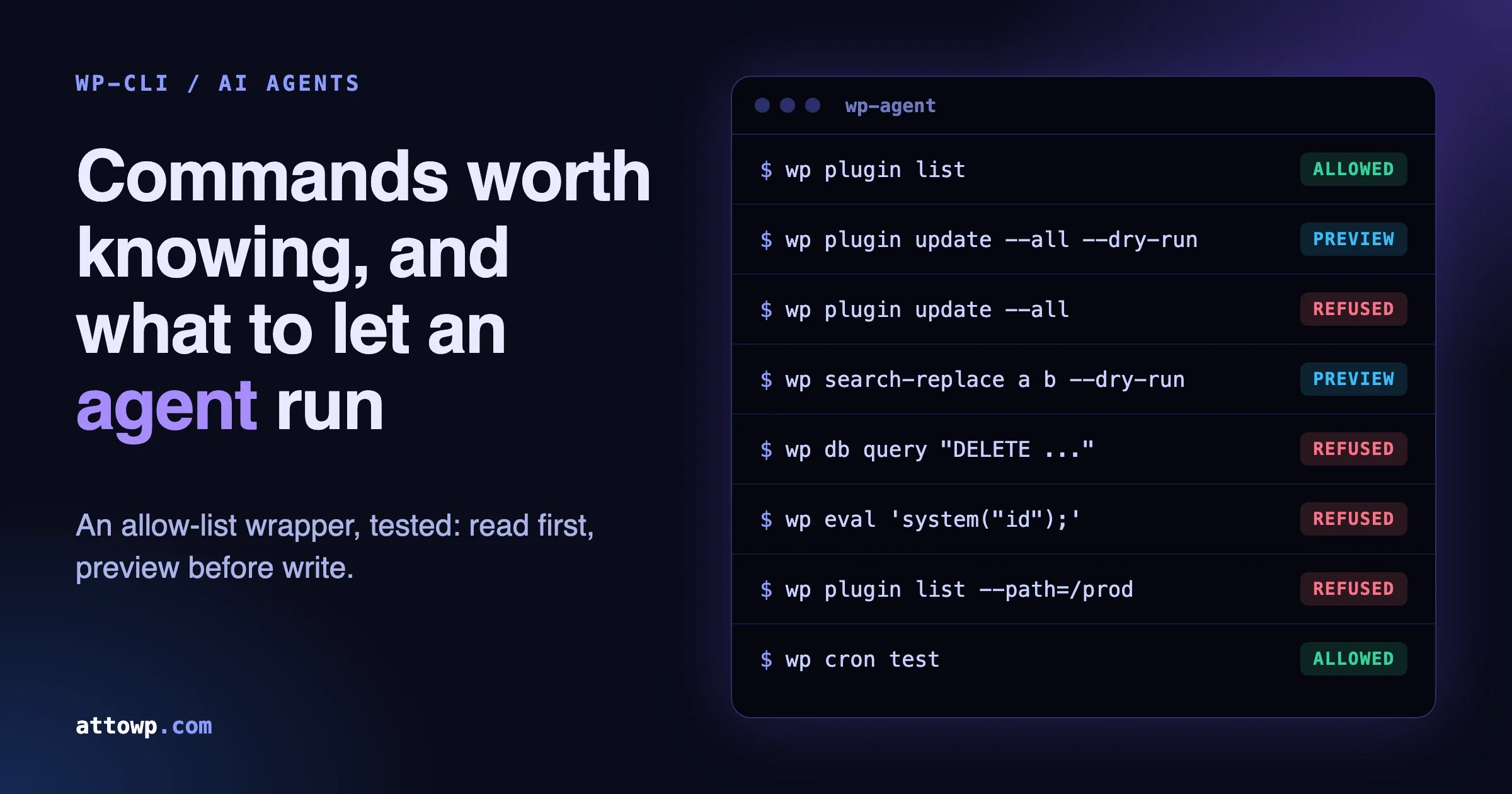
Rules are only as good as their enforcement, and a model can ignore a rule written in a prompt. So put the enforcement in a wrapper the agent cannot talk its way past. This script allows a short list of read-only commands, allows plugin update and search-replace only with --dry-run, and refuses everything else.
#!/usr/bin/env bash
# wp-agent: run only allow-listed, read-only WP-CLI commands for an AI agent.
# Usage: WP_PATH=/var/www/staging wp-agent plugin list --format=json
set -euo pipefail

WP_BIN="${WP_BIN:-wp}"
: "${WP_PATH:?set WP_PATH to the WordPress root}"

cmd="$*"

# 1. Global flags that run code or change the target are never allowed.
if [[ " $cmd " =~ [[:space:]]--(exec|require|ssh|http|path|config|allow-root|prompt|user|url)(=|[[:space:]]) ]]; then
  echo "wp-agent: global flag not allowed" >&2; exit 126
fi

# 2. Read-only allow-list. Anything else is refused.
allow=(
  '^core (version|check-update|verify-checksums)( |$)'
  '^plugin (list|is-active|is-installed|verify-checksums)( |$)'
  '^theme (list|is-active|is-installed)( |$)'
  '^user list( |$)'
  '^cron (event list|schedule list|test)( |$)'
  '^post list( |$)'
  '^db size( |$)'
  '^rewrite list( |$)'
  '^transient list( |$)'
  '^option list .*--fields=option_name(,size_bytes)?( |$)'
)
# These are allowed only as a preview.
preview=(
  '^plugin update( |$)'
  '^search-replace( |$)'
)

for re in "${allow[@]}"; do
  [[ "$cmd" =~ $re ]] && exec "$WP_BIN" --path="$WP_PATH" "$@"
done

dry=0
for a in "$@"; do [[ "$a" == "--dry-run" ]] && dry=1; done
for re in "${preview[@]}"; do
  if [[ "$cmd" =~ $re && $dry -eq 1 ]]; then
    exec "$WP_BIN" --path="$WP_PATH" "$@"
  fi
done

echo "wp-agent: refused: wp $cmd" >&2
exit 126
We tested it two ways: against a stand-in wp that just prints what it would run, and against the real WP-CLI on the development site. Results from the stand-in:
Command the agent tries | Result |
|---|---|
| Allowed |
| Allowed (preview) |
| Refused, exit 126 |
| Allowed (preview) |
| Refused |
| Refused (the flag was inside a quoted value, not a real flag) |
| Refused |
| Refused |
| Refused |
| Refused (global flag) |
| Refused (global flag) |
| Refused (see below) |
| Refused (shows values) |
| Allowed |
Against the real site it returned the core version, the dry-run update message, and the sorted option sizes shown earlier.
Why those commands are on the blocked list
eval,eval-fileandshellrun arbitrary PHP with full database access. An allow-list that includes them is not an allow-list.- The
--execand--requireglobal flags run PHP before WordPress loads, so they have to be blocked at the flag level as well. db queryaccepts any SQL, includingDELETEandUPDATE.option getreads any option. Some options hold API keys and tokens, and the output goes into the model’s context and probably a log. That is why we only allowoption listwhen it asks for names and sizes.--ssh,--path,--urland--userchange where and as whom a command runs. The wrapper sets the path itself, and the agent does not get a say.user listprints names and email addresses. We allow it for the admin audit, and you should decide whether personal data should pass through your agent provider.
The wrapper is a starting point, not a security boundary on its own. If the agent can reach the real wp binary directly, it can skip the wrapper. Remove that path: run the agent as a system user whose shell can only call wp-agent, or put the wrapper behind a container or an SSH forced command. For anything that touches production, add the human to the loop.
Which mistakes do people make with WP-CLI?
- Running the write version first. The dry run takes seconds and has saved a lot of databases.
- Trusting a green line. The plugin checksum run said Success while it had verified nothing.
- Forgetting multisite. Without
--url, a command runs against the main site only. - Skipping plugins and then trusting the output. Skipped code cannot register its rewrite rules, post types or cron events.
- Running as root with
--allow-root. Files created by root become unwritable for the web server user. - Letting an agent loop. A model that retries a failing command ten times can create ten of whatever the command creates. Cap retries in the agent setup.
- Believing a tool you did not test. WP-CLI versions differ, packages add commands, and hosts patch things. Run
wp helpfor the command on the target machine.
FAQ
What is WP-CLI used for?
Administering WordPress from a terminal: updating plugins, searching and replacing in the database, managing users, running scheduled jobs, exporting data and scripting repeated tasks across many sites.
Is WP-CLI included with WordPress?
No. It is a separate tool you install, though many hosts provide it. wp --info tells you which version and PHP binary you have.
Can an AI agent use WP-CLI safely?
Yes, with limits you enforce outside the model: a staging copy, a limited WordPress user, read-only commands by default, --dry-run before writes and a log of everything it ran. Prompt instructions alone do not count as enforcement.
Does WP-CLI work with MCP?
Yes. The WordPress MCP Adapter documents wp mcp-adapter serve for STDIO connections, and wp mcp-adapter list to see the registered servers. Run it with a named user so the permissions are real.
How do I run WP-CLI on a remote server?
Use the --ssh global flag or an alias in wp-cli.yml, for example wp @staging plugin list. WP-CLI proxies the command over SSH to the WP-CLI installed on the remote machine, which must have it installed.
What is the difference between WP-CLI and the REST API?
WP-CLI runs on the server with direct access to WordPress code and the database. The REST API runs over HTTP and applies authentication on every request. For custom endpoints with proper permissions, see Custom WordPress REST API Endpoints Done Right.
Why is wp eval risky?
It executes any PHP you pass it with the same power as the site’s own code. That is useful for debugging and a problem for any automated caller.
Where to start
Install the wrapper on a staging copy. Point your agent at it, and run the same read-only questions you would ask yourself: what is installed, what would update, do the files verify, who is an admin, when does cron fire. Read the output yourself the first few times. When the agent’s answers match what you see, widen the allow-list one command at a time, and keep a record of why each one was added. The commands are the easy part. The habit of previewing before writing is what protects the site.

No comments yet