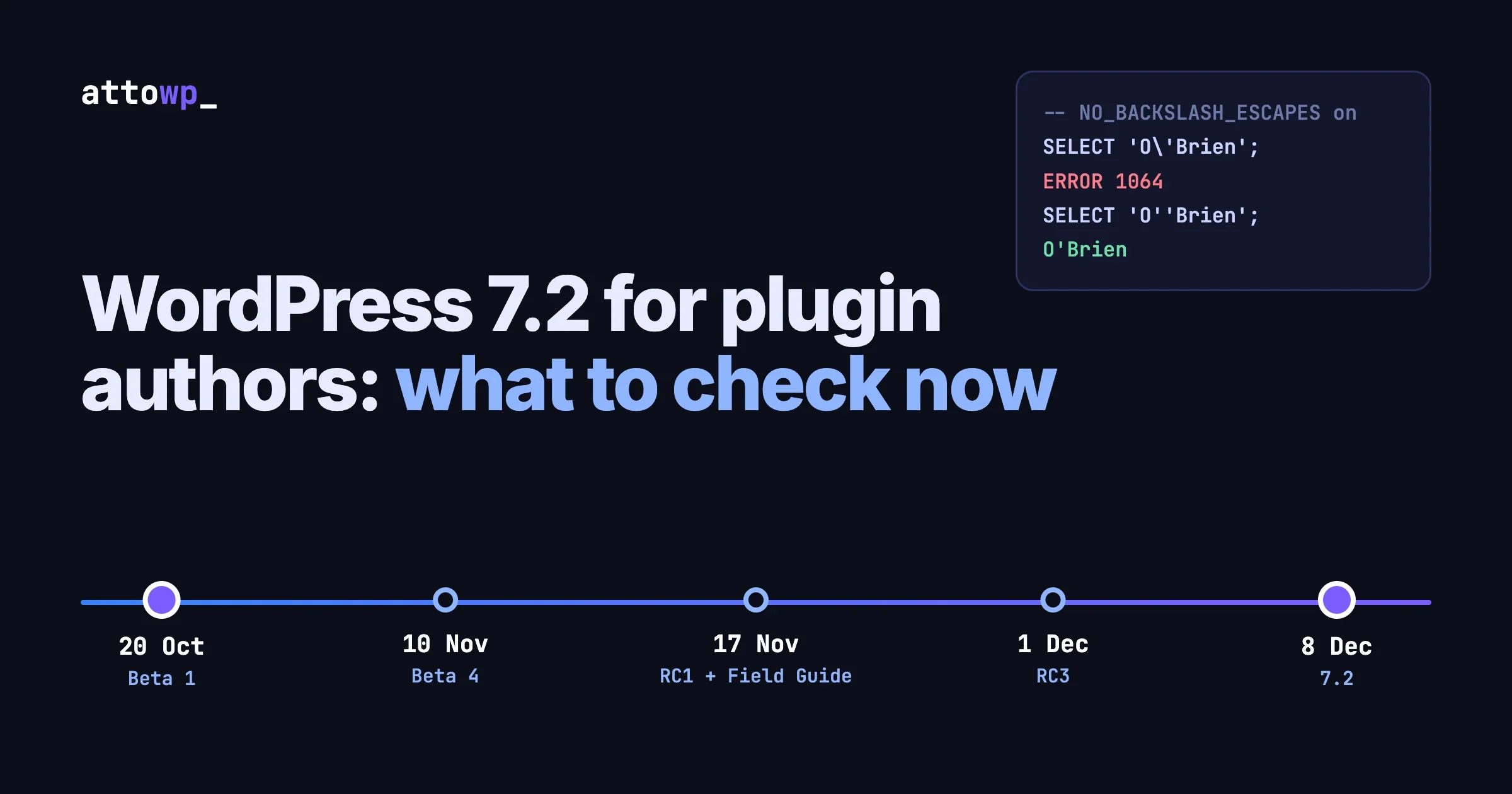
If your plugin sends every query through $wpdb->prepare() on the standard WordPress connection, the SQL mode change in WordPress 7.2 needs nothing from you. If your plugin opens its own database connection, sets sql_mode itself, ships a db.php drop-in, or builds queries with addslashes(), you have something to check before Beta 1 on 20 October 2026. This post explains the change, shows on a real MySQL server what the mode does to escaped strings, gives you the searches to run on your code, and lays out the 7.2 schedule with what to do at each stage.
The change and its reasons are from the dev note published on 9 October 2026 and from class-wpdb.php in WordPress trunk. The SQL results were run on MySQL 8.0.46 while writing this. The Docker, WP-CLI and CI snippets are standard commands that we did not run against a 7.2 build, because Beta 1 is not out yet.
In this guide
- What changes in 7.2, in one paragraph and one diff
- What NO_BACKSLASH_ESCAPES does, tested
- Which plugins are affected, and which are not
- How to check your code
- How to test against a server that has the mode on
- If you really need the mode
- The 7.2 schedule, and a plugin author’s plan for each date
- Questions people ask
What changes in WordPress 7.2?
When WordPress connects to the database it calls wpdb::set_sql_mode(), which reads the session’s SQL modes and removes the ones WordPress does not support. In 7.2 that list gains one entry. Here is the property in 7.1 and in trunk:
// WordPress 7.1: wp-includes/class-wpdb.php
protected $incompatible_modes = array(
	'NO_ZERO_DATE',
	'ONLY_FULL_GROUP_BY',
	'STRICT_TRANS_TABLES',
	'STRICT_ALL_TABLES',
	'TRADITIONAL',
	'ANSI',
);

// WordPress 7.2 (trunk): one line added
protected $incompatible_modes = array(
	'NO_ZERO_DATE',
	'ONLY_FULL_GROUP_BY',
	'STRICT_TRANS_TABLES',
	'STRICT_ALL_TABLES',
	'TRADITIONAL',
	'ANSI',
	'NO_BACKSLASH_ESCAPES',
);
The dev note gives the reason plainly: “WordPress uses the backslash character (\) to escape special characters in SQL queries. When NO_BACKSLASH_ESCAPES is on, MySQL reads the backslash as a normal character, not as an escape character. Queries with escaped values can then fail or return the wrong data.” It adds that some hosts or server setups turn the mode on, and that sites on those servers “could have hard-to-find database problems.”
Three details from the note matter for plugin authors:
- The change “affects only the WordPress database connection. It doesn’t change the server’s global settings.”
- “Most sites won’t notice any difference.”
- The mode is removed at connection time, which is before plugins load. Keep that in mind for the opt-out section below.
The tracking ticket is #66185.
What does NO_BACKSLASH_ESCAPES do?
We ran the same statements twice on MySQL 8.0.46: once with the default session modes, once after adding NO_BACKSLASH_ESCAPES. The results show why the mode and backslash-based escaping cannot coexist.
Statement | Default modes | With NO_BACKSLASH_ESCAPES |
|---|---|---|
|
|
|
|
| ERROR 1064, syntax error |
|
|
|
| One string: | Evaluated as an expression, returned |
|
|
|
|
|
|
Read the rows as four separate failures.
Row 1: silent data corruption. An escaped backslash is stored as two characters. A Windows path, a regular expression or a namespaced class name saved through backslash escaping comes back with every backslash doubled. Nothing errors.
Row 2: valid queries stop parsing. A value containing an apostrophe, escaped the usual way, becomes a syntax error. This is the “hard-to-find database problem”: it happens only for certain input, such as a customer named O’Brien.
Row 4: escaping stops protecting you. With the mode on, \' no longer escapes the quote. The backslash is a literal character and the quote ends the string. Everything after it is parsed as SQL. In our test the server evaluated 'x\' OR 1=1 and returned 1. Backslash escaping applied to user input, on a connection with this mode on, is an injection hole.
Row 5: escaped LIKE patterns stop matching. wpdb::esc_like() escapes %, _ and \ with backslashes. With the mode on, that escape was not honoured in our test, so a search for a literal percent sign found nothing. An explicit ESCAPE clause worked in both modes.
Row 3 is the safe form in both modes: doubling the quote is standard SQL and does not depend on backslashes.
Which plugins are affected?
The standard WordPress connection is now protected by core on 7.2. What 7.2 does not cover is every other way plugin code talks to MySQL.
What your plugin does | Affected by the mode? | Covered by the 7.2 change? |
|---|---|---|
Uses the global | Not on 7.2 | Yes. Core clears the mode on connect. |
Same, but still supports WordPress 7.1 and earlier | Yes, on hosts that set the mode | No. The fix is in 7.2 only. |
Creates a second | Not on 7.2 | Yes. Each |
Opens its own | Yes | No. Core never sees that connection. |
Runs | Possibly | No. You can put the mode back after core removed it. |
Ships or relies on a | Depends on the drop-in | Only if the drop-in keeps core’s |
Builds SQL with | Yes, wherever the mode is on | Only on the core connection, and it was never the right way to escape |
Uses | Not on 7.2 through | Yes on 7.2. On other connections, add an explicit ESCAPE clause. |
One point about how $wpdb escapes. wpdb::_real_escape() calls mysqli_real_escape_string() on the live connection, and falls back to addslashes() only when there is no connection, with a _doing_it_wrong() notice. The driver’s function knows about the connection it is given. addslashes() knows nothing about any connection. That is one more reason to let prepare() do the work. We covered the wider habits in WordPress $wpdb Best Practices.
How do you check your code?
Run these from the plugin’s root folder. Each one finds a pattern from the table above.
# 1. Your own connections: core's mode clearing does not apply to these
grep -rnE "new\s+(mysqli|PDO)\b|mysqli_connect\s*\(|mysqli_init\s*\(" --include='*.php' . | grep -v vendor/

# 2. Code that sets SQL modes itself
grep -rniE "sql_mode" --include='*.php' . | grep -v vendor/

# 3. Hand-rolled escaping that reaches a query
grep -rnE "addslashes\s*\(|mysql_real_escape_string|mysqli_real_escape_string" --include='*.php' . | grep -v vendor/

# 4. Queries built by concatenation with no prepare() nearby
grep -rnE '\$wpdb->(query|get_results|get_var|get_row|get_col)\s*\(\s*"[^"]*\$' --include='*.php' . | grep -v vendor/

# 5. LIKE queries: confirm each one goes through esc_like() and prepare()
grep -rnE "LIKE\s+['\"%]|esc_like" --include='*.php' . | grep -v vendor/

# 6. A drop-in, or code that depends on one
grep -rnE "db\.php|DB_DROPIN|class\s+\w+\s+extends\s+wpdb" --include='*.php' . | grep -v vendor/
What to do with each result:
- Search 1. For every connection you open, decide the SQL modes explicitly straight after connecting. If your queries on that connection use backslash escaping, remove the mode on that session. If they use bound parameters, which is the better answer, the mode does not matter.
- Search 2. If you set
sql_modeto a fixed string, check that it does not includeNO_BACKSLASH_ESCAPES, and prefer removing single modes from the current value over replacing the whole list. - Search 3. Replace with
$wpdb->prepare()on the WordPress connection, or with prepared statements and bound parameters on your own. - Search 4. Every hit is worth reading whether or not this mode exists.
- Search 5. The correct shape is below.
- Search 6. If you extend
wpdb, make sure your class does not overrideset_sql_mode()or$incompatible_modesin a way that drops the new entry.
// A LIKE query that behaves the same on every supported WordPress version
$like = '%' . $wpdb->esc_like( $term ) . '%';
$rows = $wpdb->get_results(
	$wpdb->prepare(
		"SELECT ID, post_title FROM {$wpdb->posts} WHERE post_title LIKE %s",
		$like
	)
);
For your own connection, bound parameters remove the question entirely:
// Own connection: no string escaping, so the session's backslash mode is irrelevant
$stmt = $mysqli->prepare( 'SELECT id FROM ext_orders WHERE customer_name = ?' );
$stmt->bind_param( 's', $name );
$stmt->execute();
How do you test against a server with the mode on?
You need a MySQL server where NO_BACKSLASH_ESCAPES is set globally, so every new connection starts with it. Use a throwaway container, never a shared database.
# A disposable MySQL with the mode on for every connection
docker run -d --name mysql-nbe -e MYSQL_ROOT_PASSWORD=root -e MYSQL_DATABASE=wp -p 3399:3306 \
  mysql:8.0 --sql-mode="ONLY_FULL_GROUP_BY,STRICT_TRANS_TABLES,NO_BACKSLASH_ESCAPES"

# Confirm it
docker exec mysql-nbe mysql -uroot -proot -e "SELECT @@GLOBAL.sql_mode\G"
Point a test WordPress install at it, then ask WordPress what its own session looks like:
wp eval 'global $wpdb; echo $wpdb->get_var( "SELECT @@SESSION.sql_mode" ), PHP_EOL;'On WordPress 7.1 you should see NO_BACKSLASH_ESCAPES still in the list, because 7.1 does not remove it. On a 7.2 build it should be gone. That one command tells you which behaviour your test site has.
Then run four checks on both versions:
- Save and reload a value containing an apostrophe and a backslash through every form your plugin has.
O'BrienandC:\temp\fileare enough. On 7.1 with the mode on, watch for errors and doubled backslashes. - Run your search and filter screens with a term containing
%and_. - Exercise any code path from search 1. These are the paths 7.2 does not fix. If they break on this server, they break on 7.2 too.
- Run your automated tests with the database host set to this container.
If you support WordPress versions below 7.2, the honest position is that your plugin can still meet this mode on those versions. Your options are to rely only on prepare() and core’s own escaping, or to document that the mode is unsupported. Do not try to change the session mode from a plugin on old versions as a workaround. Core connects before plugins load, so queries have already run by the time your code does.
What if a site really needs the mode?
The dev note gives the supported way to keep it, using the existing incompatible_sql_modes filter:
add_filter( 'incompatible_sql_modes', function ( $modes ) {
	return array_diff( $modes, array( 'NO_BACKSLASH_ESCAPES' ) );
} );
Where this goes matters. From the note: “WordPress connects to the database before plugins load, so add this code in a db.php drop-in. Code in a normal plugin or a must-use plugin runs too late.” The note also warns that “WordPress Core may not work correctly with this mode turned on.”
For plugin authors that means two things. Do not add this filter from a plugin, because it will have no effect on the main connection. And if a customer reports problems on a site that has opted back in through a drop-in, that site is running a configuration core says it does not support. Ask for the output of the wp eval command above as part of your support checklist.
What should site owners on managed MySQL know?
Most will see no change. The mode has to be switched on by the host or the database administrator, and it is not part of MySQL’s defaults. On the server we tested, the default session modes were ONLY_FULL_GROUP_BY, STRICT_TRANS_TABLES, NO_ZERO_IN_DATE, NO_ZERO_DATE, ERROR_FOR_DIVISION_BY_ZERO, NO_ENGINE_SUBSTITUTION.
To see what a server sets globally:
wp db query "SELECT @@GLOBAL.sql_mode"If NO_BACKSLASH_ESCAPES is in that list, the site has been exposed to the problems in the table above, and updating to 7.2 removes that exposure for WordPress’s own connection. Any tool that connects to the same database outside WordPress, such as a reporting script or an import job, still gets the server’s global setting.
What is the WordPress 7.2 schedule?
From the 7.2 release page:
Date (2026) | Milestone | What a plugin author does |
|---|---|---|
20 October | Beta 1 | Install it on a test site. Run your test suite and click through every screen. Report regressions now, while there is time to fix them. |
27 October | Beta 2 | Read the dev notes as they are published. Re-test anything a note touches. |
3 November | Beta 3 | Fix your own deprecation notices. Test with |
10 November | Beta 4 | Last beta. Anything still broken in your plugin needs a fix scheduled. |
17 November | Release Candidate 1 | The Field Guide collects every dev note in one place. Hard string freeze. Read the guide end to end. |
24 November | Release Candidate 2 | Ship your compatibility release, so users have it before 7.2 arrives. |
1 December | Release Candidate 3 | Update “Tested up to” once you have tested against an RC. |
7 December | Dry run and 24-hour code freeze | Nothing. Be available. |
8 December | WordPress 7.2 | Watch your support channel for the first week. |
The release page calls 7.2 the final major release of 2026 and says a new default theme ships alongside it. We covered that theme in Three WordPress Changes Developers Should Know This Month.
Getting a beta onto a test site
# On a test site only. Version strings follow the pattern used for earlier releases.
wp core update --version=7.2-beta1
wp core version

# Or follow nightly builds from trunk
wp core update --version=nightly
The WordPress Beta Tester plugin does the same from the dashboard. Whichever you use, keep the test site separate from anything real, and take a database copy first so you can return to 7.1 for comparison.
Adding the pre-release to CI
If your plugin has automated tests, add the pre-release as an extra job that is allowed to fail. You see breakage as it lands and your main pipeline stays green. A sketch for GitHub Actions, to adapt to how your tests install WordPress:
strategy:
  fail-fast: false
  matrix:
    wp: [ '7.0', '7.1', 'nightly' ]
    php: [ '8.1', '8.3', '8.5' ]
continue-on-error: ${{ matrix.wp == 'nightly' }}
services:
  mysql:
    image: mysql:8.0
    env:
      MYSQL_ROOT_PASSWORD: root
      MYSQL_DATABASE: wordpress_test
    ports: [ '3306:3306' ]
To cover this post’s subject as well, add one job whose MySQL service starts with NO_BACKSLASH_ESCAPES in its SQL mode, and run it against both your oldest supported WordPress and nightly.
A short plan for this release
- This week: run the six searches above. Fix anything from searches 1, 3 and 4.
- 20 October: install Beta 1. Run the session-mode check and your tests.
- Through the betas: read each dev note tagged for 7.2 and note the ones that touch your plugin.
- 17 November: read the Field Guide. Finalise strings before the freeze if you ship translations tied to core strings.
- By 24 November: release your compatible version.
- After RC testing: bump “Tested up to”.
If your plugin also has data upgrades to run when users arrive from an older version, the routine in Meta Boxes in the WordPress 7 Editor, and Safe Upgrades When Users Skip Versions applies here too. Site owners planning the same upgrade alongside PHP and MySQL changes can use the end-of-year upgrade calendar on Tweaks WP.
Questions people ask
What is NO_BACKSLASH_ESCAPES in MySQL?
It is an SQL mode that makes MySQL treat the backslash as an ordinary character inside strings, not as an escape character. With it on, \' no longer escapes a quote and \\ is stored as two backslashes.
What does WordPress 7.2 change about it?
WordPress 7.2 adds NO_BACKSLASH_ESCAPES to the SQL modes it removes from its own database session when it connects, alongside modes such as STRICT_ALL_TABLES, TRADITIONAL and ANSI. The server’s global setting is not changed.
Do I need to change my plugin for this?
Not if all your queries go through $wpdb with prepare(). Check your plugin if it opens its own mysqli or PDO connection, sets sql_mode, extends wpdb, or escapes values with addslashes().
Can a plugin keep NO_BACKSLASH_ESCAPES turned on?
Not from a normal or must-use plugin. The dev note says WordPress connects to the database before plugins load, so the incompatible_sql_modes filter must be added in a db.php drop-in, and it warns that core may not work correctly with the mode on.
When is WordPress 7.2 released?
8 December 2026, according to the release schedule. Beta 1 is on 20 October 2026 and Release Candidate 1 on 17 November 2026.
When should I update “Tested up to” for 7.2?
After you have run your plugin against a release candidate and fixed what you found. RC1 is scheduled for 17 November 2026.
Does this fix sites running older WordPress versions?
No. The change is in 7.2. A site on 7.1 or earlier whose database server sets this mode still has it on WordPress’s connection.
If you maintain a plugin with its own database layer and want a second pair of eyes on it before the 7.2 betas, get in touch through the contact page on attowp.com.

No comments yet