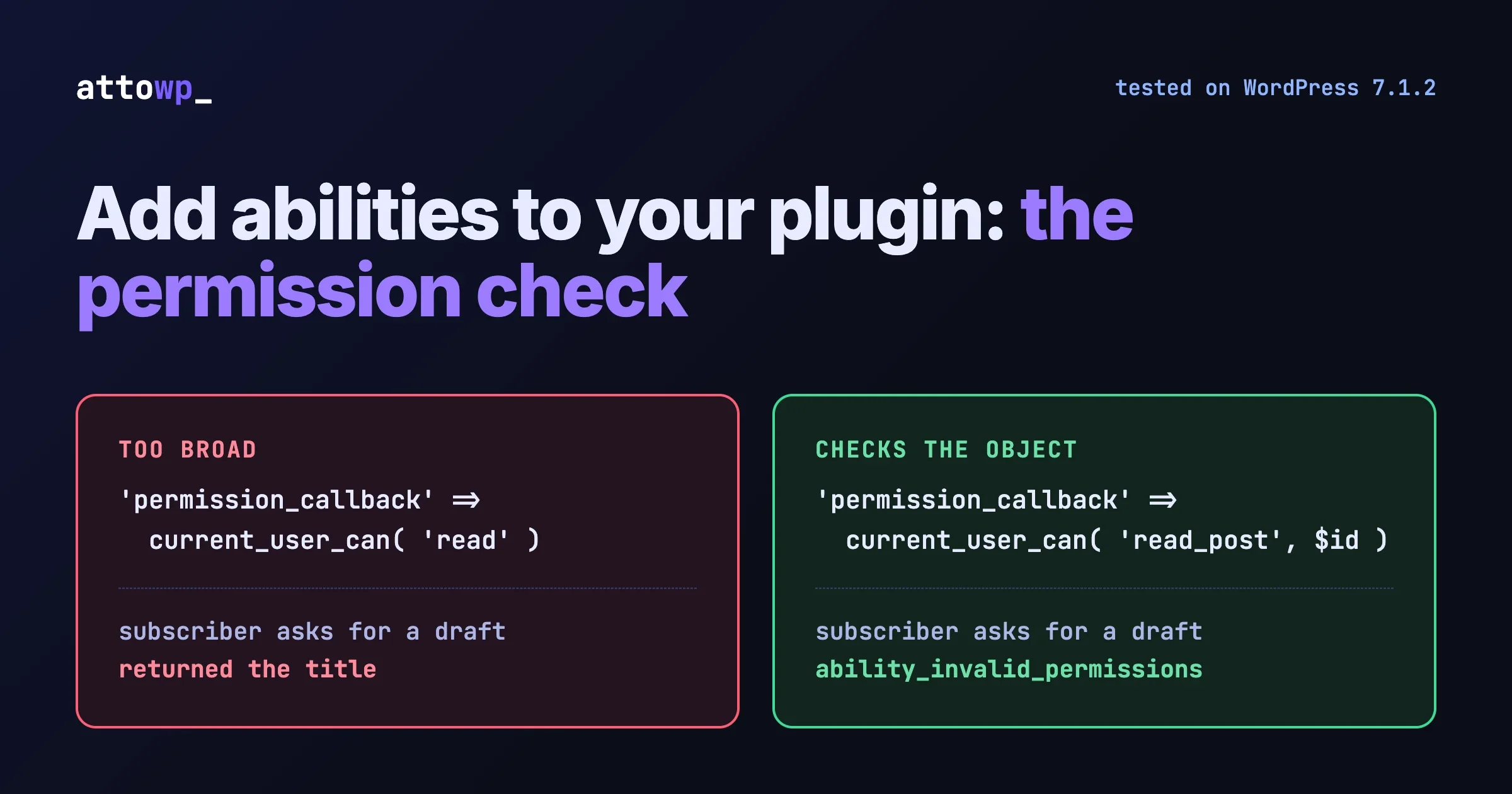
An ability is a named action your plugin registers with WordPress: a description, a schema for what goes in, a schema for what comes out, a permission check and a callback. Register one and the same action becomes available to PHP code, to the REST API and, through the MCP Adapter, to an AI agent. The registration takes about thirty lines. The two things that decide whether it is safe and useful are the permission callback, which is easy to write too broadly, and the output, which is easy to make too thin to work with.
This post gives you a working ability, shows the permission mistake with real output, and uses a current WooCommerce issue to show what “too thin” means in practice. Everything in the code blocks was run on WordPress 7.1.2 with PHP 8.2 and WooCommerce 11.1.1 while writing this, and the results shown are the actual output. Hook and function names were also checked against the Abilities API source in the 7.1 branch.
In this guide
- What an ability is, and what registering one gives you
- A working example, with the output from each kind of call
- The order WordPress runs things in, and why it matters
- The permission mistake, demonstrated
- Returning enough to be useful: the WooCommerce lesson
- Who can see your ability: REST and MCP exposure
- How to test it
- Which of your plugin’s actions deserve an ability
- Questions people ask
What is an ability?
The Abilities API has been in WordPress core since 6.9. An ability has a name in the form namespace/ability-name, a label and description, a category, an input schema, an output schema, a permission callback and an execute callback. WordPress stores these in a registry that anything can query.
What you get for registering one:
- Input validation for free. WordPress checks input against your schema before your code runs.
- One permission gate. Every route to the action passes through the same check.
- A REST endpoint, if you opt in, under
/wp-json/wp-abilities/v1/. - Discovery. Tools can list what your plugin can do and read the schemas without parsing your documentation.
- Agent access, when the site owner connects an MCP client through the MCP Adapter and the ability is marked public.
If you are deciding how an agent should reach a site at all, read Four Ways to Connect an AI Agent to WordPress first. This post is about the plugin author’s side: what you register.
A working example
The ability below returns a short summary of one post. It is read-only, which keeps the example safe to try. Two hooks are involved: categories register on wp_abilities_api_categories_init and abilities on wp_abilities_api_init. Registering outside those hooks triggers a _doing_it_wrong() notice.
<?php
// Tested on WordPress 7.1.2, PHP 8.2.

add_action( 'wp_abilities_api_categories_init', function () {
	wp_register_ability_category( 'attowp-demo', array(
		'label'       => 'Attowp demo',
		'description' => 'Example abilities for the tutorial.',
	) );
} );

add_action( 'wp_abilities_api_init', function () {
	wp_register_ability( 'attowp-demo/get-post-summary', array(
		'label'        => 'Get post summary',
		'description'  => 'Returns the title, status, author, dates, word count and link for one post.',
		'category'     => 'attowp-demo',

		'input_schema' => array(
			'type'                 => 'object',
			'properties'           => array(
				'post_id' => array(
					'type'        => 'integer',
					'minimum'     => 1,
					'description' => 'ID of the post.',
				),
			),
			'required'             => array( 'post_id' ),
			'additionalProperties' => false,
		),

		'output_schema' => array(
			'type'       => 'object',
			'properties' => array(
				'id'           => array( 'type' => 'integer' ),
				'title'        => array( 'type' => 'string' ),
				'status'       => array( 'type' => 'string' ),
				'author'       => array( 'type' => 'string' ),
				'modified_gmt' => array( 'type' => 'string' ),
				'word_count'   => array( 'type' => 'integer' ),
				'permalink'    => array( 'type' => 'string' ),
			),
			'required'   => array( 'id', 'title', 'status' ),
		),

		// Checked against the user making the call, for the specific post asked for.
		'permission_callback' => function ( $input ) {
			return current_user_can( 'read_post', (int) $input['post_id'] );
		},

		'execute_callback' => function ( $input ) {
			$post = get_post( (int) $input['post_id'] );
			if ( ! $post ) {
				return new WP_Error( 'attowp_not_found', 'No post with that ID.', array( 'status' => 404 ) );
			}
			return array(
				'id'           => $post->ID,
				'title'        => get_the_title( $post ),
				'status'       => $post->post_status,
				'author'       => get_the_author_meta( 'display_name', $post->post_author ),
				'modified_gmt' => $post->post_modified_gmt,
				'word_count'   => str_word_count( wp_strip_all_tags( $post->post_content ) ),
				'permalink'    => get_permalink( $post ),
			);
		},

		'meta' => array(
			'show_in_rest' => true,
			'annotations'  => array(
				'readonly'    => true,
				'destructive' => false,
				'idempotent'  => true,
			),
		),
	) );
} );
Naming has a rule that core enforces: the name must match ^[a-z0-9-]+/[a-z0-9-]+$. Lowercase letters, digits and hyphens, exactly one slash. Use your plugin’s slug as the namespace.
What each kind of call returned
We called the ability from PHP with wp_get_ability( 'attowp-demo/get-post-summary' )->execute( $input ) as different users. These are the real results.
Caller and input | Result |
|---|---|
Administrator, a published post |
|
Subscriber, a published post | The same data |
Administrator, |
|
Administrator, no |
|
Administrator, an extra field |
|
Administrator, a post ID that does not exist |
|
Logged-out visitor, a published post |
|
Subscriber, someone else’s draft |
|
The first five rows are what you would hope for. Your callback never ran for the three invalid inputs, because WordPress rejected them from the schema alone. Rows six and seven are worth a closer look, and the next section explains them.
What order does WordPress run things in?
From WP_Ability::execute() in WordPress 7.1, the sequence is:
- Fire
wp_ability_invoked. - Let
wp_pre_execute_abilityshort-circuit the call. - Normalize the input.
- Validate the input against
input_schema. - Run the permission callback.
- Fire
wp_before_execute_ability. - Run your execute callback.
- Validate the result against
output_schema. - Fire
wp_after_execute_abilityand return.
Three practical consequences.
Your permission callback can trust the shape of its input. Validation ran first, so $input['post_id'] exists and is an integer by the time you read it.
“Not found” can surface as “not allowed”. That is row six in the table. The permission check ran before the execute callback, current_user_can( 'read_post', 99999999 ) is false for a post that does not exist, and so the caller got a permission error and our 404 was never reached. This is a reasonable default, since it does not reveal which IDs exist. If your ability needs to tell the two apart, the permission callback has to handle the missing object deliberately.
Permission errors are flattened on purpose. If your permission callback returns a WP_Error, core does not pass its message to the caller. The source comment reads: “Don’t leak the permission check error to someone without the correct perms.” The caller always receives the generic ability_invalid_permissions.
Row seven is a decision, not a bug. A logged-out visitor can read a published post on the front end, but current_user_can() for a user who is not logged in returned false here. If you want an ability to work for anonymous callers, write the permission callback to say so explicitly. For most plugin actions you do not want that.
The hooks in that list let other code observe or block calls. We covered them in An AI Agent Can Call Your Abilities. Now You Can Intercept It.
The permission mistake
The most common mistake is checking a general capability when the action concerns a specific object. It looks fine, it passes a quick test as an administrator, and it leaks.
We registered a second ability, identical except for its permission callback:
// The mistake: "can this user read things in general?"
'permission_callback' => function () {
	return current_user_can( 'read' );
},
Then we created a draft as an administrator, switched to a subscriber and called both abilities with the draft’s ID. The draft was removed straight after the test.
Permission callback | Subscriber asks for an administrator’s draft |
|---|---|
|
|
|
|
Every subscriber has the read capability. get_post() returns drafts to any code that asks. So the loose version handed an unpublished title to the lowest role on the site. With an agent connected as that user, the same request is one sentence in a chat window.
The capability is checked against the user making the call, which is the WordPress user the REST request or MCP connection authenticated as. That cuts both ways:
- Too loose and the ability leaks or lets a low role change things.
- Too strict and it fails for the narrow-role user a careful site owner created for their agent. If you require
manage_optionsfor something an editor can already do in the dashboard, the owner’s only fix is to give the agent an administrator account, which is the opposite of what you want.
Rules that hold up:
- Check the object, not the area. Use the meta capabilities that take an ID:
read_post,edit_post,delete_post,edit_user,edit_term. - Match the dashboard. The ability should need the same capability as the screen that does the same job by hand.
- Use the input. The callback receives the validated input. A permission callback that ignores its argument deserves a second look.
- Check again in bulk actions. If the ability accepts a list of IDs, check every one, and decide whether one failure rejects the whole call.
- Test as the lowest role. If a subscriber gets data back, ask whether a subscriber could see that data in the dashboard.
For the site owner’s side of this, including which user an agent should run as, see Give AI a Job, Not the Keys.
Returning enough to be useful: the WooCommerce lesson
WooCommerce added order and product abilities in 10.9.0. On 2 October 2026 a contributor opened issue #69325, “Order and product abilities expose too little data for agents to do real store work”. The report was drafted with AI help under its author’s supervision, as it says at the top, so we checked its central claim ourselves by reading the output schemas on a WooCommerce 11.1.1 site.
Ability | Fields returned per item (WooCommerce 11.1.1) |
|---|---|
| id, status, currency, currency_symbol, total, customer_id, billing_email, payment_method, payment_method_title, four date fields, line_items |
| id, name, slug, permalink, type, status, sku, currency, currency_symbol, price, regular_price, sale_price, stock_status, stock_quantity, manage_stock, virtual, downloadable, external_url, button_text, grouped_products, four date fields |
That matches the report. An order carries no name, address, phone number or shipping method. A product carries no categories, tags, attributes, weight, dimensions or images. The issue’s point is that this covers listing orders and prices, and not the work a shop owner would hand to an agent: shipping, contacting a customer, invoicing.
The discussion that followed is instructive for anyone designing an ability.
- Some of the gap was deliberate. The issue’s author noted in a follow-up that some data was left out because it is personally identifiable, and agreed that not sending it to AI assistants by default makes sense.
- A thin ability does not stop a determined agent. In the same comment the author wrote that their agent got the missing data anyway by calling the REST API with the same credentials.
- The triage reply set a direction. A WooCommerce triage note on 7 October rated it medium priority and put three things in scope: non-personal product data, readable and writable; filters on ability responses, output schemas and write inputs; and customer personal data on orders that is not shared by default and needs an explicit opt-in by the merchant. It adds that the opt-in should also cover REST requests made with the same agent credentials, “so an agent can’t get around it by switching APIs.”
- A concrete failure was added. Another commenter described an agent that uploaded product photos to the Media Library and then could not attach them, because
product-updatehas no image fields and rejects extra properties.
The issue is open and this is a triage decision, not shipped code. It is still a clear record of what goes wrong, and it gives five rules for your own abilities.
- Return what the next step needs. Ask what a person would do with the result. If they would open another screen to finish the job, the ability is missing fields.
- Make reads and writes symmetric. If an ability can read a field, the matching write ability should be able to set it, and return the updated object so the caller can confirm.
- Treat personal data as a separate decision. Leave it out by default and put it behind a setting the site owner turns on. Do not fold it into the permission callback, where nobody can see the choice.
- Remember the other doors. If the same user can get the data through your REST endpoints, leaving it out of the ability protects nothing.
- Let others extend it. Core passes every registration through the
wp_register_ability_argsfilter, so another plugin can adjust yours. Offering your own documented filter on the result is kinder than making extensions rewrite your schema.
One caution on rule 1. 'additionalProperties' => false on input is what produced the helpful “x is not a valid property” error in our test. It is also what made the photo case fail hard. Strict input is right. Pair it with complete input.
Who can see your ability?
Three levels, each off unless you turn it on.
Surface | How it is enabled | What we observed |
|---|---|---|
PHP | Always, once registered |
|
REST |
| With it: status 200 on the ability’s route. Without it, on the second ability: 404. |
MCP clients | Marked public for MCP | Our ability’s meta read back as |
The REST routes are under wp-abilities/v1. Running a read-only ability uses GET, and WordPress enforces it. A POST to the run route of our read-only ability returned status 405 with “Read-only abilities require GET method.” That behaviour comes from the readonly annotation, so set annotations truthfully: they change how the ability is called, and clients use them to decide how cautious to be.
For MCP exposure, the public flag and the filtering functions are covered in Deciding Which Abilities an AI Client Can See in WP 7.1. The short version for a plugin author: leave abilities private by default and let the site owner choose what an agent can reach.
How do you test an ability?
Test from PHP first, since it removes the transport from the picture.
# Is it registered, and what does it expose?
wp eval '$a = wp_get_ability( "attowp-demo/get-post-summary" ); var_dump( (bool) $a ); print_r( $a->get_meta() );'

# Run it as a specific user
wp eval '$a = wp_get_ability( "attowp-demo/get-post-summary" ); print_r( $a->execute( array( "post_id" => 1 ) ) );' --user=admin

# The same call as your lowest role. This is the test that finds leaks.
wp eval '$a = wp_get_ability( "attowp-demo/get-post-summary" ); print_r( $a->execute( array( "post_id" => 1 ) ) );' --user=a-subscriber-login

# Ask the permission question without executing
wp eval '$a = wp_get_ability( "attowp-demo/get-post-summary" ); var_dump( $a->check_permissions( array( "post_id" => 1 ) ) );' --user=a-subscriber-login
Then over REST, as an authenticated user with an Application Password:
SITE=https://example.test
AUTH='username:application-password'

# Discover
curl -s -u "$AUTH" "$SITE/wp-json/wp-abilities/v1/abilities/attowp-demo/get-post-summary" | jq '.name.input_schema'

# Run a read-only ability (GET)
curl -s -u "$AUTH" -G "$SITE/wp-json/wp-abilities/v1/abilities/attowp-demo/get-post-summary/run" \
  --data-urlencode 'input[post_id]=1' | jq
We ran the equivalent requests through WordPress’s internal REST dispatcher, not over HTTP with curl, so treat the exact curl flags as the part to check on your site. The routes, the GET requirement and the response shapes are what we observed.
A minimum test matrix for each ability:
Case | Expected |
|---|---|
Valid input, a user who should be allowed | Result matching the output schema |
Valid input, your lowest role | Denied, or only data that role can already see |
Valid input, logged out | Denied, unless you designed for anonymous use |
Someone else’s private object | Denied |
Wrong type, missing field, extra field |
|
An ID that does not exist | Whatever you decided, tested on purpose |
A result missing a required output field | Rejected by output validation. Fix the callback. |
Finally, connect an MCP client on a staging site and ask it to use the ability in plain language. Watch what it does when the result lacks something it needs. That is the fastest way to find a thin output.
Which actions deserve an ability?
Not every function. An ability is a public contract with a schema, and you will be maintaining it. Go through your plugin’s actions with these questions.
Question | If yes |
|---|---|
Would a site owner ask for this in a sentence? (“Show me unpaid invoices”, “Mark that request as done”) | Good candidate |
Does it already exist as a REST endpoint or a WP-CLI command? | Good candidate. The contract is already designed. |
Is it a read with a clear filter? | Start here. Read abilities carry the least risk. |
Can it be undone, such as trash instead of delete or draft instead of publish? | Reasonable as a write ability |
Is it irreversible, or does it send money, email or data off the site? | Hold back, or require a capability only senior roles have, and say so in the description |
Is it an internal helper nobody would name? | Not an ability |
Does it need a multi-step screen to make sense? | Split it into steps that each stand alone, or leave it in the dashboard |
A sensible first release for most plugins is three to six abilities: the main list or query, a single-item read, and the one or two status changes people make most often. Describe each one in a full sentence, because the description is what an agent reads to decide whether to call it.
Vendors are already at different points. In the companion post we listed what we could verify from changelogs: WooCommerce’s product and order abilities and LifterLMS’s coverage of its REST endpoints. The JavaScript side of the same API is in What the Abilities API JS Client Lets You Build Now.
Questions people ask
Which WordPress version do I need to register abilities?
WordPress 6.9 or later, where the Abilities API became part of core. The example in this post was run on 7.1.2. If your plugin supports older versions, wrap the registration in a function_exists( 'wp_register_ability' ) check.
Which hook do I register abilities on?
wp_abilities_api_init for abilities and wp_abilities_api_categories_init for categories. Registering at another time triggers a _doing_it_wrong() notice.
Who is the permission callback checked against?
The current WordPress user for that request: the logged-in user in the dashboard, the user an Application Password belongs to over REST or MCP, or the --user given to WP-CLI. It receives the validated input, so it can and should check the specific object.
Does registering an ability expose it to AI agents automatically?
No. An ability is available to PHP once registered. REST exposure needs show_in_rest, and exposure to MCP clients needs the ability marked public. In our test the default for the public flag was false.
Why does my ability return a permission error for an ID that does not exist?
Because the permission callback runs before the execute callback, and an object-level capability check is false for an object that is not there. Your “not found” branch is never reached. Handle the missing object in the permission callback if you need a different answer.
Should an ability return customer or user personal data?
Not by default. The WooCommerce discussion points to the safer pattern: leave personal data out unless the site owner opts in, and make sure the same data is not freely available to the same user through another API.
Can another plugin change my ability?
Yes. Core passes registration arguments through the wp_register_ability_args filter, and there are filters on input, permission results and execution results. Document the filters you intend others to use.
If you would like your plugin’s actions reviewed for which should become abilities, or a permission model checked before you ship one, get in touch through the contact page on attowp.com.

No comments yet