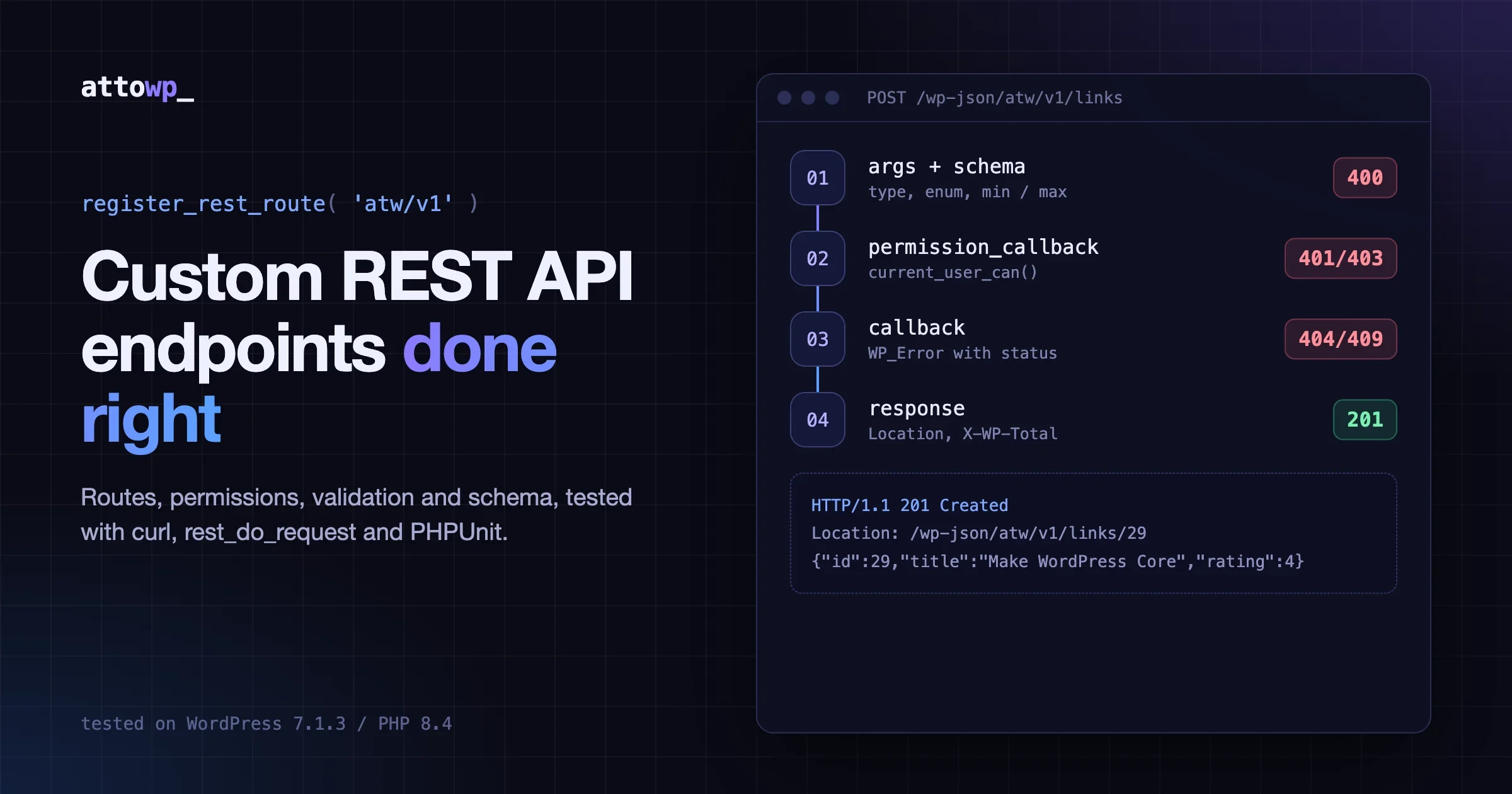
Custom WordPress REST API endpoints are production-ready when each one has five things: a versioned route, a permission_callback that checks the real capability, typed arguments that validate and sanitize input, a JSON schema that describes the response, and WP_Error responses with the right HTTP status codes. Most broken endpoints I review have the route and the callback and skip the other three. This guide builds one complete endpoint, a small link library, and tests every part of it with real requests.
Tested on WordPress 7.1.3 / PHP 8.4.18, October 2026. Every snippet below was run on a local install. The outputs are copied from the terminal, not written by hand.
This post is about building endpoints. If you need to decide how clients log in to them, read the WordPress REST API authentication guide first and come back.
What do custom WordPress REST API endpoints need before they ship?
It needs a route in your own namespace, a permission check for every method, declared arguments, a schema, and honest error codes. Each piece stops a specific failure. The table below is the checklist I run before a route goes live.
Piece | What it does | What goes wrong without it |
|---|---|---|
Namespace + version ( | Keeps your routes apart from core and other plugins | Route collisions, no way to ship breaking changes |
| Decides who may call each method | Anyone can write data, or core logs a |
| Validates and sanitizes input before your code runs | Manual |
JSON schema | Describes the resource, drives args and the | Clients guess field types, docs drift from code |
| Returns 400, 401, 403, 404, 409 instead of 200 with an error string | Clients cannot tell failure from success |
Pagination headers | Sends | Clients fetch everything or cannot build page links |
The official REST API Handbook page on adding custom endpoints covers the API surface. This post focuses on the decisions and the failure modes. The example plugin is a “link library”: a private custom post type that stores a title, a URL and a rating from 1 to 5. Small enough to read in one sitting, real enough to need every item in that table.
How do you register a custom REST API route in WordPress?
Call register_rest_route() inside the rest_api_init action, passing a namespace, a route and an array with methods, callback and permission_callback. That is the minimum WordPress accepts without a notice. Here is a read-only status route as a single must-use plugin file:
<?php
add_action( 'rest_api_init', function () {
	register_rest_route( 'atw/v1', '/status', array(
		'methods'             => WP_REST_Server::READABLE,
		'callback'            => function ( WP_REST_Request $request ) {
			return array(
				'site'    => get_bloginfo( 'name' ),
				'links'   => (int) wp_count_posts( 'atw_link' )->publish,
				'version' => get_bloginfo( 'version' ),
			);
		},
		'permission_callback' => '__return_true',
	) );
} );
A request to it returns whatever the callback returns, encoded as JSON:
$ curl -s http://localhost:8899/wp-json/atw/v1/status
{"site":"RESTTest","links":25,"version":"7.1.3"}
Three details matter here. The callback returns a plain array, and core wraps it in a WP_REST_Response for you. WP_REST_Server::READABLE is the constant for GET, so you never mistype a method string. And '__return_true' is a deliberate choice: this data is public, and saying so out loud is the point.
How should you name and version the namespace?
Use vendor/v1: a short, unique vendor or plugin slug, then a version. Core owns wp/v2, and other plugins own theirs. The version is your escape hatch. When you need to rename a field or change a response shape, you register atw/v2 next to atw/v1 and keep the old one running until clients move. Never change the shape of a released version in place.
The route part should name the resource as a plural noun (/links) with the item route below it (/links/(?P<id>[\d]+)). The named regex group becomes $request['id']. Verbs belong in the HTTP method, not the URL, so avoid routes like /create-link.
Should you use a controller class or plain functions?
Use a class that extends WP_REST_Controller once a resource has more than one method. The base class gives you schema helpers, context filtering and collection params that you would otherwise write by hand. The plain function form is fine for a one-off read route like /status above.
The plugin’s main file registers the post type and hands the routes to the controller:
<?php
/**
 * Plugin Name: ATW Link Library
 * Description: Example custom REST API endpoints (attowp.com tutorial).
 * Version: 1.0.0
 * Requires PHP: 8.1
 */

defined( 'ABSPATH' ) || exit;

require_once __DIR__ . '/class-atw-links-controller.php';

add_action( 'init', function () {
	register_post_type( 'atw_link', array(
		'label'        => 'Links',
		'public'       => false,
		'show_ui'      => true,
		'show_in_rest' => false, // We expose our own routes instead.
		'supports'     => array( 'title' ),
		'map_meta_cap' => true,
		'capability_type' => 'post',
	) );
} );

add_action( 'rest_api_init', function () {
	( new ATW_Links_Controller() )->register_routes();
} );
How do you put several HTTP methods on one route?
Pass an array of endpoint arrays to a single register_rest_route() call, one per method, each with its own callback, permission check and args. Add a schema key at the same level so every method shares one resource description. Here is the controller’s register_routes():
<?php
defined( 'ABSPATH' ) || exit;

class ATW_Links_Controller extends WP_REST_Controller {

	public function __construct() {
		$this->namespace = 'atw/v1';
		$this->rest_base = 'links';
	}

	public function register_routes() {
		register_rest_route( $this->namespace, '/' . $this->rest_base, array(
			array(
				'methods'             => WP_REST_Server::READABLE,
				'callback'            => array( $this, 'get_items' ),
				'permission_callback' => array( $this, 'get_items_permissions_check' ),
				'args'                => $this->get_collection_params(),
			),
			array(
				'methods'             => WP_REST_Server::CREATABLE,
				'callback'            => array( $this, 'create_item' ),
				'permission_callback' => array( $this, 'create_item_permissions_check' ),
				'args'                => $this->get_endpoint_args_for_item_schema( WP_REST_Server::CREATABLE ),
			),
			'schema' => array( $this, 'get_public_item_schema' ),
		) );

		register_rest_route( $this->namespace, '/' . $this->rest_base . '/(?P<id>[\d]+)', array(
			'args'   => array(
				'id' => array(
					'description' => 'Unique identifier for the link.',
					'type'        => 'integer',
				),
			),
			array(
				'methods'             => WP_REST_Server::READABLE,
				'callback'            => array( $this, 'get_item' ),
				'permission_callback' => array( $this, 'get_item_permissions_check' ),
				'args'                => array( 'context' => $this->get_context_param( array( 'default' => 'view' ) ) ),
			),
			array(
				'methods'             => WP_REST_Server::EDITABLE,
				'callback'            => array( $this, 'update_item' ),
				'permission_callback' => array( $this, 'update_item_permissions_check' ),
				'args'                => $this->get_endpoint_args_for_item_schema( WP_REST_Server::EDITABLE ),
			),
			array(
				'methods'             => WP_REST_Server::DELETABLE,
				'callback'            => array( $this, 'delete_item' ),
				'permission_callback' => array( $this, 'delete_item_permissions_check' ),
			),
			'schema' => array( $this, 'get_public_item_schema' ),
		) );
	}

	// Methods from the next sections go here.
}
The method constants map to HTTP verbs like this:
Constant | HTTP methods | Used for |
|---|---|---|
| GET | List or fetch |
| POST | Create |
| POST, PUT, PATCH | Update |
| DELETE | Delete |
| GET, POST, PUT, PATCH, DELETE | Rarely a good idea |
Notice that the id argument sits at the route level, outside the method arrays. Args defined there apply to every method on that route, so you declare the type once. The collection route uses get_endpoint_args_for_item_schema( CREATABLE ) and the item route uses the EDITABLE variant. That one difference matters, and the schema section below shows why.
What should permission_callback return?
Return true to allow the request, or a WP_Error with a status to refuse it. Check a capability with current_user_can(), never a role name, and check against the specific object when one exists. __return_true is correct only for data you would happily print on a public page, and never for a method that writes.
If you leave permission_callback out, WordPress still registers the route, but it fires a _doing_it_wrong notice. I registered a route without one and caught the notice:
doing_it_wrong: register_rest_route
The REST API route definition for atw/v1/oops is missing the required permission_callback argument. For REST API routes that are intended to be public, use __return_true as the permission callback.
oops status: 200
That last line is the problem. The route still answered with 200, so a missing check is a silent hole, not a crash. Here are the controller’s checks:
	public function get_items_permissions_check( $request ) {
		// Published links are public, but the edit context exposes more fields.
		if ( 'edit' === $request['context'] && ! current_user_can( 'edit_posts' ) ) {
			return new WP_Error(
				'rest_forbidden_context',
				'Sorry, you are not allowed to edit links.',
				array( 'status' => rest_authorization_required_code() )
			);
		}
		return true;
	}

	public function get_item_permissions_check( $request ) {
		return $this->get_items_permissions_check( $request );
	}

	public function create_item_permissions_check( $request ) {
		if ( ! current_user_can( 'edit_posts' ) ) {
			return new WP_Error(
				'rest_forbidden',
				'You are not allowed to create links.',
				array( 'status' => rest_authorization_required_code() )
			);
		}
		return true;
	}

	public function update_item_permissions_check( $request ) {
		$post = $this->get_link( $request['id'] );
		if ( is_wp_error( $post ) ) {
			return $post;
		}
		if ( ! current_user_can( 'edit_post', $post->ID ) ) {
			return new WP_Error(
				'rest_forbidden',
				'You are not allowed to edit this link.',
				array( 'status' => rest_authorization_required_code() )
			);
		}
		return true;
	}

	public function delete_item_permissions_check( $request ) {
		$post = $this->get_link( $request['id'] );
		if ( is_wp_error( $post ) ) {
			return $post;
		}
		if ( ! current_user_can( 'delete_post', $post->ID ) ) {
			return new WP_Error(
				'rest_forbidden',
				'You are not allowed to delete this link.',
				array( 'status' => rest_authorization_required_code() )
			);
		}
		return true;
	}
Four rules are at work in that code:
- Use
rest_authorization_required_code()for the status. It returns 401 when nobody is logged in and 403 when a logged-in user lacks the capability. Clients need that difference: 401 means “send credentials”, 403 means “these credentials will never work”. - Check the object, not only the type.
current_user_can( 'edit_post', $post->ID )runs the meta capability mapping, so an author can edit their own links but not an editor’s.edit_postsalone would let any author edit any link. - Return 404 from the permission check when the object does not exist. Otherwise the update callback has to repeat the lookup and handle a missing post itself.
- Guard the
editcontext. Public reads are fine, but?context=editreturns extra fields (here, the author ID). Without the check, any visitor can ask for the edit view.
Real requests against those checks, using application passwords for three users:
# Subscriber tries to create a link
HTTP/1.1 403 Forbidden
{"code":"rest_forbidden","message":"You are not allowed to create links.","data":{"status":403}}

# Author tries to PATCH a link an editor created
HTTP/1.1 403 Forbidden
{"code":"rest_forbidden","message":"You are not allowed to edit this link.","data":{"status":403}}

# Logged-out visitor asks for the edit context
{"code":"rest_forbidden_context","message":"Sorry, you are not allowed to edit links.","data":{"status":401}}
For a deeper look at checking the object instead of a broad capability, the same pattern applies to the Abilities API, covered in Add Abilities to Your Plugin: A Working Example.
How do you validate and sanitize request arguments?
Declare every argument in args with a type and constraints such as enum, minimum, maximum, minLength or format. WordPress then validates the input against those rules, coerces types (the string "5" becomes the integer 5), and rejects bad requests with a 400 before your callback runs. Add validate_callback or sanitize_callback only for rules the schema cannot express.
The order of operations is worth knowing, because it explains a few surprises. For each request, the server runs:
- Required check and
validate_callbackfor every argument sanitize_callbackfor every argumentpermission_callback- Your
callback
Validation runs before the permission check. A logged-out request with a bad URL gets a 400, not a 401:
$ curl -s -X POST http://localhost:8899/wp-json/atw/v1/links -d 'title=x&url=http://x.org/' -w ' HTTP %{http_code}\n'
{"code":"rest_invalid_param","message":"Invalid parameter(s): url","data":{"status":400,"params":{"url":"url must use https."},"details":{"url":{"code":"rest_invalid_param","message":"url must use https.","data":{"status":400}}}}} HTTP 400
That is fine for this resource, but it means your validators must never leak private data in their error messages, since anyone can trigger them.
Why does a custom validate_callback skip the schema checks?
Because it replaces the default. When an argument comes from a schema, WordPress sets its validate_callback to rest_validate_request_arg, which enforces the type, format and bounds. If you supply your own through arg_options, yours runs instead, and the schema rules are ignored unless you call the default yourself. The fix is one line at the top of your validator:
	public function validate_https_url( $value, $request, $param ) {
		// Run the schema checks first: a custom validate_callback replaces them.
		$valid = rest_validate_request_arg( $value, $request, $param );
		if ( is_wp_error( $valid ) ) {
			return $valid;
		}
		if ( 'https' !== wp_parse_url( $value, PHP_URL_SCHEME ) ) {
			return new WP_Error(
				'rest_invalid_param',
				sprintf( '%s must use https.', $param ),
				array( 'status' => 400 )
			);
		}
		return true;
	}
The same applies to sanitize_callback. The default, rest_sanitize_request_arg, only coerces types. It does not strip HTML from strings, so a title still needs sanitize_text_field. In the schema below, arg_options sets it for title, and esc_url_raw for url. The test request sent a title of <b>REST Handbook</b>, and the stored title came back as REST Handbook.
Here is a request with two bad values. Both errors come back together, so the client can fix the whole form in one pass:
== invalid: HTTP 400
{
    "code": "rest_invalid_param",
    "message": "Invalid parameter(s): url, rating",
    "data": {
        "status": 400,
        "params": {
            "url": "url must use https.",
            "rating": "rating must be between 1 (inclusive) and 5 (inclusive)"
        }...
    }
}
And a request that leaves out a required field:
== missing title: HTTP 400
{
    "code": "rest_missing_callback_param",
    "message": "Missing parameter(s): title",
    "data": {
        "status": 400,
        "params": [
            "title"
        ]
    }
}
None of that took a line of code in the callback. The callback can trust $request['rating'] to be an integer from 1 to 5.
Why give a custom endpoint a JSON schema?
A schema describes the resource once, and WordPress reuses that description in three places: it generates the endpoint’s arguments, it filters response fields by context, and it publishes the shape through an OPTIONS request so clients can discover it. Without a schema you maintain the same field list in three places, and they drift apart.
	public function get_item_schema() {
		if ( $this->schema ) {
			return $this->add_additional_fields_schema( $this->schema );
		}

		$this->schema = array(
			'$schema'    => 'http://json-schema.org/draft-04/schema#',
			'title'      => 'atw-link',
			'type'       => 'object',
			'properties' => array(
				'id'      => array(
					'description' => 'Unique identifier for the link.',
					'type'        => 'integer',
					'context'     => array( 'view', 'edit' ),
					'readonly'    => true,
				),
				'title'   => array(
					'description' => 'Human-readable label.',
					'type'        => 'string',
					'minLength'   => 1,
					'maxLength'   => 120,
					'required'    => true,
					'context'     => array( 'view', 'edit' ),
					'arg_options' => array( 'sanitize_callback' => 'sanitize_text_field' ),
				),
				'url'     => array(
					'description' => 'The bookmarked address. Must use https.',
					'type'        => 'string',
					'format'      => 'uri',
					'required'    => true,
					'context'     => array( 'view', 'edit' ),
					'arg_options' => array(
						'validate_callback' => array( $this, 'validate_https_url' ),
						'sanitize_callback' => 'esc_url_raw',
					),
				),
				'rating'  => array(
					'description' => 'Rating from 1 to 5.',
					'type'        => 'integer',
					'minimum'     => 1,
					'maximum'     => 5,
					'default'     => 3,
					'context'     => array( 'view', 'edit' ),
				),
				'created' => array(
					'description' => 'Creation date in GMT, RFC 3339.',
					'type'        => 'string',
					'format'      => 'date-time',
					'context'     => array( 'view', 'edit' ),
					'readonly'    => true,
				),
				'author'  => array(
					'description' => 'ID of the user who added the link.',
					'type'        => 'integer',
					'context'     => array( 'edit' ),
					'readonly'    => true,
				),
			),
		);

		return $this->add_additional_fields_schema( $this->schema );
	}
The handbook’s schema reference lists every keyword WordPress supports. Some keys in that schema do real work beyond documentation:
readonlykeepsid,createdandauthorout of the create and update args. A client cannot set them.contextdecides which fields appear.authoris listed only underedit, so the public view omits it.requiredonly applies when creating.get_endpoint_args_for_item_schema( EDITABLE )drops it, so aPATCHcan send one field.defaultfillsratingwith 3 when a create request leaves it out.
You can see the required switch in the OPTIONS output. On the collection route (create), title is required:
$ curl -s -X OPTIONS http://localhost:8899/wp-json/atw/v1/links   # endpoints[1].args.title
{
  "description": "Human-readable label.",
  "type": "string",
  "minLength": 1,
  "maxLength": 120,
  "required": true
}
On the item route (update), the same field is optional:
$ curl -s -X OPTIONS http://localhost:8899/wp-json/atw/v1/links/5   # endpoints[1].args.title
{
  "description": "Human-readable label.",
  "type": "string",
  "minLength": 1,
  "maxLength": 120,
  "required": false
}
The OPTIONS response also lists the full schema under schema.properties: ['id', 'title', 'url', 'rating', 'created', 'author']. Note that get_public_item_schema() strips arg_options before publishing, so your sanitizer names stay private.
The response side uses the schema through filter_response_by_context(). The controller’s prepare_item_for_response() builds the full array and lets the base class remove fields the current context should not show. The same block holds the lookup and duplicate helpers:
	protected function get_link( $id ) {
		$post = get_post( (int) $id );
		if ( ! $post || 'atw_link' !== $post->post_type ) {
			return new WP_Error( 'atw_link_not_found', 'Link not found.', array( 'status' => 404 ) );
		}
		return $post;
	}

	public function prepare_item_for_response( $post, $request ) {
		$data = array(
			'id'      => $post->ID,
			'title'   => $post->post_title,
			'url'     => get_post_meta( $post->ID, '_atw_url', true ),
			'rating'  => (int) get_post_meta( $post->ID, '_atw_rating', true ),
			'created' => mysql_to_rfc3339( $post->post_date_gmt ),
			'author'  => (int) $post->post_author,
		);

		$context = ! empty( $request['context'] ) ? $request['context'] : 'view';
		$data    = $this->filter_response_by_context( $data, $context );

		$response = rest_ensure_response( $data );
		$response->add_links( array(
			'self'       => array( 'href' => rest_url( "{$this->namespace}/{$this->rest_base}/{$post->ID}" ) ),
			'collection' => array( 'href' => rest_url( "{$this->namespace}/{$this->rest_base}" ) ),
		) );
		return $response;
	}

	protected function url_exists( $url ) {
		$found = get_posts( array(
			'post_type'      => 'atw_link',
			'post_status'    => 'any',
			'meta_key'       => '_atw_url',
			'meta_value'     => $url,
			'fields'         => 'ids',
			'posts_per_page' => 1,
		) );
		return ! empty( $found );
	}

	public function get_item( $request ) {
		$post = $this->get_link( $request['id'] );
		if ( is_wp_error( $post ) ) {
			return $post;
		}
		return $this->prepare_item_for_response( $post, $request );
	}
How do you return errors with the right status codes?
Return a WP_Error whose data array includes status. The REST server turns it into a JSON body with code, message and data, and sends the status as the HTTP response code. Never return array( 'error' => '...' ) with a 200, because every client then has to parse the body to learn the request failed.
Status | When to use it | Example in this plugin |
|---|---|---|
200 | Successful read, update or delete |
|
201 | Resource created, plus a |
|
400 | Input failed validation, or page out of range |
|
401 | No valid credentials sent | Logged-out create |
403 | Authenticated, but not allowed | Subscriber create |
404 | Object does not exist |
|
409 | Conflicts with existing data | Duplicate URL |
500 | Your code or the database failed |
|
Use a code string with your prefix (atw_link_exists) so clients can branch on it without parsing the message, which may be translated. Here are the create, update and delete callbacks:
	public function create_item( $request ) {
		if ( $this->url_exists( $request['url'] ) ) {
			return new WP_Error(
				'atw_link_exists',
				'A link with this URL already exists.',
				array( 'status' => 409 )
			);
		}

		$post_id = wp_insert_post( array(
			'post_type'   => 'atw_link',
			'post_status' => 'publish',
			'post_title'  => $request['title'],
		), true );

		if ( is_wp_error( $post_id ) ) {
			$post_id->add_data( array( 'status' => 500 ) );
			return $post_id;
		}

		update_post_meta( $post_id, '_atw_url', $request['url'] );
		update_post_meta( $post_id, '_atw_rating', $request['rating'] );

		$response = $this->prepare_item_for_response( get_post( $post_id ), $request );
		$response->set_status( 201 );
		$response->header( 'Location', rest_url( "{$this->namespace}/{$this->rest_base}/{$post_id}" ) );
		return $response;
	}

	public function update_item( $request ) {
		$post = $this->get_link( $request['id'] );

		if ( isset( $request['title'] ) ) {
			wp_update_post( array( 'ID' => $post->ID, 'post_title' => $request['title'] ) );
		}
		if ( isset( $request['url'] ) ) {
			$current = get_post_meta( $post->ID, '_atw_url', true );
			if ( $request['url'] !== $current && $this->url_exists( $request['url'] ) ) {
				return new WP_Error( 'atw_link_exists', 'A link with this URL already exists.', array( 'status' => 409 ) );
			}
			update_post_meta( $post->ID, '_atw_url', $request['url'] );
		}
		if ( isset( $request['rating'] ) ) {
			update_post_meta( $post->ID, '_atw_rating', $request['rating'] );
		}

		return $this->prepare_item_for_response( get_post( $post->ID ), $request );
	}

	public function delete_item( $request ) {
		$post     = $this->get_link( $request['id'] );
		$previous = $this->prepare_item_for_response( $post, $request );

		wp_delete_post( $post->ID, true );

		return new WP_REST_Response( array(
			'deleted'  => true,
			'previous' => $previous->get_data(),
		), 200 );
	}
A create returns 201 with a Location header pointing at the new item. A duplicate gets a 409, and a missing item a 404:
# Editor creates a link with an application password
HTTP/1.1 201 Created
Location: http://localhost:8899/wp-json/atw/v1/links/29
{"id":29,"title":"Make WordPress Core","url":"https:\/\/make.wordpress.org\/core\/","rating":4,"created":"2026-10-16T21:41:59"...}

# The next two come from the WP-CLI run (rest_do_request), JSON compacted
== duplicate: HTTP 409
{"code": "atw_link_exists", "message": "A link with this URL already exists.", "data": {"status": 409}}

== get 999: HTTP 404
{"code": "atw_link_not_found", "message": "Link not found.", "data": {"status": 404}}
The delete callback returns the deleted item under previous. Clients can show an undo message or log what changed without a second request.
How do you paginate a custom REST API endpoint?
Accept page and per_page as integer args with a hard maximum, pass them to your query, and send the totals in the X-WP-Total and X-WP-TotalPages headers. Core endpoints use the same headers, so any client that already pages through /wp/v2/posts works with yours unchanged.
	public function get_collection_params() {
		return array(
			'context'  => $this->get_context_param( array( 'default' => 'view' ) ),
			'page'     => array(
				'description' => 'Current page of the collection.',
				'type'        => 'integer',
				'default'     => 1,
				'minimum'     => 1,
			),
			'per_page' => array(
				'description' => 'Maximum number of items per page.',
				'type'        => 'integer',
				'default'     => 10,
				'minimum'     => 1,
				'maximum'     => 100,
			),
			'search'   => array(
				'description'       => 'Limit results to titles matching a string.',
				'type'              => 'string',
				'default'           => '',
				'sanitize_callback' => 'sanitize_text_field',
			),
			'orderby'  => array(
				'description' => 'Sort collection by attribute.',
				'type'        => 'string',
				'default'     => 'date',
				'enum'        => array( 'date', 'title', 'id' ),
			),
			'order'    => array(
				'description' => 'Sort direction.',
				'type'        => 'string',
				'default'     => 'desc',
				'enum'        => array( 'asc', 'desc' ),
			),
		);
	}
The maximum of 100 on per_page is not optional. Without it, one request with per_page=100000 loads your whole table into memory. The enum on orderby stops clients from sorting by arbitrary columns. Both are enforced before your code runs:
$ curl -s 'http://localhost:8899/wp-json/atw/v1/links?per_page=500'
{"code":"rest_invalid_param","message":"Invalid parameter(s): per_page","data":{"status":400,"params":{"per_page":"per_page must be between 1 (inclusive) and 100 (inclusive)"}...}}

$ curl -s 'http://localhost:8899/wp-json/atw/v1/links?orderby=rand'
{"code":"rest_invalid_param","message":"Invalid parameter(s): orderby","data":{"status":400,"params":{"orderby":"orderby is not one of date, title, and id."}...}}
Now the collection callback:
	public function get_items( $request ) {
		$args = array(
			'post_type'      => 'atw_link',
			'post_status'    => 'publish',
			'posts_per_page' => $request['per_page'],
			'paged'          => $request['page'],
			's'              => $request['search'],
			'orderby'        => 'id' === $request['orderby'] ? 'ID' : $request['orderby'],
			'order'          => strtoupper( $request['order'] ),
		);
		$query = new WP_Query( $args );
		$total = (int) $query->found_posts;

		// WP_Query reports found_posts = 0 when the page is out of range.
		if ( $total < 1 && $request['page'] > 1 ) {
			unset( $args['paged'] );
			$total = (int) ( new WP_Query( $args ) )->found_posts;
		}

		$pages = (int) ceil( $total / $request['per_page'] );

		if ( $request['page'] > $pages && $total > 0 ) {
			return new WP_Error(
				'rest_invalid_page_number',
				'The page number requested is larger than the number of pages available.',
				array( 'status' => 400 )
			);
		}

		$items = array();
		foreach ( $query->posts as $post ) {
			$items[] = $this->prepare_response_for_collection(
				$this->prepare_item_for_response( $post, $request )
			);
		}

		$response = rest_ensure_response( $items );
		$response->header( 'X-WP-Total', $total );
		$response->header( 'X-WP-TotalPages', $pages );
		return $response;
	}
Why does found_posts come back as 0 on a high page number?
Because WP_Query skips its count query when the page it fetched is empty. My first version of this endpoint returned 200 with an empty array for ?page=99 instead of an error, and the totals said zero. The fix, which core’s posts controller also uses, is to rerun the query without paged when the total is zero on a page past the first. After the fix:
$ curl -s -i "http://localhost:8899/wp-json/atw/v1/links?page=99"
HTTP/1.1 400 Bad Request
{"code":"rest_invalid_page_number","message":"The page number requested is larger than the number of pages available.","data":{"status":400}}
A normal page request shows the headers. Core also adds X-WP-Total and X-WP-TotalPages to Access-Control-Expose-Headers, so browser clients on other origins can read them:
$ curl -s -i "http://localhost:8899/wp-json/atw/v1/links?per_page=5&page=2&orderby=title&order=asc"
HTTP/1.1 200 OK
Content-Type: application/json; charset=UTF-8
Access-Control-Expose-Headers: X-WP-Total, X-WP-TotalPages, Link
X-WP-Total: 25
X-WP-TotalPages: 5
Allow: GET

[{"id":17,"title":"Sample link 13","url":"https:\/\/example.com\/13","rating":4...}...]
An empty search still returns a clean response rather than an error, with both headers set to 0.
How do you test WordPress REST API endpoints with real requests?
Test at three levels: rest_do_request() from WP-CLI for fast checks without HTTP, curl with an application password to prove authentication and headers over the wire, and a PHPUnit test case so the behaviour stays fixed when someone changes the code next year. Each level catches problems the others miss.
How do you call an endpoint from WP-CLI?
rest_do_request() runs a request through the full REST server, including validation and permission checks, inside one PHP process. It is the fastest feedback loop you have:
$ wp eval 'wp_set_current_user(0); $r = rest_do_request( new WP_REST_Request( "GET", "/atw/v1/links/4" ) ); echo $r->get_status(), " ", wp_json_encode( $r->get_data() ), "\n";'
200 {"id":4,"title":"REST Handbook","url":"https:\/\/developer.wordpress.org\/rest-api\/","rating":5,"created":"2026-10-16T21:41:30"}
Change the user with wp_set_current_user() to test each role. For write requests, build the request and call $request->set_body_params() before dispatching. That is how the 409, 404 and 400 outputs earlier in this post were produced.
How do you test with curl and an application password?
Create an application password for a test user with WP-CLI, then send it as HTTP Basic auth. WordPress accepts the password with or without its spaces.
$ wp user application-password create editor1 curl-test --porcelain
hXhMbFMTX1nuHBtmnaE0fQC2

$ curl -s -i -u 'editor1:hXhM bFMT X1nu HBtm naE0 fQC2' -X POST http://localhost:8899/wp-json/atw/v1/links \
  -H 'Content-Type: application/json' \
  -d '{"title":"Make WordPress Core","url":"https://make.wordpress.org/core/","rating":4}'
HTTP/1.1 201 Created
Location: http://localhost:8899/wp-json/atw/v1/links/29

$ curl -s -i -u 'editor1:hXhMbFMTX1nuHBtmnaE0fQC2' -X PATCH "http://localhost:8899/wp-json/atw/v1/links/29?context=edit" \
  -H 'Content-Type: application/json' -d '{"rating":2}'
HTTP/1.1 200 OK
{"id":29,"title":"Make WordPress Core","url":"https:\/\/make.wordpress.org\/core\/","rating":2,"created":"2026-10-16T21:41:59","author":2...}

$ curl -s -i -u 'editor1:hXhMbFMTX1nuHBtmnaE0fQC2' -X DELETE http://localhost:8899/wp-json/atw/v1/links/29
HTTP/1.1 200 OK
{"deleted":true,"previous":{"id":29,"title":"Make WordPress Core","url":"https:\/\/make.wordpress.org\/core\/","rating":2,"created":"2026-10-16T21:41:59"}}
The PATCH sent only rating, and the update worked because the editable args do not require title or url. Application passwords need HTTPS unless the site’s environment type is local, which is how this test site was set up. The full setup, revocation and troubleshooting steps are in WordPress Application Passwords: REST API Guide for Developers. If you are choosing between application passwords, JWT, OAuth and cookie nonces for a real client, the authentication methods comparison covers the trade-offs.
How do you write a PHPUnit test for a REST endpoint?
Extend WP_Test_REST_TestCase, create users in wpSetUpBeforeClass(), and dispatch requests with rest_get_server()->dispatch(). The base class adds assertErrorResponse(), which checks the error code and status in one call. I used the wp-phpunit/wp-phpunit Composer package (7.1.1) with PHPUnit 9.6 and the Yoast polyfills. The bootstrap loads the plugin before WordPress starts:
<?php
require dirname( __DIR__ ) . '/vendor/yoast/phpunit-polyfills/phpunitpolyfills-autoload.php';

$_tests_dir = getenv( 'WP_PHPUNIT__DIR' );
require_once $_tests_dir . '/includes/functions.php';

tests_add_filter( 'muplugins_loaded', function () {
	require dirname( __DIR__ ) . '/atw-links.php';
} );

require $_tests_dir . '/includes/bootstrap.php';
The test class covers the route, the permission split, sanitization, validation and pagination headers:
<?php
class Test_Links_Endpoint extends WP_Test_REST_TestCase {

	protected static $editor;
	protected static $subscriber;

	public static function wpSetUpBeforeClass( WP_UnitTest_Factory $factory ) {
		self::$editor     = $factory->user->create( array( 'role' => 'editor' ) );
		self::$subscriber = $factory->user->create( array( 'role' => 'subscriber' ) );
	}

	public function test_route_is_registered() {
		$routes = rest_get_server()->get_routes();
		$this->assertArrayHasKey( '/atw/v1/links', $routes );
		$this->assertArrayHasKey( '/atw/v1/links/(?P<id>[\d]+)', $routes );
	}

	public function test_subscriber_cannot_create() {
		wp_set_current_user( self::$subscriber );
		$request = new WP_REST_Request( 'POST', '/atw/v1/links' );
		$request->set_body_params( array( 'title' => 'Nope', 'url' => 'https://example.org/' ) );

		$response = rest_get_server()->dispatch( $request );
		$this->assertErrorResponse( 'rest_forbidden', $response, 403 );
	}

	public function test_editor_creates_link() {
		wp_set_current_user( self::$editor );
		$request = new WP_REST_Request( 'POST', '/atw/v1/links' );
		$request->set_body_params( array( 'title' => '<em>Docs</em>', 'url' => 'https://example.org/docs', 'rating' => '4' ) );

		$response = rest_get_server()->dispatch( $request );
		$data     = $response->get_data();

		$this->assertSame( 201, $response->get_status() );
		$this->assertSame( 'Docs', $data['title'] );
		$this->assertSame( 4, $data['rating'] );
	}

	public function test_http_url_is_rejected() {
		wp_set_current_user( self::$editor );
		$request = new WP_REST_Request( 'POST', '/atw/v1/links' );
		$request->set_body_params( array( 'title' => 'Plain', 'url' => 'http://example.org/' ) );

		$response = rest_get_server()->dispatch( $request );
		$this->assertErrorResponse( 'rest_invalid_param', $response, 400 );
	}

	public function test_pagination_headers() {
		self::factory()->post->create_many( 12, array( 'post_type' => 'atw_link' ) );

		$request = new WP_REST_Request( 'GET', '/atw/v1/links' );
		$request->set_query_params( array( 'per_page' => 5 ) );
		$response = rest_get_server()->dispatch( $request );
		$headers  = $response->get_headers();

		$this->assertCount( 5, $response->get_data() );
		$this->assertSame( 12, $headers['X-WP-Total'] );
		$this->assertSame( 3, $headers['X-WP-TotalPages'] );
	}
}
The run, with WP_PHPUNIT__TESTS_CONFIG pointing at a wp-tests-config.php for a throwaway test database:
$ WP_PHPUNIT__TESTS_CONFIG=./wp-tests-config.php vendor/bin/phpunit --testdox
PHPUnit 9.6.38 by Sebastian Bergmann and contributors.

_Links_Endpoint
 ✔ Route is registered
 ✔ Subscriber cannot create
 ✔ Editor creates link
 ✔ Http url is rejected
 ✔ Pagination headers

Time: 00:00.472, Memory: 50.50 MB

OK (5 tests, 16 assertions)
Point the tests config at a separate database. The test bootstrap drops and reinstalls its tables on every run.
What changes when the endpoint runs on a big site?
The code above is correct, but two parts of these WordPress REST API endpoints get slow at scale, and you should know which before you copy it. The duplicate check queries postmeta by meta_value, and that column has no index, so the lookup scans every row with the _atw_url key. At a few thousand links it does not matter. At a few hundred thousand, move the URLs to a custom table with a unique index on a hash of the URL, and let the database reject duplicates.
The second cost is the count query. Every collection request runs SQL_CALC_FOUND_ROWS or its equivalent so it can send X-WP-Total. For public collections that many clients poll, cache the response per query string in the object cache and clear that cache group when a link is created, updated or deleted. Keep the per_page ceiling at 100 either way. The rest of the design (typed args, enum sorting, bounded pages) is already what a large site needs.
Frequently Asked Questions
Is it safe to use __return_true as a permission_callback?
Yes, for read-only routes that return data you would show on a public page. It is never safe for a route that creates, updates or deletes anything. If the route has both a public GET and a write method, give each method its own permission check in its own endpoint array, as the controller above does.
What is the difference between validate_callback and sanitize_callback?
validate_callback decides whether a value is acceptable and returns true or a WP_Error, which becomes a 400. sanitize_callback runs after validation and returns a cleaned value that your callback receives. Validation rejects, sanitization cleans. If you set your own validate_callback, call rest_validate_request_arg() inside it or the schema rules stop applying.
Should I extend WP_REST_Controller or register routes with functions?
Extend WP_REST_Controller for any resource with more than one method. You get get_endpoint_args_for_item_schema(), filter_response_by_context(), get_context_param() and a consistent structure that matches core’s own controllers. Plain functions are fine for a single read-only route.
How do I see the schema of a custom endpoint?
Send an OPTIONS request to the route, for example curl -X OPTIONS https://example.com/wp-json/atw/v1/links. The response lists every method, its arguments with types and constraints, and the full schema. The namespace index at /wp-json/atw/v1 also lists all routes in that namespace.
Why does my endpoint return 401 for a logged-in user in the browser?
Cookie authentication only works when the request includes a REST nonce in the X-WP-Nonce header. Without it, WordPress treats the request as logged out, so current_user_can() fails and rest_authorization_required_code() returns 401. Pass the nonce from wp_create_nonce( 'wp_rest' ), or use the wp-api-fetch script, which adds it for you.
How do I make a breaking change to a custom endpoint?
Register the new shape under a new version namespace, such as atw/v2, and keep atw/v1 running. Announce a removal date for the old version, watch your logs for remaining callers, and remove it only when traffic stops. Adding a new optional field to an existing version is not a breaking change, so that can ship in place.

No comments yet