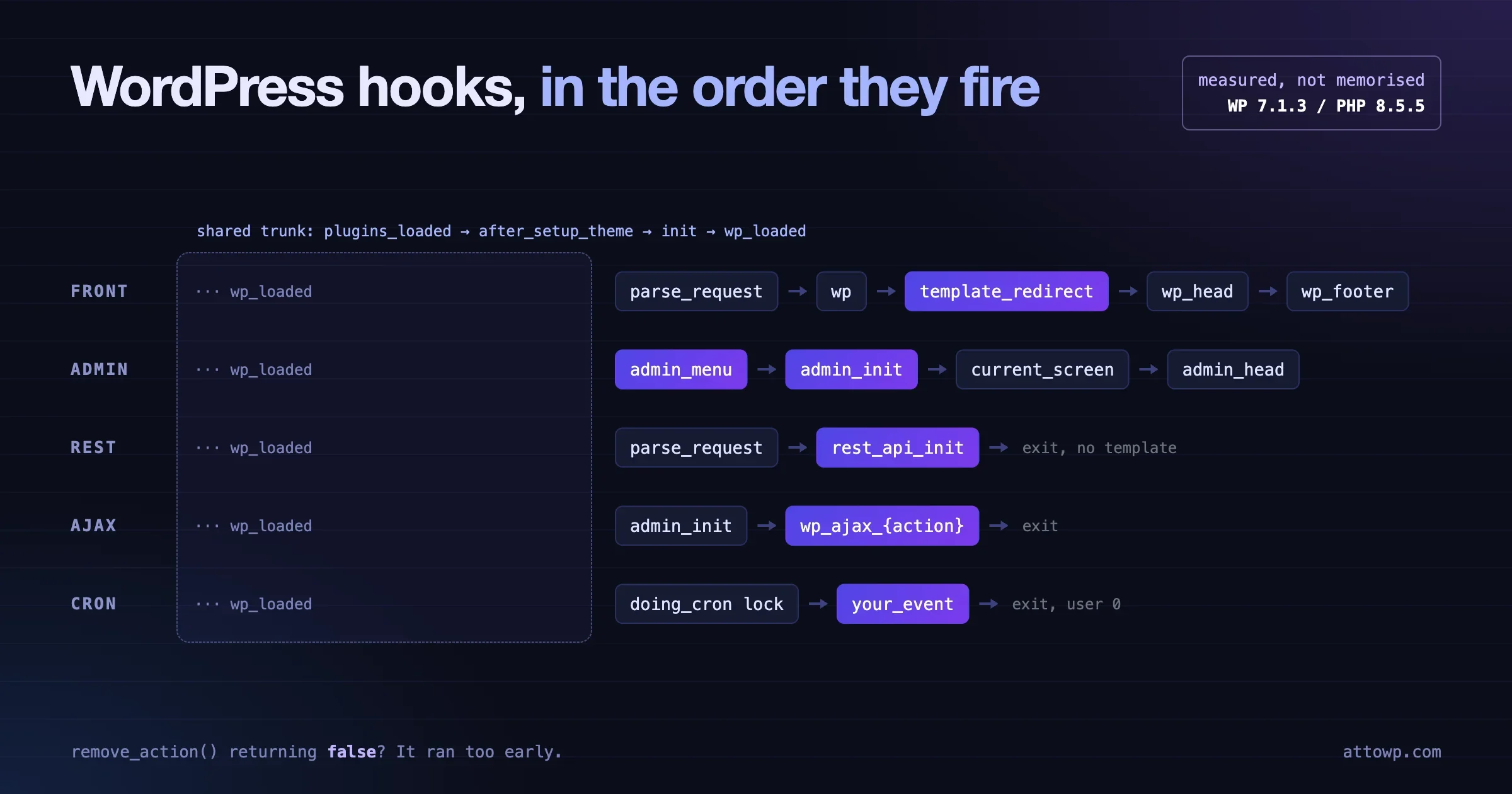
Tested on WordPress 7.1.3 / PHP 8.5.5, October 2026. Every order in this article comes from a logging mu-plugin on a clean install (Twenty Twenty-Five, no other plugins), not from memory or from an old diagram.
On every request WordPress fires the same core sequence: muplugins_loaded, plugins_loaded, setup_theme, after_setup_theme, init, wp_loaded. After wp_loaded the path splits. A front-end page runs parse_request, wp, template_redirect, wp_head and wp_footer. An admin screen runs admin_menu, then admin_init, then the screen hooks. A REST call runs rest_api_init inside parse_request and never reaches the template. AJAX goes from wp_loaded to admin_init to your wp_ajax_* handler. Cron goes from wp_loaded straight to the scheduled event.
Most hook bugs I have fixed in client plugins come down to one of two things: code attached to a hook that never fires on that request type, or code that runs before the thing it depends on exists. Knowing the measured order fixes both. Below you get one table per request type, what belongs on each hook, the remove_action traps with real results, and the snippet to see the order on your own site.
What order do WordPress hooks fire in on every request?
The bootstrap order is the same for front end, admin, REST, AJAX and cron. It runs inside wp-settings.php, and nothing you do in a plugin changes it. This is the shared trunk that every request climbs before it branches.
mu_plugin_loadedfires once per must-use plugin file, thenmuplugins_loadedfires when all of them are in.- Core registers its own taxonomies and post types (
registered_taxonomy,registered_post_typefire forcategory,post,page,wp_templateand the rest). - Each active plugin file is included.
plugin_loadedfires after each one. pluggable.phploads, thenplugins_loadedfires.sanitize_comment_cookiesandwp_roles_initfire.setup_themefires, then the active theme’sfunctions.phpis included.after_setup_themefires.set_current_userfires (on logged-out front-end requests this is where the user is resolved).initfires.widgets_initruns inside it at priority 1.wp_loadedfires. WordPress, plugins and theme are fully loaded.
Two details from the log surprised me the first time. Core’s built-in post types and taxonomies are registered before your plugin file is even included, which is why get_post_type_object( 'post' ) works early, while your own post types do not exist until you register them on init. And on logged-in admin and AJAX requests, set_current_user fired before after_setup_theme, because core needs the user’s locale to load translations. On a logged-out front-end request it fired after. So “when is the current user known” depends on the request, and you should not rely on either position.
Which hook should I use to bootstrap a plugin?
Use plugins_loaded to wire up your plugin, and init to register anything WordPress stores in a global registry. On plugins_loaded every other plugin’s file has been included, so checks like class_exists( 'WooCommerce' ) give a reliable answer. Pluggable functions such as wp_get_current_user() and is_user_logged_in() also exist by then. They do not exist while your main plugin file is being included, so calling them at file scope is a fatal error on some setups.
<?php
/**
 * Plugin Name: Acme Events
 */

// File scope: define constants and require files only.
define( 'ACME_EVENTS_FILE', __FILE__ );
require __DIR__ . '/includes/class-acme-events.php';

// Every other plugin is loaded now. Safe to check for dependencies.
add_action( 'plugins_loaded', array( 'Acme_Events', 'boot' ) );

// Registries: post types, taxonomies, shortcodes, blocks, rewrite rules.
add_action( 'init', array( 'Acme_Events', 'register_content' ) );
If you are building your first plugin and want the full file layout around this, the WordPress plugin development guide walks through it from an empty folder.
What fires on a front-end page request, and in what order?
After wp_loaded, a front-end request parses the URL, runs the main query, picks a template, and prints the page. Here is the measured order for the front page of a block theme, logged out. Hooks that fire many times (like the_post) are listed at their first firing.
# | Action | What belongs here |
|---|---|---|
1 |
| Code that must run before regular plugins, such as an early environment check. |
2 |
| Plugin bootstrap, dependency checks, loading integrations. |
3 |
| Rarely used. Fires just before the theme’s |
4 |
|
|
5 |
| Reacting to the user being resolved. Most code should not need it. |
6 |
| Post types, taxonomies, shortcodes, blocks, rewrite rules, form handlers. |
7 |
| Registering sidebars and classic widgets. |
8 |
| Work that needs everything loaded but runs before the query, such as handling a POST and redirecting. |
9 |
| Custom routing based on query vars. REST requests branch off here. |
10 |
| Adjusting the parsed query flags. |
11 |
| Changing the main query (check |
12 |
| Debugging the final SQL selection. Rarely needed. |
13 |
| Custom HTTP headers (cache, security, CORS for front-end pages). |
14 |
| The main query has run. First point where |
15 |
| Redirects and access control for front-end pages. Last stop before output. |
16 |
| Last hook before the template file is included. |
17 |
| Per-loop and per-post adjustments. |
18 |
| Meta tags and inline head output. Runs the next three hooks. |
19 |
| Enqueue front-end CSS and JS. Fires inside |
20 |
| Printing queued assets. Do not enqueue here. |
21 |
| Output right after the opening |
22 |
| Footer output and late scripts. |
23 |
| Printing footer scripts. Fires inside |
24 |
| Logging and cleanup after output. The response is already sent. |
Why did the loop fire before wp_head?
Because this is a block theme. With a block theme, WordPress renders the whole block template to a string first and prints wp_head afterwards, so loop_start, the_post and loop_end all fired before wp_head in my log. In a classic theme, header.php calls wp_head() before the loop, so the order flips.
This matters in two places. If you set a flag inside a block’s render callback (“this page has a gallery, load the gallery CSS”), a block theme lets you enqueue in time for the head. A classic theme does not, and the style lands in the footer instead. And code that assumes “wp_head has run, so the page has started” is wrong on block themes. If you need to decide something about the page before any rendering, do it on wp or template_redirect, which fire before the template in both theme types.
Where should I put redirects and access checks?
Put them on template_redirect. The main query has run, so conditional tags work, and no output has been sent, so wp_safe_redirect() still works. Hooking redirects to init means you have no query yet, so is_page( 'members' ) always returns false there.
add_action( 'template_redirect', function () {
	if ( is_page( 'members' ) && ! is_user_logged_in() ) {
		wp_safe_redirect( wp_login_url( get_permalink() ) );
		exit;
	}
} );
Keep in mind that this protects the HTML page only. The REST table below shows that template_redirect never fires for /wp-json/ requests, so the same content served through the REST API needs its own permission check.
What fires on a wp-admin page request?
An admin request shares the trunk up to wp_loaded, then runs auth_redirect, builds the menu, fires admin_init, sets up the screen, and prints the admin page. This is the measured order for wp-admin/edit.php as an administrator.
# | Action | What belongs here |
|---|---|---|
1 |
| Plugin bootstrap (same as front end). |
2 |
| Fired before |
3 |
| Theme supports, image sizes. |
4 |
| Registries. Runs on admin requests too, so keep it light. |
5 |
| Everything loaded. |
6 |
| Fires when the login check passes. Rarely hooked. |
7 |
| Internal, used by core before the public hook. |
8 |
|
|
9 |
|
|
10 |
| Admin bar setup. |
11 |
| First point where |
12 |
| Code for one specific screen. The suffix is the page hook ( |
13 |
| Admin CSS and JS. Receives |
14 |
| Printing queued assets. |
15 |
| Inline output in the admin |
16 |
| Output at the top of the admin page body. |
17 |
| Adding admin bar nodes with |
18 |
| Admin notices. |
19 |
| Filter dropdowns above the posts list table. |
20 |
| Footer output, modal markup. |
21 |
| Printing footer scripts. |
22 |
| Cleanup. |
Does admin_menu fire before admin_init?
Yes, and this one catches experienced developers. In my log, admin_menu fired at position 8 and admin_init at position 9. In wp-admin/admin.php, core requires wp-admin/menu.php (which fires _admin_menu and admin_menu) a few lines before do_action( 'admin_init' ). The name suggests admin_init is the start of admin, but on a normal admin page it is not the first admin hook.
The practical bug: a plugin sets a property in admin_init (say, “is the license active?”) and reads it in the admin_menu callback to decide whether to show a submenu. The property is always empty when the menu is built. Either compute the value inside the admin_menu callback itself, or compute it on plugins_loaded or init, which run before both.
How do I run code on one admin screen only?
Use the load-{$page_hook} action, or check the screen on current_screen. add_menu_page() and add_submenu_page() return the page hook, so you can attach to exactly your screen.
add_action( 'admin_menu', function () {
	$hook = add_menu_page( 'Acme Reports', 'Acme Reports', 'manage_options', 'acme-reports', 'acme_render_reports' );

	// Runs only when this screen loads, after admin_init and current_screen.
	add_action( "load-{$hook}", 'acme_reports_handle_actions' );
} );

add_action( 'admin_enqueue_scripts', function ( $hook_suffix ) {
	if ( 'toplevel_page_acme-reports' !== $hook_suffix ) {
		return;
	}
	wp_enqueue_script( 'acme-reports', plugins_url( 'build/reports.js', __FILE__ ), array(), '1.0.0', true );
} );
What fires on a REST API request?
A REST request runs the same trunk to wp_loaded, then parse_request, where core’s rest_api_loaded() callback fires rest_api_init, serves the response and exits. No wp, no template_redirect, no wp_head, and no admin_init. I requested ?rest_route=/wp/v2/posts logged out (the pretty /wp-json/ URL takes the same path).
# | Action | What belongs here |
|---|---|---|
1 |
| Plugin bootstrap. |
2 |
| Theme setup. Runs on REST too. |
3 |
| User resolved from the cookie. Application Password and other auth run through filters here. |
4 |
| Post types and meta registration. |
5 |
| Everything loaded. |
6 |
| The REST branch starts here. |
7 |
|
|
8 |
| Fired as core registers settings for the settings endpoint. |
9 |
| Fires for the controller’s |
10 |
| Fires as posts are prepared for the response. |
11 |
| Cleanup. |
Why is my REST route returning rest_no_route?
Almost always because register_rest_route() ran on the wrong hook. It must run on rest_api_init. Registering on admin_init fails because admin_init never fires on REST requests. Registering on init sometimes works and triggers a _doing_it_wrong notice. Registering inside a condition like if ( is_admin() ) fails because is_admin() is false on REST requests, even when the call comes from the block editor inside wp-admin.
add_action( 'rest_api_init', function () {
	register_rest_route( 'acme/v1', '/events', array(
		'methods'             => WP_REST_Server::READABLE,
		'callback'            => 'acme_rest_list_events',
		'permission_callback' => function () {
			return current_user_can( 'edit_posts' );
		},
	) );
} );
The same rule covers access control. If a front-end page is gated on template_redirect, the matching REST route needs a real permission_callback, because the REST request never passes through template_redirect. For how the current user gets resolved on REST calls from outside the browser, see the Application Passwords REST API guide.
What fires on an admin-ajax.php request?
An AJAX request through admin-ajax.php runs the trunk, then admin_init, then your wp_ajax_{action} (logged in) or wp_ajax_nopriv_{action} (logged out) handler, then exits. It does not fire admin_menu, current_screen, or any template hook. I sent action=heartbeat as a logged-in administrator.
# | Action | What belongs here |
|---|---|---|
1 |
| Plugin bootstrap. |
2 |
| Fired before |
3 |
| Theme setup. |
4 |
| Registries. |
5 |
| Everything loaded. |
6 |
| Runs on every AJAX request, logged in or not. |
7 |
| Your handler: |
8 |
| Cleanup. |
Why does admin_init slow down front-end AJAX?
Because admin-ajax.php is an admin request. is_admin() returns true and admin_init fires, even for a logged-out visitor clicking “load more” on the front end. Any plugin that does heavy work on admin_init (update checks, building a settings array, redirecting to a welcome screen) does it on every one of those requests. A redirect on admin_init can even break AJAX outright, because the response becomes an HTML redirect instead of JSON.
Guard admin-only work, or move it to a screen-specific hook:
add_action( 'admin_init', function () {
	if ( wp_doing_ajax() ) {
		return; // Not a screen. Skip the welcome redirect and heavy setup.
	}
	if ( get_option( 'acme_show_welcome' ) ) {
		delete_option( 'acme_show_welcome' );
		wp_safe_redirect( admin_url( 'admin.php?page=acme-welcome' ) );
		exit;
	}
} );
For new front-end features, a REST route is usually the better choice than admin-ajax.php. It skips admin_init entirely, it is easier to cache, and you get argument validation for free.
What fires when wp-cron runs?
A cron request to wp-cron.php runs the trunk, takes the doing_cron lock, fires each due event as an action, releases the lock, and exits. No admin hooks and no template hooks fire. I scheduled a single event called hol_demo_event and requested wp-cron.php?doing_wp_cron.
# | Action | What belongs here |
|---|---|---|
1 |
| Plugin bootstrap. Your event callbacks must be attached by here or on |
2 |
| Theme setup. |
3 |
| Resolves to user 0. Cron has no logged-in user. |
4 |
| Registries. Post types exist before events run. |
5 |
| Everything loaded. |
6 |
| Core takes the cron lock. |
7 |
| The event is removed from (or rescheduled in) the cron array before it runs. |
8 |
| Your event callback. The hook name is the event name. |
9 |
| Another due event (a core one) in the same run. |
10 |
| Lock released. |
11 |
| Cleanup. |
Why does my cron callback never run?
The usual cause is that the add_action() for the event lives inside code that does not load during cron. A cron event is just do_action( 'your_event' ) fired after wp_loaded. If you attach the callback inside an admin_init callback, an is_admin() check, or a template_redirect handler, nothing is listening when wp-cron.php fires the event, and the event is removed from the queue anyway. Attach event callbacks at plugin load or on init, unconditionally.
// Always attached, on every request type.
add_action( 'acme_nightly_cleanup', 'acme_run_nightly_cleanup' );

// Schedule once, for example on activation.
register_activation_hook( __FILE__, function () {
	if ( ! wp_next_scheduled( 'acme_nightly_cleanup' ) ) {
		wp_schedule_event( time(), 'daily', 'acme_nightly_cleanup' );
	}
} );

function acme_run_nightly_cleanup() {
	// No current user here. Do not rely on current_user_can().
}
The second cause is permissions. Inside a cron callback get_current_user_id() returns 0, so a function that checks current_user_can( 'edit_posts' ) before doing work silently does nothing. Split the capability check from the work, and call the work function directly from cron.
How do hook priority and accepted arguments work?
Priority sets the order of callbacks on the same hook: lower numbers run first, the default is 10, and callbacks with equal priority run in the order they were added. Accepted arguments sets how many of the hook’s values your callback receives: the default is 1, so you must ask for more.
// save_post passes three values: $post_id, $post, $update.
// Without the 4th argument (3), $post and $update never arrive.
add_action( 'save_post', 'acme_on_save', 20, 3 );

function acme_on_save( $post_id, $post, $update ) {
	if ( wp_is_post_revision( $post_id ) || 'acme_event' !== $post->post_type ) {
		return;
	}
	// ...
}
Priority is also how some core behaviour is wired. wp_enqueue_scripts is not called directly by your theme: core attaches it to wp_head at priority 1, then prints styles at priority 8 and head scripts at priority 9. That is why enqueueing on wp_head at priority 10 is too late for the head: the styles have already been printed, so your file ends up in the footer.
Use PHP_INT_MAX sparingly. It looks like a clean way to “run last”, but when two plugins both use it, you are back to load order, and the next developer has no idea why. A specific number like 20 or 99 with a comment explaining what you need to run after is easier to maintain.
Why does remove_action return false?
remove_action() returns false when the callback is not attached at that moment with that exact priority. There are two separate causes, and I tested both on the same install: calling it before the callback was added, and calling it with a different priority than the one used to add it.
The timing trap: removing a theme callback from a plugin
Twenty Twenty-Five attaches its stylesheet like this in functions.php:
add_action( 'wp_enqueue_scripts', 'twentytwentyfive_enqueue_styles' );Plugins and mu-plugins load before the theme’s functions.php. So this, at plugin load time, has nothing to remove:
// In a plugin or mu-plugin, at file scope.
remove_action( 'wp_enqueue_scripts', 'twentytwentyfive_enqueue_styles' ); // false
Result in my test: remove_action() returned false, and the front page still printed the twentytwentyfive-style stylesheet (1 match in the HTML). Then I moved the same call to after_setup_theme, which fires after the theme’s functions.php is included:
add_action( 'after_setup_theme', function () {
	remove_action( 'wp_enqueue_scripts', 'twentytwentyfive_enqueue_styles' ); // true
} );
Result: true, and the stylesheet was gone from the page (0 matches). The rule: to remove something, run your removal on a hook that fires after the code that added it, and before the hook it is attached to fires. For theme callbacks, after_setup_theme or init. For callbacks another plugin adds on plugins_loaded, use plugins_loaded with a later priority, or init.
The priority trap: removing a core callback
Core adds the emoji detection script with a priority of 7:
// wp-includes/default-filters.php
add_action( 'wp_head', 'print_emoji_detection_script', 7 );
Core’s default filters are attached before any plugin loads, so timing is not the problem here. Priority is:
remove_action( 'wp_head', 'print_emoji_detection_script' );    // false: looks at priority 10
remove_action( 'wp_head', 'print_emoji_detection_script', 7 ); // true
Both results are from the same request. The fix is to read the original add_action() call and copy its priority. If you cannot find it, has_action( 'wp_head', 'print_emoji_detection_script' ) returns the priority (7 here) instead of true.
What about callbacks added by class methods?
If a plugin adds array( $this, 'render' ), you need the same object instance to remove it. A new instance of the class is a different callback. Look for a global, a singleton accessor like Plugin::instance(), or a filter the plugin offers. If none exist, the clean option is to ask the author for a hook. Walking $wp_filter to find the object works, but it breaks on the plugin’s next refactor. When I build free and pro plugin pairs, I expose named instances for exactly this reason, which is part of the approach in coupling free and pro plugins without copying code.
Which hook should I use for common tasks?
Here is the short answer list I give to new developers on a team. Each one follows from the measured order above.
- Register a post type or taxonomy:
init. Then flush rewrite rules once on activation, never on every request. - Load a plugin text domain:
init. Since WordPress 6.7, loading translations earlier triggers a “translation loading was triggered too early” notice. - Theme supports, image sizes, menus:
after_setup_theme. - Front-end CSS and JS:
wp_enqueue_scripts. Neverwp_headorinit. - Admin CSS and JS:
admin_enqueue_scripts, checking$hook_suffix. - Block editor assets:
enqueue_block_editor_assets. - Admin menu pages:
admin_menu. - Settings API:
admin_initfor the screen, and alsorest_api_initif the setting hasshow_in_rest. - REST routes:
rest_api_init. - Front-end redirects and gating:
template_redirect. - Change the main query:
pre_get_postswith anis_main_query()check. - Handle a front-end form POST:
initorwp_loaded, with a nonce check, then redirect. - Cron event callbacks: attach at plugin load or
init, unconditionally. - Logging after the response:
shutdown.
What breaks if I call these functions too early?
A short list of the errors I see most in code review, with the hook that fixes each:
is_user_logged_in()at plugin file scope: fatal “call to undefined function” becausepluggable.phploads after plugin files. Move it toplugins_loadedor later.is_singular(),is_page()oninit: always false, the query has not run. Usewportemplate_redirect.get_current_screen()onadmin_init: returns null, the screen is set later. Usecurrent_screenorload-{$page_hook}.register_post_type()onplugins_loaded: works, but rewrite rules and translations are wrong. Useinit.wp_enqueue_style()onwp_footer: the style prints in the footer and the page flashes unstyled. Enqueue onwp_enqueue_scripts.
How can I see the hook order on my own site?
Add a small must-use plugin that listens on the special all hook and records the first time each action fires. This is the exact file I used for every table in this article. Put it in wp-content/mu-plugins/hook-order-logger.php on a local or staging site, load the pages you care about, read the logs, then delete the file.
<?php
/**
 * Plugin Name: Hook Order Logger (temporary)
 * Logs the first time each action fires on a request. Remove after use.
 */
if ( ! defined( 'ABSPATH' ) ) {
	exit;
}

$GLOBALS['hol_seen'] = array();

add_action( 'all', function ( $hook ) {
	// Actions bump $wp_actions before the 'all' hook runs; filters do not.
	if ( ! isset( $GLOBALS['wp_actions'][ $hook ] ) || isset( $GLOBALS['hol_seen'][ $hook ] ) ) {
		return;
	}
	$GLOBALS['hol_seen'][ $hook ] = count( $GLOBALS['hol_seen'] ) + 1;
} );

register_shutdown_function( function () {
	$uri  = $_SERVER['REQUEST_URI'] ?? ( 'cli:' . implode( ' ', $GLOBALS['argv'] ?? array() ) );
	$file = WP_CONTENT_DIR . '/hook-order-' . substr( md5( $uri . microtime() ), 0, 8 ) . '.log';
	$out  = '# ' . $uri . "\n";
	foreach ( $GLOBALS['hol_seen'] as $hook => $n ) {
		$out .= $n . "\t" . $hook . "\n";
	}
	file_put_contents( $file, $out );
} );
How it works: do_action() increments $wp_actions[ $hook ] before it calls the all hook, while apply_filters() does not touch that array. Checking $wp_actions is therefore a cheap way to log actions and skip the hundreds of filters that fire on every page. Each request writes its own log file, so parallel requests (the page plus its REST and AJAX calls) do not overwrite each other.
Then request each type and read the log:
# Front end, REST, cron (logged out)
curl -s -o /dev/null https://example.test/
curl -s -o /dev/null "https://example.test/?rest_route=/wp/v2/posts"
curl -s -o /dev/null "https://example.test/wp-cron.php?doing_wp_cron"

# Admin and AJAX need a logged-in cookie, so load those in the browser.
cat wp-content/hook-order-*.log
Three limits to know. The logger starts at the first mu-plugin, so anything earlier (advanced-cache.php, db.php, multisite sunrise.php) is not in the log. The all hook adds overhead to every hook call, so never leave this on a production site. And on a real site, the list will be much longer than mine, because every plugin adds its own actions. That is the point: the log shows where your plugins actually sit, not where a diagram says they should.
Is Query Monitor a better option?
For day-to-day work, yes. Query Monitor’s “Hooks & Actions” panel lists every action that fired on the current page, with every callback attached to it, its priority, and which plugin or theme added it. It answers “who is attached to this hook and at what priority” much faster than reading a log. The logger above is better for request types where you cannot see the Query Monitor panel easily, such as cron, or for comparing two requests side by side in a diff. If you already use Query Monitor for performance work, the performance monitoring comparison covers how it fits next to New Relic and Datadog.
Frequently Asked Questions
What is the first hook a WordPress plugin can use?
For a regular plugin, the first useful hook is plugin_loaded (fired right after your own file is included) and then plugins_loaded (fired after all plugins). A must-use plugin loads earlier and can use muplugins_loaded. Anything before that point, such as advanced-cache.php, runs before the plugin API is available to plugins at all.
What is the difference between init and wp_loaded?
init is where plugins and themes register things: post types, taxonomies, shortcodes and blocks. wp_loaded fires right after init has finished for everyone, so it is the point where you can rely on all of those registrations being in place. Use init to register, and wp_loaded when you need to act on everything that was registered, such as handling a form submission that touches another plugin’s post type.
Does admin_init run on the front end?
Not on normal front-end page loads. It does run on every request to admin-ajax.php, including logged-out front-end AJAX calls, because those are admin requests. It does not run on REST API requests or cron. My measured logs above show admin_init in the admin and AJAX tables only.
Why does is_admin() return false in the block editor’s REST calls?
The block editor page itself is an admin page, but the editor saves and loads data through the REST API at /wp-json/, and those are separate HTTP requests. is_admin() checks whether the current request is for an admin screen, so it is false for every REST call. Use wp_is_serving_rest_request() or check the route instead, and put REST logic on rest_api_init.
Do hooks fire in the same order on every site?
The core sequence in the tables is the same everywhere, because it is hardcoded in wp-settings.php, wp-admin/admin.php and the template loader. What changes per site is which extra actions fire between them (every plugin adds its own), the position of conditional ones like set_current_user, and the loop position on block versus classic themes. Run the logger on your own stack before relying on a specific detail.
When should I use did_action() instead of adding a hook?
Use did_action( 'init' ) when your code can be called at different times and must behave correctly either way. A common pattern in libraries: if init has already fired, register right away; otherwise attach to init. It returns the number of times the action has fired, so 0 means “not yet”.
if ( did_action( 'init' ) ) {
	acme_register_types();
} else {
	add_action( 'init', 'acme_register_types' );
}
No comments yet