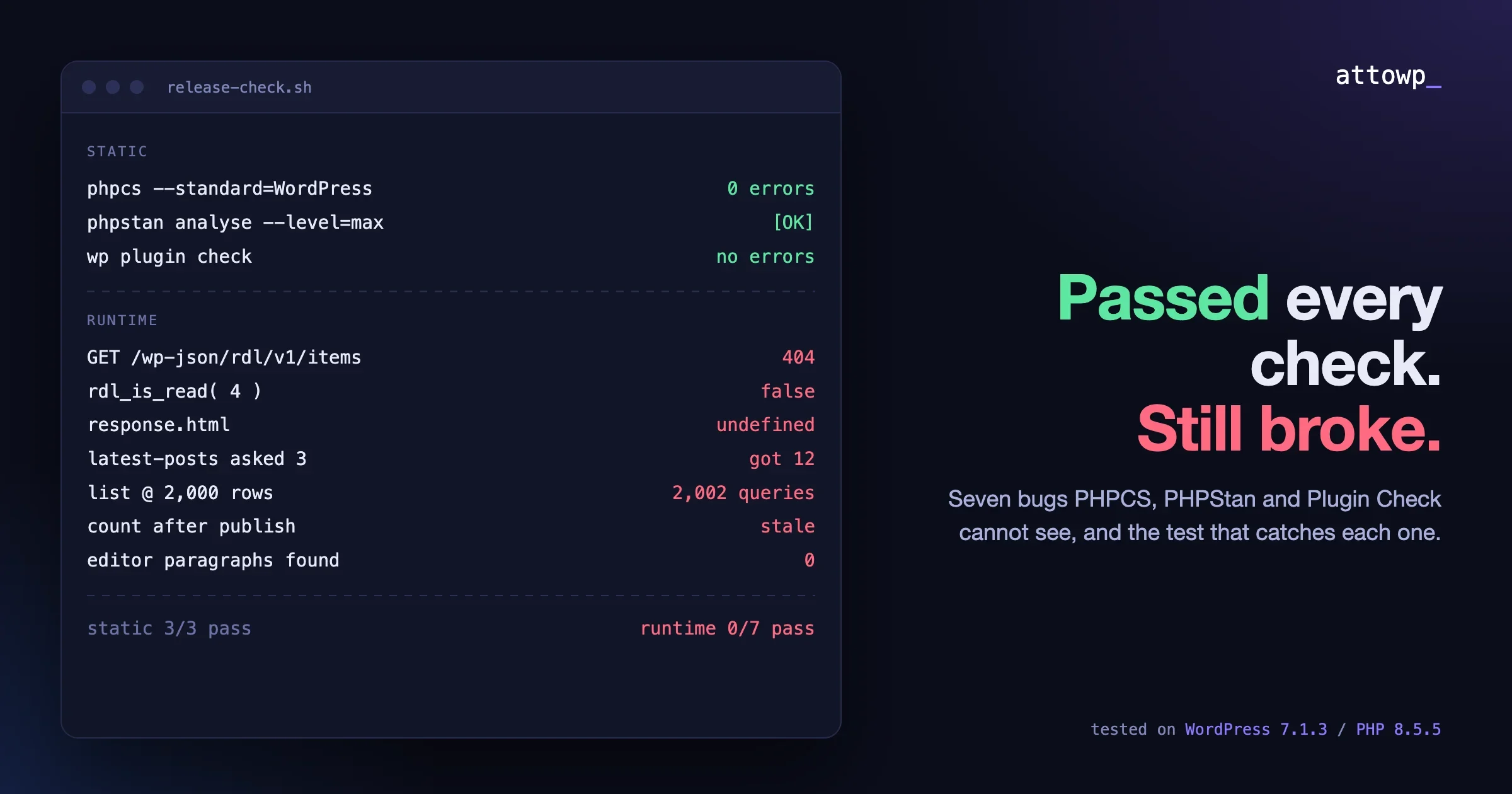
A plugin can pass PHPCS, PHPStan at level max and the Plugin Check tool, and still fail for the first person who installs it. Those three tools read your source files. They never send a request, never open the editor, never share a site with WooCommerce or a page cache, and never see more than the rows in your head. The bugs that reach users live in exactly those places, which is why WordPress plugin testing has to go past static analysis.
To show this with real output instead of opinion, I wrote a small demo plugin with seven bugs, one for each failure class below. All three tools passed it cleanly. Then I ran each bug the way a user would hit it, and wrote the smallest test that catches it.
Tested on WordPress 7.1.3 / PHP 8.5.5, October 2026. PHPCS 3.13.5 with WordPress Coding Standards 3.3.0, PHPStan 2.3.1 with szepeviktor/phpstan-wordpress at level max, Plugin Check 2.1.0, Twenty Twenty-Five, SQLite database integration on PHP’s built-in server.
What do PHPCS, PHPStan and Plugin Check actually prove?
They prove that your code is well formed, typed consistently and free of known unsafe patterns. They do not prove that it works. Each tool reads files and compares them against rules; none of them runs WordPress, so none of them knows which hooks fire in which request, what a real response looks like, or what other code is loaded next to yours.
That is not a complaint about the tools. They do their jobs well, and you should keep running all three. The problem is treating a green static check as a release gate on its own.
Tool | What it checks | What it cannot see |
|---|---|---|
PHPCS + WPCS | Formatting, escaping, sanitizing, nonce use, prefixing, docblocks | Whether the escaped output is the right output |
PHPStan | Types, undefined calls, impossible conditions, wrong argument shapes | Runtime context such as |
Plugin Check | Directory rules, readme headers, risky functions, i18n, some performance patterns | Other plugins, real data volume, caches, the editor UI |
Here is what the three tools said about the demo plugin, with all seven bugs in it:
$ phpcs --standard=WordPress --extensions=php .
$ echo $?
0

$ vendor/bin/phpstan analyse -c phpstan.neon   # level: max
 [OK] No errors

$ wp plugin check reading-list-demo
Success: Checks complete. No errors found.
Getting there was not free. PHPStan at level max made me handle mixed values from get_transient() and from request parameters, which is useful work. It just has nothing to say about the seven problems below.
Why does my REST route return rest_no_route when the code looks right?
Because the hook that registers it never runs in the request that needs it. The most common version is a registration wrapped in an is_admin() check. A REST request goes through index.php, not wp-admin, so is_admin() is false and rest_api_init never gets your callback.
if ( is_admin() ) {
	add_action( 'rest_api_init', 'rdl_register_routes' );
}
Every static tool is happy with this. The function exists, the hook name is valid, the callback is typed. Here is the real request:
$ curl -s -w '\nHTTP %{http_code}\n' http://localhost:8931/wp-json/rdl/v1/items
{"code":"rest_no_route","message":"No route was found matching the URL and request method.","data":{"status":404}}
HTTP 404
The reason this ships is that a developer often tests the route from the block editor or an admin screen while logged in, sees the JS working, and moves on. Or they test it in a PHPUnit test that calls do_action( 'rest_api_init' ) from a context where is_admin() happens to be true. The real REST request is never made.
The test that catches it
Make a real HTTP request to every route you register, logged out and logged in, and assert the status code. One curl per route in a shell script is enough to start. The fix is to register unconditionally, because rest_api_init only fires for REST requests in the first place:
add_action( 'rest_api_init', 'rdl_register_routes' );$ curl -s -o /dev/null -w 'REST HTTP %{http_code}\n' http://localhost:8931/wp-json/rdl/v1/items
REST HTTP 200The same family includes hooks added too late (an init callback registered from inside another init callback at a later priority), wp_ajax_nopriv_ handlers that were never added, and code inside admin_init that you expected on the front end. The rule is the same for all of them: the request type decides which hooks run, so test with the request type your users send.
Why does a saved setting or meta value read back empty?
Because the writer and the reader use different keys. It is the most boring bug on this list and one of the most frequent. One function saves _rdl_read, another reads rdl_read, and both are valid strings as far as any static tool knows.
function rdl_mark_read( int $post_id ): void {
	update_post_meta( $post_id, '_rdl_read', 1 );
}

function rdl_is_read( int $post_id ): bool {
	return (bool) get_post_meta( $post_id, 'rdl_read', true );
}
Running it:
$ wp eval '$id = 4; rdl_mark_read( $id ); var_dump( rdl_is_read( $id ) ); print_r( array_keys( get_post_meta( $id ) ) );'
bool(false)
Array
(
    [0] => _rdl_read
)
The data is in the database. The UI says it is not. Users report “the setting does not save”, you look at the database, see the value, and close the report as cannot reproduce. In real plugins the two sides are usually in different files, often written months apart, and sometimes split across a free and a pro plugin. Option arrays have the same problem one level down: $settings['per_page'] written, $settings['posts_per_page'] read.
The test that catches it
A round-trip test: write through the same function the UI uses, read through the same function the front end uses, assert the value. Do not test the writer and reader separately, because each one is correct on its own. Then remove the class of bug by making the key a single constant:
const RDL_META_READ = '_rdl_read';

update_post_meta( $post_id, RDL_META_READ, 1 );
get_post_meta( $post_id, RDL_META_READ, true );
$ wp eval '$id = 4; rdl_mark_read( $id ); var_dump( rdl_is_read( $id ) );'
bool(true)For a larger plugin, a grep across the codebase for every string passed to get_option, update_option, get_post_meta and update_post_meta, grouped by key, finds keys that are read but never written. That one report has found more real bugs for us than any single static rule.
Why does the AJAX call succeed but nothing changes on the page?
Because the PHP side and the JS side disagree about the shape of the response. wp_send_json_success() wraps your payload in { "success": true, "data": ... }. If the JS reads response.html instead of response.data.html, it gets undefined, the if is false, and nothing happens. No error, no console warning, HTTP 200.
wp_send_json_success( array( 'html' => rdl_render_list() ) );.then( ( response ) => {
if ( response.html ) {
list.innerHTML = response.html;
}
} );The actual response from admin-ajax.php:
$ curl -s -X POST http://localhost:8931/wp-admin/admin-ajax.php -d action=rdl_list -d nonce=$NONCE
{"success":true,"data":{"html":"<ul class=\"rdl-list\"><li>Designing Data-Intensive Applications (0)<\/li><\/ul>"}}
PHPStan does not read your JavaScript. ESLint does not read your PHP. The contract between them is not checked by anything unless you check it. The same thing happens with REST responses that return an object on success and a WP_Error shape on failure, lists that come back as an object when PHP array keys are not sequential, and numbers that arrive as strings.
The test that catches it
A contract test that calls the real endpoint and reads the response with the exact expression the front-end code uses:
// Contract test: call the real endpoint, then read the response
// with the exact property path the front-end script uses.
const [ url, nonce ] = process.argv.slice( 2 );
const body = new URLSearchParams( { action: 'rdl_list', nonce } );
const res = await fetch( url, { method: 'POST', body } );
const response = await res.json();

const readByJs = response.html; // same expression as js/list.js
if ( typeof readByJs !== 'string' ) {
	console.error( 'FAIL: js/list.js reads response.html, got', typeof readByJs );
	console.error( 'Top-level keys:', Object.keys( response ) );
	process.exit( 1 );
}
console.log( 'PASS: list HTML is where the JS looks for it' );
$ node tests-ajax-contract.mjs http://localhost:8931/wp-admin/admin-ajax.php $NONCE
FAIL: js/list.js reads response.html, got undefined
Top-level keys: [ 'success', 'data' ]After changing the JS to if ( response.success && typeof response.data?.html === 'string' ) and the test expression to match, it prints PASS: list HTML is where the JS looks for it. The value is not in this one test. It is in the habit: every endpoint gets one test that reads the response the way its consumer reads it, so a change to either side fails loudly.
How can my plugin break another plugin’s query?
By changing a shared query without checking that it is the query you meant. pre_get_posts runs for every WP_Query on the request, including the ones other plugins, the theme and core blocks create. A page-size change meant for your archive becomes a page-size change for everyone.
function rdl_archive_page_size( WP_Query $query ): void {
	if ( is_admin() ) {
		return;
	}
	$query->set( 'posts_per_page', 12 );
}
add_action( 'pre_get_posts', 'rdl_archive_page_size' );
To see the effect on code I did not write, I put core’s Latest Posts block on a page, set to show 3 posts, and counted the titles in the real page HTML:
$ curl -s http://localhost:8931/latest/ | grep -o 'wp-block-latest-posts__post-title' | wc -l
      12

$ wp eval '$q = get_posts( array( "numberposts" => 5 ) ); echo "get_posts asked for 5, got: ", count( $q ), "\n";'
get_posts asked for 5, got: 12
Note that get_posts() sets suppress_filters to true, and the leak still happens, because pre_get_posts is an action, not one of the filters that flag turns off. Any related-posts widget, any WooCommerce product shortcode, any directory plugin that runs its own query on the front end now gets 12 results instead of the number it asked for.
There was a second effect I did not plan for. My own list function asks for numberposts => -1. On the front end, the leak capped it at 12 items. In admin-ajax.php, where is_admin() is true, the same function returned every item. One function, two different results depending on the request type, and the cap hid the scale problem in the next section until I tested the AJAX path.
The test that catches it
Two things. First, guard the hook to the exact query you want:
if ( is_admin() || ! $query->is_main_query() || ! $query->is_post_type_archive( 'rdl_item' ) ) {
	return;
}
After that change the same page renders 3 titles, as the block asked. Second, keep a plugin-mix test site: a site with the plugins your users most often run next to yours (a commerce plugin, an SEO plugin, a page builder, a caching plugin, a forms plugin, a membership plugin) and some content in each. Walk your main screens there before every release and look for changed counts, missing assets and PHP notices in the debug log. It is slow the first time and fast after that, and it is the only way to see interactions that depend on someone else’s code.
Other conflicts worth checking on that site: two plugins bundling different versions of the same Composer library, global function names without a prefix, scripts registered under a generic handle such as select2 or chart, and CSS selectors that are not scoped to your markup.
What changes when a list grows to 2,000 rows?
The cost per row stops being invisible. A list that runs one extra query per item is fine at 20 items and slow at 2,000, and an unbounded query loads every row into memory on every request. Static tools see a get_posts() call inside a loop and have no idea whether the loop runs five times or fifty thousand.
$items = get_posts( array( 'post_type' => 'rdl_item', 'numberposts' => -1 ) );
foreach ( $items as $item ) {
	$notes = get_posts( array(
		'post_type'   => 'rdl_note',
		'post_parent' => $item->ID,
		'numberposts' => -1,
		'fields'      => 'ids',
	) );
	$out .= sprintf( '<li>%s (%d)</li>', esc_html( get_the_title( $item ) ), count( $notes ) );
}
I measured it with a small script that counts queries through $wpdb->num_queries, run in an admin context (the same context admin-ajax.php uses), then timed the real AJAX request with curl. First with 20 items, then after seeding 2,000 items and one note per item:
Version | Items rendered | Queries | Render time | AJAX over HTTP | Response size |
|---|---|---|---|---|---|
Unbounded + per-row query, 20 items | 20 | 22 | 8 ms | 0.016 s | 676 bytes |
Unbounded + per-row query, 2,000 items | 2,000 | 2,002 | 1,197 ms | 1.10 s | 62,976 bytes |
Paginated (50) + one grouped query, 2,000 items | 50 | 4 | 4 ms | 0.013 s | 1,661 bytes |
These numbers are from SQLite on a laptop with nothing else running. On a shared MySQL host with a busy site, the 2,000-row version is worse, and it scales linearly: at 10,000 items it is five times worse again. Nobody notices any of this on a test site with a dozen posts.
The test that catches it
Seed a large data set before release and look at query counts, not just page load. WP-CLI makes the seeding part one command:
wp post generate --count=2000 --post_type=rdl_itemFor related rows, a short wp eval-file script that inserts one child per parent is enough. Then fix the two problems separately. Paginate the list, and fetch the per-row data for the whole page in one query:
$items = get_posts( array(
	'post_type'      => 'rdl_item',
	'posts_per_page' => 50,
	'paged'          => max( 1, $page ),
) );

// One query for every note on this page, then count in PHP.
$notes = get_posts( array(
	'post_type'              => 'rdl_note',
	'post_parent__in'        => array_map( static fn ( WP_Post $item ): int => $item->ID, $items ),
	'posts_per_page'         => -1,
	'no_found_rows'          => true,
	'update_post_meta_cache' => false,
	'update_post_term_cache' => false,
) );
$counts = array();
foreach ( $notes as $note ) {
	$counts[ $note->post_parent ] = ( $counts[ $note->post_parent ] ?? 0 ) + 1;
}
A side note from writing this fix: my first version used 'fields' => 'id=>parent', which returns small objects with ID and post_parent. PHPStan rejected it, because the WordPress stubs describe that return as a list of integers. So static analysis can also push you away from the most efficient correct code. I switched to full post objects with the meta and term caches turned off, which PHPStan accepts.
The checklist I use for any list, grid or table: a LIMIT on every query, a separate COUNT(*) for totals instead of counting a loaded array, an index on every column in WHERE and ORDER BY for custom tables, no query inside a loop, and a filter for the main discriminator (status, type, date) so a 2,000-row list is usable, not just fast.
Why does a cached value stay wrong after a save?
Because the code that writes the data does not clear the cache that holds a copy of it. A transient, an object cache entry or a full-page cache all keep serving the old value until they expire, and static tools have no model of which write should invalidate which cache.
function rdl_item_count(): int {
	$cached = get_transient( 'rdl_item_count' );
	if ( is_numeric( $cached ) ) {
		return (int) $cached;
	}
	$counts = wp_count_posts( 'rdl_item' );
	$count  = is_numeric( $counts->publish ) ? (int) $counts->publish : 0;
	set_transient( 'rdl_item_count', $count, DAY_IN_SECONDS );
	return $count;
}
A write-then-read test shows it:
$before = rdl_item_count();
wp_insert_post( array( 'post_type' => 'rdl_item', 'post_status' => 'publish', 'post_title' => 'Cache test item' ) );
$after = rdl_item_count();
printf( "before: %d | after publish: %d | real: %d\n", $before, $after, wp_count_posts( 'rdl_item' )->publish );
echo ( $after === $before + 1 ) ? "PASS\n" : "FAIL: count did not change after a write\n";
$ wp eval-file test-count-cache.php
before: 2000 | after publish: 2000 | real: 2001
FAIL: count did not change after a writeThe test that catches it
Every cached read gets a write-then-read test. Then clear the cache on every path that changes the data, which for posts means status transitions and deletes:
function rdl_flush_item_count( string $new_status, string $old_status, WP_Post $post ): void {
	if ( 'rdl_item' === $post->post_type && $new_status !== $old_status ) {
		delete_transient( 'rdl_item_count' );
	}
}
add_action( 'transition_post_status', 'rdl_flush_item_count', 10, 3 );
add_action( 'deleted_post', static function (): void {
	delete_transient( 'rdl_item_count' );
} );
Here is the part that surprised me. The first run after deploying the fix still failed:
$ wp eval-file test-count-cache.php
before: 2000 | after publish: 2002 | real: 2002
FAIL: count did not change after a write

$ wp eval-file test-count-cache.php
before: 2002 | after publish: 2003 | real: 2003
PASS
The invalidation worked (the count moved to the real number on the next write), but the before value was still the stale 2,000 left over from the buggy version. Shipping a cache fix does not fix the values already cached on live sites. Clear the affected keys in your upgrade routine, or change the cache key so old entries are ignored. I covered upgrade routines in the post on the upgrade path nobody tests, and this is one more thing that belongs there.
Run the same test with a persistent object cache enabled, because transients then live in Redis or Memcached instead of the options table, and code that writes with raw SQL skips the cache layer completely. The differences between those backends are in our comparison of Redis, Memcached and LiteSpeed object caching. Also test behind a full-page cache: a nonce printed into cached HTML expires after 12 to 24 hours, and every logged-out visitor then gets a page whose AJAX calls fail the nonce check.
Why does editor JavaScript find nothing in the block editor?
Because the blocks are not in the document your script runs in. The post editor renders the canvas inside an iframe, and your script loaded through enqueue_block_editor_assets runs in the parent window. A document.querySelectorAll() for block markup returns nothing.
wp.domReady( () => {
	const blocks = document.querySelectorAll( '.wp-block-paragraph' );
	blocks.forEach( ( block ) => block.classList.add( 'rdl-highlight' ) );
	console.log( 'rdl-editor: paragraphs found', blocks.length );
} );
I opened a post with three paragraphs in a real Chromium session with Playwright, captured the console and inspected both documents:
{
  "result": {
    "wpVersion": "branch-7-1",
    "topDocumentParagraphs": 0,
    "iframeParagraphs": 3,
    "highlightedInIframe": 0
  },
  "rdlLogs": [ "rdl-editor: paragraphs found 0" ]
}
No static tool can know that document means the wrong document here. Even a test in a plain jsdom environment would pass, because jsdom has no iframe. The editor has been moving to the iframe for several releases, and we covered why many older block tests were not testing what they claimed in the post on the iframed post editor.
The test that catches it
A real browser walk of the editor with your plugin active. Open a post, wait for the canvas iframe, and assert on the content inside it. The fix is to stop reaching into the DOM and use the block API, which renders inside the iframe for you and also covers blocks added after page load:
const { addFilter } = wp.hooks;
const { createHigherOrderComponent } = wp.compose;
const { createElement } = wp.element;

const withHighlight = createHigherOrderComponent(
	( BlockListBlock ) => ( props ) =>
		props.name === 'core/paragraph'
			? createElement( BlockListBlock, { ...props, className: [ props.className, 'rdl-highlight' ].filter( Boolean ).join( ' ' ) } )
			: createElement( BlockListBlock, props ),
	'withRdlHighlight'
);

addFilter( 'editor.BlockListBlock', 'rdl/highlight', withHighlight );
The same Playwright check after the change returned {"iframeParagraphs":3,"highlightedInIframe":3}. Styles have the same problem: editor CSS that targets block content has to reach the iframe, which means add_editor_style() or the block’s own editorStyle, not a stylesheet printed into the admin page.
How do you make WordPress plugin testing routine before every release?
Keep the static checks in CI, and add a short runtime pass that uses the same entry points your users do. None of this needs a large test framework. Most of the tests in this post are one curl command, one wp eval-file script or one Playwright check.
- Real HTTP requests. Every REST route and AJAX action gets one request, logged out and logged in, with the status code asserted. This catches hooks that never fire and permission callbacks that block the wrong users.
- Round-trip tests. Every setting and every meta field: write through the UI path, read through the display path, compare. Keep keys in constants.
- Contract tests. Every endpoint consumed by JavaScript gets a test that reads the real response with the same expression the JS uses.
- A plugin-mix site. Your plugin next to the plugins your users run most. Walk the main screens with
WP_DEBUG_LOGon and read the log. - A seeded large data set. 2,000 or more rows for every list you ship, with query counts recorded per screen so a regression shows up as a number.
- Write-then-read cache tests. Run once with no object cache, once with Redis or Memcached, and once behind a page cache.
- A browser walk of the editor. Any plugin with editor code gets a Playwright check that looks inside the canvas iframe.
- An upgrade run. Install the previous release, add data, update, and repeat the checks above.
Write the list down per plugin, and when a bug report reaches you, add the check that would have caught it. After a few releases the list matches the way your plugin actually fails, which no generic rule set can do. The HTTP and WP-CLI checks fit in a CI pipeline next to PHPCS and PHPStan; the plugin-mix walk and the editor walk are easier to keep as a manual step on a staging site.
Frequently Asked Questions
Should I stop running PHPCS, PHPStan or Plugin Check?
No. They catch real problems cheaply, including escaping and sanitizing mistakes that become security issues, and Plugin Check is the recommended pre-check before a WordPress.org submission. Keep them in CI. Just do not treat a clean run as proof that the plugin works.
What PHPStan level should a WordPress plugin use?
Start at the highest level your existing code passes, add a baseline for the rest, and raise the level over time. With szepeviktor/phpstan-wordpress, level 5 or 6 is a practical start for an older plugin. New code can aim for level max, as long as you fix the reported issues properly instead of adding casts to silence them.
Can unit tests replace these runtime checks?
Only partly. Unit tests run inside one PHP process with a context you set up, so they share the blind spots of static analysis: no real request type, no other plugins, no page cache, no browser. Integration tests that make real HTTP requests and a browser walk cover what unit tests cannot.
How much test data is enough?
Seed at least 2,000 rows for every list, table and archive you ship, and more if your users are communities, stores or directories. The goal is to make per-row costs visible. A query count that grows with the number of rows is the signal to look for.
Which plugins belong on a plugin-mix test site?
The ones your users actually run next to yours. Check your support tickets and the system status reports customers send. A common starting set is a commerce plugin, an SEO plugin, a page builder, a caching plugin, a forms plugin and a membership plugin, plus your own other plugins if you sell a family of them.
Do I need a browser test if my plugin has no block editor code?
Yes, for any screen with JavaScript. The editor iframe is one case, but the AJAX shape mismatch in this post was only visible as “nothing happens” in the browser. A short walk of each screen with the console open catches that whole class.

No comments yet