There is a category of plugin bug that is invisible in development, invisible in staging, invisible in continuous integration, and present on every site that already had your plugin installed.
It has a consistent signature. The feature works perfectly on a clean install. It fails, or silently does nothing, on upgraded sites. The error report, if one arrives at all, describes behaviour you cannot reproduce.
The cause is not subtle once you look at it, and it is written directly into WordPress core.
Core suppresses your activation hook on every update
Most developers know that register_activation_hook does not fire on an update. It belongs to the same family as the browser-side assumptions covered in filtering as discovery rather than authorisation: a guard that looks like it runs everywhere and does not. Fewer know that this is not an oversight or a side effect. Core deliberately suppresses it, on both sides of the operation, and the code says so plainly.
When a plugin is updated through the browser, Plugin_Upgrader first deactivates it. In wp-admin/includes/class-plugin-upgrader.php:
if ( is_plugin_active( $plugin ) ) {
    // Deactivate the plugin silently, Prevent deactivation hooks from running.
    deactivate_plugins( $plugin, true );
}
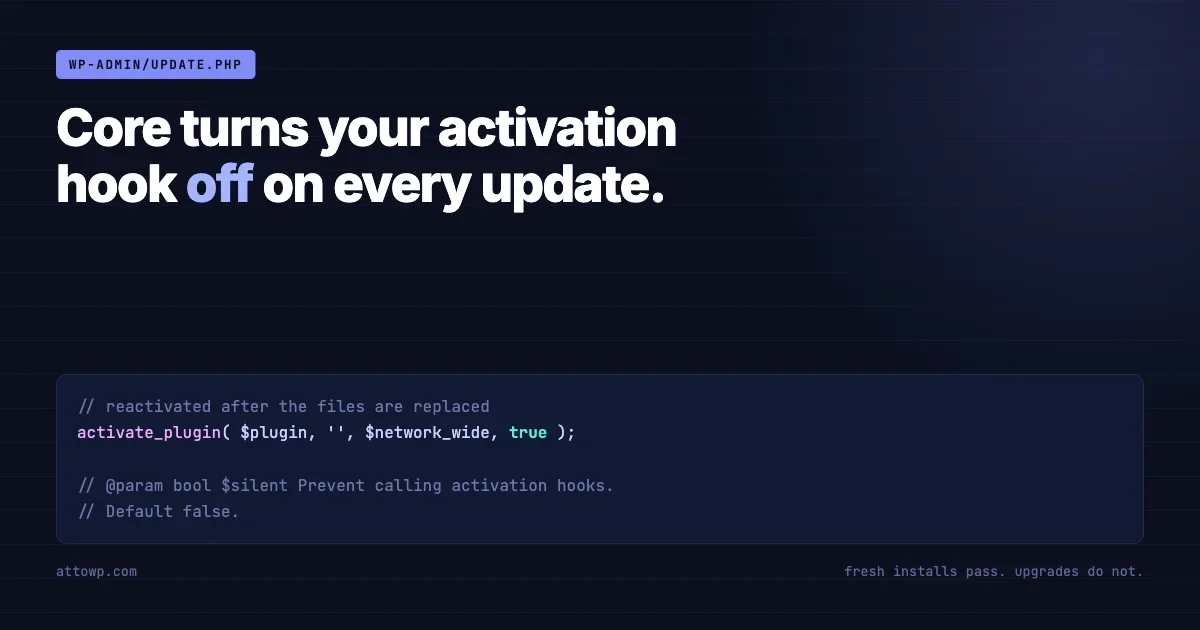
The comment is core’s own. The second argument to deactivate_plugins() is the silent flag, and it is passed as true specifically so that deactivation hooks do not run.
After the files are replaced, the plugin is reactivated from wp-admin/update.php:
activate_plugin( $plugin, '', ! empty( $_GET['networkwide'] ), true );That fourth argument is also the silent flag. Core documents it as follows:
@param bool $silent Prevent calling activation hooks. Default false.Default false. Passed true.
So on a manual update the plugin is deactivated without its deactivation hook, and reactivated without its activation hook. Whatever you registered there did not run.
Automatic updates behave differently again
The same method contains an early return that is worth reading carefully, because it means the update path is not one path but two:
// When in cron (background updates) don't deactivate the plugin,
// as we require a browser to reactivate it.
if ( wp_doing_cron() ) {
    return $response;
}
During a background update the plugin is never deactivated at all. The files are replaced underneath a running plugin, and execution continues with the old code already loaded in memory for the remainder of that request.
The practical consequence is that a site which auto-updates and a site whose administrator clicks Update Now do not follow the same sequence. Neither runs your activation hook, but they differ in what state the process is in when the new files land. Any assumption you make about that moment holds on at most one of them.
And the files may not be the files
One further complication belongs with the background-update case. On a server running an opcode cache, the compiled version of a PHP file can outlive the file itself. New code lands on disk while requests continue to execute the previous compilation until the cache notices, and how quickly it notices depends on configuration rather than on anything the plugin controls.
The window is usually short and usually harmless. It stops being harmless when a migration runs during it, because the migration is then executing against expectations from one version while another version’s files are on disk. Anything that writes during an update is exposed to this, which is a further argument for the guarded-check placement: it runs on a later request, by which point the ambiguity has resolved.
What this actually breaks
The activation hook is where a great deal of plugin setup traditionally lives. Everything in the following list is a real failure mode produced by putting work there and shipping an update.
Capabilities
A new release adds a capability and grants it to a role on activation. Fresh installs have it. Upgraded sites do not, so the feature is invisible to everyone who already used your plugin, and the symptom is not an error. It is an absent menu item, which nobody reports because there is nothing to see.
Scheduled events
A cron event scheduled at activation never gets scheduled on upgraded sites. Whatever it was meant to do, cleanup, digest email, reconciliation, quietly does not happen. This one can run undetected for months, because the absence of a scheduled task produces no log line.
Rewrite rules
Registering a post type or endpoint and flushing rewrite rules on activation is standard advice. Add a new endpoint in version two and the flush does not happen on upgrade, so the route returns a 404 on every existing site until somebody visits the permalinks screen. The plugin is not broken in any way an administrator can see. The URL simply does not exist.
Default options
This one has a second failure hiding inside it. Setting defaults on activation means upgraded sites never receive new keys. But the more common version is subtler: the settings array is stored whole, and the code reads it whole.
// Wrong. An upgraded site has the old array,
// so a key added in this release is simply missing.
$settings = get_option( 'myplugin_settings' );
if ( $settings['new_feature_enabled'] ) { ... }

// Right. Defaults are merged at read time,
// so a key added in any release exists everywhere.
$settings = wp_parse_args(
    get_option( 'myplugin_settings', array() ),
    myplugin_default_settings()
);
Merging defaults at read time rather than writing them at activation removes an entire class of upgrade bug and costs nothing. It is the single highest-value change in this article.
Schema changes, which fail differently
Custom tables deserve their own section, because the failure is quieter than the others and considerably more expensive.
The conventional pattern stores a schema version and compares it on load:
const SCHEMA_VERSION = '1.4.0';

function myplugin_maybe_upgrade_schema() {
    if ( get_option( 'myplugin_schema_version' ) === self::SCHEMA_VERSION ) {
        return;
    }
    myplugin_install_tables();  // dbDelta, idempotent
    update_option( 'myplugin_schema_version', self::SCHEMA_VERSION );
}
This works, and it fails in exactly one way: somebody adds a column to the table definition and does not change the constant.
At that point the new column exists in the install routine, which fresh installs run, and the comparison returns early on every site that already has the plugin. The migration does not run on the installed base. It runs on nobody except new users, which is the smallest group and the one least likely to notice anything.
An unbumped schema version does not mean the migration runs late. It means it runs on nobody who already had your plugin.
A worked example from our own code, because an abstract version of this is less useful than a real one.
A column named connect_transfer_id was added to the orders table of WP Sell Services Pro in July. The schema version was not bumped. Only fresh installs received the column. Every site that upgraded ran refund classification against a column that was not there, and the Stripe Connect path errored, on every upgraded site, for roughly a month, until it was found and fixed in 1.6.0.
Nothing about that is exotic. It is a one-line omission in a pull request that reviewed cleanly, and it is invisible to any test suite that builds its database from the install routine, which is nearly all of them.
Repair on load, not on activation
The fix for damage already distributed cannot itself live in the activation hook, for all the reasons above. It has to run on a normal request.
The pattern is to verify the actual state of the database rather than trusting the recorded version, and to make the check cheap enough to run on every load:
add_action( 'plugins_loaded', function () {
    if ( get_option( 'myplugin_schema_ok' ) === MYPLUGIN_SCHEMA_VERSION ) {
        return;  // one option read on the happy path
    }
    myplugin_install_tables();          // dbDelta adds what is missing
    update_option( 'myplugin_schema_ok', MYPLUGIN_SCHEMA_VERSION );
} );
BuddyNext 1.1.5 shipped a related change in the same spirit, described in its changelog as repairing a missing database table on the next load rather than assuming it was present because the recorded schema version matched. That is the correct instinct generalised: the recorded version is a claim about the database, not the database.
Equality is not the same as ordering
The guard shown above compares the stored version to the current one with equality. That is deliberate and it is correct for the narrow question of whether the database matches this release, but it is worth understanding what it does not handle.
If migrations must run in order, because version three depends on a column added in version two, equality is not enough. A site upgrading from 1.2.0 straight to 1.4.0 skips a release, and any migration keyed to running only when the previous version was exactly 1.3.0 will not fire.
$from = get_option( 'myplugin_schema_version', '0' );

// Each step runs if the site has not already passed it,
// so a site skipping two releases still runs all three.
if ( version_compare( $from, '1.3.0', '<' ) ) {
    myplugin_migrate_130();
}
if ( version_compare( $from, '1.4.0', '<' ) ) {
    myplugin_migrate_140();
}

update_option( 'myplugin_schema_version', MYPLUGIN_SCHEMA_VERSION );
Two properties make this safe. Each step is guarded independently, so skipped releases still run every migration between where the site was and where it is going. And each migration should be idempotent, so a partial run followed by a retry does not double-apply.
The second property matters more than it appears. Migrations get interrupted. A large table, a slow query, a request that times out, and the version has not been written yet while some of the work has been done. Eventonomy 1.5.0 shipped a fix in exactly this territory, described as ensuring pending database updates complete even when a previous update was interrupted partway.
Multisite multiplies every case above
If a plugin carries per-site tables and can be network activated, everything described so far happens once per site rather than once.
Network activation runs the activation hook with the network-wide flag set, and a plugin that loops over sites at that moment handles the sites that exist at that moment. Any site created afterwards has the plugin active and none of the setup, which is the same bug as the upgrade case arriving through a different door.
The read-time and guarded-check placements handle this correctly without special cases, because they run in the context of whichever site is being served. The activation-hook placement does not, and no amount of care inside the hook fixes it, because the hook is not called for sites that did not exist yet.
The practical test is to create a new site on a network where the plugin is already network active, and check that it works. On a plugin that does its setup at activation, it will not.
Where to put the work instead
Three placements cover almost every case.
- At read time. Defaults merged with
wp_parse_args, capabilities checked against a canonical map rather than a stored grant. Nothing to migrate because nothing was ever written. - On a normal request, guarded by a version check. Schema migrations, data backfills, anything that must write. Costs one option read per request when up to date.
- On
upgrader_process_complete. Fires after an update completes, and receives the list of what was updated. Useful for cache invalidation and flushing rewrite rules, with one caveat below.
The caveat on the third is significant and frequently missed. upgrader_process_complete runs in the request that performed the update, while the old plugin code is still the code that is loaded. Anything you call from there is the previous version of your own functions. It is a reliable place to invalidate caches and set a flag. It is not a reliable place to run a migration written in the release you just installed.
Setting a flag there and acting on it during the next request gets you the notification without the loaded-code problem.
The reason this keeps happening
Everything above is known. It is in the developer handbook, it has been written about for years, and most experienced plugin developers can recite it. It still ships, regularly, from teams who know all of it.
The reason is structural rather than educational. Every verification environment is built by installing the plugin. Continuous integration installs fresh. A Docker test box installs fresh. A reviewer checking a pull request installs fresh. The zip is verified by installing it into a clean WordPress.
Meanwhile every user is upgrading. The path that all of your testing exercises is the path that almost none of your installed base takes.
Rather than assert that in the abstract, here is our own evidence. Three release notes published on the same day in August 2026 carry a variant of the same sentence:
The upgrade path was not exercised before tagging. A fresh install from the zip was, in a clean Docker WordPress.
That note appears in Learnomy 1.9.3, in Learnomy Pro 1.9.3, and in Eventonomy 1.5.0. Three products, one day, the same gap, disclosed deliberately because the alternative is customers finding it.
The disclosure is the right practice and it is not the fix. The fix is to make the upgrade path something the pipeline exercises rather than something the release notes apologise for.
Testing the path your users take
The minimum viable version of this is not elaborate. Install the previous release, seed it with data, then update to the candidate and assert. Throughout the examples below, myplugin stands for your own plugin slug and wp myplugin seed for whatever command your plugin provides to create test data; the WordPress commands around them are stock WP-CLI.
# Install the released version, not the branch
wp plugin install myplugin --version=1.5.0 --activate

# Seed something the migration has to survive
wp myplugin seed --orders=50

# Upgrade to the candidate zip, the way a user would
wp plugin install ./build/myplugin.zip --force

# Assert against the database, not the install routine
wp db query "DESCRIBE wp_myplugin_orders" | grep connect_transfer_id
wp option get myplugin_schema_version
wp cron event list | grep myplugin
wp cap list administrator | grep myplugin
Four assertions covering schema, version, scheduled events and capabilities. Every one of them would have caught a bug described in this article, and the whole thing runs in under a minute.
Two refinements worth adding once that works. Run it against the two previous releases as well as the immediate one, because plenty of sites skip versions. And run it under cron conditions as well as browser conditions, since core takes different branches for each.
Finding the damage already deployed
Prevention handles the next release. If you maintain plugins across a number of sites, the more pressing question is which of them are already carrying one of these faults.
All four failure modes are detectable from the command line, which makes them auditable across a fleet without opening a single dashboard, in the same way a platform-level change is audited rather than assumed.
# Does the recorded schema version match what the code expects?
wp option get myplugin_schema_version

# Does the column the code assumes actually exist?
wp db query "SHOW COLUMNS FROM \`$(wp db prefix --quiet)myplugin_orders\` LIKE 'connect_transfer_id'"

# Is the scheduled event the plugin relies on actually scheduled?
wp cron event list --fields=hook,next_run_relative | grep myplugin

# Does the role hold the capability the feature checks for?
wp cap list administrator | grep myplugin

# Do the rewrite rules include the route added in a later release?
wp rewrite list --format=csv | grep myplugin
Wrapped in a loop over an alias group, that becomes a single sweep answering the question for every site at once.
for site in @clients; do
  echo "== $site"
  wp --ssh="$site" option get myplugin_schema_version 2>/dev/null || echo "  not installed"
  wp --ssh="$site" cron event list --fields=hook 2>/dev/null | grep -c myplugin
done
The output that matters is inconsistency. Sites reporting different schema versions for the same plugin version are sites where a migration did not run, and that is the signature this whole article is about.
One caution on the rewrite check. An empty result there is ambiguous rather than conclusive, because rules are cached and the absence of a rule can mean it was never flushed or simply that the cache is stale. Confirm by requesting the route and looking at the status code rather than trusting the listing alone.
A checklist for the next release
- Did any table definition change? If so, was the schema version constant changed in the same commit?
- Does any new capability get granted anywhere other than a canonical map read at runtime?
- Does any new cron event get scheduled anywhere other than a guarded check on a normal request?
- Did a new post type, taxonomy or REST route arrive without a rewrite flush that upgraded sites will actually reach?
- Are settings read through a defaults merge, so a key added this release exists on sites that upgraded?
- Has the candidate been installed over the previous release, with data present, rather than only into an empty site?
The first question is the one worth automating. A test that fails when a schema file changes without its version constant changing is perhaps fifteen lines, and it eliminates the most expensive bug in this article permanently.
A rough version of that test needs no framework. Hash the file that defines the tables, store the hash beside the expected schema version, and fail when one moves without the other.
# Fails the build when the schema changed but the version did not
CURRENT=$(md5 -q includes/class-schema.php)
RECORDED=$(grep -oE "SCHEMA_FILE_HASH = '[a-f0-9]+'" includes/class-schema.php | cut -d"'" -f2)

if [ "$CURRENT" != "$RECORDED" ]; then
  echo "Schema file changed. Bump SCHEMA_VERSION and update SCHEMA_FILE_HASH."
  exit 1
fi
It is crude, and it converts a bug that took a month to notice into a build failure that takes a minute to fix. That trade is worth making even in an imperfect form.
Summary
WordPress core suppresses activation hooks on update deliberately, passing the silent flag on both the deactivation and the reactivation, and it takes a different branch again for background updates. Any setup work placed in the activation hook therefore reaches new installations only.
The resulting bugs are quiet by nature: a missing capability, an unscheduled task, a route that 404s, a column that is not there. None of them announce themselves, and none of them appear in an environment built by installing the plugin.
Move the work to read time where you can, guard it behind a version check on a normal request where you cannot, and add one test that installs over the previous release. The last of those takes an afternoon and covers the majority of what this article describes.



No comments yet