
Short answer: if you’re already running (or planning to run) a community on BuddyNext, BuddyNext Pro is the simplest path to a paid membership tier because Stripe billing, gated Spaces, and a customer portal live in the same plugin as your feed, no separate membership plugin required. If you just need to gate content on an existing WordPress site with no community layer, MemberPress is the most complete dedicated membership plugin, at a price that reflects it. Everything else on this list fits a specific budget or use case.
Membership plugins all do the same basic job: put content behind a paywall and collect recurring payments. Where they actually differ is what you have to bolt on around that core job, and whether the plugin assumes you’re building a membership site from scratch or adding paywalls to a site that already exists. This list covers six plugins that are all still actively maintained, ranked by what they actually include rather than what their marketing pages claim.
On this page
- Quick comparison
- What to actually look for in a WordPress membership plugin
- Bundled monetization versus a standalone membership plugin
- Why run a paid membership on WordPress instead of Patreon or Substack
- 1. BuddyNext Pro
- 2. MemberPress
- 3. Paid Memberships Pro
- 4. Restrict Content Pro
- 5. s2Member
- 6. WishList Member
- Feature comparison: the top three
- Frequently asked questions
- Which one should you actually pick
Quick comparison
Plugin | Best for | Starting price | Free tier |
|---|---|---|---|
BuddyNext Pro | Membership built into a community platform | Community core free, Pro from $149/yr | Yes, community core |
MemberPress | Most complete dedicated membership plugin | $199.50/yr | No |
Paid Memberships Pro | Free core with modular add-ons | Free, paid add-ons | Yes |
Restrict Content Pro | Simple, predictable pricing | Paid, flat annual | No meaningful free tier |
s2Member | Free tier with real payment processing | Free (PayPal), Pro adds Stripe | Yes |
WishList Member | Non-technical drip-content setup | Paid, flat annual | No meaningful free tier |
What to actually look for in a WordPress membership plugin
Every plugin on this list can restrict a post to paying members, so that part of the decision is effectively already made for you. The differences that actually matter show up in the parts around that core feature, once real members start paying and canceling every month:
- What payment processors it actually supports. Stripe support is close to universal now, but PayPal-only free tiers and processor-specific add-on pricing are still common. Check this before you build a checkout flow around a plugin that doesn’t support the processor you actually want.
- Whether it assumes a community underneath it. A dedicated membership plugin bolts onto any WordPress site. A platform-native option like BuddyNext Pro assumes (and rewards) already having a feed and Spaces to gate, rather than gating a stack of individual posts and pages.
- Drip content and cancellation handling. Releasing content over time and handling failed payments, dunning, and cancellations gracefully separates a mature membership plugin from a checkout form bolted to a paywall shortcode.
- What happens when you outgrow the free or entry tier. Add-on pricing that starts cheap can end up costing more than a flat Pro tier once you need three or four of them. Do the math on what you’ll actually need, not just the headline price.
- How members actually manage their own billing. A self-serve portal where a member can update a card, change tiers, or cancel without emailing you is the difference between a membership site that scales past a few dozen people and one where you’re manually processing refund requests on a Sunday night. Check whether this is included free or gated behind a higher tier.
Bundled monetization versus a standalone membership plugin
This is the real decision underneath this whole category. If you’re building a membership site around an existing community, forum, or course platform, a membership plugin bolted on top means two admin screens, two sets of user-role logic, and two plugins that both need to agree on who’s currently paying.
A platform that includes membership natively, the way BuddyNext Pro does for community sites, collapses that into one system: the same member record that has a profile and posts in the feed is the one Stripe knows about. Nobody has to reconcile two separate lists of who’s currently paying.
If you don’t have (or want) a full community platform, that advantage disappears and a dedicated membership plugin is simply the more direct tool. There’s no universally right answer here, only the right answer for what the rest of your site already is.
Why run a paid membership on WordPress instead of Patreon or Substack
Hosted platforms like Patreon and Substack take a real percentage of every payment, on top of the payment processor’s own fee, forever. For a creator earning a modest amount, that’s a manageable cost for zero setup. For a membership site earning meaningfully, that percentage compounds into a real number every single month, with no way to negotiate it down as you grow. Over several years, that ongoing cut is often larger than the total cost of a self-hosted plugin, even a premium one.
A WordPress membership plugin flips the economics: a flat license fee (or nothing at all, for the free options on this list) plus standard payment processor fees, and no platform taking an ongoing cut of revenue regardless of scale. The trade-off is real too, you’re responsible for the plugin, the hosting, and the checkout flow working correctly, rather than a platform handling all of it. For a membership business past the hobby stage, owning that infrastructure usually pays for itself quickly. You also keep the member relationship and the member data on your own domain, rather than renting access to an audience that technically belongs to someone else’s platform.
1. BuddyNext Pro
Disclosure: BuddyNext is built by Wbcom Designs, who we work with. We’re listing it here because the Stripe integration genuinely lives inside the same plugin as the community features, not because of that relationship, and the screenshot below is from a real install.
BuddyNext Pro adds native Stripe membership tiers directly into the community platform we covered in our WordPress community plugin roundup: monthly, yearly, or one-time tiers, free trials, gated Spaces, inline content locks, and a self-serve customer portal so members can manage their own billing without emailing you.
Here’s the real membership pricing page from a live install, not a mockup:
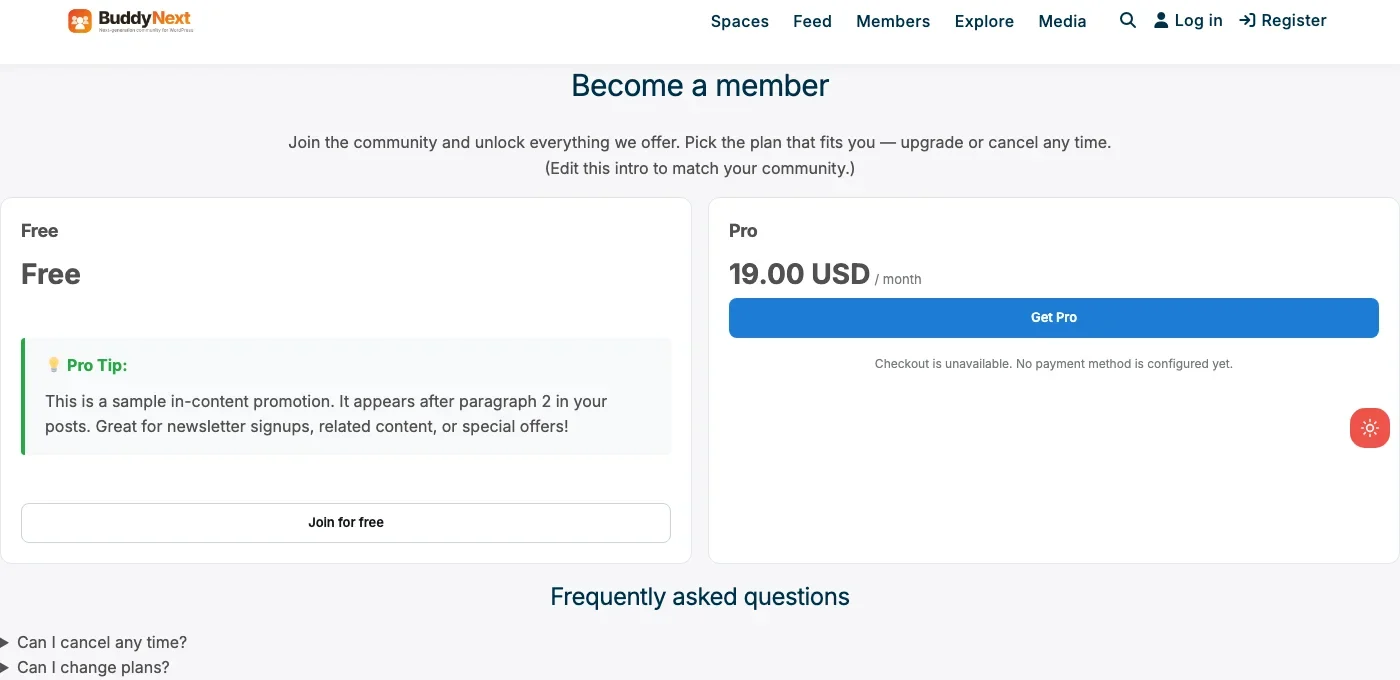
Free and Pro tiers, a real $19/month price point, and a working “Get Pro” button. This particular install hasn’t connected a live Stripe account yet, which is exactly why the checkout note says so honestly instead of faking a transaction; the pricing page and tier structure themselves are the genuine plugin UI, not a design comp.
Architecture note: the reason this is worth calling its own category entry rather than just a footnote on the community post is that the membership layer and the community layer share one user table, one role system, and one admin. A member who upgrades doesn’t become a separate record that a different plugin has to reconcile against BuddyNext’s own member list. That’s the specific problem a bolted-on membership plugin has to solve for itself on every other platform on this list.
What we like: membership and community share one data model. MRR dashboard sits in the same admin as moderation. Free trials and a real customer portal, not just a paywall. Free community core stays fully functional without ever buying Pro.
Could be improved: only worth adopting if you want (or already have) BuddyNext’s community layer, not a fit for a pure content-gating use case with no feed or Spaces involved. Smaller volume of third-party membership integrations than a decade-old dedicated plugin.
Pricing: community core free forever. Pro (which includes membership) starts at $149/yr, Personal tier, 1 site.
2. MemberPress
MemberPress is the plugin most “best membership plugin” lists lead with, and for a pure content-gating use case, that’s fair. It handles courses, drip content, forums (via bbPress integration), and a genuinely deep rules engine for exactly who can see what, all in one product with no free tier to fall back on.
The trade-off is price and scope: MemberPress assumes you’re building the membership site as the primary thing your WordPress install does, and prices accordingly. There’s no free version to test the waters with, and no meaningful discount for a small, simple gate on a handful of posts. If your site’s main job really is the membership business, that pricing tends to be worth it; if membership is one feature among several on a larger site, it’s worth comparing against the free-core options further down this list first.
What we like: deep, mature rules engine for content access. Native course and drip-content tools. Large ecosystem of integrations after years in the category.
Could be improved: no free tier at all. Priced for a dedicated membership business, not a light content gate. Adds its own full user-management layer on top of whatever else your site already does.
Pricing: from $199.50/yr, no free version, no free trial (14-day money-back guarantee instead).
3. Paid Memberships Pro
Paid Memberships Pro is the closest thing on this list to BuddyNext Pro’s free-core philosophy applied to a standalone membership plugin: the core plugin, including unlimited membership levels and Stripe or PayPal recurring billing, is genuinely free, with more than 60 add-ons (free and paid) for the parts you might not need on day one.
That structure rewards knowing what you actually need. A site that only needs basic tiered content gating can run entirely free. A site that needs advanced reporting, specific gateway integrations, or deep LMS pairing will end up buying several add-ons, at which point it’s worth comparing the total against a flat-priced competitor.
What we like: genuinely functional free core, not a crippled trial. Large add-on marketplace for specific needs. Long track record and active development.
Could be improved: per-add-on pricing makes total cost unpredictable if you need several. Development has moved primarily to the plugin’s own site rather than wordpress.org, so check there for the latest version first.
Pricing: free core, individual add-ons priced separately.
4. Restrict Content Pro
Restrict Content Pro built its reputation on being the simpler, more predictable alternative to MemberPress: one flat annual price, a cleaner admin, and a feature set focused specifically on content restriction and subscription billing rather than trying to also be a course platform and a forum.
Now under iThemes/Liquid Web ownership after its original developer sold it in 2020, it’s a mature, actively maintained product, but like MemberPress it has no meaningful free tier, so there’s no free way to confirm it fits your workflow before paying. Its add-ons, when you do need one, are included with all plans rather than sold individually, which keeps the total cost more predictable than a per-add-on model once you’re past the base feature set.
What we like: simpler, more predictable feature set than MemberPress. Flat annual pricing instead of per-add-on costs. Clean admin UI that doesn’t try to do everything.
Could be improved: no free tier to trial. Narrower feature scope than MemberPress if you specifically want built-in courses or forums.
Pricing: paid, flat annual license. Confirm current tiers directly.
5. s2Member
s2Member’s pitch has stayed consistent for over a decade: a genuinely free framework that handles real payment processing (PayPal Website Payments Standard, with recurring billing) at no cost, with a Pro version for Stripe and more advanced gateway support.
It’s a good fit for a budget-conscious site that’s comfortable with PayPal as the primary payment method, or one willing to pay for Pro specifically to get Stripe. The admin and setup flow feel older than newer entrants on this list, a fair trade for some sites given the free tier’s genuine capability. Content protection covers pages, posts, categories, custom URIs, and even portions of content within a single post, which is more granular than several paid competitors offer at any price.
What we like: free tier includes real recurring billing, not just a feature-limited demo. Long track record. Pro pricing is a one-time cost option, not only subscription.
Could be improved: free tier is PayPal-only; Stripe requires Pro. Admin UI and setup flow feel dated next to newer membership plugins.
Pricing: free (PayPal), Pro adds Stripe and more, one-time or annual pricing available.
6. WishList Member
WishList Member has been in this category since 2008, with a specific reputation for being approachable to non-technical site owners: level-based access, drip content, and payment integrations set up through a wizard-style flow rather than a developer-oriented settings screen.
Every membership level and every member are unlimited on any plan, no upsell to a higher tier just to add more members, which is a genuinely different pricing philosophy than per-feature add-on models. Like MemberPress and Restrict Content Pro, there’s no free tier to test first. The company has stayed in business and kept the product updated since 2008, which is longer than most of the newer platform-native alternatives have existed, worth factoring in if long-term stability matters more to you than modern architecture.
What we like: approachable for non-developers. Unlimited members and levels on every plan. Long history and stable support team.
Could be improved: no free tier. Less architecturally modern than newer entrants (fewer block-based admin screens, more classic WordPress UI patterns).
Pricing: paid, flat annual license. Confirm current tiers directly.
Feature comparison: the top three
Feature | BuddyNext Pro | MemberPress | Paid Memberships Pro |
|---|---|---|---|
Free tier | Yes, full community core | No | Yes, full core |
Native community/feed integration | Yes, same plugin | No, add-on ecosystem | No, standalone |
Stripe support | Yes, native | Yes, native | Yes, native |
Customer self-service portal | Yes | Yes | Via add-on |
Course/drip content | Via Learnomy pairing | Native | Via add-on |
Pricing model | Flat annual, includes community | Flat annual | Free core + per-add-on |
Frequently asked questions
Do I need BuddyNext’s free community core to use BuddyNext Pro’s membership features?
Yes. BuddyNext Pro is an upgrade to the BuddyNext community platform, not a standalone membership plugin. If you don’t want the community layer, a dedicated plugin like MemberPress or Paid Memberships Pro is the more direct fit.
What’s the cheapest way to add real recurring payments to a WordPress site?
s2Member’s free tier supports real PayPal recurring billing at no cost. Paid Memberships Pro’s free core supports Stripe and PayPal recurring billing natively as well. Both are genuine, not feature-limited trials.
Is MemberPress worth the price over free alternatives?
If you want courses, drip content, and forum gating handled natively in one polished product with strong support, yes. If your needs are simpler, gating a set of posts behind a subscription, Paid Memberships Pro’s free core likely covers it without the cost.
Can I use two membership plugins together, one for community and one for content?
Technically yes, but it usually means two separate systems both deciding who’s a paying member, which is the exact coordination problem a platform-native option like BuddyNext Pro avoids. If you’re starting fresh, picking one system to be the source of truth is worth the up-front decision.
Which of these plugins handles failed payments and cancellations best?
MemberPress, Paid Memberships Pro, and BuddyNext Pro all handle dunning and cancellation through their Stripe integrations natively. s2Member’s free PayPal tier has more limited retry handling than its Pro/Stripe tier. Restrict Content Pro and WishList Member both handle this adequately but check current gateway-specific documentation, since retry behavior depends partly on the payment processor itself.
Do any of these plugins take a percentage cut of my revenue?
No. All six charge a flat license fee (or are free), not a revenue share. Payment processor fees (Stripe, PayPal) apply separately regardless of which plugin you choose, since those are charged by the payment processor, not the WordPress plugin.
Does a membership plugin replace the need for an email list?
No. All six plugins handle access and billing, not email marketing. Most integrate with dedicated email tools (Mailchimp, ConvertKit, or similar) for the actual member communication, rather than trying to replace them. Plan for a separate email tool regardless of which membership plugin you pick.
Can I run a free trial without a credit card upfront?
BuddyNext Pro, MemberPress, and Paid Memberships Pro all support free trials as part of their native Stripe integration, including no-card trials depending on how you configure the tier. s2Member’s free PayPal tier doesn’t support this pattern as cleanly, since PayPal’s flow differs from Stripe’s trial handling.
How hard is it to migrate from one membership plugin to another later?
Harder than most site owners expect. Member records, active subscriptions, and payment history are all structured differently across these plugins, and Stripe subscriptions in particular are tied to the integration that created them. Migrating mid-flight usually means asking members to re-subscribe rather than a clean, automatic transfer. Treat the initial choice as a long-term one rather than something to revisit casually in a year.
Which one should you actually pick
If a community, feed, or Spaces are already part of the plan, start with BuddyNext Pro and let membership live in the same system as everything else your members do. If you’re gating content on a site with no community layer and want the deepest, most mature dedicated tool, MemberPress earns its price.
If budget matters more than polish, Paid Memberships Pro’s free core or s2Member’s free PayPal tier will genuinely get a paid membership site running at no cost. Restrict Content Pro fits a site that wants MemberPress’s reliability without its scope, and WishList Member fits a non-technical owner who wants a wizard-driven setup over a developer-facing settings screen.
Whichever you pick, the decision that matters more than the plugin itself is deciding up front whether membership is one feature of a bigger site or the entire point of the site. That answer points you at a bundled platform or a dedicated tool far more reliably than any feature checklist does. Get that one decision right, and the rest of the setup is mostly mechanical from there.
See also our forum plugin roundup for the Jetonomy pairing mentioned above, and our community plugin roundup for the full BuddyNext platform this membership layer sits on top of.
Related WordPress plugin guides
- Best WordPress Fan Club Plugins, same BuddyNext Pro tier mechanics, applied to creators selling direct access instead of a general membership.
- Best WordPress Coaching Community Plugins, a paid-cohort variant of the same Stripe-tier decision, with accountability structure layered on top.
- Best WordPress Brand Community Plugins, covers the VIP-tier case where membership gates a segment of an existing brand community.
- Best WordPress Professional Networking Plugins, how the same Stripe-tier approach handles association dues instead of consumer subscriptions.
- Best Free WordPress Community Plugins, the free-core-only path for sites that aren’t ready to pay for a membership tier yet.
Last reviewed: September 2026.




No comments yet