Short answer: if you’re building a community around your brand or product rather than a general-purpose social network, BuddyNext is the strongest WordPress option because its free core covers a branded feed, member profiles, and native moderation without needing a separate plugin for any of it, and it doesn’t cost you the algorithm control or data ownership a Facebook Group does. BuddyBoss Platform is the right call specifically when a branded mobile app matters to the brand. Everything else on this list fits a narrower budget or use case.
A brand community is a specific kind of community: the members already have something in common (they bought your product, they follow your work, they’re in your customer base) before they ever show up, which changes what the plugin actually needs to do well. Discovery and icebreaking matter less than they do in a general social network. Making members feel like they’re inside something the brand actually owns and cares about matters more. This roundup covers the plugins that get that balance right, along with the honest alternative most brands are actually weighing it against.
On this page
- Quick comparison
- What a brand community actually needs
- Why not just run a Facebook Group for your brand
- What launching a brand community actually looks like
- 1. BuddyNext
- 2. BuddyPress
- 3. BuddyBoss Platform
- 4. PeepSo
- 5. Ultimate Member
- Feature comparison: the top three
- Frequently asked questions
- Which one should you actually pick
Quick comparison
Plugin | Best for | Starting price | Free tier |
|---|---|---|---|
BuddyNext | Owned branded community, full stack free | Free, Pro from $149/yr | Yes, full core |
BuddyPress | Largest ecosystem, zero cost | Free | Yes, no Pro tier |
BuddyBoss Platform | Branded mobile app for customers | Free plugin, paid app/theme bundle | Yes, limited |
PeepSo | Lightweight, modern out of the box | Free, paid modules | Yes |
Ultimate Member | Branded member directory, lighter weight | Free, paid addons | Yes |
What a brand community actually needs
Feature checklists look identical across most of this category. What actually separates a brand community plugin worth using from one that isn’t shows up in a handful of specific places, most of which only become obvious after real customers start using the thing:
- How much it looks and feels like the brand, not the plugin. A branded community that visibly looks like a stock install of someone else’s software undercuts the whole point. Look for real theming control over colors, logos, and layout, not just a color picker buried three settings screens deep.
- Native moderation that scales past the founder personally reading every post. A brand community that grows past a few hundred members needs reports, strikes, and banned-word filtering built in, not bolted on as a separate paid plugin discovered after the first moderation crisis.
- A real path to gating premium access. Many brand communities eventually want a paid tier, VIP customers, early access members, or a straightforward loyalty program. Whatever you pick should have a real answer for this without requiring a second plugin.
- Data you actually own. The entire point of running a brand community on your own WordPress site instead of a hosted platform is owning the customer relationship and the data behind it. A plugin that locks your community’s data into a proprietary format undermines that from the inside.
- How the community connects back to the rest of the business. A brand community that’s completely disconnected from the store, the support desk, or the email list is a nice-to-have. One where a purchase can unlock a Space, or a community post can be surfaced to the support team, starts to justify its own maintenance cost.
Why not just run a Facebook Group for your brand
This is the honest starting comparison, because a huge number of brand communities live entirely inside a Facebook Group today, and it genuinely works for plenty of them. Setup takes minutes, your existing customers are probably already on Facebook, and there’s no hosting or maintenance to think about.
The costs show up over time rather than on day one. Facebook’s algorithm, not you, decides how many of your members actually see a given post. You don’t own the member list, so you can’t email them directly or export the relationship if you ever need to. And a Facebook Group carries your brand inside a platform whose ads, unrelated content, and design choices you don’t control, sitting right next to whatever your community is trying to say about your brand.
A WordPress-based brand community trades that convenience for ownership: every member record, every post, every interaction lives in a database you control, fully exportable, fully yours if you ever change hosts, themes, or plugins. For a brand that expects its community to matter in five years, not just this quarter, that trade tends to be worth making early rather than after the group has grown large enough that migrating away from Facebook becomes genuinely painful.
What launching a brand community actually looks like
Picture a mid-sized consumer product brand with an engaged base of a few thousand repeat customers. The realistic launch order isn’t “turn on every feature and announce it to the whole customer list,” it’s staged, starting with the people most likely to actually show up. A soft launch to the top few hundred customers, repeat buyers, people who’ve emailed support with detailed feedback, people who follow the brand’s social accounts closely, gives the community real activity before the wider announcement, rather than a ghost town on day one.
Seeding matters here more than most brands expect. A handful of genuine posts from the team, a real product update, a behind-the-scenes photo, an honest answer to a common question, give the first wave of members something to react to instead of an empty feed. Only after that initial activity is real does a wider announcement (email list, social post, receipt insert) make sense. A brand community announced to the full customer base before it has any real content reads as abandoned within a week, and first impressions here are hard to undo. Plan the seeding work as a real task with an owner, not something that happens automatically once the plugin is installed.
The VIP or paid tier, if the brand wants one eventually, is worth introducing after the free community has proven it holds people’s attention, not before. A paid tier with no free community to point to first is a much harder sell than a paid upgrade path inside a community members already visit.
Moderation planning belongs in this early phase too, not as an afterthought once something goes wrong. Deciding who has moderator access, what the actual house rules are, and how a genuinely difficult situation (a public complaint, a heated disagreement between customers) gets handled is much easier to think through calmly before launch than to improvise during the first real incident. A brand community with no stated rules and no assigned moderator is one bad week away from becoming a support and reputation problem instead of an asset.
1. BuddyNext
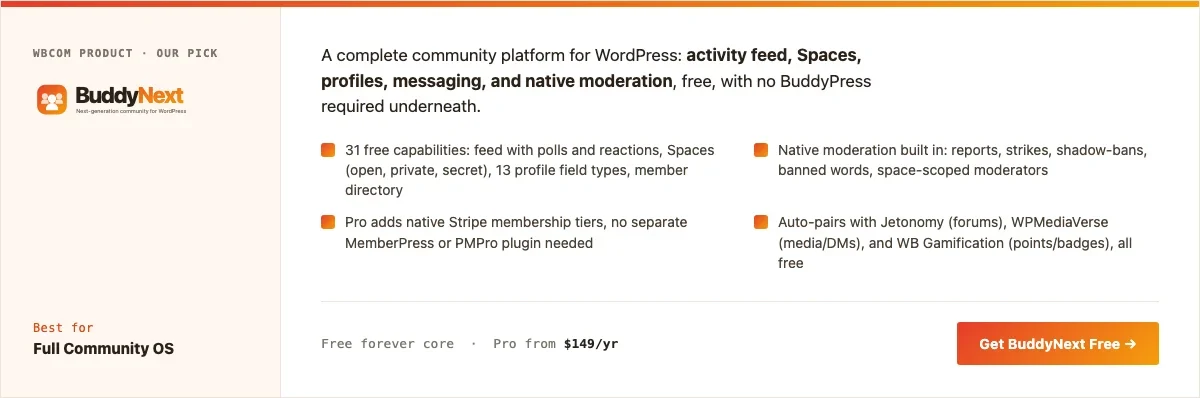
Disclosure: BuddyNext is built by Wbcom Designs, who we work with. We’re listing it here because its free tier genuinely covers what a brand community needs without add-ons, not because of that relationship, and the screenshot below is from a real install.
BuddyNext’s free core is a complete branded community out of the box: an activity feed with reactions and polls, Spaces that can map onto product lines or customer segments, member profiles, a directory, and native moderation, with no companion plugin required to feel finished. For a brand community specifically, the Spaces model is worth calling out: an open Space for general discussion, a private Space for VIP or early-access customers, and a support-focused Space can all coexist under one roof with different access rules per Space.
Here’s a real BuddyNext Spaces directory from a live install, not a design mockup:
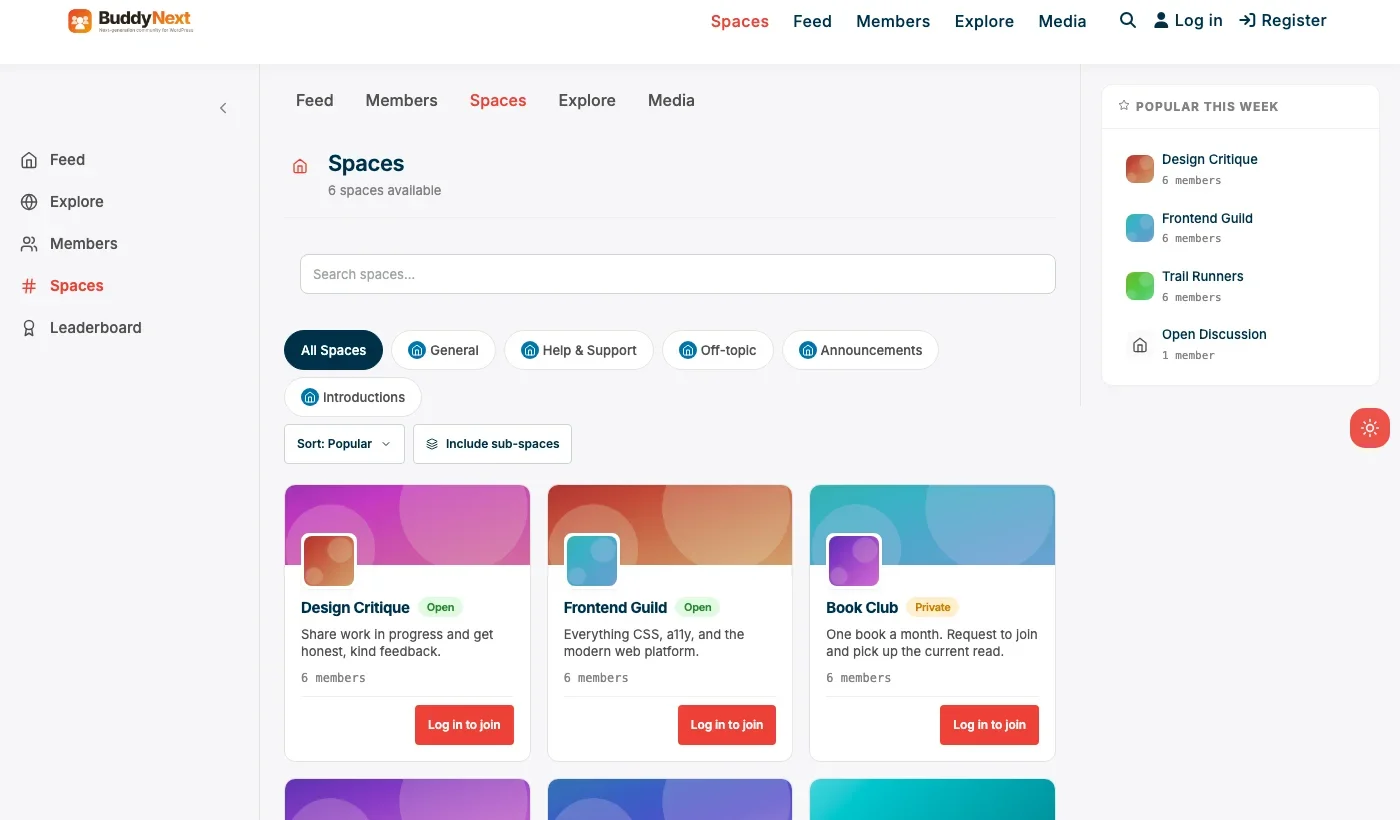
Swap the specific Space names for a brand’s own product lines or customer segments and the underlying mechanism, real Spaces with real membership and join flows, is exactly what a brand community needs to organize itself around more than one topic or access tier.
Architecture note: we covered BuddyNext’s broader positioning against BuddyPress and other general community plugins in our WordPress community plugin roundup. The detail that matters most for a brand specifically is that BuddyNext Pro’s native Stripe tiers make a VIP or paid-membership layer part of the same plugin running the community, rather than a separate membership plugin that has to be kept in sync with who’s currently a customer.
Member types are worth calling out separately from Spaces for a brand community specifically. A brand can tag verified purchasers, newsletter subscribers, and ambassadors as distinct member types, then use those tags to control who sees what, without building a separate membership tier for each one. That’s a lighter-weight tool than full Pro monetization for a brand that wants segmentation without necessarily charging for access yet.
What we like: free core is complete enough to launch a real branded community without paying anything. Native moderation from day one. Spaces model fits multi-segment brand communities (VIP, support, general) cleanly.
Could be improved: smaller theme and third-party plugin ecosystem than BuddyPress, since it’s a newer platform. Deep custom branding beyond color and logo may need developer time, as with most WordPress community plugins.
Pricing: free core forever. Pro starts at $149/yr if you want native Stripe membership tiers for VIP access.
2. BuddyPress
BuddyPress remains a legitimate choice for a brand community specifically because of its ecosystem: more themes have been built to work with BuddyPress than any other WordPress community plugin, which matters if visual customization is the top priority and a developer is available to implement it. It’s completely free, backed by its own database tables for its core components, and has over a decade of documented patterns for exactly this use case.
The trade-off for a brand community specifically is that BuddyPress alone doesn’t include native moderation or a monetization path, both of which a growing brand community tends to need. Expect to add bbPress, a membership plugin, or both as the community matures past a small, low-maintenance group.
What we like: zero cost forever. Largest available ecosystem of community-focused WordPress themes. Mature, well-documented, own-table architecture for its core components.
Could be improved: no native moderation suite. No built-in monetization path for VIP tiers. Needs a compatible theme to look current out of the box.
Pricing: free, always.
3. BuddyBoss Platform
BuddyBoss Platform earns its spot on a brand-community list specifically because of its mobile app story, which matters more for brand communities than most other community types. A brand with an engaged customer base often wants that community reachable as a real app in the App Store and Play Store, not just a mobile-responsive website, and BuddyBoss is the most established WordPress-based way to get there.
The Platform plugin itself is free, but the app, theme, and bundle needed to actually ship the branded app experience are a paid annual package, and a real cost to weigh against how much a native app genuinely matters to the specific brand and audience.
What we like: the strongest native mobile app path of any option on this list. Deep customization options for brands with design resources to invest.
Could be improved: real cost is the full bundle, not just the free plugin. Overkill for a brand community that only needs a web presence.
Pricing: Platform plugin free, full bundle priced annually.
4. PeepSo
PeepSo is worth a look for a brand that wants a clean, modern-looking community without needing a specialized theme to get there, and without BuddyPress’s full setup overhead. Its free core covers feed, groups, and profiles, with paid modules available for specific features like richer media or gamification.
For a brand community with a clear, modest feature list, PeepSo’s lighter footprint is genuinely appealing. Budget for the specific modules you’ll actually need rather than assuming the free core alone covers everything a growing brand community eventually wants.
What we like: modern look without a special theme requirement. Lighter weight than BuddyPress plus add-ons. Active development.
Could be improved: per-module pricing adds up if you need several. No native monetization as complete as BuddyNext Pro’s Stripe tiers.
Pricing: free core, individual modules priced separately.
5. Ultimate Member
For a brand that mainly wants a searchable customer or fan directory rather than a full activity feed and groups, Ultimate Member’s registration and profile system, paired with a directory add-on, is a genuinely lighter path. It’s a good fit for a brand ambassador program or a customer showcase rather than an open-discussion community. A brand running an ambassador or affiliate program specifically often wants exactly this: a public-facing roster of approved partners with custom fields for their social handles, region, or specialty, without needing a feed or discussion layer at all.
What we like: fast, light setup for a directory-first use case. Strong custom registration form builder for collecting brand-relevant profile fields.
Could be improved: no discussion or feed layer without adding more plugins, which starts to rebuild what BuddyNext already includes natively.
Pricing: free core, paid addon bundles for directory and social features.
Feature comparison: the top three
Feature | BuddyNext | BuddyPress | BuddyBoss Platform |
|---|---|---|---|
Native moderation | Yes, free | No | Basic, deeper tools paid |
VIP/paid tier support | Yes, Pro Stripe tiers | No, needs separate plugin | Via bundle/add-ons |
Multi-segment Spaces/groups | Yes, open/private/secret | Yes, via Groups component | Yes, via Groups |
Native mobile app path | Not native | No | Yes, strong |
Free tier completeness | Full core free | Full core free, narrower scope | Plugin free, bundle paid |
Frequently asked questions
Is a WordPress brand community actually worth the setup effort compared to Facebook or Discord?
If the community is expected to matter for years and the customer relationship itself has real value, yes. For a short campaign or a low-stakes fan group, a Facebook Group or Discord server is a reasonable, much faster starting point.
Can a brand community be private, visible only to customers who bought something?
Yes. BuddyNext’s private and secret Spaces, combined with member types, can restrict access to verified customers only, which is a common pattern for post-purchase brand communities.
Do I need a developer to make BuddyNext look like our brand instead of a generic community site?
Basic branding, logo, colors, and layout choices, doesn’t require a developer. Deep custom design work, the way any WordPress plugin’s front end can be customized, benefits from developer time the way it would with any of the plugins on this list.
What’s the fastest way to launch a basic brand community this month?
BuddyNext’s free core: install, configure basic branding, create a couple of Spaces, and invite existing customers. No other plugin is required to have something real to show on day one.
Should a brand community be public and indexable by Google, or private?
It depends on the goal. A support-focused or SEO-driven brand community (public Q&A that helps future customers who find it via search) benefits from being public. A VIP or loyalty-focused community usually works better private, since exclusivity is part of the value being offered.
How is a brand community different from a customer support forum?
They can overlap, but a brand community’s primary goal is relationship and engagement; a support forum’s primary goal is resolving issues efficiently. Many brands run both: a Jetonomy-powered support space alongside a broader BuddyNext community for everything else, since the two serve genuinely different member intents.
How big does a customer base need to be before a brand community makes sense?
There’s no hard number, but a few hundred genuinely engaged customers is a reasonable floor. Below that, the community tends to feel emptier than a well-run email list or social presence, and the setup effort isn’t repaid yet. A brand with a smaller but highly engaged niche audience can work at lower numbers than a brand with a large but passive customer base.
Can a brand community replace customer support entirely?
Not entirely, but it can absorb a meaningful share of it. Common questions answered once in a public Space save the support team from repeating the same answer by email or chat, and let other customers find the answer via search. Complex or account-specific issues still need a direct support channel.
Should employees post in the brand community as themselves or as the brand account?
Most brand communities that feel alive use a mix: an official brand account for announcements and product updates, and real team members posting as themselves for anything conversational. A community where every response comes from a faceless brand account tends to feel more like a support ticket queue than a place people want to hang out.
Which one should you actually pick
If you’re launching a brand community today and want to own the relationship and the data behind it without assembling several plugins, start with BuddyNext. Its free core is complete enough to launch on, and the path to a VIP paid tier is a plugin update away rather than a second plugin. Choose BuddyBoss Platform specifically when a branded native mobile app is a real requirement, not just a nice-to-have. BuddyPress remains the right call if visual customization backed by the largest available theme ecosystem matters more than native moderation or monetization out of the box. PeepSo fits a brand that wants a modern look with a lighter footprint, and Ultimate Member fits a brand that only needs a customer or ambassador directory rather than a full community experience.
One more thing worth deciding before launch rather than after: who inside the company actually owns the brand community day to day. A community with no clear internal owner tends to drift, posts go unanswered for days, a customer complaint sits unmoderated, and the whole thing starts to feel neglected rather than cared for. It doesn’t need to be a full-time role at launch, but someone specific should be checking in daily, even if that’s a marketing team member spending twenty minutes a day rather than a dedicated community manager. Assign that ownership before the public launch, not after the first uncomfortable gap in responses becomes visible to members.
Related WordPress plugin guides
- Best WordPress Membership Plugins, the full breakdown of adding a paid VIP tier once the free brand community has proven itself.
- Best WordPress Nonprofit Community Plugins, the same BuddyNext free-core approach applied to a much tighter budget.
- Best WordPress Professional Networking Plugins, covers member-type segmentation in more depth for a directory-first brand community.
- Best WordPress Fan Club Plugins, the more personal, creator-led version of the same brand-community mechanics.
- Best Free WordPress Community Plugins, a wider roundup of what’s genuinely free versus free-core across this whole category.
Last reviewed: September 2026.




No comments yet