Short answer: if you’re building a professional networking community around an industry, alumni base, or membership organization, BuddyNext is the strongest WordPress option because its free core covers member directories with real professional fields (title, company, industry, skills), Spaces for sub-groups, and native moderation, without needing LinkedIn’s algorithm or noise in the way. LinkedIn Groups remain the fastest way to start with zero setup, but they hand the member relationship and the data to a platform you don’t control. Everything else on this list fits a narrower budget or use case.
Professional networking is a specific kind of community: members join to build relationships that advance their careers, not to chat casually, which changes what actually matters in a plugin. A searchable, filterable directory matters more here than in a general community. So does a member’s ability to control what’s visible to whom. This roundup covers the plugins that get that balance right, along with the honest comparison most organizations are actually weighing it against.
On this page
- Quick comparison
- What a professional networking community actually needs
- Why not just use a LinkedIn Group
- Who actually runs a professional networking community
- 1. BuddyNext
- 2. BuddyPress
- 3. BuddyBoss Platform
- 4. PeepSo
- 5. Ultimate Member
- Feature comparison: the top three
- Frequently asked questions
- Which one should you actually pick
Quick comparison
Plugin | Best for | Starting price | Free tier |
|---|---|---|---|
BuddyNext | Owned professional directory, full stack free | Free, Pro from $149/yr | Yes, full core |
BuddyPress | Largest ecosystem, zero cost | Free | Yes, no Pro tier |
BuddyBoss Platform | Branded mobile networking app | Free plugin, paid app/theme bundle | Yes, limited |
PeepSo | Lightweight, modern out of the box | Free, paid modules | Yes |
Ultimate Member | Pure searchable member directory | Free, paid addons | Yes |
What a professional networking community actually needs
A professional networking plugin gets judged on a different set of criteria than a general social community:
- Real professional fields, not generic profile boxes. Job title, company, industry, years of experience, and skills need to be actual searchable, filterable fields, not free-text bios nobody can query.
- Granular privacy control. A member job-hunting quietly, or one who doesn’t want a current employer to see certain activity, needs real control over who sees what, not an all-or-nothing public profile.
- A directory that’s actually browsable. Filtering by industry, location, or skill turns a member list into something people actually use to find each other, rather than a static roster nobody opens twice.
- Native moderation for a professional-grade space. A community members’ employers might notice needs to stay genuinely professional, which means real reporting and moderation tools, not a hope that nothing goes wrong.
- A path to sub-groups by industry, chapter, or interest. Most professional networks aren’t one big room; they’re a dozen smaller ones (regional chapters, industry verticals, committees) that need their own space without needing a dozen separate sites.
Why not just use a LinkedIn Group
This deserves an honest answer, since LinkedIn is genuinely the default for professional networking and works for a huge number of organizations. Every member already has a profile there, setup takes minutes, and there’s no hosting or moderation infrastructure to think about.
The costs show up as the community matures. LinkedIn’s algorithm decides how many group members actually see a given post, not the group’s organizer. LinkedIn owns the member data and the relationship, so there’s no way to email the group directly, export the list, or build features specific to the organization’s actual needs (custom fields, committee sign-ups, event RSVPs tied to membership status). And a LinkedIn Group sits inside LinkedIn’s ads, unrelated content, and design choices, which dilutes the organization’s own brand and professional identity.
A WordPress-based professional network trades that convenience for ownership: every member record, every connection, every post lives in a database the organization controls, fully exportable if it ever changes platforms. For a professional association or alumni network that expects to matter for years, not just a single event cycle, that ownership tends to be worth the extra setup effort, especially once membership dues or event ticketing get involved and the organization needs a real system of record rather than a group it doesn’t control.
Who actually runs a professional networking community
It’s worth being specific about who this actually serves, since “professional networking” covers a wider range of organizations than it might first appear. Industry associations running a members-only directory for their trade. Alumni networks connecting graduates by industry and location rather than just by graduation year. Professional certification bodies maintaining a directory of credentialed members that also functions as a trust signal to the public. Coworking spaces and business incubators building a private network among their tenant companies. Conference organizers maintaining a year-round community between annual events, rather than letting engagement disappear the moment the event ends.
Each of these has a slightly different emphasis, but they share the same core requirement: a searchable, structured directory of real professionals, not a generic activity feed. This is exactly why the plugins that win this comparison are the ones with strong custom-field and directory capability, not necessarily the ones with the flashiest feed design. A conference organizer specifically benefits from a network that stays active between events, since a community that only exists during the three days of a conference loses most of the relationship-building value a year-round presence would provide.
1. BuddyNext
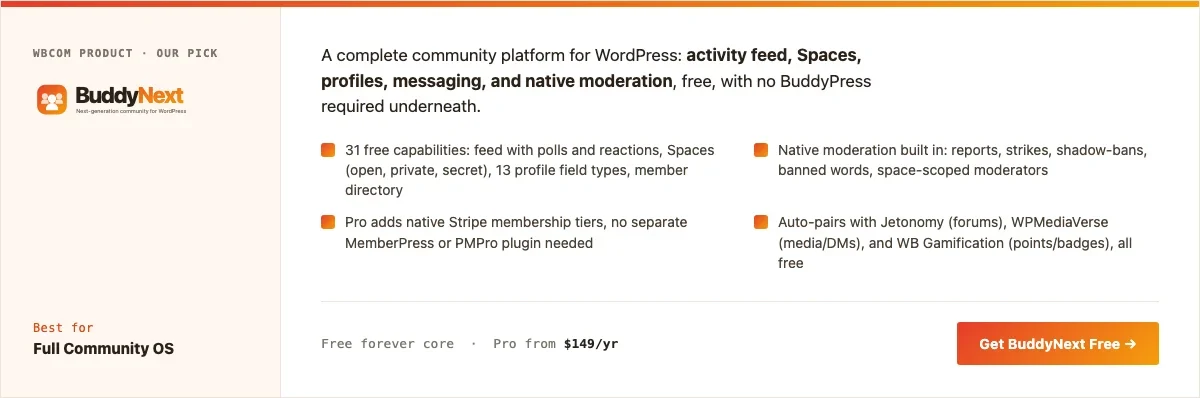
Disclosure: BuddyNext is built by Wbcom Designs, who we work with. We’re listing it here because its free tier genuinely covers a professional directory without add-ons, not because of that relationship.
BuddyNext’s free core covers what a professional network actually needs: member profiles with custom fields (job title, company, industry, skills), a searchable directory, Spaces that map cleanly onto industry verticals or regional chapters, and native moderation, with no companion plugin required. Member types let an organization distinguish verified members, board members, and sponsors without a paid upgrade.
Here’s a real BuddyNext Spaces directory from a live install, the same mechanism an organization would use for industry or chapter sub-groups:
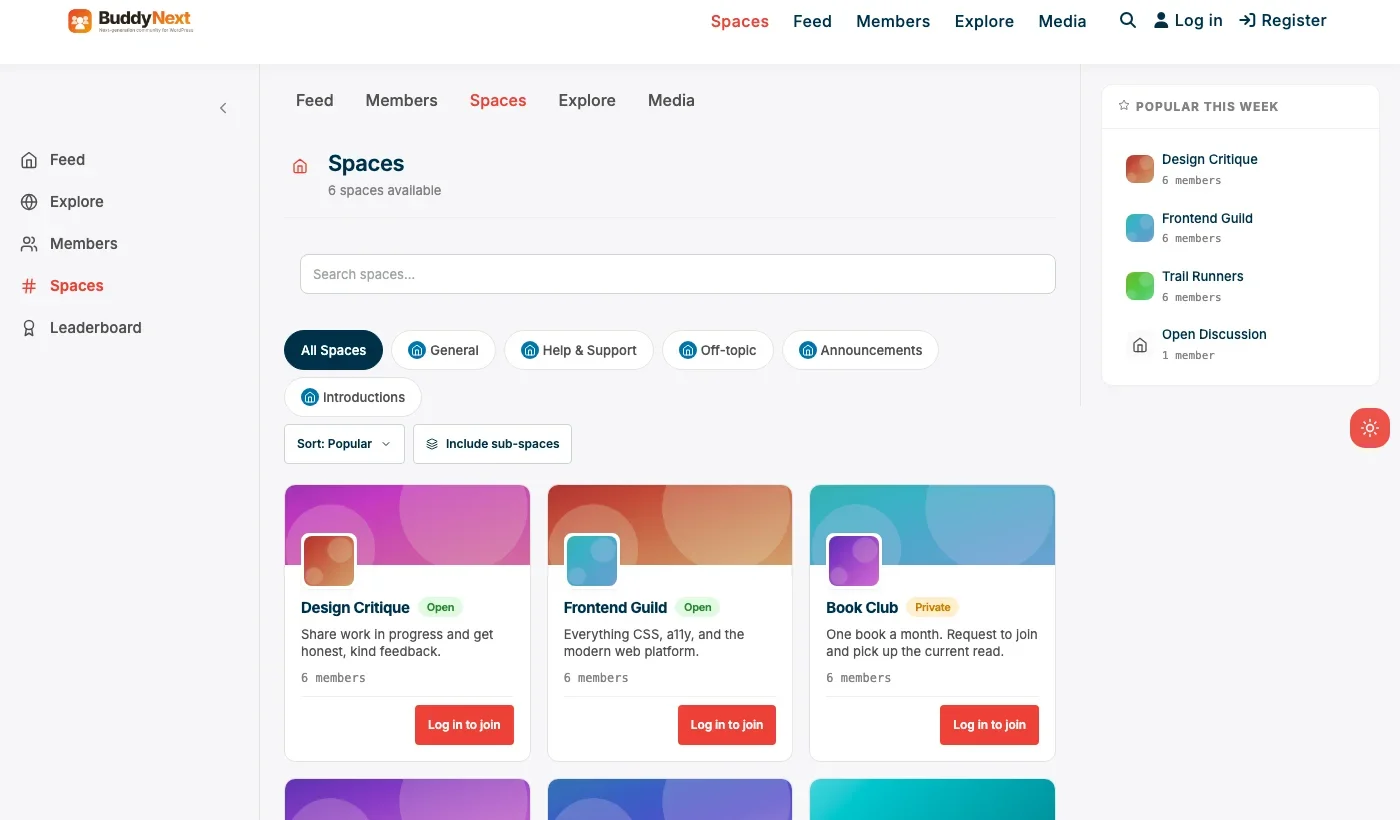
Swap the specific Space names for industry verticals, regional chapters, or committees and the underlying mechanism, a real Space with its own membership and discussion, is exactly what a professional network needs to organize itself around more than one grouping at once.
Architecture note: we covered BuddyNext’s general positioning in our WordPress community plugin roundup and its alumni-specific angle in our alumni network plugin roundup. What matters specifically for professional networking is that custom profile fields are native, not an add-on: job title, company, and industry are first-class searchable fields in the member directory, not free-text bio content that can’t be filtered.
What we like: free core is complete enough to launch a real professional directory without paying anything. Native moderation keeps a professional-grade space genuinely professional. Spaces model fits multi-chapter or multi-industry organizations cleanly.
Could be improved: smaller theme and third-party plugin ecosystem than BuddyPress, since it’s a newer platform. Advanced directory filtering beyond the built-in fields may need developer time for highly specific taxonomy needs.
Pricing: free core forever. Pro starts at $149/yr if you want native Stripe membership tiers for paid association dues.
2. BuddyPress
BuddyPress remains a legitimate choice for a professional network specifically because of its ecosystem: more themes and directory add-ons have been built for BuddyPress than any other WordPress community plugin, which matters if a highly specific directory layout is the top priority and a developer is available to build it. It’s completely free and backed by over a decade of documented patterns for member directories specifically.
The trade-off is that BuddyPress alone doesn’t include native moderation or a monetization path for association dues, both of which a growing professional network tends to need. Expect to add a membership plugin as the network matures past a small, informal group.
What we like: zero cost forever. Largest available ecosystem of directory-focused WordPress themes and add-ons. Mature, well-documented architecture.
Could be improved: no native moderation suite. No built-in monetization path for membership dues. Needs a compatible directory theme to look current out of the box.
Pricing: free, always.
3. BuddyBoss Platform
BuddyBoss Platform earns its spot on a professional-networking list specifically because of its mobile app story. A professional association or alumni network with members who’d rather check the directory from their phone during a conference or event genuinely benefits from a native app in the App Store and Play Store, not just a mobile-responsive website.
The Platform plugin itself is free, but the app, theme, and bundle needed to actually ship a branded app experience are a paid annual package, a real cost to weigh against how often members would realistically use a dedicated app versus a bookmarked mobile site.
What we like: the strongest native mobile app path of any option on this list. Deep customization options for organizations with design resources to invest.
Could be improved: real cost is the full bundle, not just the free plugin. Overkill for a professional network that only needs a web-based directory.
Pricing: Platform plugin free, full bundle priced annually.
4. PeepSo
PeepSo is worth a look for an organization that wants a clean, modern-looking directory and feed without needing a specialized theme, and without BuddyPress’s full setup overhead. Its free core covers feed, groups, and profiles, with paid modules for specific features like richer media or gamification-style recognition for active members.
For a professional network with a clear, modest feature list, mainly a directory and light discussion, PeepSo’s lighter footprint is genuinely appealing.
What we like: modern look without a special theme requirement. Lighter weight than BuddyPress plus add-ons. Active development.
Could be improved: per-module pricing adds up if you need several. Directory filtering by professional fields is less mature than BuddyNext’s built-in approach.
Pricing: free core, individual modules priced separately.
5. Ultimate Member
For an organization that mainly wants a searchable professional directory rather than a full activity feed and groups, Ultimate Member’s registration and profile system, paired with a directory add-on, is a genuinely lighter path. It’s a strong fit for a certification body or trade association that needs a public-facing, filterable roster of members rather than an internal discussion community.
What we like: fast, light setup for a directory-first use case. Strong custom registration form builder for collecting professional fields like certification number or specialty.
Could be improved: no discussion or feed layer without adding more plugins, which starts to rebuild what BuddyNext already includes natively.
Pricing: free core, paid addon bundles for directory and social features.
Feature comparison: the top three
Feature | BuddyNext | BuddyPress | BuddyBoss Platform |
|---|---|---|---|
Native moderation | Yes, free | No | Basic, deeper tools paid |
Custom professional fields | Yes, native | Via xProfile, manual setup | Yes, native |
Industry/chapter sub-groups | Yes, Spaces | Yes, via Groups component | Yes, via Groups |
Native mobile app path | Not native | No | Yes, strong |
Free tier completeness | Full core free | Full core free, narrower scope | Plugin free, bundle paid |
Frequently asked questions
Is a WordPress professional network actually worth it compared to a LinkedIn Group?
If the organization expects the network to matter for years, and especially once membership dues or event ticketing are involved, yes. For a short-term or low-stakes group, a LinkedIn Group is a reasonable, much faster starting point.
Can members control who sees their profile details?
Yes. BuddyNext’s privacy controls let members set field-level visibility (public, members-only, or private), which matters for professionals who don’t want every detail visible to the general public or a current employer.
Do I need a developer to set up custom professional fields?
Basic custom fields, job title, company, industry, are configurable through BuddyNext’s admin screens without a developer. More complex taxonomy-based filtering (multi-select industry tags with faceted search) benefits from developer time, as it would with any of the plugins on this list.
What’s the fastest way to launch a basic professional directory this month?
BuddyNext’s free core: install, configure the professional profile fields, create a Space or two for chapters or industries, and invite existing members. No other plugin is required to have something real to show on day one.
Should a professional network be public and indexable by Google, or private?
It depends on the goal. A trade association wanting public visibility as a trust signal (verified members) benefits from a public, indexable directory. A more exclusive or competitive-sensitive network usually works better as members-only.
How is this different from a general community plugin roundup?
The mechanics overlap heavily, since BuddyNext and BuddyPress serve both use cases. What’s different is the emphasis: a professional network lives or dies on directory quality and custom fields, while a general community leans more on feed and discussion. We cover the general case in our community plugin roundup.
Can a professional network charge membership dues through the same plugin?
Yes, with BuddyNext Pro’s native Stripe tiers, an organization can gate full directory access or premium features behind a paid membership tier, without needing a separate membership plugin to keep in sync with who’s currently a dues-paying member.
How big does a professional network need to be before this makes sense?
There’s no hard minimum, but a few hundred genuinely active members is a reasonable floor for a directory to feel useful rather than sparse. A tightly focused niche (a specific certification, a specific regional industry group) can work at smaller numbers than a broad, generic professional category.
Which one should you actually pick
If you’re launching a professional network today and want a real directory with custom fields, industry or chapter sub-groups, and native moderation without assembling several plugins, start with BuddyNext. Its free core is complete enough to launch on, and the path to paid membership dues is a plugin update away rather than a second plugin. Choose BuddyBoss Platform specifically when a branded native mobile app is a real requirement for how members will use the directory day to day. BuddyPress remains the right call if a highly specific directory layout backed by the largest available theme ecosystem matters more than native moderation out of the box. PeepSo fits an organization that wants a modern look with a lighter footprint, and Ultimate Member fits an organization that only needs a filterable member roster rather than a full networking experience.
Whatever you choose, the decision that matters most in year two isn’t the plugin, it’s whether the directory data stays current. A professional network with outdated job titles and defunct companies listed loses credibility fast. Build a lightweight annual reminder into the organization’s calendar (an email prompting members to update their profile) rather than assuming members will do it unprompted, since most won’t until asked directly.
A realistic launch checklist
Most organizations underestimate how much of the work is people and process rather than plugin configuration. Before inviting the full membership list, it’s worth having a genuine answer to a handful of practical questions rather than assuming the technology alone will make the network useful.
- Who seeds the directory first? A professional network launched with zero populated profiles feels empty and untrustworthy on day one. Recruiting a founding group, board members, active volunteers, well-known figures in the industry, to complete real profiles before the public launch gives new members something worth browsing immediately.
- Who moderates, and what’s the actual policy? A professional-grade space needs a real point of contact for reports and a written policy on what’s acceptable, decided before the first difficult situation rather than improvised during one.
- How does a member actually get verified? If verified-member status matters to the organization’s credibility, deciding what verification actually means (dues paid, credential confirmed, employer confirmed) up front avoids an awkward retrofit later.
- What happens to inactive or lapsed members? A directory that never removes lapsed members eventually fills with dead listings. Deciding on a review cadence, even an informal annual one, keeps the directory trustworthy over time.
None of this is complicated, but it’s the part that actually determines whether members find the directory useful six months after launch, not the plugin choice itself. The plugin makes a good directory possible; the organization’s own follow-through is what makes it good in practice.
Migrating from a spreadsheet or old directory plugin
Most organizations building their first real professional networking site aren’t starting from nothing, they’re migrating from a static spreadsheet, a PDF member list, or an aging directory plugin that never got real adoption. This migration is worth planning deliberately rather than treating as a simple data dump, since the quality of the initial import strongly shapes whether members trust the new directory enough to keep their own profile updated.
A CSV export mapped to BuddyNext’s custom fields (name, email, job title, company, industry) handles the bulk import cleanly for most organizations. What’s easy to underestimate is the cleanup work: inconsistent industry labels (“Tech” versus “Technology” versus “IT”), outdated job titles, and duplicate entries from years of manual spreadsheet updates all need a pass before import, since a directory that inherits years of data debt from the old system starts with the same credibility problem the old system had.
A practical middle path many organizations use: import the bulk data as-is to get the directory populated on day one, then run a time-boxed “verify your profile” campaign in the first month, asking every member to log in once and confirm or correct their own details. This distributes the cleanup work across the membership instead of putting it entirely on one staff member, and it has the side benefit of getting members to actually visit and interact with the new platform during the critical early weeks when engagement habits are still forming.
Related WordPress plugin guides
- Best WordPress Membership Plugins, for adding paid association dues once the free directory is running.
- Best WordPress Nonprofit Community Plugins, a similar directory-and-Spaces model applied to volunteer coordination instead of career networking.
- Best WordPress Brand Community Plugins, covers member-type segmentation for a customer-facing rather than career-facing directory.
- Best Free WordPress Community Plugins, the wider roundup of what’s genuinely free before an association pays for Pro.
Last reviewed: September 2026.




No comments yet