Short answer: for a nonprofit, BuddyNext is the strongest starting point for the community side (volunteers, chapters, member directory) because the free core is genuinely complete on a budget that usually can’t stretch to per-seat SaaS pricing, and it pairs naturally with GiveWP for the donation side rather than needing a single tool to do both jobs badly. Donorbox remains the fastest way to just start accepting donations with no community layer at all. Everything else here fits a specific chapter structure or budget.
A nonprofit community usually has to serve three different groups at once: donors who want to see impact, volunteers who need coordination and recognition, and staff who need all of it to run without a full-time community manager. Budget constraints that a for-profit brand community rarely faces make the free-tier completeness of a plugin matter more here than almost anywhere else on this site. This roundup covers the stack that handles all three groups without asking a cash-strapped organization to pay for the basics.
On this page
- Quick comparison
- What a nonprofit community actually needs
- The budget reality nonprofits actually face
- Why not just use Donorbox or a Facebook Group
- Why volunteer coordination is the real differentiator
- 1. BuddyNext
- 2. GiveWP
- 3. WB Gamification
- 4. BuddyPress + GiveWP
- 5. Ultimate Member
- Feature comparison: community plus donations
- Frequently asked questions
- Which one should you actually pick
- Handling multi-chapter or multi-branch organizations
Quick comparison
Plugin | Best for | Starting price | Free tier |
|---|---|---|---|
BuddyNext | Volunteer and donor community, full stack free | Free, Pro from $149/yr | Yes, full core |
GiveWP | Donation processing built for nonprofits | Free, paid add-ons | Yes |
WB Gamification | Volunteer recognition, free forever | Free, no Pro tier exists | Yes, everything |
BuddyPress + GiveWP | Free DIY combination | Free | Yes, both free |
Ultimate Member | Volunteer directory, lighter weight | Free, paid addons | Yes |
What a nonprofit community actually needs
A nonprofit’s community needs differ from a business’s in specific, practical ways:
- Genuinely usable free tiers. A small nonprofit’s technology budget is often measured in tens of dollars a month, not hundreds. A plugin that gates moderation, search, or basic community features behind a paid tier effectively excludes smaller organizations from using it at all.
- Volunteer recognition that doesn’t require staff time to run manually. Points, badges, and leaderboards for volunteer hours or donation milestones keep people engaged without a coordinator manually thanking each person individually every week.
- A clean separation (or clean connection) between community and donations. Donors and volunteers overlap but aren’t identical groups. The plugin stack needs to either connect these cleanly or avoid conflating them into one confusing signup flow.
- Low ongoing maintenance burden. Nonprofit technology is frequently run by a single staff member or volunteer with limited technical time. A stack that mostly runs itself after initial setup is worth more here than one with a deeper feature list that needs regular hands-on management.
The budget reality nonprofits actually face
It’s worth naming this directly rather than assuming it away: most nonprofit technology decisions are made against a real, often very small, discretionary budget, frequently justified to a board that wants to see donation dollars going to the mission rather than software subscriptions. A community stack that’s genuinely free at the core, with paid upgrades reserved for growth-stage features rather than basics, matches how nonprofit budgeting actually works far better than a SaaS platform charging a flat monthly fee regardless of how small the organization is.
This is also why WB Gamification earns a specific mention on this list despite being a smaller, more focused tool than the others: it is completely free with no Pro tier at all, a genuine rarity in this space, and volunteer recognition is exactly the kind of feature nonprofits want without a recurring cost attached to it.
Grant funding and board oversight add a layer most for-profit budget decisions don’t have to navigate. Software costs sometimes need to be justified line by line against a specific grant’s allowed expenses, and a board treasurer reviewing a new recurring subscription is a real approval hurdle a for-profit marketing team rarely faces for a similar-sized purchase. A stack where the core functionality is free, and the paid upgrade is a discretionary choice made once revenue or volunteer numbers justify it, is much easier to get approved than a mandatory monthly line item from day one.
Why not just use Donorbox or a Facebook Group
Donorbox and similar hosted donation tools are a completely reasonable way to just start accepting donations, with no WordPress site required at all. For an organization that only needs a donate button on an existing website or social page, that simplicity is genuinely the right call, and this whole comparison may not apply yet.
The limitation shows up once an organization wants an actual community around its mission, volunteer coordination, chapter directories, donor recognition, discussion, that a donation button alone doesn’t provide. A Facebook Group can fill that gap short-term, with the same ownership and algorithm trade-offs discussed elsewhere on this site: the organization doesn’t own the member list, and Facebook’s feed algorithm decides who actually sees an update, not the nonprofit itself.
A WordPress-based community, paired with a dedicated donation plugin like GiveWP, keeps both the community and the donor relationship owned by the organization, exportable, and independent of any single platform’s rules or algorithm changes. For a nonprofit whose mission depends on a durable, long-term relationship with supporters, that ownership is worth the additional setup effort.
Why volunteer coordination is the real differentiator here
Most comparisons of nonprofit technology focus on the donation side, since that’s where the money changes hands and the metrics are easy to measure. Volunteer coordination gets far less attention despite being, for many organizations, the harder ongoing operational problem. A donation happens once (or on a schedule); a volunteer relationship needs scheduling, communication, recognition, and a sense of belonging sustained over months or years to actually retain people.
This is where a community plugin earns its place independent of whatever donation tool an organization uses. A Space per program area lets volunteers coordinating a food pantry see different conversations than volunteers running a tutoring program, without needing separate mailing lists or spreadsheets to track who’s in which group. A member directory with real fields (skills, availability, certifications like food-handler cards or background-check status) turns “who can help with this event” from a coordinator’s memory into a searchable, current record anyone with access can check.
The recognition piece matters more than it might seem from a feature list. Volunteer burnout and attrition are constant problems for nonprofits, and a visible, low-effort way to acknowledge hours given, a badge, a leaderboard, a simple public thank-you post, meaningfully affects whether people stick around past their first few shifts. This is exactly the gap WB Gamification fills at zero cost, which is why it earns its own entry on this list despite being a narrower tool than a full community platform.
None of this replaces genuine human appreciation from staff and fellow volunteers, and no plugin should be treated as a substitute for it. What it does is make the low-effort, easy-to-forget parts of recognition, noticing a milestone, publicly acknowledging a streak of consistent shifts, automatic rather than dependent on a coordinator remembering to do it manually on top of everything else on their plate.
1. BuddyNext
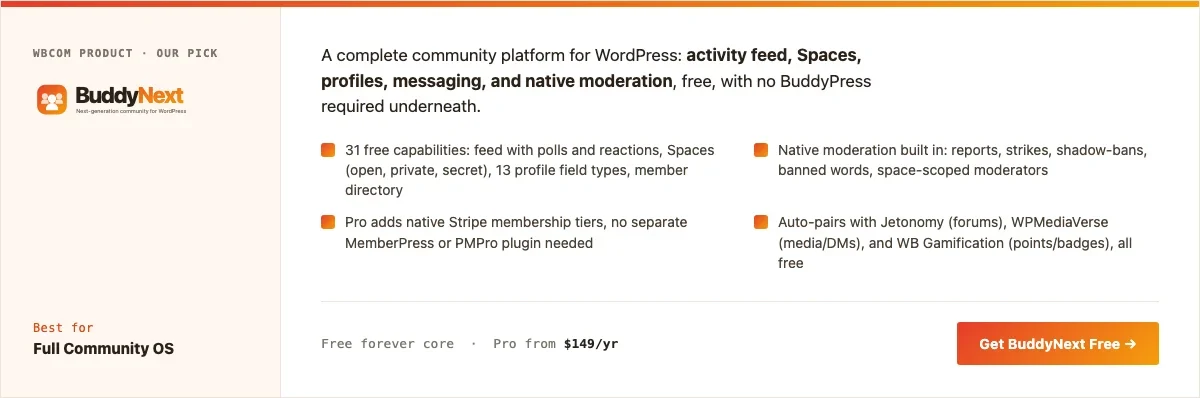
Disclosure: BuddyNext is built by Wbcom Designs, who we work with. We’re recommending it here because its free tier is genuinely complete enough for a nonprofit’s real budget constraints, not because of that relationship.
BuddyNext’s free core covers what a nonprofit community actually needs without a recurring cost: a feed for updates, Spaces that can map onto chapters or program areas, member profiles with custom fields (volunteer role, chapter, skills), and native moderation, all included.
Here’s a real BuddyNext Spaces directory from a live install, the same mechanism a nonprofit would use for chapter or program-area organization:
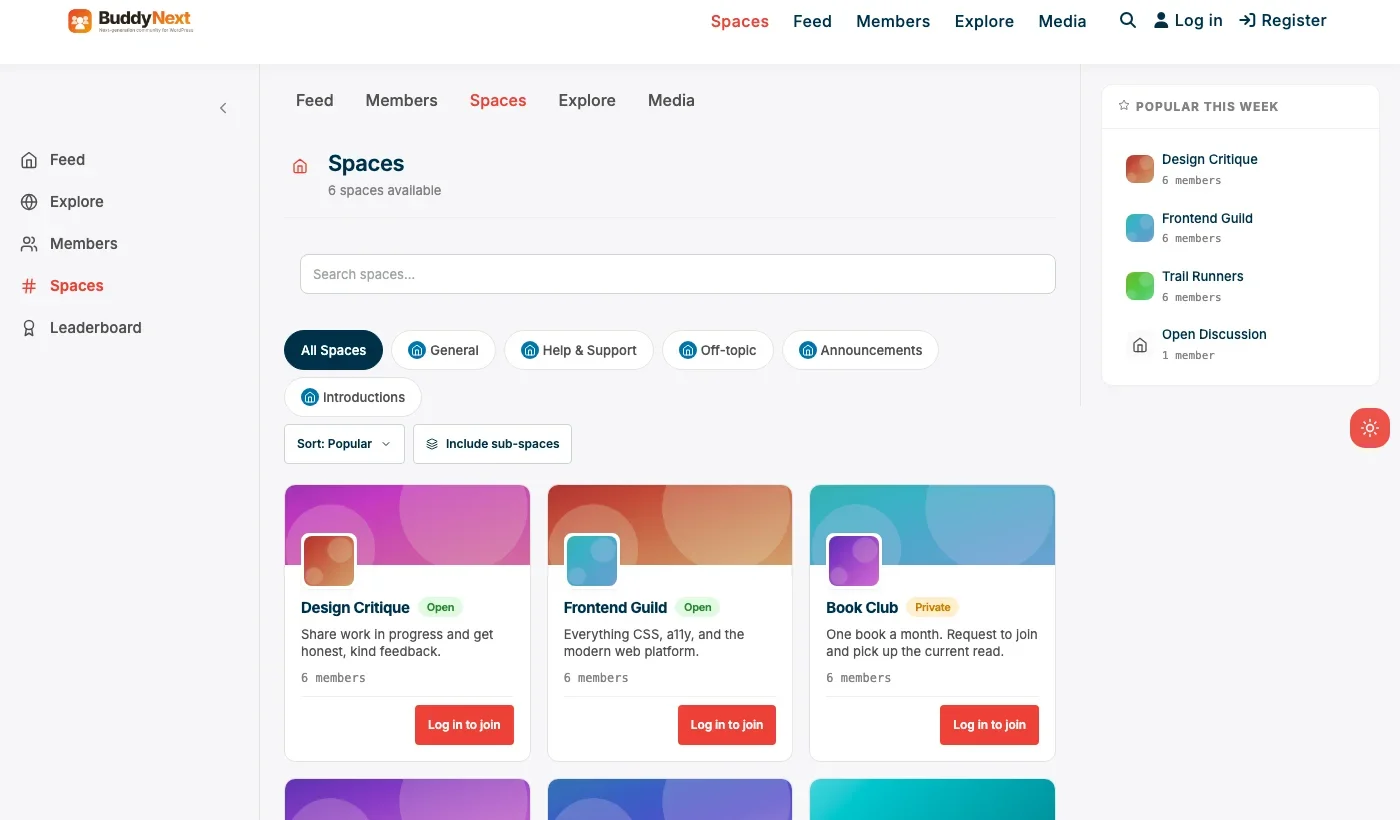
Architecture note: we covered BuddyNext’s general positioning in our WordPress community plugin roundup. What matters specifically for a nonprofit is that native moderation, member types, and Spaces are all free, meaning an organization doesn’t have to choose between having a real community and staying within a tight technology budget.
What we like: free core genuinely covers real nonprofit needs, not a crippled trial. Native moderation reduces the staff time needed to keep a volunteer community civil. Member types cleanly separate donors, volunteers, and staff without a paid upgrade.
Could be improved: no built-in donation processing; pair it with GiveWP for that half of the picture. Smaller nonprofit-specific template library than dedicated nonprofit platforms.
Pricing: free core forever. Pro starts at $149/yr if the organization eventually wants paid membership tiers.
2. GiveWP
GiveWP is a WordPress-native donation plugin built specifically for nonprofits: recurring donations, donor management, campaign pages, and receipts designed around how nonprofits actually operate rather than a generic payment form repurposed for donations. Pairing it with BuddyNext gives an organization a real community and real donation processing without either tool trying to do the other’s job badly.
Campaign-specific fundraising pages are worth calling out specifically, since they’re a common nonprofit need that a generic membership or e-commerce checkout doesn’t model well. A time-boxed campaign with its own goal, progress bar, and dedicated page is a different product than a general “donate” button, and it’s the kind of feature a nonprofit-specific tool gets right by default rather than as an afterthought.
What we like: purpose-built for nonprofit donation flows, not a generic checkout form. Free core handles one-time and recurring donations. Large add-on ecosystem for specific fundraising needs.
Could be improved: no community or volunteer-coordination features; it’s a donation tool specifically, not a full nonprofit platform on its own.
Pricing: free core, paid add-ons for advanced fundraising features.
3. WB Gamification
WB Gamification adds points, badges, streaks, and leaderboards to any WordPress site, completely free, with no Pro tier at all. For a nonprofit, this is the volunteer-recognition layer: tracking volunteer hours or donation milestones with visible badges rather than manual thank-you emails, at zero ongoing cost.
What we like: genuinely free forever, unlike GamiPress or myCred which charge per integration. Works on top of BuddyNext or standalone WordPress. Recognition automation reduces staff workload around volunteer appreciation.
Could be improved: it’s a recognition layer, not a community or donation platform by itself; it’s additive to BuddyNext and GiveWP, not a replacement for either.
Pricing: completely free, forever, every feature included.
4. BuddyPress + GiveWP
The same combination built on the older, larger-ecosystem BuddyPress instead of BuddyNext. Both plugins are free, and BuddyPress’s decade of nonprofit-adjacent themes and documentation is a genuine asset for an organization with volunteer developer help available. Nothing auto-integrates between the two, so expect manual setup connecting donor recognition to community profiles if that’s a goal.
What we like: completely free stack, largest available theme ecosystem for a BuddyPress-based nonprofit site.
Could be improved: no native moderation suite in BuddyPress itself; more setup work than the BuddyNext-based pairing.
Pricing: free, both plugins.
5. Ultimate Member
For a nonprofit that mainly needs a volunteer directory, searchable by skill, location, or availability, rather than a full activity feed, Ultimate Member’s registration and profile system is a lighter starting point. It’s a good fit for an organization coordinating volunteers for specific events rather than running an ongoing discussion community.
What we like: fast, light setup for pure directory needs. Strong custom registration forms for volunteer skills and availability.
Could be improved: no feed, discussion, or donation features without add-ons or pairing with other plugins.
Pricing: free core, paid addon bundles for extended functionality.
Feature comparison: community plus donations
Need | Best tool | Cost |
|---|---|---|
Volunteer and chapter community | BuddyNext | Free |
Donation processing | GiveWP | Free core |
Volunteer recognition | WB Gamification | Free forever |
Native moderation | BuddyNext | Free |
Paid membership tier (if needed) | BuddyNext Pro | $149/yr |
Frequently asked questions
Can BuddyNext and GiveWP share member data?
They don’t have a documented native integration today, so plan on them operating as two systems: BuddyNext for community and profiles, GiveWP for donation records. For an organization needing tighter integration (a donor’s giving history shown on their community profile), that’s custom development work rather than an out-of-the-box feature. Many nonprofits find that acceptable, since donor privacy considerations often argue against surfacing giving history publicly on a profile anyway.
Is BuddyNext actually free, or does moderation require Pro?
Native moderation, reports, strikes, banned words, is part of BuddyNext’s free core, not gated behind Pro. Pro adds monetization and growth features on top, not basic safety tooling.
What’s the fastest way to launch a basic nonprofit community this month?
BuddyNext’s free core alone: a feed, a few Spaces for programs or chapters, and profiles for volunteers. Add GiveWP separately whenever donation processing becomes a priority; the two don’t need to launch simultaneously.
Do volunteers need to create yet another account and password?
BuddyNext supports social login (Google, Facebook, GitHub, Discord), which reduces signup friction for volunteers who don’t want another password to manage on top of everything else in their lives.
Should a small nonprofit with one staff member even attempt a full community platform?
If volunteer coordination and donor engagement genuinely matter to the mission, yes, but start small: one or two Spaces, not a dozen. A free core plugin with a narrow initial scope is manageable for a single staff member in a way a large, ambitious launch across many features usually isn’t. Expanding scope later, once the first Space or two is genuinely running itself, is far easier than walking back an overambitious launch that overwhelmed the one person maintaining it.
Can a small nonprofit realistically run this stack without a developer?
Yes, for the core setup. Installing BuddyNext and GiveWP, configuring basic branding, creating a few Spaces, and setting up a donation form are all doable through each plugin’s own admin screens without custom code. Deeper customization, connecting the two systems more tightly, custom fields beyond what’s built in, benefits from developer time the same way it would on any platform.
How should a nonprofit handle recurring donor recognition without it feeling transactional?
Public, specific recognition (a named thank-you tied to what the gift actually funded) tends to land better than a generic badge alone. WB Gamification’s badge system can be a layer on top of that, not a replacement for a genuine, specific thank-you from real staff or volunteers.
What’s the realistic timeline to get a basic nonprofit community live?
With BuddyNext’s free core and no custom development, a basic version, branding, a handful of Spaces, member types for volunteers and donors, is realistically a few days of focused setup work for someone reasonably comfortable with WordPress. Adding GiveWP and connecting a payment processor adds a similar amount of time on top. Budget extra time on top of that for board or leadership review before a public launch, since that approval step often takes longer than the technical setup itself.
Which one should you actually pick
Start with BuddyNext for the community and volunteer side, since the free core genuinely matches nonprofit budget realities rather than gating basics behind a paid tier. Add GiveWP separately for donation processing, since a dedicated nonprofit donation tool outperforms a generic checkout bolted onto a community plugin. Layer in WB Gamification for volunteer recognition at zero ongoing cost. Reach for the BuddyPress-plus-GiveWP combination if a volunteer developer is available and BuddyPress’s larger ecosystem outweighs the extra setup work, and Ultimate Member if a searchable volunteer directory is genuinely the entire scope of what’s needed.
Handling multi-chapter or multi-branch organizations
A national or regional nonprofit with local chapters has a structural question this stack handles well but worth spelling out explicitly: should each chapter be its own Space inside one shared BuddyNext install, or does the organization need fully separate sites per chapter. For most multi-chapter nonprofits, one shared install with a Space per chapter is the better default, since it keeps a single member directory, a single donation record system, and a single place for national staff to see activity across every chapter at once, rather than fragmenting data across separate installs that don’t talk to each other.
The exception is a chapter structure with genuinely independent finances, boards, and legal status per chapter, closer to a franchise than a branch office. In that case, separate sites per chapter, each running the same stack independently, better matches the actual organizational and financial separation, even though it means the national organization loses the single unified view that a shared install provides.
A middle path some multi-chapter organizations land on: one shared BuddyNext install for the community and volunteer side, where a single unified view genuinely helps national staff, paired with separate GiveWP installs (or separate campaigns within one GiveWP install) per chapter for donation processing, since donor funds and financial reporting often do need to stay cleanly separated by chapter even when the community itself benefits from being shared. There’s no single right answer here independent of the organization’s actual legal and financial structure, and it’s worth involving whoever manages chapter finances in this specific decision before building the technical setup around an assumption that turns out to be wrong.
Whatever structure a nonprofit lands on, it’s worth revisiting the decision once a year rather than treating it as permanent. A young organization with two chapters and no real independent finances yet may genuinely need separate legal structures within a few years of growth, and a stack designed around today’s reality should be easy enough to reorganize later without a full rebuild. Choosing tools that don’t lock the organization into one structural assumption, BuddyNext’s Spaces model and GiveWP’s per-campaign donation tracking both flex either way, keeps that door open.
Related WordPress plugin guides
- Best WordPress Brand Community Plugins, the same BuddyNext Spaces model applied to a business budget instead of a nonprofit one.
- Best WordPress Professional Networking Plugins, a closer look at custom-field directories for volunteer or member skill tracking.
- Best WordPress Membership Plugins, for the day a nonprofit adds a paid membership tier on top of the free community.
- Best Free WordPress Community Plugins, a wider comparison of what’s genuinely free versus free-core across this whole category.
Last reviewed: September 2026.




No comments yet