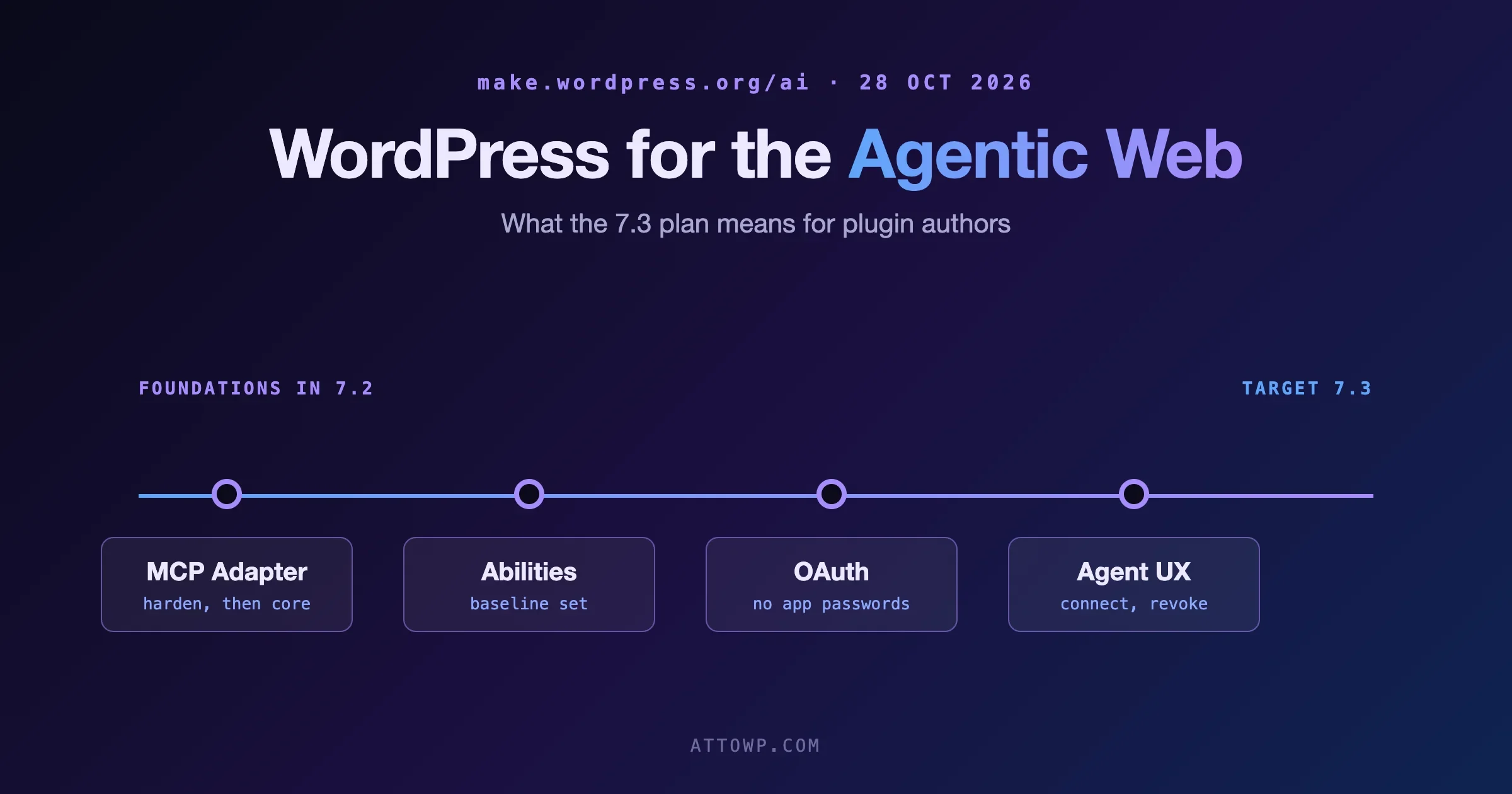
The WordPress AI team’s plan for the agentic web is a proposal, not a promise: four coordinated workstreams aimed at WordPress 7.3, with the 7.2 cycle used to lay foundations. The four are the MCP Adapter, a baseline of Abilities, OAuth authorisation, and one end-to-end user experience that ties them together. For plugin authors the practical answer is short. Register your plugin’s useful actions as Abilities with tight permission callbacks, stop treating Application Passwords as the way an agent logs in, and do not bundle your own copy of the MCP Adapter. Everything below explains why, and what each of those looks like in code.
The plan was published on make.wordpress.org/ai on 28 October 2026 by Jason Adams under the title “WordPress for the Agentic Web”. We read the post, the 7 October MCP Adapter announcement and the 21 October contributor meeting summary on the same site, and this article sticks to what those three say. Where something is not in them, we say so near the end.
What does the 7.3 plan for MCP, Abilities and OAuth actually say?
The post starts from a simple scene. A user opens their own agent and says “I want you to help me with my example.com site”. The agent recognises WordPress, hands back a link to authorise access, the user signs in, and the agent says it is in. The post says making that possible for every WordPress user needs native capabilities that are easy to discover, connect to and use.
It then names the problem with today’s setup. The MCP Adapter plugin is a good foundation, but users still have to install and configure it, make sure useful Abilities exist (perhaps via the AI plugin), and manage authentication by hand with Application Passwords. The post adds, in a half-joke, “hopefully not pasting them in plaintext to their agent”. It calls that approach not scalable for the broad WordPress user base.
The proposal has four areas of work, “targeting WordPress 7.3 while using the 7.2 release cycle to establish the necessary foundations”.
Workstream | During the 7.2 cycle | Goal for 7.3 |
|---|---|---|
MCP Adapter | Iterate on the plugin quickly: reliability, security, usability | Propose bringing MCP into core, by direct merge or a bundled approach that lets the adapter evolve on its own |
Abilities | Identify a baseline of Abilities for common site-management jobs; see whether a few foundational ones can land in 7.2 before the end of beta | A useful set of native Abilities in core |
OAuth | Map the flows, architecture and security considerations | Implementation in core, so users authorise agents without making and sharing Application Passwords |
End-to-end experience | Build and test prototypes to find friction | One cohesive path: agent finds the site, asks for access, works, and the owner can manage or revoke permissions |
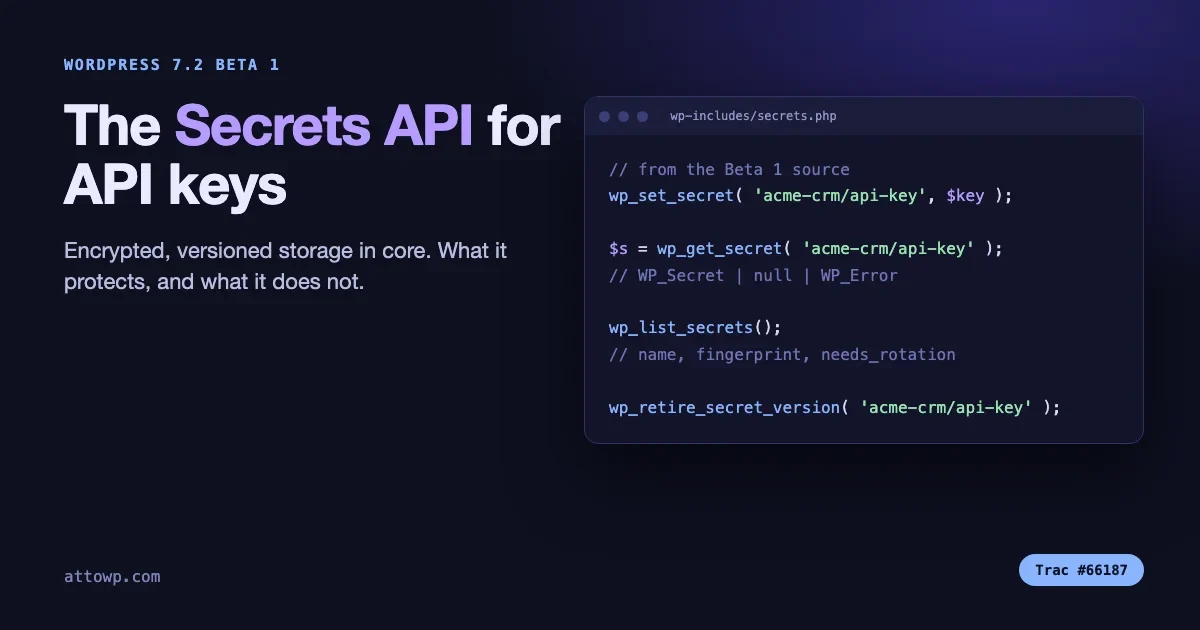
Two details are easy to miss. First, OAuth is described as useful beyond MCP, for example for the REST API, and “should be developed in coordination with the broader Core team”. Second, the post links the upcoming Secrets API in WordPress 7.2 to this work, as a way to support secure token handling. We covered that API when Beta 1 landed, in WordPress 7.2 Secrets API: A Standard Place for API Keys and Tokens.
What the post does not promise
The wording matters here, and it is more careful than most summaries of it. The post says “inclusion in core will depend on technical readiness, security, and the normal core review processes”. It calls the goals ambitious. It asks for a dedicated focus lead for each of the four areas, paired with interested Core Committers so that architecture, compatibility and security questions come up early instead of at merge time. It also says appropriate review and audits, “including specialized security-focused AI models”, will be needed because external agents will be given new ways to interact with WordPress.
So treat 7.3 as a target. The post does not give a release date for 7.3. The only date we could confirm is for the release before it: the WordPress.org 7.1.4 announcement says WordPress 7.2 is currently planned for 8 December.
Why is this different from what the team said three weeks ago?
On 7 October the AI team announced that the MCP Adapter was available on WordPress.org as a canonical plugin. That post made a pointed argument for keeping it out of core. The MCP specification was still in flux, with a major breaking update shipped less than three months earlier. That volatility, it said, made MCP a poor fit for a core package with massive and often automated distribution, its own release cadence and a strong backwards-compatibility promise. Keeping the adapter outside core would let it move at the speed of the protocol.
By 21 October the weekly meeting summary records a shift in direction. Jason Adams reported approval to move forward with making MCP “a de facto part of the WordPress experience”. The summary is careful to add that this does not necessarily mean moving the whole adapter into core. The options discussed were bundling the plugin with WordPress, enabling it through existing core interfaces, or putting specific capabilities straight into core. Contributors found common ground on making MCP part of the default experience while leaving the technical route open.
The 28 October post is that open question written down as a plan: “a direct merge or a bundled approach”. The 7 October worry about a moving protocol has not gone away. It is the likely reason the bundled option is on the table at all, since a bundled plugin could update on its own schedule.
The benchmark that pushed it
One line in the 21 October summary explains the urgency. Early results from the WordPress agent benchmarks found that agents completed 0% of the benchmarked tasks using the MCP Adapter alone. The reason given: the adapter does not bundle the Abilities needed for common WordPress operations. Agents using other routes, including REST API access, scored higher, although some of those approaches raised security concerns.
The contributors drew two lessons. Capability, whether an agent can finish a job with WordPress tools, improves when standard core Abilities are part of the MCP experience. Selection, whether an agent picks WordPress in the first place, is a longer-term problem tied to discoverability and positioning. The summary says the benchmarks show the need for a complete MCP experience and not just a connection mechanism. That is where the Abilities workstream comes from.
What the authentication debate looks like
The same meeting argued about OAuth. One contributor suggested it belongs in the default MCP experience and would reduce reliance on Application Passwords. Another raised concern about adding security-sensitive functionality to WordPress sites without enough review and auditing. A third pointed out that authentication is a broader architecture question, not an MCP-only one, and that OAuth might be implemented centrally in core, possibly using the Secrets API to protect tokens. The summary also records the point that each client or integration should have its own credentials, so a compromised one does limited damage. No final decision was reached.
If you write plugins, that last point is the one to remember. The direction is separate credentials per client, authorised by the site owner, revocable, with tokens held through a core API. It is the opposite of one shared password pasted into a chat window.
What should plugin authors do during the 7.2 cycle?
The honest reading is that you cannot build against OAuth or a bundled MCP server today, because neither exists yet. You can get ready on the parts that do exist. The Abilities API has been in core since 6.9. The MCP Adapter is on WordPress.org. Everything on this list works now and still makes sense whichever way the 7.3 decisions fall.
1. Register your read actions as Abilities first
An Ability is a named, self-describing action with an input schema, an output schema, a permission callback and an execute callback. Register one and the same action becomes reachable from PHP, from REST if you opt in, and from an agent through the MCP Adapter. Start with read-only actions such as “get an order summary” or “list this member’s courses”. They are the safest to expose and the most useful to an agent, and the benchmark result above suggests that having them available is half the battle.
<?php
add_action( 'wp_abilities_api_categories_init', function () {
	wp_register_ability_category( 'my-plugin', array(
		'label'       => 'My Plugin',
		'description' => 'Actions provided by My Plugin.',
	) );
} );

add_action( 'wp_abilities_api_init', function () {
	wp_register_ability( 'my-plugin/get-order-summary', array(
		'label'        => 'Get order summary',
		'description'  => 'Returns status, total and line count for one order.',
		'category'     => 'my-plugin',
		'input_schema' => array(
			'type'                 => 'object',
			'properties'           => array(
				'order_id' => array( 'type' => 'integer', 'minimum' => 1 ),
			),
			'required'             => array( 'order_id' ),
			'additionalProperties' => false,
		),
		'output_schema' => array(
			'type'       => 'object',
			'properties' => array(
				'status' => array( 'type' => 'string' ),
				'total'  => array( 'type' => 'string' ),
				'lines'  => array( 'type' => 'integer' ),
			),
		),
		'permission_callback' => function ( $input ) {
			return current_user_can( 'read_shop_order', (int) $input['order_id'] );
		},
		'execute_callback'    => 'my_plugin_get_order_summary',
		'meta'                => array(
			'annotations' => array(
				'readonly'    => true,
				'destructive' => false,
				'idempotent'  => true,
			),
		),
	) );
} );
Names follow the rule namespace/ability-name with lowercase letters, digits and hyphens, so use your plugin slug as the namespace. For a worked, tested example including the common permission mistake, see Add Abilities to Your Plugin: A Working Example.
2. Check permissions per object, not per role
This is the single most common way to make an Ability unsafe, and it gets worse when the caller is an agent acting for a user. A callback that returns current_user_can( 'edit_posts' ) says the user may edit posts in general. It does not say they may touch the post the agent named. Pass the ID through and check the capability against that object, as in the example above. Treat every input as untrusted, because an agent can be tricked by the content it reads, including content written by your other users.
3. Say what is public, and say what is destructive
WordPress 7.1 added a single public flag in an Ability’s metadata to record that the author meant it for outside use, and REST reads it. Per the dev note we summarised in Deciding Which Abilities an AI Client Can See in WP 7.1, the MCP Adapter was due to respect it from its next release. Set it deliberately, and keep the default of private for anything you have not reviewed.
'meta' => array(
	'public'      => true,
	'annotations' => array(
		'readonly'    => false,
		'destructive' => true,   // deletes or overwrites data
		'idempotent'  => false,
	),
),
The annotations are hints to the client, not enforcement. A well-behaved agent asks for confirmation before running something marked destructive. Your permission callback is still the only real gate, and the exposure filtering we described is discovery, not authorisation.
4. Return enough to be useful
The benchmark story is a warning about thin results. An agent that gets back an ID and nothing else has to make a second call to learn anything, and many will give up or guess. Return the fields a person would need to decide the next step: status, dates, names, a link. Keep the payload bounded so a large store does not hand an agent forty thousand rows. Our comparison of four ways to connect an agent to WordPress shows how the same action looks through each route.
5. Stop designing around Application Passwords
Application Passwords are what agents use today, and nothing here removes them. But the direction of travel is clear in all three source posts: authorise through a flow the owner understands, one credential per client, revocable, with tokens stored through a proper secrets API. If your plugin has any feature that asks a user to paste a long-lived secret to connect an agent or app, flag it for redesign. If your plugin stores tokens for a third-party service, move toward the Secrets API once it ships in 7.2, instead of writing them to an option in plain text.
Two rules cost nothing today. Always check capabilities against the current user and never against a hard-coded “agent user”. And never write code that assumes the caller is an administrator because the call came over MCP.
6. Do not bundle your own copy of the MCP Adapter
The 7 October post says why the canonical plugin exists. Before it, developers could download the adapter by hand or bundle it as a Composer dependency, and then “handle dependency updates and cross-plugin conflicts themselves”. With the adapter possibly shipping inside WordPress itself in 7.3, a bundled copy in your plugin is the likeliest source of version clashes later. Detect it instead:
add_action( 'plugins_loaded', function () {
	if ( ! function_exists( 'wp_register_ability' ) ) {
		return; // Abilities API not available (WordPress older than 6.9).
	}
	// Register abilities only. Do not load or ship an MCP server here.
} );
Your plugin’s job is to register Abilities. Whether an agent reaches them through the adapter on WordPress.org, a bundled adapter or a core feature is not your problem, and that is the point of the design.
7. Build a custom MCP server only when the default one is not enough
The adapter ships a default server at /wp-json/mcp/mcp-adapter-default-server with three fundamental tools, and any publicly exposed Ability is discoverable and runnable through it. Developers who need something more explicit can create their own server by hooking mcp_adapter_init. The plugin docs give guidance on when a custom server is warranted. For most plugins it is not. A custom server is more surface to maintain and secure, and it is the part most likely to be superseded by what core decides.
A 15-minute readiness check for your plugin
Run this on a development site with your plugin active. It tells you what you expose today and whether the permission callbacks hold up for a low-privilege user.
# 1. List every registered ability, with its category
wp eval 'foreach ( wp_get_abilities() as $a ) { echo $a->get_name(), "  [", $a->get_category(), "]\n"; }'

# 2. List only the ones marked public (WordPress 7.1 and later)
wp eval 'foreach ( wp_get_abilities( array( "meta" => array( "public" => true ) ) ) as $a ) { echo $a->get_name(), "\n"; }'

# 3. See what the REST API shows to a logged-out visitor
curl -s https://example.test/wp-json/wp-abilities/v1/abilities | head -c 600

# 4. Run an ability as a low-privilege user and confirm it is refused
wp eval 'wp_set_current_user( 5 ); $r = wp_get_ability( "my-plugin/get-order-summary" )->execute( array( "order_id" => 1 ) ); var_dump( is_wp_error( $r ) ? $r->get_error_code() : "ALLOWED" );'
Replace user ID 5 with a Subscriber on your test site. The fourth command should print an error code such as ability_invalid_permissions, not ALLOWED. If it prints ALLOWED for an order that belongs to someone else, you have found a bug that would have been worse with an agent in the loop.
Check | Pass looks like | If it fails |
|---|---|---|
Every public Ability has a deliberate reason | You can say why each one is exposed | Remove |
Permission callback uses the object ID | Low-role caller is refused for others’ data | Rewrite with |
Input schema is strict |
| Tighten the schema, it validates before your code runs |
Output is bounded | Pagination or a hard cap on rows | Add a limit and a cursor |
Destructive actions are labelled | Annotations match behaviour | Fix annotations and add a confirmation step |
No long-lived secret in the connect flow | Nothing for a user to paste into a chat | Plan an OAuth-ready flow, use Secrets API when available |
Your command line is also where an agent will often start. Our guide to WP-CLI commands worth knowing, and how AI agents use them covers the allow-list wrapper that keeps an agent read-only, which is a sensible stopgap while the native connection route is built.
What this means if you run a site or an agency
You do not need to do anything for 7.3 yet. Two small habits help. Keep an inventory of which plugins register Abilities and which of those are public, because the answer will matter once agents can find your site on their own. And keep the scoping rule from Give AI a Job, Not the Keys: one written job, a limited user, staging first, an undo. The plan describes a smoother connection, not a safer one by itself. Safety still depends on what each Ability allows.
If you are weighing page-builder agents, Elementor MCP and the Divi AI Agent are the vendor-specific versions of the same idea, and they will sit beside whatever core ships.
What we could not confirm
- The 7.3 date. The post targets 7.3 and gives no release date. The 21 October summary says 7.3 was discussed as a possible target for deeper integration, “though no release commitment was made”.
- Merge or bundle. The post says “a direct merge or a bundled approach”. No decision is recorded.
- Which Abilities will be in the baseline. The post says a baseline will be identified, and does not list them.
- OAuth design. The post says the flows and architecture will be mapped during 7.2. The 21 October summary records no final decision.
- Traffic statistics. The post cites figures on AI adoption and on how AI-referred traffic converts, attributed to named companies. We did not verify those independently and do not rely on them.
- Whether a focus lead exists yet. The post is a call for leads and contributors. We have not seen who took them on.
Common questions
Is the MCP Adapter going into WordPress core?
That is the proposal for 7.3, either as a direct merge or a bundled plugin that can update separately. It is not decided, and the post says inclusion depends on technical readiness, security and normal core review.
Will OAuth replace Application Passwords?
The goal is that users can authorise agents without making and sharing Application Passwords, with OAuth implemented in core for 7.3. The post does not say Application Passwords will be removed.
Do I need to write an MCP server for my plugin?
Almost certainly not. Register Abilities and let the adapter expose them. A custom server through mcp_adapter_init is for cases where the default server cannot express what you need.
What is the difference between an Ability and a REST route?
A REST route is an HTTP endpoint you design and secure yourself. An Ability is a registered action with a schema and a permission check that WordPress can expose through REST, PHP and MCP from one definition. Abilities are what the AI team is standardising on for agents.
Which WordPress version do Abilities need?
The Abilities API has been in core since 6.9. The public metadata flag and the filtering arguments for wp_get_abilities() arrived in 7.1, as covered in our earlier posts.
What should I test in the 7.2 betas?
Register your Abilities, call them as low-privilege users, check the REST listing for what a logged-out visitor sees, and watch the AI team’s weekly summaries for any foundational Abilities that land before the end of beta. The post says the team will look at that.

No comments yet