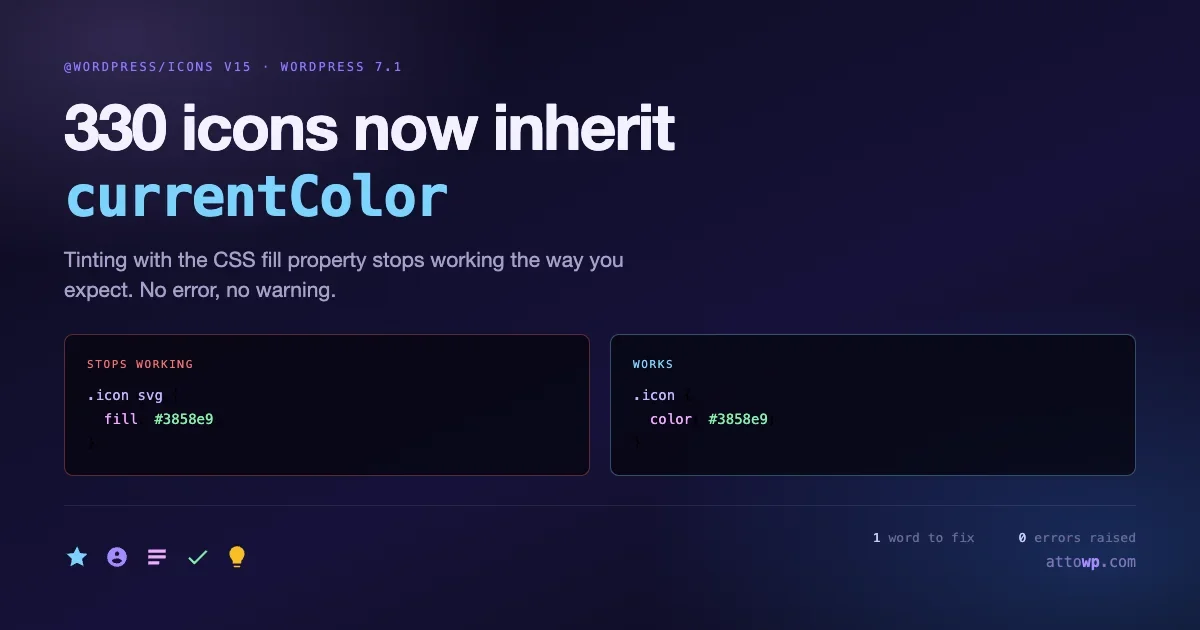
There is a category of bug that produces no error, no warning, and no failing test. The interface just looks wrong, usually to a customer rather than to you. WordPress 7.1 ships one of those, and it affects every plugin that tints an icon.
All 330 icons in @wordpress/icons version 15 now declare fill="currentColor". If you were colouring icons by setting the CSS fill property, that stops working the way you expect. The fix is a one word change in your stylesheet, but only if you know to look.
At the same time, WordPress is building out a proper Icons API: a wp/v2/icon-collections REST endpoint, label based search in WP_Icons_Registry, and register_icon() and unregister_icon() functions planned for 7.1. Those two things are related, and understanding why explains what the icon system is becoming.
The change in one paragraph
Previously, an icon in the package shipped as an SVG whose paths either carried no fill attribute or carried a hard coded one. Colouring it meant reaching into the SVG from CSS and setting fill on the element or its paths.
Now every icon declares fill="currentColor" at the SVG level. currentColor is a CSS keyword that resolves to the computed value of the element’s color property. The icon inherits its colour from text colour, the same way a text glyph does.
/* Before: reach in and paint the shape */
.my-plugin__icon svg {
    fill: #3858e9;
}

/* After: set the colour the icon inherits */
.my-plugin__icon {
    color: #3858e9;
}
That is the entire migration for most codebases. The reason it deserves attention is not difficulty, it is detectability.
Why this fails quietly
Work through what happens to your old CSS after the change.
Your rule sets fill: #3858e9 on the SVG. The SVG has its own fill="currentColor" presentation attribute. CSS beats presentation attributes in the cascade, so in the simple case your rule still wins and the icon still renders blue.
That is why this does not show up immediately in testing, and it is also why it is dangerous. It works until it does not.
The cases where it breaks:
- You style the wrapper, not the SVG. A rule like
.my-icon { fill: red; }on a containing element relies onfillbeing inherited down to the SVG. It is an inherited property, so that worked before. Now the SVG’s ownfill="currentColor"attribute applies directly to the element and the inherited value never reaches it. The icon renders in whatevercolorresolves to, which is usually your body text colour. - You rely on specificity you no longer have. Any place where your
fillrule was already weak enough to lose a cascade fight now loses to a default that is present on every icon rather than only some. - Multi-path icons with mixed fills. Icons that previously had per-path fills now uniformly inherit, so a two tone icon flattens to one colour.
- Hover and focus states. If your base state sets
filland your hover state setscolor, or the reverse, the two no longer talk to each other and the state change stops applying.
None of those throw. They render.
Finding it in your code
Grep for fill in your stylesheets and look at each hit in context:
grep -rn "fill:" src/ assets/ --include="*.css" --include="*.scss"
grep -rn "fill=" src/ --include="*.js" --include="*.jsx" --include="*.tsx"
Not every result is a problem. A hit is worth fixing when it is styling an icon that comes from @wordpress/icons. A hit on an SVG you author and control yourself is fine to leave alone, though switching it to currentColor is usually an improvement anyway.
Find where you import package icons so you know which components to review:
grep -rn "@wordpress/icons" src/ | sort | uniq -c | sort -rnThen check what version you are developing against:
npm ls @wordpress/iconsRemember that the version in your lockfile is not the version your users run. WordPress packages are externals in a @wordpress/scripts build, resolved at runtime from core. Your package.json controls what you type-check against, not what executes on a customer’s site.
Rewriting the CSS properly
The naive fix is to swap fill for color everywhere and move on. That works. There is a better version that costs the same effort.
Because currentColor resolves through inheritance, you can now colour an icon and its adjacent label with a single declaration:
/* One rule colours the icon and the text together */
.my-plugin__button {
    color: var(--wp--preset--color--contrast, #1e1e1e);
    display: inline-flex;
    align-items: center;
    gap: 8px;
}

.my-plugin__button:hover.my-plugin__button:focus-visible {
    color: var(--wp--preset--color--primary, #3858e9);
}
The icon follows the label automatically. State changes need one rule rather than two that must be kept in sync. This is the actual benefit of the change: icons behave like text, so they inherit theming, dark mode, and state handling without separate plumbing.
It also means icons pick up theme palette colours through theme.json presets without you mapping anything. If a site owner changes their contrast colour, your icons follow.
The one case worth keeping fill
If you deliberately want a two tone icon where one path differs from the rest, you still need per path styling, and fill is the way to do it:
.my-plugin__logo path:first-child {
    fill: var(--wp--preset--color--primary);
}

.my-plugin__logo path:last-child {
    fill: currentColor;
}
That is a legitimate use. Just be aware that you are now overriding a default that every icon carries, so your selector needs to be specific enough to win reliably rather than by accident.
Admin colour schemes are where this pays off
WordPress ships eight admin colour schemes, and users pick one in their profile. Most plugin authors ignore them, which is why so many plugin interfaces look correct in the default scheme and slightly wrong in Midnight or Ectoplasm.
An icon with a hard coded fill has the same problem as a hard coded text colour: it was chosen against one background and it sits on eight. A #3858e9 icon that reads well on the default light chrome disappears into the dark panel of the Midnight scheme.
Inheriting currentColor fixes this without you doing anything, provided you let text colour come from the admin scheme rather than pinning it yourself:
/* Pinned: same colour in all eight schemes, wrong in several */
.my-plugin__panel { color: #1e1e1e; }

/* Inherited: follows whatever scheme the user chose */
.my-plugin__panel { color: inherit; }
WordPress exposes scheme colours as CSS custom properties in the admin, which gives you a middle path when you need a specific role colour rather than plain text colour:
.my-plugin__icon--accent {
    color: var(--wp-admin-theme-color, #3858e9);
}

.my-plugin__icon--accent:hover {
    color: var(--wp-admin-theme-color-darker-10, #2145e6);
}
--wp-admin-theme-color resolves to the accent colour of the active scheme. Using it means your accented icons match the surrounding chrome for every user rather than only the ones who kept the default. Combined with currentColor on the icon itself, you get correct colour in all eight schemes from two declarations.
This is worth checking rather than assuming. Switch your user profile to Midnight and open your plugin’s screens. It takes a minute and it routinely surfaces two or three things that were only ever tested against the default.
Size, stroke and the 24 pixel grid
While you are in the icon code, there is a related convention worth matching, because it determines whether your icons sit correctly next to core’s.
Icons in @wordpress/icons are drawn on a 24 by 24 viewBox. Rendering happens through the Icon component, which takes a size prop:
import { Icon, cog } from '@wordpress/icons';

<Icon icon={ cog } size={ 24 } />
The number that matters is not the visual size you want, it is the relationship between the viewBox and the rendered size. An icon drawn on a 20 unit grid and rendered at 24 pixels has been scaled up by 20 percent, and every stroke in it is 20 percent heavier than the core icon sitting beside it. That is the actual cause of the common complaint that a custom icon “looks bolder” than the built in ones.
If you author icons, draw them at 24 by 24 and keep stroke weights consistent with the core set. If you are adapting icons from another library drawn at 16 or 20 units, rescale the artwork rather than letting the browser scale it.
Sizing in CSS rather than through the size prop is fine and sometimes necessary, but be explicit about both dimensions so the icon cannot be distorted by a flex context:
.my-plugin__icon svg {
    width: 24px;
    height: 24px;
    flex-shrink: 0;
}
The flex-shrink: 0 matters more than it looks. Inside a flex row with a long label, an SVG without it will be squashed horizontally when space runs short, which produces an icon that is subtly the wrong aspect ratio rather than one that is obviously broken.
The Icons API, and where this is heading
The currentColor change makes more sense once you look at what is being built around it.
WordPress is assembling a registry for icons rather than treating them as a bag of React components. The pieces landing include a wp/v2/icon-collections REST endpoint, label based search inside WP_Icons_Registry, and register_icon() and unregister_icon() functions planned for 7.1.
Read that as a system where icons are discoverable data rather than imports. A registry means the editor can present an icon picker populated from every registered collection, including yours. A REST endpoint means that picker can be built by anyone, in any interface, without bundling the icon set. Label based search means the picker is usable once the collection grows past a screenful.
For that to work, icons have to be styleable by whoever renders them, and that is only true if colour comes from context rather than from the icon. An icon with a hard coded fill cannot be dropped into an arbitrary interface and look right. An icon that inherits currentColor can.
So the two changes are one change. Making icons inherit colour is the precondition for making them a shared, registrable resource.
What to do with this now
Not much yet, and that is the honest answer. The registration functions are planned for 7.1 rather than shipped, and building against a moving API before it lands is how you end up doing the migration twice.
What is worth doing now is making sure your icons are ready to participate. That means no hard coded fills in the SVG source, colour driven by currentColor, and a consistent size convention. If your icon set already looks like the core set, adopting the registry later is a registration call rather than a redesign.
If you maintain an icon set that other plugins consume, this is worth tracking closely, because a registry changes distribution. Today your consumers import your package. Later they may query a registry your plugin populates, which is a different integration and probably a better one.
While you are in there: icon-only buttons
Every audit of icon code turns up the same accessibility gap, and since you are opening these files anyway it is worth fixing in the same pass.
An icon-only button has no text node, so a screen reader has nothing to announce unless you provide it. The icon itself is decorative and should be hidden from assistive technology, with the accessible name carried by the button:
<Button
    icon={ cog }
    label={ __( 'Open settings', 'my-plugin' ) }
    onClick={ openSettings }
/>
The label prop on core’s Button handles both halves: it sets an accessible name and renders a tooltip. If you are building the markup yourself rather than using the component, do the same thing explicitly:
<button type="button" aria-label="<?php esc_attr_e( 'Open settings', 'my-plugin' ); ?>">
    <svg aria-hidden="true" focusable="false" width="24" height="24" viewBox="0 0 24 24">
        <path fill="currentColor" d="..." />
    </svg>
</button>
Both attributes on the SVG earn their place. aria-hidden="true" stops the graphic being announced as a separate object, and focusable="false" keeps it out of the tab order, which matters because some browsers historically made SVG elements focusable and produced a phantom tab stop inside the button.
The failure this prevents is a screen reader announcing “button” with no indication of what it does. In a toolbar of six icon buttons that is six identical announcements, which makes the interface unusable rather than merely awkward.
There is a related colour question. Once icons inherit currentColor, a disabled icon-only button that dims via opacity dims the icon too, which is usually what you want. If instead you were setting a specific grey fill for the disabled state, that rule is now competing with the inherited colour, and the two states can end up visually identical. Check disabled buttons specifically.
Testing the change
This is a visual change, so a visual check is the test. Install the Gutenberg plugin on staging to get the icon package ahead of core:
wp plugin install gutenberg --activate
wp plugin list --name=gutenberg --field=version
Then open every interface where your plugin renders an icon and look at it. Specifically:
- Default state. Is the icon the colour you intended, or has it fallen back to body text colour?
- Hover and focus. Does the colour change still apply, and does it apply to the icon as well as the label?
- Dark colour schemes. An icon inheriting
currentColorfollows a dark scheme automatically. An icon with a hard coded fill does not, and this is where the difference is most visible. - Disabled and inactive states. These usually reduce opacity or shift colour, and they are the states people forget to check.
- Icon only buttons. Where there is no adjacent text, a wrong inherited colour has nothing to look wrong against, so it is easy to miss.
Checking this alongside the other 7.1 component work is more efficient than a separate pass, since it touches the same screens. The __next40pxDefaultSize hard deprecation covered in our piece on the 40px default becoming permanent requires opening exactly the same interfaces, and so does the React 19 block migration. Do all three in one sitting.
Questions people are asking
Will my icons definitely break?
No. Many codebases set fill directly on the SVG element with enough specificity that the rule still wins, and those render unchanged. The ones that break are wrappers relying on inheritance, weak selectors, and anything with per path colours. You cannot tell which case you are in without looking.
Is currentColor supported everywhere I care about?
Yes. It has been in CSS for many years and is supported in every browser WordPress targets. This is not a compatibility question, it is a cascade question.
Do I need to change my SVG source files?
Only if you author your own icons. If you consume @wordpress/icons, the SVGs come from the package and the change is already made for you. If you ship your own, adding fill="currentColor" and removing hard coded fills brings them in line and makes them behave predictably wherever they are dropped.
What happens to icons in a block that a theme restyles?
They follow the theme, which is the point. An icon inheriting currentColor picks up whatever color applies in that context, including values coming from theme.json presets. That is usually what you want and occasionally is not, in which case set the colour explicitly on the icon’s container.
My icons come from a third party set, not @wordpress/icons. Does this affect me?
Not directly, because the change is to the WordPress package. It affects you the moment your icons sit next to core’s, which on an admin screen is immediately. Core icons now follow text colour and yours do not, so a toolbar mixing both will drift out of agreement in any scheme or state where text colour changes. Bringing your set onto currentColor is how you keep them consistent, and it is the same one line change.
Can I test this without installing the Gutenberg plugin?
You can approximate it by adding fill="currentColor" to the SVGs in your local copy and seeing what breaks, which is useful for a quick check. It is not a substitute, because it does not reproduce the cascade interaction with the real package markup. For anything you are shipping to customers, test against the actual package on a staging site.
Should I wait for register_icon() before touching any of this?
No. The CSS change is worth making now because the behaviour has already changed. The registration API is a separate piece of work that has not shipped, and starting on it before it lands means guessing at a signature. Fix the colours, leave the registry alone.
Your checklist
- Grep stylesheets for
fill:and identify which hits target package icons. - Replace those with
color:on the appropriate element. - Consolidate icon and label colour into one rule where they sit together.
- Keep
fillonly for deliberate per path colouring, with a specific enough selector. - Check hover, focus, disabled and dark scheme states visually.
- Pay particular attention to icon only buttons, where a wrong colour is easy to miss.
- Leave
register_icon()alone until 7.1 ships it.
The work here is an hour, most of it looking at screens rather than editing code. The reason to do it before 19 August is that the alternative is finding out from a screenshot in a support ticket, where the reported symptom will be “the icons look weird” and the cause will be a stylesheet you last touched two years ago.
One last thing worth saying about changes of this shape. A migration that throws an exception gets fixed the day it lands, because error tracking reports it and the feature is unusable until someone does. A migration that only changes appearance gets fixed months later, because nothing reports it and the people who notice assume it was intended. The second kind is cheaper to fix and more expensive to ignore, which is a bad combination for anything competing against a bug queue for attention.
The practical answer is to treat visual changes in a release as work with a deadline rather than work to get around to. This one has a date on it, and the date is the same as the release.


No comments yet