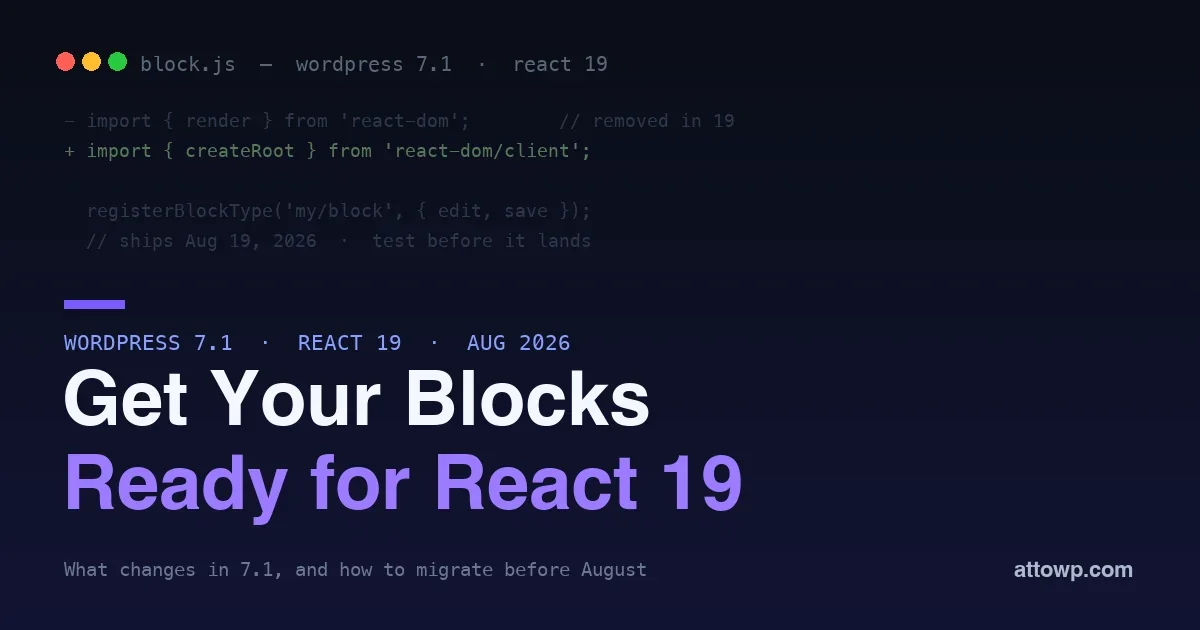
Update, 29 July 2026: This post was published on 1 July, when React 19 was slated for WordPress 7.1. It is not shipping in 7.1. Core enabled React 19 in Gutenberg, hit unexpected incompatibilities between the old and new React versions and in the way plugins consume React, and reverted. WordPress 7.1 continues to use React 18.3.
Everything below about how to migrate is still accurate and still worth doing: createRoot over render, no defaultProps on function components, no string refs, no second copy of React. What changed is the deadline. There is no longer a 19 August cliff, and the upgrade is deferred rather than cancelled, so treat this as work to land at your own pace. For the full story and what the real 7.1 compatibility risk is now, see React 19 Is Not in WordPress 7.1 After All.
WordPress 7.0 shipped in May with the Abilities API and its AI infrastructure. The roadmap to 7.1, published on 19 June 2026, set the next release for 19 August 2026, and at the time it carried a change that mattered to every block developer more than any headline feature: WordPress core moving from React 18 to React 19. That upgrade has since been pulled from 7.1, but it remains on the horizon, and if you build custom blocks it is still a compatibility event you want to meet on your own schedule rather than discover from a support ticket.
This post covers why the React 19 bump can break custom blocks, and a concrete migration checklist to get your blocks ready. None of it is dramatic if you start early. All of it is painful if you wait for the release that eventually carries it.
What was planned for WordPress 7.1
The 7.1 roadmap was a mix of editor features and the platform upgrade underneath them:
- React 19 across the editor and the
@wordpress/elementlayer that blocks build on. This was the change with the widest blast radius, and it is the one that has since been deferred. - New core blocks, including Tabs, a Table of Contents, and a Playlist block, reducing the need for a plugin for these common patterns. These did ship.
- A Notes suggestion mode, extending the collaboration features toward an editorial review flow.
- Pseudo-state and responsive styling in the block styling engine, so more of what used to need custom CSS becomes native. These did ship.
The features are welcome, and for anyone maintaining blocks React 19 remains the line item to plan around, just without a fixed date attached to it.
Why React 19 matters for block developers
Most custom blocks never import React directly. They import from @wordpress/element, WordPress’s thin wrapper over React, and from the @wordpress/* packages. That abstraction is exactly what protects you: when core bumps to React 19, @wordpress/element re-exports React 19, and well-behaved blocks get the new version transparently.
The blocks that break are the ones that reached around the abstraction or leaned on APIs React 19 removed. React 19 deletes a set of long-deprecated APIs, and a block using any of them stops working the moment core upgrades the underlying React. The abstraction only shields you if you stayed inside it. This is precisely the problem core ran into when it tried the upgrade: too much of the ecosystem had stepped outside.
The APIs React 19 removes
These are the removals most likely to appear in a WordPress block or admin script:
ReactDOM.renderandReactDOM.hydrateare gone, replaced bycreateRootandhydrateRoot. Any block that mounts its own React tree (a custom modal, a front-end widget) using the old call breaks.ReactDOM.unmountComponentAtNodeis removed in favor of the root’sunmount()method.- String refs (
ref="myEl") are gone; use callback refs oruseRef. - Legacy context (
contextTypes,childContextTypes) is removed; use the modern Context API. propTypesanddefaultPropson function components are ignored; use default parameters and TypeScript instead.
A 60-second affected-or-not check
Before planning anything, find out whether you are even exposed. From your block’s source directory, search for the removed APIs:
grep -rn "ReactDOM.render" src/
grep -rn "defaultProps"    src/
grep -rn "contextTypes"    src/
No matches, and you use only @wordpress/* imports? You are almost certainly fine and can move straight to a staging test to confirm. Matches? Each one is a line on your migration list. This single check tells most developers within a minute whether React 19 is a five-minute task or a real one.
The block migration checklist
Run this against every custom block and editor script you maintain. It is no longer deadline-bound, but every item on it is worth doing on React 18.3 today.
1. Find direct react-dom usage
Grep your source for ReactDOM.render, .hydrate, and unmountComponentAtNode. Any front-end block that mounts a React tree is the first thing to fix.
// Breaks in React 19:
import { render } from '@wordpress/element';
render( , document.getElementById( 'my-widget' ) );

// React 19 ready:
import { createRoot } from '@wordpress/element';
createRoot( document.getElementById( 'my-widget' ) ).render(  );
Note that createRoot is a React 18 API, not a React 19 one. This swap is correct on the version WordPress ships right now, which is why it is worth doing regardless of when the upgrade lands.
2. Replace string refs
Search for ref=" in JSX. Convert every string ref to a useRef or a callback ref. String refs have been deprecated for years, but they linger in older blocks.
3. Drop propTypes and defaultProps from function components
If your block components declare Component.propTypes or Component.defaultProps, move to default parameters. React 19 ignores defaultProps on function components, so a component relying on it will suddenly receive undefined.
// Was:
function Notice( props ) { const type = props.type; }
Notice.defaultProps = { type: 'info' };
// React 19 ready:
function Notice( { type = 'info' } ) { /* ... */ }
4. Audit legacy context
Any use of contextTypes or childContextTypes must move to createContext and the modern provider/consumer pattern. This is rare in blocks but common in older admin interfaces.
5. Update your build tooling
Make sure @wordpress/scripts (or its successor) is current, so your build resolves the React that core ships. A stale build can bundle its own React and cause two-copies-of-React bugs that are miserable to debug.
6. Rebuild and watch the console
Run your build and read every warning. React surfaces deprecations loudly before it removes them; the warnings are your migration to-do list.
What React 19 gives you back
The migration is not all cost. React 19 brings improvements block developers will use once core ships it. Ref can now be passed as a regular prop, removing most reasons to reach for forwardRef. The new use hook simplifies reading promises and context inside components. Actions and form handling get first-class support, which maps well onto the editor’s data flows. And hydration error messages are far clearer, which matters for front-end blocks that server-render. The same upgrade that forces a small cleanup also hands you a better React to build on, so treat the migration as the price of admission to tools worth having.
How to test ahead of the upgrade
You do not have to wait for a core release to find out where you stand. The Gutenberg plugin runs ahead of core and is where the React 19 work continues as an experiment, so installing the current Gutenberg on a staging site is the best available preview of what the upgrade will do to your blocks. Watch the Make Core blog for when React 19 is enabled there again.
Test in the editor and on the front end, since a block can render fine in one and break in the other. For the general pattern of building and testing interactive blocks, our guide to React in WordPress covers the fundamentals the migration builds on.
The two-copies-of-React trap
The most confusing failure in this whole migration is not a removed API; it is a version mismatch. WordPress core provides React through @wordpress/element, and your block is supposed to use that shared copy rather than bundle its own. When a block pins an old @wordpress/scripts or imports React directly, the build can bundle a second copy of React. Now two Reacts run on the same page, hooks throw about being called outside a component, context silently fails to cross the boundary, and nothing in the error points at the real cause. The fix is to externalize React so your block always uses core’s copy. Confirm your build treats react and react-dom as externals, which @wordpress/scripts does by default, and never import React from your own dependencies into editor code. This is a live bug today on React 18.3, not a future one.
What tends to break in practice
Across real block libraries, the same few things account for most of the breakage:
- Front-end view scripts that mount their own React tree with the old
rendercall. - Older components carrying
defaultProps, which silently start receiving undefined values. - Third-party libraries bundled into a block that themselves use removed React APIs and have not updated.
- Blocks that pin an old
@wordpress/scripts, bundling a second copy of React that fights with core’s.
Your migration timeline
Without a fixed release date attached, the sensible schedule is simply to do it soon and not carry it as open risk:
- Now: inventory your blocks and grep for the removed APIs. You will likely find the whole exposure in one afternoon.
- This month: fix what you find, update
@wordpress/scripts, and rebuild. Most fixes are one-line swaps, and all of them are correct on React 18.3. - Ongoing: test your library on the current Gutenberg plugin on staging and clear every React warning as it appears.
- When React 19 is proposed for a core release again: run a full editor-and-front-end pass against that beta. If you did the work above, this is a confirmation rather than a project.
The work is small; the only thing that makes it large is doing it under pressure the week a release ships.
If you manage many client sites
The calculus changes when React 19 eventually lands across a portfolio of sites at once. You are not testing one block library; you are testing every custom block, theme script, and third-party plugin on dozens of sites, all upgrading the same week. The move is to standardize now: audit which sites run custom or older blocks, prioritize the ones with the most custom editor code, and stage against a representative sample rather than all at once. A shared checklist and a single staging pass per block library, reused across the sites that share it, turns a portfolio-wide risk into a manageable batch. The sites most likely to break on release day are the neglected ones running old bundled blocks nobody has touched in a year, so those are exactly where to look first. The deferral bought you time to do this calmly, which is worth using.
Frequently asked questions
Will my blocks break when WordPress 7.1 ships?
Not from React. 7.1 ships on React 18.3, so the React 19 removals are not a factor in that release. When the upgrade does land in a later version, only blocks using one of the removed APIs will break; blocks that stay inside @wordpress/element and the @wordpress/* packages generally upgrade transparently.
How much time does this migration take?
For a typical block, minutes: swap a render call, drop a defaultProps, retest. For a large library with third-party dependencies, budget a day to audit and a staging cycle to verify. Doing it before the upgrade is announced again is what keeps it small.
Do I need to rewrite my blocks in a new way?
No. This is a compatibility update, not a rewrite. You are removing a handful of deprecated calls, not changing how blocks are built. The block API itself is stable across the change.
What if I depend on a plugin that has not updated?
Test it on the Gutenberg plugin now, and if it breaks, report it to the author early. Giving maintainers a heads-up well before the upgrade lands is the difference between a fixed plugin and a broken site on release day, and the deferral has just handed everyone extra runway to do exactly that.
Does this affect classic (non-block) code?
Only if that code uses React. Pure PHP, jQuery, or vanilla JavaScript is unaffected. React 19 is only a concern where you are running React, which in WordPress means the block editor and any custom React interfaces.
Is React 19 the same as the block API changing?
No. The block registration API, attributes, and block.json are stable. React 19 is the rendering library underneath; you are updating how components mount and clean up, not how blocks are defined.
Should I adopt the new React 19 features right away?
You cannot yet, since core is still on React 18.3. Get compatible first so that when the upgrade lands nothing breaks. Once core is on React 19 cleanly, the new hooks and ref-as-prop are worth adopting incrementally, but they are an enhancement, not part of the required migration.
What about React Server Components?
WordPress is not adopting React Server Components; this is a React 18 to 19 client-side upgrade. RSC is a separate architecture core has not signaled for the block editor, so it is not something block developers need to plan around.
Should I undo the migration work now that it is deferred?
No. Every change on the checklist is valid on React 18.3 and improves your code today. createRoot is the supported mounting API on the current version, and the rest remove deprecated patterns. Undoing correct code to reintroduce deprecated code would only mean doing the work twice.
The bottom line
React 19 under the block editor was going to be WordPress 7.1’s most consequential change for developers. It is not in that release: core tried it, found the ecosystem was not ready, and deferred it. The migration itself is unchanged and still worth doing. If your blocks stayed inside WordPress’s abstractions, the eventual upgrade is close to free. If they reached for ReactDOM.render, string refs, or defaultProps, they need a small, well-defined migration you can do today, on React 18.3, with no deadline pressure at all. Run the checklist, test against the Gutenberg plugin, and you will be ready whenever the upgrade returns. The same discipline that got your plugins ready for the 7.0 Abilities API applies here: meet the platform change on your schedule, not its.

No comments yet