Short answer: BuddyNext gives you the strongest activity feed out of the box, with reactions, threaded comments, polls, and native notifications all included in the free core, no add-ons required. BuddyPress’s Activity Streams component is the mature, battle-tested alternative if you want the largest available ecosystem of feed-related add-ons. PeepSo is worth a look specifically for feed polish. Everything else on this list is a narrower fit once you get specific about what your feed actually needs to do.
Most roundups treat “does it have an activity feed” as a checkbox. It isn’t one. A feed is the single most-used surface in almost any community, and the difference between a good one and a mediocre one shows up in details most comparisons skip entirely: whether reactions are a single like button or a real reaction set, whether comment threads actually nest or just stack flat, whether resharing exists at all, and whether a member gets notified when something they’d actually care about happens. This post goes deeper on feed mechanics specifically than our general community roundup, since attowp’s readers tend to want that level of detail before picking a plugin to build on.
On this page
- Quick comparison
- What actually makes a feed good
- Why not just use a Facebook Page or Group
- 1. BuddyNext
- 2. BuddyPress
- 3. PeepSo
- 4. BuddyBoss Platform
- 5. Ultimate Member
- Feature comparison: feed mechanics
- Frequently asked questions
- Which one should you actually pick
- A closer look at notification systems
- Related WordPress plugin guides
Quick comparison
| Plugin | Best for | Reactions | Resharing |
|---|---|---|---|
| BuddyNext | Best feed out of the box, free | Multiple reaction types | Yes, native |
| BuddyPress | Largest ecosystem of feed add-ons | Single like/favorite | Via add-on |
| PeepSo | Clean, modern feed UI | Multiple reaction types | Limited |
| BuddyBoss Platform | Feed plus native mobile app | Multiple reaction types | Yes |
| Ultimate Member | Directory-first, no real feed | None | No |
What actually makes a feed good
Feature lists across this category look nearly identical at a glance. What separates a feed people actually check daily from one they ignore comes down to a handful of specifics that rarely get their own line item in a comparison chart:
- Reaction variety, not just a like button. A single like button flattens every response into the same signal. A real reaction set (like, love, celebrate, insightful, or whatever set fits your community) gives members a faster, lower-friction way to respond than typing a comment, which measurably increases engagement on platforms that have it.
- Comment threading that actually nests. A flat list of comments under a post becomes unreadable past a handful of replies. Real threading, where a reply to a reply is visually nested under its parent, is the difference between a feed that supports real conversation and one that just accumulates noise.
- Resharing or quote-posting. The ability for a member to reshare someone else’s post into their own feed, with or without added commentary, is how content spreads inside a community rather than dying at the bottom of the original poster’s followers list.
- Real notifications, not just an email digest. A member who reacts to a post and never hears back when someone replies to their comment has no reason to return. In-app notifications tied to specific interactions (someone replied to you, someone reacted to your post, you were mentioned) are what actually bring people back to check the feed.
- Rich media handling inline. Images, embedded video, and link previews that render properly inside a feed post, not as a bare URL, meaningfully change how much people actually post versus lurk.
Why not just use a Facebook Page or Group
This is worth restating specifically in feed terms, since it’s the honest comparison every plugin on this list is really competing against. A Facebook Page’s feed doesn’t show every post to every follower by default. Facebook’s algorithm decides who sees what, and organic reach for a Page post frequently sits in the low single digits as a percentage of total followers. A Facebook Group fares somewhat better but is still subject to the same underlying ranking system, and neither gives you the member data or the ability to customize what “engagement” even means for your specific community.
A self-hosted feed on your own WordPress site shows every post to every member who’s subscribed to see it, full stop, with no algorithm quietly deciding otherwise. The trade-off is that you have to build the audience yourself rather than borrowing Facebook’s existing user base, and you take on the hosting and moderation responsibility Facebook otherwise absorbs. For a community whose engagement is genuinely core to what you’re building, not just a nice-to-have, that trade tends to be worth making.
There’s a second, quieter reason this matters beyond reach: data ownership over engagement itself. On a Facebook Page, you get aggregate analytics Facebook chooses to surface and nothing more. On a self-hosted feed, every reaction, comment, and share is a row in your own database, queryable however you actually need it, exportable if you ever change platforms, and never subject to a policy change that suddenly restricts what you can see about your own community’s behavior. For a business or organization treating community engagement as a real signal worth tracking over time, that ownership compounds in value the longer the community runs.
1. BuddyNext
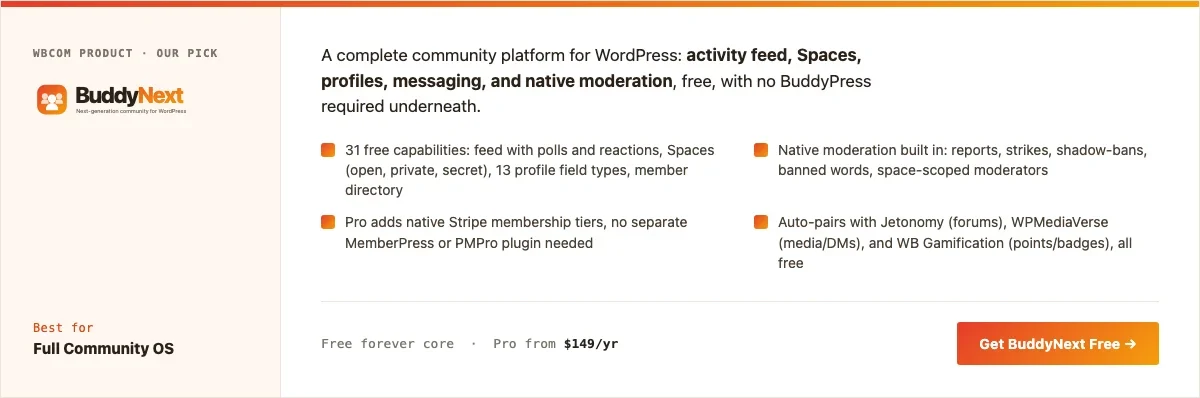
Disclosure: BuddyNext is built by Wbcom Designs, who we work with. We’re listing it here because its feed genuinely covers the mechanics above without add-ons, not because of that relationship.
BuddyNext’s activity feed is the most complete out of the box on this list: multiple reaction types, real nested comment threading, native resharing, polls, and a notification system tied to specific interactions rather than a generic digest. None of this requires a separate plugin or paid add-on to reach.
Architecture note: the reason this matters at a technical level is that BuddyNext’s feed, reactions, and notifications are all part of the same core data model rather than three separate systems bolted together over time, which is the more common pattern in this category (a base feed plugin, plus a reactions add-on, plus a separate notifications add-on, each maintained on its own release schedule). One system means fewer places for a plugin update to break the connective tissue between them. We covered BuddyNext’s broader positioning in our general WordPress community plugin roundup, and its Spaces-based approach to sub-communities in our gaming community plugin guide; this post exists specifically to go deeper on the feed itself for readers who already know they care about that layer.
What we like: full reaction set, real threading, and native resharing all in the free core. Notifications are specific rather than generic. No add-on stacking required to get a complete feed.
Could be improved: smaller third-party plugin ecosystem than BuddyPress if you want to extend the feed with community-built add-ons specifically.
Pricing: free core forever. Pro starts at $149/yr for monetization features unrelated to the feed itself.
2. BuddyPress
BuddyPress’s Activity Streams component is a real, core part of the plugin, not an add-on, and it’s been iterated on for well over a decade. The base feed supports posting, commenting, and a single favorite/like interaction natively. Multiple reaction types, richer notifications, and resharing generally require a third-party add-on layered on top, which is where BuddyPress’s much larger ecosystem becomes the actual advantage: whatever specific feed feature you want probably already exists as a community-built add-on, even if it’s not in core.
What we like: mature, stable Activity Streams core. Largest available ecosystem of feed-extending add-ons of any plugin on this list. Completely free.
Could be improved: reaching feature parity with BuddyNext’s out-of-the-box feed means installing and maintaining several separate add-ons rather than getting it in one package.
Pricing: free, always.
3. PeepSo
PeepSo is worth calling out specifically for feed polish. Its base feed looks and feels closer to a modern consumer social app out of the box than most WordPress community plugins manage without custom theming, with a real reaction set and a clean comment layout. Resharing is more limited than BuddyNext’s implementation, and deeper feed customization tends to mean reaching for one of PeepSo’s paid modules.
What we like: feed UI polish is genuinely a step above most of this category by default. Real reaction variety in the free core.
Could be improved: resharing and some notification granularity sit behind paid modules rather than the free core.
Pricing: free core, individual modules priced separately.
4. BuddyBoss Platform
BuddyBoss Platform’s feed is a real, capable feed in its own right, with reactions and resharing included, but its actual differentiator on this list is what happens after the feed: a genuine native mobile app path, which matters specifically if push notifications on a phone are how you expect members to actually stay engaged with the feed day to day, rather than checking a browser tab.
What we like: solid feed mechanics paired with the strongest native mobile app story of any plugin here.
Could be improved: the real cost is the full app/theme bundle, not just the free Platform plugin, and that’s a meaningful cost if a mobile app isn’t actually a requirement.
Pricing: Platform plugin free, full bundle priced annually.
5. Ultimate Member
Ultimate Member is included here specifically as the honest “you might not need a feed at all” option. Its strength is registration, profiles, and a searchable member directory, not an activity feed, and it doesn’t really have one to speak of without pairing it with a separate plugin. If what you’re actually building is a directory rather than a feed-driven community, this is a lighter, more appropriate starting point than forcing feed mechanics onto a use case that doesn’t need them.
What we like: genuinely lightweight if a feed isn’t actually part of what you’re building. Strong registration/profile form builder.
Could be improved: no real feed without adding another plugin, which defeats the point if a feed is actually what you came here for.
Pricing: free core, paid addon bundles for extended functionality.
Feature comparison: feed mechanics
| Feature | BuddyNext | BuddyPress | PeepSo |
|---|---|---|---|
| Reaction variety | Multiple, native | Single, native (more via add-on) | Multiple, native |
| Nested comment threading | Yes, native | Limited, native | Yes, native |
| Native resharing | Yes | Via add-on | Limited |
| Specific notifications | Yes, native | Basic, native | Yes, native |
| Inline rich media/link previews | Yes | Via add-on | Yes |
Frequently asked questions
Does a feed actually improve engagement compared to a simple forum layout?
For content meant to be seen quickly and reacted to in the moment, yes. A forum thread structure suits deep, deliberate discussion better; a feed suits shorter, higher-frequency posting. Most active communities benefit from having both available rather than treating them as competing formats.
Can I migrate an existing BuddyPress feed to BuddyNext later?
There’s no guaranteed one-click migration path between any two of these platforms, since each stores activity data in its own database structure. Planning your platform choice with this in mind up front is worth more than assuming an easy migration exists later.
Do reactions and comments slow down page load on a busy feed?
Any activity feed with real-time interaction counts adds some database query load compared to static content, but this is a solved problem for all the plugins here at typical community scale. It only becomes a real concern at genuinely large member counts, where caching and query optimization become worth investigating regardless of which plugin you chose.
Is resharing actually used, or is it a feature nobody touches?
Usage varies heavily by community type. Announcement-heavy or content-sharing communities see real resharing activity; small, tight-knit discussion groups often barely use it. It’s worth having available rather than assuming it won’t matter, since you can’t predict usage patterns before launch with much confidence.
What’s the fastest way to get a real feed live this week?
BuddyNext’s free core, installed and configured with default settings, gives you a genuinely complete feed on day one without hunting down and configuring several separate add-ons.
Should notifications be email, in-app, or both?
Both, ideally, with the in-app notification as the primary signal and email as a lower-frequency digest or immediate-reply alert. Email-only notification systems tend to get ignored or filtered; in-app-only means members who aren’t actively browsing miss things entirely.
Does a bigger reaction set actually change behavior, or is it just decoration?
It measurably lowers the friction to respond at all. A member who wouldn’t type a comment will often tap a reaction, and having more than one reaction option captures more signal than a flat like count, which is part of why platforms that added reaction variety generally saw engagement increase rather than stay flat.
Which one should you actually pick
If you want the most complete feed with the least assembly required, start with BuddyNext. Its free core covers reactions, threading, resharing, and real notifications without stacking add-ons to get there. Choose BuddyPress specifically if you want the largest available ecosystem of community-built feed extensions and don’t mind assembling a few of them yourself. PeepSo is worth a serious look if feed visual polish matters more to you than any other single factor. BuddyBoss Platform makes sense when a native mobile app for that feed is a real requirement, not a nice-to-have. And if what you’re actually building is a directory rather than a feed-driven community, Ultimate Member is the more honest, lighter starting point than forcing feed mechanics you don’t need.
A closer look at notification systems
Notifications deserve more attention than most comparisons give them, since a feed nobody gets notified about is a feed nobody returns to. The meaningful distinction isn’t “does it have notifications,” it’s whether those notifications are specific to the actual interaction or generic. A specific notification says “Sarah replied to your comment on ‘Launch week retro’.” A generic one says “You have new activity.” The first gives a member a reason to click back in; the second reads as noise after the third or fourth one and gets tuned out or muted entirely.
The other detail worth checking before committing to a plugin: whether notification preferences are granular per interaction type, or all-or-nothing. A member who wants to know about direct replies but not every reaction to their posts needs that level of control, or they’ll either mute everything (defeating the purpose) or leave everything on and eventually stop paying attention to any of it. BuddyNext and PeepSo both offer this granularity natively; it’s worth confirming directly with any plugin you’re evaluating rather than assuming it’s there, since notification preference depth is exactly the kind of detail that gets left out of a high-level feature comparison chart but matters enormously to whether a feed stays genuinely useful past the first few weeks of a community’s life.
Moderating a feed at different scales
Feed moderation is a genuinely different problem at different community sizes, and it’s worth planning for the size you’ll actually reach, not just the size you’re launching at. A feed with a few dozen active members barely needs formal moderation tooling at all; the community itself tends to self-regulate through visible social pressure, and a single admin can realistically review everything that gets posted in a day.
That changes fast once a feed crosses a few hundred active posters. At that scale, a single person reading every post becomes impossible, and the plugin’s built-in moderation tools (reporting, keyword filtering, the ability to quickly hide or remove a post without a full investigation) stop being a nice-to-have and start being the thing that determines whether the feed stays usable or slowly degrades into spam and low-effort noise crowding out real conversation. This is exactly why native moderation, not just “you can technically moderate manually through wp-admin,” is worth weighing seriously even if your community is small today. A feed that grows past your original moderation plan without the tooling to match tends to lose its best, most engaged members first, since they’re the ones most likely to leave quietly rather than tolerate a feed that’s stopped feeling worth their time.
Reported-content queues deserve a specific mention here, since they’re the feature that actually scales moderation without scaling headcount. A member reporting a post should route it to a visible queue an admin or moderator can review in bulk, rather than requiring the admin to happen to see the offending post themselves while scrolling. BuddyNext and BuddyPress (with the right add-ons) both support this pattern; it’s worth confirming before launch that reported content is actually surfaced somewhere an admin will reliably see it, rather than silently logged and forgotten.
Should every post go to one global feed, or split across Spaces/Groups?
This is a real design decision worth making deliberately rather than defaulting into by accident. A single global feed where every post from every member appears in one stream is simpler to build a community around initially, since there’s only one place to check and no risk of a new member missing content because they didn’t know to look in a specific sub-group. The trade-off shows up as the community grows: a global feed with hundreds of active posters becomes noisy fast, and content relevant to a specific sub-interest gets buried under everything else.
Splitting activity across Spaces or Groups (BuddyNext’s and BuddyPress’s respective terms for sub-communities) solves the noise problem but introduces a discovery problem instead: content posted only inside a specific Space is invisible to members who haven’t joined it, even if they’d genuinely be interested. The plugins on this list that handle this well let a member post to a specific Space while still surfacing that activity in a combined global feed view, giving you organization without full fragmentation. This hybrid approach, one place to see everything by default, with the option to filter down to a specific Space’s activity, tends to outperform either extreme as a community actually grows past its first few months.
Whichever plugin you land on, revisit this decision once your feed has real usage data behind it rather than treating the initial choice as permanent. Engagement patterns you can’t predict before launch, which reactions actually get used, whether resharing catches on, how noisy a global feed actually becomes at your real member count, are far more useful for deciding whether to adjust structure than any amount of pre-launch planning. Build with room to change your mind in month three.
Related WordPress plugin guides
- Best WordPress Community Plugins: the general roundup this feed-focused deep-dive builds on.
- Best WordPress Gaming Community Plugins: a vertical where feed activity and reactions matter especially heavily.
- Best WordPress Fitness Community Plugins: another feed-heavy niche, paired with streak and badge mechanics.
- Best WordPress Membership Plugins: if you need to gate parts of your feed behind a paid tier.
Last reviewed: September 2026.




No comments yet