Short answer: if peer interaction is core to how your course actually works, not just a nice-to-have, pair Learnomy with BuddyNext rather than picking a pure LMS plugin alone. Learnomy handles the structured curriculum (lessons, drip content, quizzes, progress tracking) while BuddyNext gives each cohort or course a real Space for discussion, questions, and peer accountability. LearnDash paired with BuddyPress is the free, DIY version of the same idea. Hosted platforms like Circle or Kajabi bundle both halves with zero setup, at the cost of a recurring fee and less ownership.
A community LMS isn’t really one product category, it’s a pairing: structured learning content on one side, ongoing peer interaction on the other. Plenty of courses genuinely don’t need the second half, a static reference course with no cohort, no discussion, no shared timeline is fine as a pure LMS. But the moment learning outcomes depend on students talking to each other, whether that’s a cohort-based bootcamp, a coaching program with a group of clients, or a certification course where peer study groups matter, the plugin choice needs to account for both halves at once.
On this page
- Quick comparison
- What a community LMS actually needs
- Do you actually need the community half
- Why not just use Circle, Mighty Networks, or Kajabi
- Who actually builds a community LMS
- 1. Learnomy + BuddyNext
- 2. LearnDash + BuddyPress
- 3. Tutor LMS
- 4. LifterLMS
- Feature comparison
- Frequently asked questions
- Which one should you actually pick
- If your use case is more specific
- What to actually measure once it’s running
Quick comparison
Option | Best for | Starting price | Community built in |
|---|---|---|---|
Learnomy + BuddyNext | Owned community LMS, free core stack | Free core, Learnomy add-ons and BuddyNext Pro from $149/yr | Yes, native Spaces |
LearnDash + BuddyPress | Largest ecosystem, DIY pairing | LearnDash paid, BuddyPress free | Yes, via Groups component |
Tutor LMS | Popular free tier, drag-drop builder | Free core, paid Pro | Limited, mostly comments/Q&A |
LifterLMS | Strong free core, flexible | Free core, paid add-ons | Via add-ons or BuddyPress pairing |
What a community LMS actually needs
The features that matter here split cleanly into two buckets, and it’s worth evaluating each half on its own terms rather than looking for one plugin that claims to do everything equally well:
- On the course side: drip content, quizzes, and real progress tracking. Students need to know where they are in the material, and a coach or instructor needs visibility into who’s actually progressing versus who’s stalled.
- On the community side: a Space or group per cohort, not one giant shared room. A single course launched three times a year needs three somewhat-separate conversations, not one endless thread mixing cohorts that started months apart.
- A connection between enrollment and access. Whoever’s paying for or enrolled in a specific course should land in the matching community Space automatically, not require manual admin work every time someone joins.
- Peer visibility that doesn’t require a separate login. If students have to leave the course player to check a completely different platform for discussion, engagement drops. The two halves should feel like one experience, not two separate logins bolted together.
Do you actually need the community half
This is worth asking honestly before adding the complexity. A community layer helps most when the course itself benefits from social proof and peer accountability, cohort-based programs, coaching, anything where completion rates matter and isolation is a real dropout risk. It matters less for a narrow, single-purpose reference course someone works through once and refers back to occasionally, where a discussion feed would mostly sit empty.
A useful gut check: if you’d genuinely value seeing students talk to each other, ask questions publicly so others benefit from the answer, or form study groups on their own, the community half is worth the setup. If the honest answer is that students mostly just want the content and to move on, a pure LMS without the community layer is simpler to build and maintain, and adding an empty feed just adds visible evidence that engagement is lower than hoped.
There’s a middle path worth naming too: starting without the community layer and adding it later once a course has proven itself. A first cohort or two run purely as an LMS course establishes whether there’s real demand at all. Once that’s confirmed and a second or third cohort is being planned, adding BuddyNext at that point, with existing alumni invited into the first Space, often works better than launching an empty community alongside an unproven course from day one. The community layer is easier to add to a working course than to make a struggling one look more active than it actually is.
Why not just use Circle, Mighty Networks, or Kajabi
This deserves the same honest treatment we give it elsewhere on this site. Hosted platforms built specifically for community-plus-courses are genuinely well-designed for this exact pairing, and setup takes a fraction of the time a self-hosted WordPress stack requires. For someone validating whether a cohort-based course concept even works, that speed has real value.
The cost is a recurring monthly fee that scales with your member count regardless of revenue, and the platform, not you, owns the infrastructure your business runs on. A WordPress-based pairing flips that: a flat license fee (or free, for the free-tier combinations here) instead of a percentage or per-member fee, and you own the student list, the content, and the platform itself. The trade is setup time and ongoing responsibility, which the hosted platforms otherwise absorb. Early-stage validation favors hosted; an established program with real, growing revenue increasingly favors owning the stack.
Who actually builds a community LMS
It’s worth naming the real buyer profiles here, since “community LMS” sounds abstract until you see who’s actually assembling one. Coding bootcamps and technical training providers are a common case: cohorts move through a curriculum together on a fixed schedule, and peer code review or study-group formation genuinely improves outcomes, so the community half isn’t decorative, it’s load-bearing. Professional certification bodies running structured prep courses for an exam are another: candidates studying for the same test at the same time benefit enormously from comparing notes, and a well-run study community measurably improves pass rates in ways a pure content library doesn’t.
Coaches and consultants running a signature program are a third common profile, covered in more depth in our dedicated coaching community guide linked below, where direct access to the coach and small-group accountability are often the actual product being sold, with the curriculum itself functioning as structure around that relationship rather than the main event. And corporate L&D teams building internal training sometimes want this too, particularly for cross-functional programs (a company-wide leadership development cohort, for instance) where peer connection across departments is itself a stated goal of the program, not just a side effect of how the content happens to be delivered.
What these profiles share is that the community layer is doing real work toward the outcome the program is selling, not existing because it seemed like a nice feature to add. That’s the honest test for whether your own situation calls for this pairing rather than a simpler, community-free LMS setup.
1. Learnomy + BuddyNext
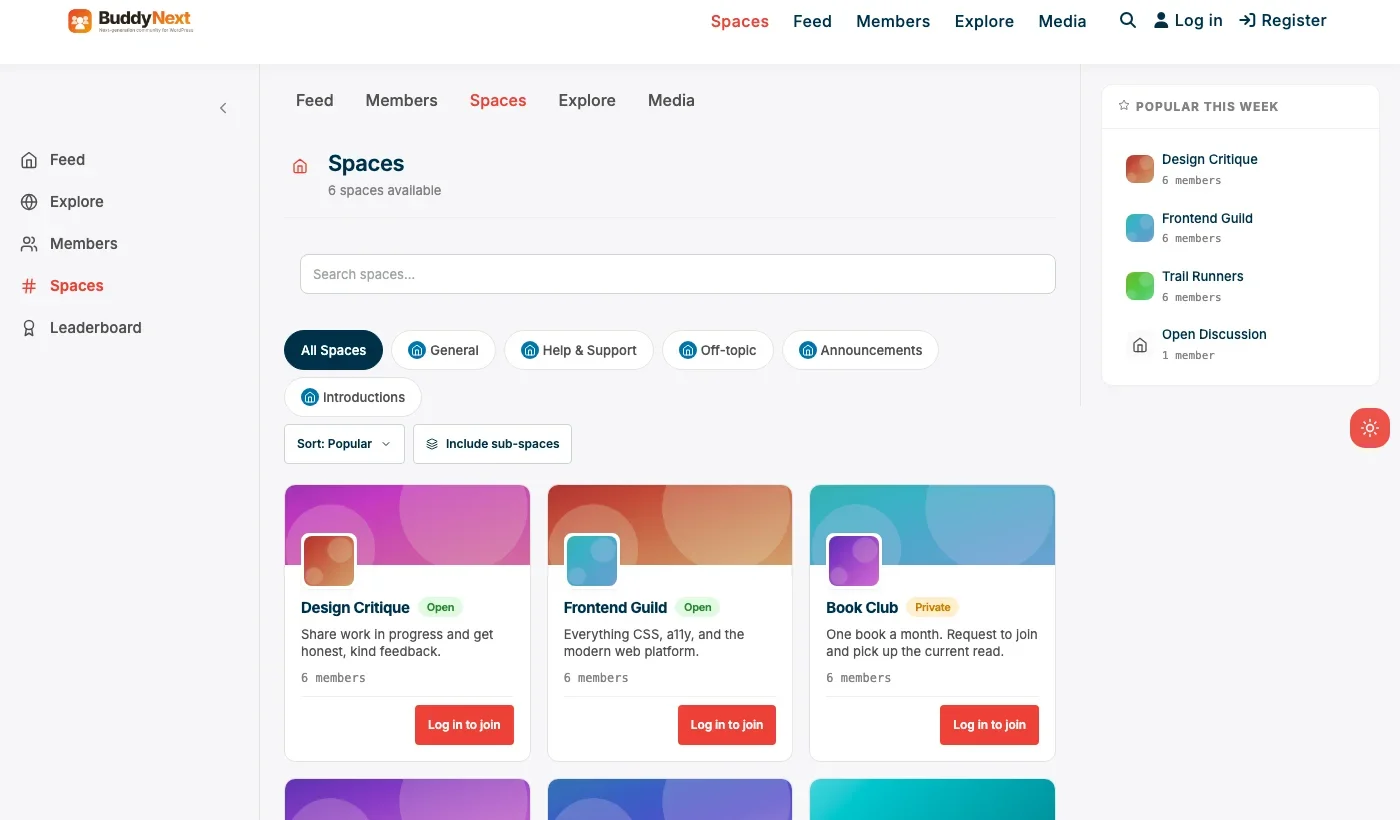
Disclosure: BuddyNext is built by Wbcom Designs, who we work with. We’re listing this pairing because it genuinely covers both halves of a community LMS without stitching together three separate plugins, not because of that relationship.
Learnomy handles the curriculum: lessons, drip-fed modules, quizzes, and progress tracking, the structured half of the pairing. BuddyNext handles the rest: a Space per cohort or course, native moderation, member profiles, and a real feed where students can post questions and see each other’s activity. A course launched three times a year gets three distinct Spaces rather than one increasingly cluttered shared room.
Architecture note: we’ve covered the specific coaching version of this pairing in our coaching community plugin roundup, where the emphasis is direct client access and small-group Spaces. This broader community-LMS framing applies the same underlying mechanism to any structured course where peer interaction is genuinely part of the learning outcome, not just paid coaching specifically.
What we like: both halves are free-core, so there’s a real, complete stack to launch on before paying anything. Native moderation on the community side. Spaces map cleanly onto cohorts, course tracks, or skill levels.
Could be improved: no single unified dashboard showing course progress and community activity in one screen out of the box; expect some setup work connecting enrollment status to Space access. Smaller combined ecosystem than the LearnDash-plus-BuddyPress pairing.
Pricing: both free at the core. Learnomy add-ons and BuddyNext Pro (native Stripe tiers) start at $149/yr if paid enrollment or gated Spaces are needed.
2. LearnDash + BuddyPress
This is the free, DIY version of the same idea, built on the two most established plugins in their respective categories. LearnDash is the long-standing category leader for structured course delivery, with a mature feature set and large ecosystem. BuddyPress remains the largest available community plugin ecosystem, with over a decade of themes and integration patterns built specifically around pairing it with course plugins like LearnDash.
The trade-off is real setup and maintenance work: nothing auto-connects course enrollment to BuddyPress Group membership out of the box, and you’ll likely need a bridging plugin or custom work to keep the two systems in sync as students enroll, complete, or churn.
What we like: both are mature, extensively documented, and battle-tested at scale. LearnDash’s course-building tools are genuinely deep. BuddyPress’s Groups component maps reasonably well onto cohorts.
Could be improved: LearnDash itself is a paid plugin, not free-core. Real integration work required to connect enrollment and community access; nothing is native out of the box.
Pricing: LearnDash paid (check current pricing on their site). BuddyPress free.
3. Tutor LMS
Tutor LMS has built a genuinely popular free tier with a drag-and-drop course builder, and it’s worth considering if the course-building experience itself is the top priority. Its community-facing features (comments and Q&A on lessons) are real but lighter than a dedicated community plugin’s Spaces-and-feed model, so treat it as a strong LMS first, with community as a secondary, more limited layer rather than a full peer-interaction platform.
What we like: genuinely strong free tier. Drag-drop course builder is a real usability advantage for instructors building courses without developer help.
Could be improved: community features are lighter than a dedicated pairing; a course wanting real cohort Spaces will likely still want to add BuddyPress or BuddyNext alongside it.
Pricing: free core, paid Pro tier for advanced features.
4. LifterLMS
LifterLMS offers a strong, flexible free core and is a reasonable choice for a course creator who wants room to grow into more advanced features via add-ons over time. Its community capability, like Tutor LMS, is better thought of as an add-on or BuddyPress pairing rather than a native, built-in feed.
What we like: flexible free core with a genuine growth path. Well-documented, established plugin with a real support ecosystem.
Could be improved: community features require add-ons or a separate pairing, similar to Tutor LMS; not a native built-in feed.
Pricing: free core, paid add-ons for advanced functionality.
Feature comparison
Feature | Learnomy + BuddyNext | LearnDash + BuddyPress | Tutor LMS |
|---|---|---|---|
Drip content and quizzes | Yes | Yes | Yes |
Native cohort Spaces | Yes, BuddyNext Spaces | Yes, via Groups component | Limited, comments/Q&A only |
Native moderation | Yes, free | No, BuddyPress alone | No |
Free core completeness | Both free at core | LearnDash paid, BuddyPress free | Free core, paid Pro |
Setup complexity for the pairing | Moderate | Moderate to high, manual bridging | Low, but limited community depth |
Frequently asked questions
Do I need two separate plugins, or is there one plugin that does both well?
Most genuinely strong community-LMS setups on WordPress are a pairing of two specialized plugins rather than one plugin doing both halves equally well. A few LMS plugins bolt on lightweight community features, but a dedicated community plugin’s Spaces, moderation, and feed are usually a meaningfully better experience than an LMS’s built-in comments section.
How do I connect course enrollment to community access automatically?
This varies by pairing. BuddyNext Pro’s native Stripe tiers can gate Space access directly by membership tier. For a LearnDash-plus-BuddyPress setup, this typically needs a bridging plugin or light custom development, since the two systems don’t natively share enrollment data.
Should every course have its own Space, or one shared community for all courses?
It depends on how distinct your courses are. Closely related courses in a sequential curriculum often benefit from one shared Space so students naturally see each other across the whole journey. Unrelated one-off courses usually benefit from separate Spaces to keep discussion relevant to what each group is actually working on.
What happens to a cohort’s Space after the course ends?
Common patterns: archive it read-only (students keep access to review old discussion but new posts stop), fold it into a broader alumni Space, or leave it open indefinitely if ongoing peer contact remains valuable. Decide this before launch rather than defaulting to whatever the plugin does automatically.
Is a community layer worth it for a low-priced course?
Usually not on its own. The setup and moderation overhead of a real community layer is easier to justify against a higher-priced program where retention and completion rates directly affect revenue. A $19 course rarely needs a dedicated Space; a $500+ cohort program usually benefits from one.
Can students see each other’s real names, or can they stay pseudonymous?
BuddyNext supports customizable display name settings, so this is a policy decision for the course owner rather than a technical limitation. Some programs want full names for accountability; others allow display names or first-name-only for comfort.
Does adding a community layer slow down the site or complicate hosting?
Running two active plugins together (an LMS plus a community platform) does add real load compared to either alone, particularly once course video, quizzes, and an active feed with images are all running on the same install. Reasonable managed WordPress hosting handles a moderate-sized cohort program without issue; a very large program (thousands of concurrent active students) is worth load-testing before a big public launch, the same due diligence any growing WordPress site should do regardless of which specific plugins are involved.
What’s a realistic timeline to launch a first cohort with both halves working?
For someone reasonably comfortable with WordPress, installing and configuring both plugins, building out a first course, and creating the matching Space is realistically a few days to a week of focused setup work, not a single afternoon. Budget extra time for genuinely writing the course content itself, which is almost always the longer pole in the schedule than the plugin configuration.
Which one should you actually pick
If you’re starting fresh and want both halves free at the core with no per-member platform fee, Learnomy paired with BuddyNext gets you there with the least assembly required. If you already have LearnDash or a strong preference for the largest available WordPress course/community ecosystem, and you or a developer can handle the integration work, LearnDash paired with BuddyPress remains a solid, well-trodden path. Tutor LMS or LifterLMS fit better when the course-building experience itself is the priority and community is a secondary, lighter add-on rather than a core requirement.
If your use case is more specific
This post covers the general community-LMS pairing decision. If your situation is more specific, a couple of our other guides go deeper on a particular angle: for paid coaching programs run in cohorts with direct client access as the core value, see our WordPress coaching community plugin roundup. And for the general community-plugin landscape independent of any course/LMS component, see our WordPress community plugin roundup. Both build on the same underlying mechanics covered here, just applied to a narrower, more specific situation.
A few other guides in this series go deeper on specific course formats that touch the community-LMS question from a different angle: Best WordPress Online Course Plugins for the general, self-paced comparison; Best WordPress Cohort Course Plugins for the Learnomy-plus-BuddyNext pairing applied specifically to scheduled cohorts; Best WordPress Online School Plugins for multi-instructor marketplaces; and Best WordPress Certification Plugins if issuing a verifiable credential matters to your program.
What to actually measure once it’s running
It’s worth deciding upfront what “working” looks like for the community half, since it’s easy to launch a Space and never revisit whether it’s actually contributing anything. Completion rate is the most direct signal: comparing completion between a cohort with an active community layer and an earlier cohort without one gives a real, if imperfect, read on whether the extra setup was worth it. A less obvious but genuinely useful signal is peer-to-peer answers, questions students answer for each other, since every one of those is a question that didn’t need the instructor’s time, and it’s a leading indicator of a Space that’s becoming self-sustaining rather than dependent on the instructor personally keeping it alive.
Posting activity alone is a weaker metric than it looks, since a Space with a handful of highly engaged students posting daily can matter more to outcomes than one with broad but shallow participation. Weighting engagement by how many distinct students are actually active, not just total post volume, gives a more honest picture of whether the community is reaching the group or just a vocal few.
Worth tracking one more thing that rarely makes it onto a dashboard: how long it takes a new student’s first question to get answered, by anyone, instructor or peer. A Space where questions sit unanswered for days trains students to stop asking, quietly and without complaint, well before completion numbers show any visible decline. Response latency in the first week or two of a new cohort is often the single best early-warning signal that a community is starting to go quiet, well before it shows up anywhere else.
None of these numbers matter in isolation. A single low week of engagement during a known holiday period or a heavy assignment crunch isn’t a signal worth acting on; a sustained downward trend across several weeks, especially one paired with slowing response latency, is. Reviewing these together on a regular cadence, not just glancing at total post count once, gives a far more honest read on whether the community half of the pairing is actually earning its keep.
Last reviewed: September 2026.




No comments yet