Short answer: for a genuine cohort-based course, pairing Learnomy with BuddyNext is the strongest WordPress option because Learnomy handles the drip curriculum, quizzes, and progress tracking while BuddyNext gives each cohort a real Space for peer discussion, live-call coordination, and accountability, without needing a separate community tool bolted on after the fact. LearnDash’s Groups feature is the strongest built-in alternative if you’re already committed to that ecosystem. Maven and Thinkific Cohorts remain the fastest way to start with zero setup, at the cost of a recurring platform fee or revenue share and less ownership over your cohort’s data.
A cohort course is a specific format: a defined group of students starts together, moves through the same weekly material on the same schedule, and (ideally) talks to each other along the way. That last part is what separates a cohort course from a self-paced course with a start date slapped on it. Get the peer layer wrong and you’ve built an expensive drip-fed PDF course; get it right and the cohort itself becomes a meaningful part of why students finish and recommend it to others.
On this page
- Quick comparison
- What a cohort course actually needs
- Cohort courses versus self-paced courses
- Why not just use Maven or Thinkific Cohorts
- 1. Learnomy + BuddyNext
- 2. LearnDash (Groups)
- 3. Tutor LMS
- 4. LifterLMS
- Feature comparison
- Frequently asked questions
- Which one should you actually pick
- What actually makes a cohort feel alive
Quick comparison
Option | Best for | Starting price | Peer Spaces |
|---|---|---|---|
Learnomy + BuddyNext | Curriculum and peer discussion in one owned stack | Free core, BuddyNext Pro from $149/yr | Yes, native Spaces |
LearnDash | Established ecosystem, real Groups feature | Paid, annual license | Groups, not a full social feed |
Tutor LMS | Strong free tier, drag-drop builder | Free core, paid Pro | Limited without add-ons |
LifterLMS | Solid free core, mature | Free core, paid add-ons | Limited without add-ons |
What a cohort course actually needs
A cohort course plugin setup gets judged on requirements a self-paced course doesn’t have:
- Scheduled unlocks tied to a cohort start date, not the individual’s enrollment date. Self-paced drip content usually counts days since signup. A cohort needs everyone’s Week 3 material to unlock on the same calendar date, regardless of when each student technically enrolled.
- A real space for peer discussion, not just comments under a lesson. Lesson comments get buried and rarely feel like a place people return to. A dedicated Space or group per cohort, with its own feed, is what actually gets used for ongoing discussion between live sessions.
- Clean separation between cohorts. A new cohort shouldn’t wade through the previous cohort’s conversation history, and a coach running multiple concurrent cohorts needs each one’s discussion kept genuinely separate.
- Completion and engagement visibility for the instructor. Knowing who’s behind on modules or gone quiet in the peer Space lets an instructor intervene before a student silently drops out, which matters more in a cohort than a self-paced course where dropout is more expected.
Cohort courses versus self-paced courses
It’s worth being precise about this distinction, since the two formats often get conflated in generic “best LMS plugin” content that doesn’t differentiate them. A self-paced course sells access to content, on the student’s own timeline, indefinitely or for a fixed access window. A cohort course sells access to a specific group experience, a shared schedule, a peer group moving through the same material together, and often live sessions, that a self-paced course structurally can’t replicate no matter how good the content is.
This distinction matters for plugin choice because a pure LMS, however good its content delivery is, wasn’t built assuming a peer layer is part of the product. Bolting community features onto an LMS after the fact tends to feel exactly like what it is, an afterthought, compared to pairing a real LMS with a real community plugin from the start. This is the same reasoning behind pairing a dedicated community plugin with structured curriculum tools rather than expecting one tool to do both jobs equally well.
Why not just use Maven or Thinkific Cohorts
This deserves an honest answer, since Maven and Thinkific’s cohort features are genuinely well-built, purpose-designed platforms for exactly this format. Setup is fast, the cohort scheduling and peer-discussion tools are polished out of the box, and there’s no WordPress maintenance to think about.
The cost is either a flat per-cohort platform fee or a percentage of revenue, plus the same ownership trade-off that shows up everywhere in this series: the instructor doesn’t own the student list, the platform relationship, or the ability to customize the experience beyond what the platform allows. For a first cohort testing whether the format works at all, that trade is often worth it. For an instructor running cohorts repeatedly as an ongoing business, the recurring cost and lack of ownership start to weigh more heavily, which is exactly when the WordPress-based combination starts to make more financial and structural sense.
1. Learnomy + BuddyNext
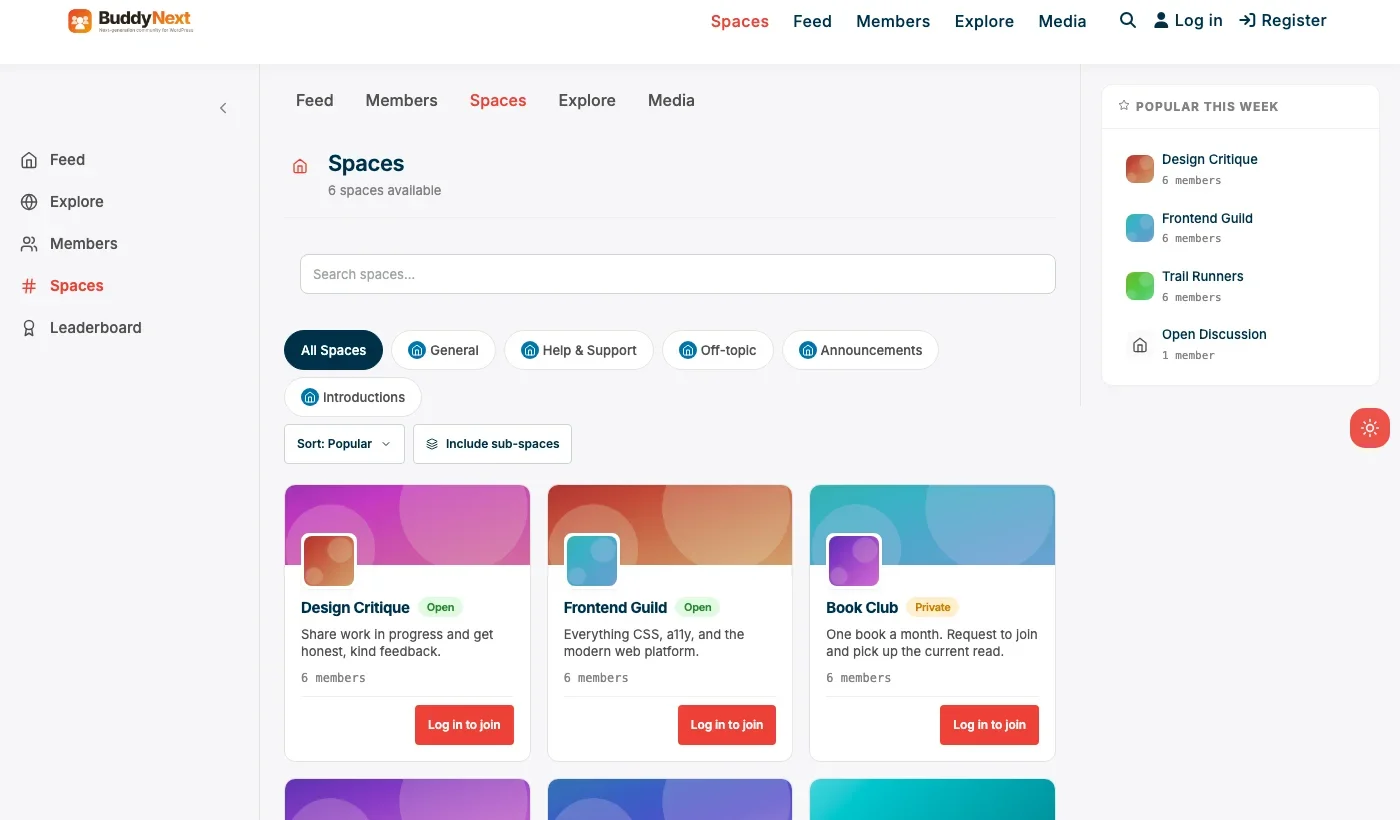
Disclosure: both Learnomy and BuddyNext are built by Wbcom Designs, who we work with. We’re recommending this pairing because it genuinely fits the cohort format, not because of that relationship.
Learnomy’s drip content and quiz tools handle the curriculum side directly: modules that unlock on a schedule, progress tracking per student, and quizzes to check understanding along the way. BuddyNext’s Spaces provide the peer layer, a fresh Space created per cohort, where students discuss the week’s material, ask questions between live sessions, and see each other’s progress and participation.
Architecture note: the same Spaces mechanism shown above, used for general community groups in our community plugin roundup and for client cohorts in our coaching community roundup, applies directly here: create one Space per cohort, restrict membership to that cohort’s enrolled students, and archive or convert it to an alumni Space once the cohort concludes. Because Learnomy and BuddyNext are separate plugins rather than one bolted-together tool, an instructor keeps full control over how tightly the two are integrated, from a simple shared login up to a Pro-tier setup where course access and Space access are gated by the same enrollment status.
What we like: real curriculum tools paired with a real peer Space, not a lesson-comments substitute for community. No recurring per-cohort platform fee. Each cohort’s Space stays cleanly separated from others.
Could be improved: requires configuring two plugins rather than one all-in-one platform, real setup time compared to a hosted cohort tool’s zero-setup start. No native calendar/scheduling tool for live session reminders; pair with a calendar plugin or external tool for that piece.
Pricing: Learnomy free core; BuddyNext free core, Pro (for paid enrollment tiers) from $149/yr.
2. LearnDash (Groups)
LearnDash’s Groups feature is a genuinely real, well-known tool for cohort-style access: assign a batch of students to a Group, tie their access and progress tracking to that Group, and manage cohorts through LearnDash’s own admin screens. For a team already invested in LearnDash’s ecosystem and themes, this is a natural fit.
Groups handles access and progress cleanly, but it’s structurally an access-control feature, not a social feed or discussion space. Peer interaction between cohort members still needs a separate plugin or workaround (a private Facebook Group, a Slack channel) layered on top.
What we like: mature, well-documented Groups feature purpose-built for exactly this access pattern. Large ecosystem of compatible themes and add-ons.
Could be improved: no native peer discussion space within LearnDash itself; expect to pair it with an external tool for that layer. Paid license required, no free core tier.
Pricing: paid, annual license required.
3. Tutor LMS
Tutor LMS’s genuinely strong free tier and drag-drop course builder make it approachable for an instructor building their first cohort course without a big upfront budget. Cohort-specific access management is lighter than LearnDash’s Groups feature, so expect more manual work organizing students by cohort.
What we like: strong free core with real course-building tools. Drag-drop builder lowers the setup learning curve.
Could be improved: cohort-specific access grouping is less mature than LearnDash’s Groups; peer discussion needs an external tool, same as the other pure-LMS options here.
Pricing: free core, paid Pro tier for advanced features.
4. LifterLMS
LifterLMS’s solid, mature free core covers course delivery reliably, with paid add-ons available as needs grow. Like Tutor LMS, it doesn’t have a purpose-built cohort/Groups feature as developed as LearnDash’s, so cohort management leans on manual organization or add-ons.
What we like: mature, reliable free core. Reasonable add-on pricing compared to some competitors.
Could be improved: cohort-specific tooling is thinner than LearnDash’s Groups; no native peer discussion space.
Pricing: free core, paid add-ons for advanced features.
Feature comparison
Feature | Learnomy + BuddyNext | LearnDash | Tutor LMS |
|---|---|---|---|
Drip curriculum | Yes | Yes | Yes |
Cohort access grouping | Yes, via enrollment + Spaces | Yes, native Groups | Limited, manual |
Native peer discussion Space | Yes, BuddyNext Spaces | No | No |
Free core available | Yes, both plugins | No, paid only | Yes |
Paid tier monetization | Yes, BuddyNext Pro Stripe tiers | Via WooCommerce/other | Via WooCommerce/other |
Frequently asked questions
Do I need both Learnomy and BuddyNext, or can I use just one?
Learnomy alone covers curriculum delivery fine for a self-paced course. For a genuine cohort format where peer interaction matters, pairing it with BuddyNext’s Spaces is what actually delivers the cohort experience rather than just a scheduled content drip.
Can I run multiple cohorts of the same course at once?
Yes. Each cohort gets its own BuddyNext Space, kept separate from other concurrent cohorts, while all cohorts can share the same underlying Learnomy course content.
What happens to the peer Space after a cohort ends?
That’s a deliberate choice, not an automatic behavior. Common patterns: archive the Space, convert it into a shared alumni Space across all past cohorts, or leave it open for graduates who want to keep discussing. Decide this before launch rather than defaulting into whichever happens by inertia.
Is LearnDash’s Groups feature basically the same as pairing Learnomy with BuddyNext?
Not quite. Groups handles access control and progress tracking per cohort well, but it isn’t a social feed or discussion space. You’d still need a separate tool (Slack, a private Facebook Group, or a community plugin) for peer interaction, which is the exact gap the Learnomy-plus-BuddyNext pairing closes natively.
How many students should a single cohort have?
There’s no universal number, but the practical ceiling is usually set by how much peer interaction the format is trying to deliver. A discussion-heavy cohort format tends to work best under 30-50 active students; a lecture-heavy format with lighter discussion can support larger cohorts without the Space feeling unmanageable.
What’s the minimum viable cohort course setup to launch this month?
Learnomy’s free core with the first module or two built out, plus a single BuddyNext Space for the cohort. That’s a real, launchable cohort course, not a demo, and later modules can be built out as the cohort actually progresses through the schedule.
Which one should you actually pick
If the peer discussion between students is a genuine part of what you’re selling, not just a nice-to-have, pair Learnomy with BuddyNext and own the whole stack. If you’re already committed to LearnDash’s ecosystem and are willing to add an external tool for peer discussion, LearnDash’s Groups feature is a mature, real option. Tutor LMS and LifterLMS both work well for the curriculum side of a cohort course but need more manual work on the cohort-specific organization and peer-discussion pieces. If the cohort format itself is unproven for your specific course, starting on Maven or Thinkific Cohorts and treating a WordPress migration as a later step is a reasonable way to validate the idea first.
What actually makes a cohort feel alive
Worth being direct about this, since it’s easy to lose sight of while comparing plugin feature lists: no plugin combination makes a cohort feel alive on its own. What does is a facilitator actively showing up in the peer Space between live sessions, a clear weekly rhythm students can predict (new module drops Monday, live call Thursday, discussion prompt posted alongside the module), and enough of a nudge in week one that quieter students see that posting is genuinely expected, not just technically possible.
The scheduling mechanics matter too, more than they might seem. A cohort where module unlock dates drift, some students ahead, some behind, because the schedule wasn’t actually enforced, quietly stops being a cohort and becomes a self-paced course with extra steps. Deciding upfront whether unlocks are strictly date-locked (everyone gets Week 3 on the same calendar day, no exceptions) or loosely paced (a suggested schedule students can deviate from) is worth being explicit about before the first cohort launches, since it shapes almost every other decision about how tightly to structure the peer Space around the shared timeline.
Related WordPress plugin guides
- Best WordPress Online Course Plugins, the general, self-paced comparison if a fixed cohort schedule isn’t actually required
- Best WordPress Online School Plugins, for a multi-instructor marketplace rather than one instructor running cohorts
- Best WordPress Tutoring Platform Plugins, for 1:1 live sessions instead of a scheduled group cohort
Pricing a cohort course versus a self-paced course
Cohort courses genuinely command a price premium over the same content sold self-paced, and it’s worth understanding why rather than just assuming a higher number is arbitrary. A self-paced course sells content access. A cohort course sells content access plus a live instructor’s attention (through scheduled calls), peer accountability, and a real deadline structure that meaningfully increases the odds a student actually finishes, which is the single biggest failure mode of self-paced courses generally. Students intuitively understand they’re paying for a materially different, higher-touch experience, which is why cohort pricing at two to five times an equivalent self-paced course price is common and generally accepted by the market.
This pricing premium also needs to cover the real additional cost of running a cohort: live call time, active moderation of the peer Space between sessions, and the instructor’s attention to who’s falling behind. A cohort priced the same as a self-paced version of the same content undersells the actual live-facilitation work involved, and tends to be unsustainable for the instructor once the novelty of the first cohort wears off and the ongoing labor of running it becomes clear.
How often to actually run new cohorts
A related, often underplanned decision: how frequently to launch a new cohort. Running cohorts too close together (monthly, for instance) can leave an instructor perpetually mid-facilitation with no real break, and it dilutes the sense of scarcity and specialness that makes a cohort feel worth signing up for in the first place. Running them too infrequently (once a year) leaves real revenue and interested students waiting on the table, and makes it harder to build the kind of iterative improvement that comes from running the same material through several cohorts and refining it each time based on what actually worked.
A quarterly or every-other-month cadence is a common middle ground many instructors land on: frequent enough to build real momentum and iterate on the curriculum between runs, infrequent enough that each cohort still feels like a genuine event rather than an always-open enrollment. Whatever cadence is chosen, treating it as a deliberate business decision rather than defaulting to whatever felt convenient for the first cohort tends to produce a more sustainable, better-refined course over time.
Marketing a cohort course around its actual start date
A cohort course has one genuine marketing advantage a self-paced course structurally can’t replicate: a real deadline. “Enrollment closes Friday, the cohort starts Monday” creates authentic urgency, not the artificial countdown timers self-paced course sales pages sometimes resort to, since a cohort genuinely does stop accepting new students once it starts. Marketing that leans into this real deadline, rather than treating the cohort format as an inconvenience to work around, tends to convert meaningfully better than marketing copy that downplays the schedule.
This also means the marketing timeline needs to work backward from the actual cohort start date rather than running on autopilot the way evergreen self-paced course marketing can. A real launch sequence, building anticipation in the weeks before enrollment opens, a clear enrollment window with a genuine close date, and a final-days push as that date approaches, does more work for a cohort course than the always-on funnel that works for self-paced content. Treating each cohort launch as a genuine event, with its own dedicated marketing push tied to its specific start date, is part of what makes the format work as a business, not just as a teaching format.
Handling refunds and guarantees for a cohort format
Refund policy deserves specific thought for a cohort course rather than copying whatever a self-paced course platform defaults to, since the format itself changes what a fair policy actually looks like. A self-paced course can offer a straightforward “try it for 14 days” guarantee, since access can simply be revoked if the student asks for a refund. A cohort course is different: once a student has occupied a seat in a live, capacity-limited group and started interacting with peers in the Space, a late refund affects the cohort itself, not just the individual transaction.
A workable middle ground many instructors use: a full refund window that closes before the cohort actually starts (so a change of mind before day one costs nothing), and a more limited or no-refund policy once the live sessions begin, since by that point the student has consumed real value and occupied a seat other students couldn’t take. Being explicit about this policy before enrollment, rather than deciding case by case when a refund request actually comes in, protects both the instructor’s time and the fairness of the decision, and it’s worth stating clearly on the enrollment page rather than burying it in fine print discovered only after a problem arises.
None of these logistics decisions are complicated in isolation, but getting them right before the first cohort launches, rather than improvising them mid-run when a real student situation forces the question, is what separates a cohort course that runs smoothly from one that generates avoidable friction every single time it repeats.
Last reviewed: September 2026.




No comments yet