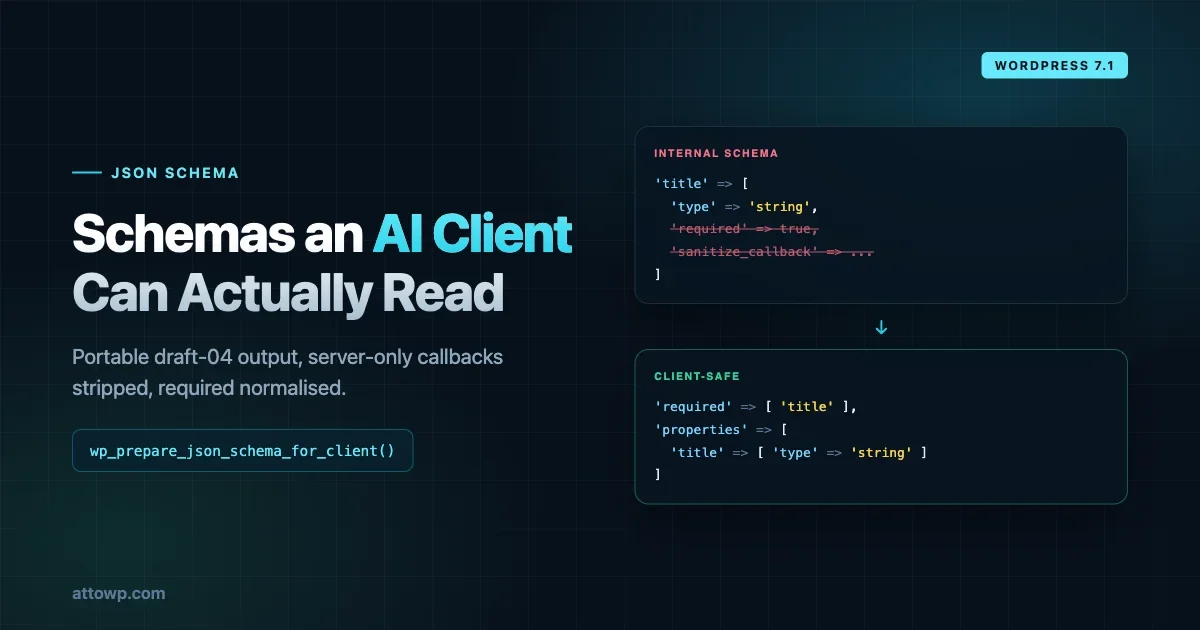
WordPress has always had schemas. Every REST route declares one, every ability declares two, and register_setting() has taken one for years. What it has not had is a way to give those schemas to anyone outside PHP without leaking things that should never leave the server.
WordPress 7.1 adds wppreparejsonschemafor_client(), and it solves a problem that has been quietly limiting every REST client, every headless front end and, increasingly, every AI agent pointed at a WordPress site.
The problem is not that WordPress schemas are bad. It is that they are not really JSON Schema.
What is actually wrong with an internal schema
Take a schema that looks completely ordinary:
$schema = array(
	'type'       => 'object',
	'properties' => array(
		'title'   => array(
			'type'              => 'string',
			'required'          => true,
			'sanitize_callback' => 'sanitize_text_field',
		),
		'content' => array(
			'type'              => 'string',
			'validate_callback' => 'is_string',
		),
	),
);
Every WordPress developer reads that and knows exactly what it means. A JSON Schema validator does not, and there are two separate reasons why.
required is in the wrong place. WordPress puts required => true on the property. JSON Schema draft-04 puts a required array on the parent object listing which property names are mandatory. A validator reading the WordPress form either ignores required entirely, or treats it as an unknown keyword. Either way, your mandatory field silently becomes optional.
sanitizecallback and validatecallback are PHP. They are strings naming server-side functions. Sending them to a browser or an AI agent is at best noise and at worst an information leak, because it tells a reader something about your internals they had no business knowing.
So the position before 7.1 was: expose the raw schema and accept validation errors plus leaked internals, or hand-write a second parallel schema for clients and keep the two in sync forever. Most projects picked the second and most of those drifted.
What the function does
wp_prepare_json_schema_for_client(
	array $schema,
	string $schema_profile = 'draft-04'
): array
Give it a schema, get back a portable one. Three transformations happen.
Required properties are normalised. Property-level required => true is lifted into a draft-04 required array on the parent:
// Before
'properties' => array(
	'title' => array(
		'type'     => 'string',
		'required' => true,
	),
)

// After
'required' => array( 'title' ),
Server-only keywords are stripped, recursively. sanitizecallback, validatecallback and arg_options are removed. The recursion matters and the list of places it descends into is worth knowing: properties, patternProperties, definitions, dependencies, items, additionalItems, additionalProperties, anyOf, oneOf, allOf and not.
That covers every structural position where a nested schema can hide. A callback buried three levels down inside a oneOf branch gets removed the same as one at the top.
Empty objects are represented correctly. This is the subtle one. PHP has a single array type, so array() serialises to [] in JSON regardless of whether you meant an empty list or an empty object. For a default on an object property, [] is wrong and will confuse a strict client:
// Before
array(
	'type'    => 'object',
	'default' => array(),
)

// After, in JSON output
{
	"type": "object",
	"default": {}
}
Anyone who has debugged a JavaScript client choking on a WordPress REST response has met this problem in some form.
Put together on the earlier example:
$prepared_schema = wp_prepare_json_schema_for_client( $schema );produces:
array(
	'type'       => 'object',
	'required'   => array( 'title' ),
	'properties' => array(
		'title'   => array(
			'type' => 'string',
		),
		'content' => array(
			'type' => 'string',
		),
	),
);
Valid draft-04, nothing server-side left in it, and no second schema to maintain.
Where to actually call it
The function transforms a schema; it does not decide when. Three places are worth wiring it in.
On a REST route's schema callback, if you expose one to clients that are not your own JS:
register_rest_route( 'my-plugin/v1', '/items', array(
	'methods'             => WP_REST_Server::CREATABLE,
	'callback'            => 'my_plugin_create_item',
	'permission_callback' => 'my_plugin_can_create',
	'args'                => my_plugin_item_args(),
) );

add_filter( 'rest_endpoints', function ( $endpoints ) {
	// Expose a client-safe copy alongside the internal definition.
	return $endpoints;
} );
On an ability's declared schema, where the consumer is an agent by design.
On anything you print into the page for a JS app. This is the one most likely to be leaking today. A settings screen that does wplocalizescript() with a schema is putting that schema into page source, callbacks included, readable by anyone who opens view-source. Preparing it first costs one function call.
The general test: if the schema crosses the PHP boundary, prepare it. If it stays server-side and feeds restvalidatevaluefromschema(), leave it exactly as it is - the callbacks are the point there, and stripping them would break validation.
That last distinction is worth being explicit about, because it is the mistake waiting to happen. wppreparejsonschemafor_client() produces an export format. It is not a cleanup pass to run over your schema definitions and store the result. Keep the internal schema as your source of truth and prepare a copy at the boundary, every time. Preparing once and caching the output as your only schema throws away the sanitize and validate callbacks that make server-side validation work.
The two profiles, and picking the right one
The second parameter is a profile, and the choice is more consequential than it looks.
draft-04 is the default. It preserves the broader JSON Schema vocabulary: $ref, definitions, allOf, not, dependencies, additionalItems. Use it for general clients, AI tools and REST integrations - anything that speaks JSON Schema properly and benefits from the full expressive range.
rest-api uses a narrower keyword set matching WordPress REST API conventions.
The distinction is about who is reading. WordPress's REST API has always used a restricted subset of JSON Schema, and clients built specifically against it expect that subset. Handing such a client a schema full of $ref and definitions may be technically valid and practically unusable.
An AI agent is the opposite case. It has no WordPress-specific expectations, it likely has a general JSON Schema implementation behind it, and richer structure gives it more to work with. $ref and definitions in particular let you express a shape once and reuse it, which produces a smaller, clearer schema for a model to reason about.
Rule of thumb: if the consumer knows it is talking to WordPress, rest-api. If it does not or should not care, draft-04.
Extending the allowlist
Keyword filtering is itself filterable, which matters if you use custom or vendor-prefixed keywords:
add_filter(
	'wp_json_schema_allowed_keywords',
	function ( $keywords, $schema_profile ) {
		if ( 'draft-04' === $schema_profile ) {
			$keywords[] = 'x-example-keyword';
		}
		return $keywords;
	},
	10,
	2
);
Note the profile is passed in, so you can allow a keyword for general clients and keep it out of REST responses.
Use this sparingly. The x- convention exists precisely so custom keywords are ignorable by validators that do not understand them, and a schema full of bespoke extensions is one that only your own client can fully consume - which defeats most of the reason for preparing it in the first place.
Why this lands now
This function did not appear in isolation. It shipped the same day as a batch of Abilities API improvements, and reading them together makes the direction obvious.
The execution lifecycle filters we covered last week gave you interception points around an ability call. 7.1 adds several more pieces, and they are all about the same thing: making WordPress legible and controllable when the caller is not your own code.
Validation beyond what a schema can express
Two new filters run supplementary validation after schema validation passes:
wpabilityvalidate_inputwpabilityvalidate_output
Both receive the same shape:
/**
 * @param true|WP_Error $is_valid Validation result.
 * @param mixed         $value    Input or output value.
 * @param string        $name     Ability name.
 */
A worked input example:
add_filter(
	'wp_ability_validate_input',
	function ( $is_valid, $input, $ability_name ) {
		if ( 'my-plugin/send-message' !== $ability_name ) {
			return $is_valid;
		}

		if ( is_wp_error( $is_valid ) ) {
			return $is_valid;
		}

		if (
			! is_array( $input )
			|| empty( $input['recipient'] )
			|| ! str_ends_with( $input['recipient'], '@example.com' )
		) {
			return new WP_Error(
				'invalid_recipient',
				__( 'The recipient must use the example.com domain.', 'my-plugin' )
			);
		}

		return true;
	},
	10,
	3
);
Two patterns in there are worth copying every time. Bail early if the ability name is not yours, because this filter fires for every ability on the site. And bail early if $isvalid is already a WPError, because you should not overwrite an earlier failure with your own.
Output validation works identically through wpabilityvalidateoutput, and is arguably more valuable. Schema validation tells you the return shape is right. It cannot tell you the operation actually did what it claimed. Checking that a send-message ability really produced a messageid catches the class of failure where something returns a well-formed object describing work it never did - which matters far more when an agent is chaining calls and will treat a valid-looking response as success.
Return true or a WPError. Returning false also fails, but produces a generic error message, so prefer WPError with a real code.
An action that fires for everything
wpabilityinvoked fires at the very beginning of WP_Ability::execute():
do_action( 'wp_ability_invoked', $this->name, $input, $this );The position is the whole point. It runs before input normalisation, validation, permission checks and short-circuit filters. It fires for invalid input, failed permissions, short-circuited execution, cached results and calls awaiting approval.
That makes it the audit hook. Every other interception point tells you about calls that got somewhere; this one tells you about every call that was attempted. If you want to know that something tried to invoke an ability it had no permission for, this is the only place you will see it.
add_action(
	'wp_ability_invoked',
	function ( $ability_name, $input, $ability ) {
		do_action(
			'my_plugin_record_ability_invocation',
			array(
				'ability'   => $ability_name,
				'timestamp' => time(),
			)
		);
	},
	10,
	3
);
One warning that deserves weight: the action receives raw, unnormalised input. Whatever the caller sent, unfiltered. If you log it, you are logging unvalidated user input, which is exactly how credentials and personal data end up in log files. Filter before you write. The example above deliberately records the ability name and a timestamp rather than the payload.
Also note wpbeforeexecuteability and wpafterexecuteability now receive the WP_Ability instance as a final argument, so those hooks can inspect the ability rather than only its name.
Typed input over REST
A quietly significant fix. GET and DELETE requests deliver query string values as strings, so an ability invoked over REST used to receive "10" where it declared an integer.
7.1 coerces input to the types declared in input_schema before execution:
GET /wp-json/wp-abilities/v1/abilities/my-plugin/list-items/run
    ?input[limit]=10&input[featured]=true&input[ids]=1,2,3
arrives as:
array(
	'limit'    => 10,
	'featured' => true,
	'ids'      => array( 1, 2, 3 ),
)
Coercion is implemented as the input argument's sanitize_callback, so both permission and execute callbacks see properly typed data. Importantly, coercion only happens when validation already accepts the input - invalid input reaches validation untouched and produces the same error as before, so nothing is masked by a helpful cast.
If you wrote defensive casting inside your ability callbacks because you could not trust REST input types, that code is now redundant. It is also harmless, so there is no urgency to remove it.
Richer core abilities
core/get-user-info gains five profile fields: firstname, lastname, nickname, description, user_url. It also supports selective retrieval:
$ability = wp_get_ability( 'core/get-user-info' );

$result = $ability->execute(
	array(
		'fields' => array( 'display_name', 'first_name', 'last_name' ),
	)
);
returning only what you asked for. Unknown field names are rejected by schema validation rather than silently ignored. roles is now normalised with array_values() so it always encodes as a JSON array rather than occasionally as an object - another small papercut that bites clients.
core/get-site-info, core/get-user-info and core/get-environment-info now follow uniform schema conventions, with every output property declaring a translatable Title Case title and a description.
That last detail sounds cosmetic and is not. Titles and descriptions on schema properties are how an agent knows what a field means. A property called user_url with no description is a guess; the same property with "The user's website address" is usable. Metadata is the interface when the consumer is a language model.
core/get-user-info is also now exposed over REST with a new public metadata flag, discoverable at /wp-json/wp-abilities/v1/abilities.
A note on the MCP adapter
If you have followed our WordPress MCP server tutorial, the significance of all this should be immediate.
MCP exposes tools to a model, and a tool is essentially a name, a description and an input schema. The quality of that schema is the entire interface. A model decides whether to call your tool, and what to pass it, by reading the schema and nothing else - there is no documentation page it consults and no colleague it asks.
Which means every problem described above was an MCP problem before it was a REST problem. A schema with property-level required tells a model a field is optional when it is mandatory, so the model omits it and the call fails. A schema carrying sanitizecallback: 'sanitizetext_field' gives a model a keyword it cannot interpret, and models are not reliably good at ignoring things they do not understand. A missing description leaves it guessing what a field is for.
wppreparejsonschemafor_client() with the draft-04 profile produces exactly what an MCP tool definition wants, and the uniform titles and descriptions now on core abilities are the same fix applied to core's own tools.
The practical upshot: if you are exposing abilities through an MCP adapter, schema quality is not polish. It is the difference between an agent that uses your plugin correctly and one that repeatedly calls it wrong and reports your software as broken.
What a plugin author should take from this
Three practical positions.
Prepare any schema you expose. If your plugin surfaces a schema anywhere a non-PHP consumer can reach it - a REST route, a JS-facing settings endpoint, an ability - run it through wppreparejsonschemafor_client(). It is one call, it removes a class of leak, and it stops you maintaining a parallel client schema.
Write descriptions as though a model is reading them. Because one probably is. Every title and description on a schema property is context an agent uses to decide whether an ability is the right tool. Terse or missing descriptions produce agents that pick the wrong ability and fail in ways that look like your bug.
Validate output, not just input. Input validation protects your code from callers. Output validation protects callers from your code, and that matters more when the caller is an autonomous agent that cannot sanity-check a plausible-looking result the way a human reviewing a UI would.
Testing that your prepared schema is actually valid
Do not assume. The transformation is mechanical, but your input schema might contain something you forgot about, and the failure is silent - you get a schema back, it just is not the one you expected.
The cheap check is a round-trip comparison during development:
add_action( 'admin_notices', function () {
	if ( ! current_user_can( 'manage_options' ) || ! isset( $_GET['schema_audit'] ) ) {
		return;
	}

	$internal = my_plugin_item_schema();
	$prepared = wp_prepare_json_schema_for_client( $internal );

	echo '<div class="notice notice-info"><pre>';
	echo esc_html( wp_json_encode( $prepared, JSON_PRETTY_PRINT ) );
	echo '</pre></div>';
} );
Look for three things in the output. Every required should be an array on a parent object, never a boolean on a property. No key anywhere should contain the string callback. And any object-typed default should render as {}, not [].
If your schema uses $ref and definitions, check they survived - they do under draft-04 and are narrowed under rest-api, so a $ref pointing at a definition that got stripped produces a schema that validates as well-formed and resolves to nothing.
For anything you are shipping to an agent, it is worth pasting the prepared output into a JSON Schema validator once. Two minutes, and it catches the case where the schema was subtly wrong before preparation and is now subtly wrong in portable form.
The bigger shape
Look at what 7.1 adds around abilities as a set: portable schemas, supplementary input and output validation, an audit hook covering every attempt, typed REST input, and richer descriptive metadata on core abilities.
That is not a feature list. It is the checklist you would write if you were making an API safe to hand to an untrusted, autonomous caller. Every item is either about describing capability accurately, verifying what goes in and out, or recording what happened.
WordPress is being fitted out as something an agent can drive. Whether or not you are building AI features, that shift changes what "good plugin API design" means. Schemas stop being documentation and become the interface. Descriptions stop being nice-to-have and become functional. And output validation stops being paranoia and starts being the only thing standing between a confident wrong answer and a user acting on it.
7.1 ships 19 August. None of this is production-usable yet, but the schema preparation function is the piece worth planning for now - it is small, it is mechanical, and it removes maintenance rather than adding it.
The migration, if you have a parallel client schema today, is genuinely satisfying: delete the duplicate, call the function on the real one, and the drift problem disappears along with the file. That is a rarer outcome than it sounds. Most API improvements ask you to adopt something new; this one lets you remove something you only ever maintained because the platform gave you no alternative.
If you take one thing away, make it this. Stop thinking of a schema as documentation that happens to be machine-readable, and start thinking of it as the contract your software is judged on by callers that cannot ask you a question. Under that framing, an accurate required array, a stripped callback and a well-written description are not tidiness. They are the product.
No comments yet