A block renders correctly in the editor. On the front end, one attribute is missing. In the WordPress REST API response, a whole element is gone. Three different versions of the same post, and nothing in your error log has anything to say about it.
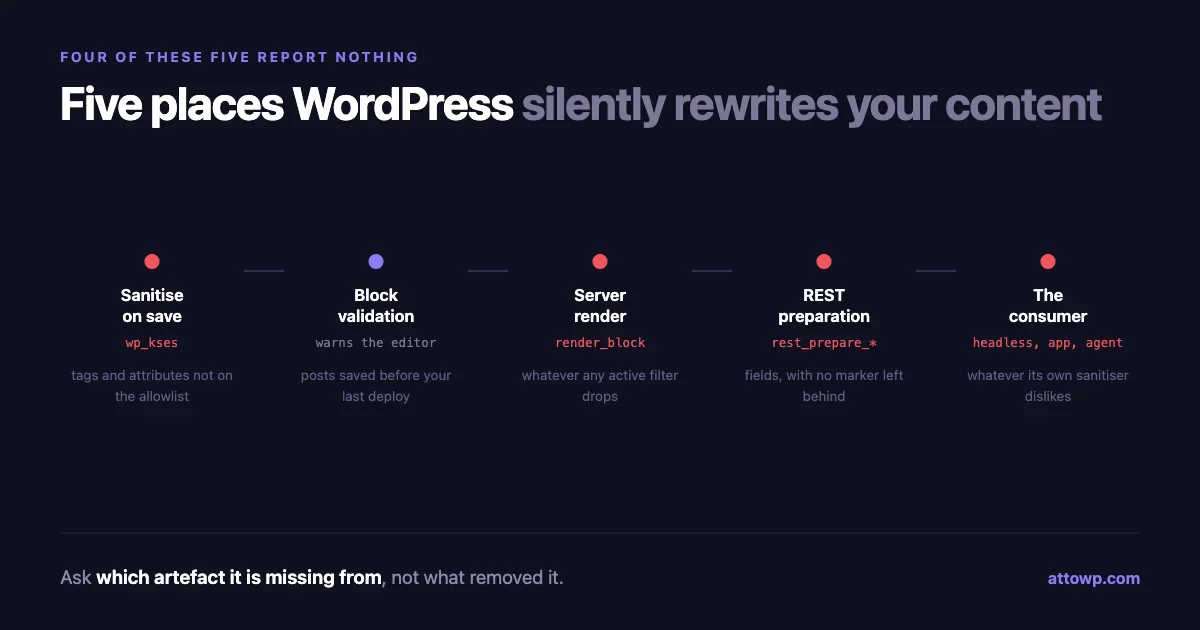
WordPress rewrites content between where you save it and where anyone reads it, at five distinct boundaries. Four of them fail silently by design: they remove something, return the shortened result, and carry on. No exception, no notice, no log entry. The content just quietly becomes a different shape than the one you wrote.
This is a map of those five boundaries, what each one eats, and a diff harness that tells you which one is responsible in about a minute rather than an afternoon.
The five boundaries
In order, from the moment a post is saved to the moment something reads it:
- Sanitisation on save.
wp_ksesand its relatives strip tags and attributes that are not on an allowlist. - Block validation on load. The editor re-parses saved markup against what the block's
savefunction would produce now, and rejects mismatches. - Server-side render.
render_blockand the block's own render callback build the front-end HTML, which for dynamic blocks has no necessary relationship to what was saved. - REST preparation.
rest_prepare_*filters and field registration decide what an API consumer receives, which is a third artefact again. - The consumer. A headless frontend, a mobile app, or increasingly an AI agent, each applying its own sanitisation to whatever it got.
Content that survives all five unchanged is the exception rather than the rule. Most of the time the changes are ones you wanted. The problem is that when they are not, nothing distinguishes the two cases.
Boundary one: sanitisation that reports nothing
The behaviour that catches the most people is the simplest. wp_kses takes content and an allowlist, and returns the content with everything not on the list removed. It does not tell you what it removed. It does not return a count. There is no second return value, no exception, no hook that fires on rejection.
$allowed = [ 'a' => [ 'href' => [] ] ];
$clean   = wp_kses( '<a href="/x" target="_blank" rel="noopener">go</a>', $allowed );
// '<a href="/x">go</a>' - target and rel are gone, silently
That is correct behaviour. An allowlist that warned about everything it excluded would be unusable. But it means a forgotten attribute in your allowlist presents identically to a design decision, and the symptom appears far away from the cause: a link that does not open in a new tab, an SVG missing its viewBox, a data- attribute your JavaScript depends on that is simply not in the DOM.
The practical rule is that any allowlist you write is a contract you are obliged to keep current. When you add an attribute to a block's markup, the allowlist that governs it is a second place you must change, and nothing will remind you. Our work on the Icons API ran into exactly this with SVG attributes, which are numerous, easy to under-specify, and produce a graphic that renders as nothing at all when one is missing.
If you want to see what a boundary is removing, compare rather than inspect:
$before = $content;
$after  = wp_kses( $content, $allowed );

if ( $before !== $after ) {
    error_log( sprintf(
        'kses changed content: %d chars in, %d out',
        strlen( $before ),
        strlen( $after )
    ) );
}
Crude, and enormously faster than guessing.
The boundary before the boundaries
There is a sixth transformation that happens before anything reaches the server, and it is worth knowing because it produces the most confusing bug reports.
When someone pastes HTML into the editor, the block editor does not store it verbatim. It runs the markup through its raw handler, which tries to match the content against registered block transforms and converts what it can into blocks. Anything it cannot map is either flattened into a paragraph or dropped.
So a client pastes a table from a document, the table arrives as a sequence of paragraphs, and by the time anyone looks at the database the original structure never existed. No server-side boundary is responsible, and no amount of adjusting an allowlist will help, because the content was reshaped in the browser before the save request was made.
The tell is that the content is wrong in the editor immediately after pasting, rather than becoming wrong later. If a report includes "it changed as soon as I pasted it," stop looking at the server.
Boundary two: block validation, the loud one
Block validation is the exception in this list, because it does tell you. It just tells the wrong person.
Static blocks store their markup in the post content between HTML comments. When the editor loads a post, it runs each block's save function against the stored attributes and compares the result to what is actually in the content. A mismatch produces the "this block contains unexpected or invalid content" warning.
That warning goes to whoever opens the editor, which is usually a content editor rather than the developer who caused it. The cause is almost always a deploy: you changed a block's save output, and every post saved with the previous version now disagrees with the new function.
The thing worth internalising is that this is a content problem created by a code change, and it is retroactive. It affects posts you are not thinking about, written before the change, which is why it tends to surface weeks later from someone in the editorial team.
Two defences. Use a deprecation entry when you change a block's save output, so the old shape stays recognised. And prefer dynamic rendering for anything whose markup is likely to change, because a dynamic block stores attributes rather than markup, and attributes do not go stale the way markup does.
Boundary three: the front end is not the saved content
For dynamic blocks, what visitors see is generated at request time by a render callback, and the saved content is only the input. Add render_block filters, which run over every block's output, and the front-end HTML can differ from the saved HTML in ways no amount of staring at the post content will explain.
This is the boundary where "it looks right in the editor" and "it is wrong on the site" both hold, and both are true reports about different artefacts.
add_filter( 'render_block', function ( $html, $block ) {
    // Every block on every page passes through here.
    return $html;
}, 10, 2 );
A filter registered like that by any active plugin is invisible from the post editor and invisible from the database. When front-end output is wrong and saved content is right, the first thing to enumerate is what is attached to this hook, not what is in the post.
Boundary four: the WordPress REST API returns a third artefact
An API consumer does not receive the saved content and does not receive the rendered front-end HTML. It receives whatever rest_prepare_{post_type} and the registered fields hand over, and that is a separately shaped thing.
Two details cause most of the confusion.
The content.rendered field applies the_content, which means shortcodes are expanded, embeds are processed, and filters attached by plugins have run. So a headless frontend gets output that already assumes a WordPress front end existed, including markup and sometimes assets that its own renderer has no idea about.
Meanwhile, rest_prepare_* filters can remove fields entirely, and a field that is not there is indistinguishable from a field that was never set. There is no marker for "this was removed on purpose."
Authentication changes the answer too. Some fields are only present for authenticated requests, so a consumer that works in your testing and fails in production may simply be unauthenticated, receiving a legitimately shorter response. We covered which mechanism to use where in REST API authentication methods compared, and the practical shortcut is that when a field is mysteriously absent, compare an authenticated request against an anonymous one before anything else.
Boundary five: whoever is actually reading
The last boundary is outside WordPress, and it is the one growing fastest.
A headless frontend receives HTML from the API and almost always sanitises it again before rendering, because injecting arbitrary HTML into a React or Vue tree without a filter is a vulnerability. That framework-side sanitiser has its own allowlist, written by someone who has never seen your block markup. It is boundary one all over again, in a different language, with a different list, maintained by a different team.
And there is now a further consumer: AI agents and retrieval systems reading your content through the REST API or the rendered page. They see whatever survived every boundary above. If a table lost its structure at boundary one, or an element vanished at boundary four, that is the version being summarised and quoted, and unlike a human reader nothing about the loss looks odd to them.
We wrote about this shift in webMCP, when your website's next visitor is an AI agent. The point relevant here is narrower: your REST output stopped being an internal implementation detail some time ago. It is now a published surface that things you will never meet are reading, and silent stripping in it is a correctness problem rather than a cosmetic one.
Why the silence is not going to change
It is reasonable to ask why WordPress does not simply report what these boundaries remove, and the answer is worth understanding because it tells you where to put your own instrumentation.
Sanitisation runs on every save, on every field, on content that legitimately contains markup the allowlist does not cover. A site with an active comment section would generate thousands of warnings a day about content that was handled exactly as intended. The signal-to-noise ratio would be so poor that the warnings would be switched off within a week, which is worse than not having them.
Block validation is the one place that does warn, and it is instructive that it is also the one most often described as annoying. The warning is correct, actionable, and shown to a person who cannot act on it, which is roughly what a universal sanitisation warning would look like at ten times the volume.
There is also a security argument. A sanitiser that reports precisely what it rejected is a sanitiser that tells an attacker exactly where the allowlist boundary sits, one probe at a time. Silence at that boundary is deliberate.
Which leaves the instrumentation to you, and points at where it belongs: not at the sanitiser, which is right to say nothing, but at your own code around it. The comparison pattern earlier in this article is the shape of it. Capture before, capture after, and log only when they differ, in development only. That produces signal proportional to your own changes rather than to your traffic.
The diff harness
Here is the part worth keeping. Rather than reasoning about which boundary is responsible, capture all three artefacts for one post and compare them. WP-CLI makes this quick.
The raw saved content, straight from the database with no filters:
wp post get 123 --field=content > /tmp/1-saved.htmlThe front-end rendered output for the same post:
wp eval '
$p = get_post( 123 );
echo apply_filters( "the_content", $p->post_content );
' > /tmp/2-rendered.html
And the REST representation, both authenticated and not:
curl -s "https://example.com/wp-json/wp/v2/posts/123" \
  | python3 -c 'import sys,json; print(json.load(sys.stdin)["content"]["rendered"])' \
  > /tmp/3-rest.html
Then diff them in sequence. The first diff that shows your missing element tells you the boundary:
diff /tmp/1-saved.html /tmp/2-rendered.html
diff /tmp/2-rendered.html /tmp/3-rest.html
Read the result like this. If the element is missing from 1-saved.html, it never made it past sanitisation on save, so the problem is an allowlist. If it is in the saved file but not the rendered one, something on render_block or the_content removed it. If it is in the rendered file but not the REST one, look at rest_prepare_* and at whether your request was authenticated. And if it is present in all three but still absent in your frontend, the boundary is your own framework's sanitiser, not WordPress at all.
Four commands, and the question changes from "why is this missing" to "which of four specific places to look." That is the whole value of the exercise.
A worked case
Here is the harness applied to a real shape of bug, because the sequence matters more than the individual commands.
The report: a custom icon block renders correctly in the editor, shows an empty space on the front end, and the headless app shows nothing at all. Three surfaces, three different outcomes, which already tells you more than one boundary is involved.
Capture all three artefacts for the affected post using the commands above. Search each for the element in question, which here is an <svg>.
First diff, saved against rendered. The SVG is present in both. So it survived sanitisation on save, and nothing on render_block removed it. Two boundaries eliminated in one command.
Look at the saved markup more closely. The <svg> element is there, but it has no viewBox attribute. It has width and height, so it occupies space, which is why the front end shows an empty box rather than nothing. That is boundary one after all, but partially: the element passed the allowlist and one of its attributes did not.
This is the failure mode worth naming, because it is the one people misdiagnose most often. An allowlist does not reject an element with a disallowed attribute. It keeps the element and drops the attribute. The result is markup that is structurally intact and functionally broken, which looks nothing like sanitisation and everything like a rendering bug.
Second diff, rendered against REST. The SVG is absent from the REST response entirely. A different boundary, a different cause: the headless app receives content that has been through one more filter than the front end did.
Two distinct bugs, then, presenting as one report, and neither would have been found by reading the block's code. The fix for the first is one entry in an allowlist. The fix for the second is at boundary four. Applying either one alone would have produced a partial fix and a reopened ticket.
The general lesson: when a symptom differs across surfaces, expect more than one boundary to be involved, and resist fixing the first one you find until you have checked the others.
Making the invisible boundaries visible
One step further, for a site where this keeps happening. Each boundary can be instrumented in development, and the instrumentation is small.
To see what is attached to the render pipeline:
wp eval '
global $wp_filter;
foreach ( ["render_block", "the_content", "rest_prepare_post"] as $h ) {
  if ( empty( $wp_filter[ $h ] ) ) { continue; }
  echo "== $h", PHP_EOL;
  foreach ( $wp_filter[ $h ]->callbacks as $prio => $cbs ) {
    foreach ( $cbs as $id => $cb ) { echo "  $prio  $id", PHP_EOL; }
  }
}'
That output is the list of everything with the opportunity to change your content, in the order it gets the chance. On a site with twenty plugins it is longer than people expect, and it is frequently the fastest path to the answer, because the culprit is usually recognisable by name.
Worth pairing with a rule: when content is wrong, identify the boundary before writing any fix. A fix applied at the wrong boundary is how a missing attribute gets re-added at render time by a filter, papering over an allowlist that is still wrong, which then bites again the next time the same content reaches a different consumer.
Designing so fewer boundaries can bite
Debugging is the fallback. The better position is content that has less to lose at each boundary in the first place.
Store attributes, not markup. A block that saves { "iconName": "star", "size": 24 } and renders server-side has almost nothing for a sanitiser to strip and nothing to go stale against a future save function. A block that saves a full SVG string carries every attribute through every boundary and has to survive all of them. The more of your block's meaning lives in attributes, the fewer boundaries can damage it.
Register REST fields explicitly. Relying on content.rendered means your API consumers receive whatever the front-end filter chain produced, including markup from plugins that have nothing to do with your data. Registering a field gives the consumer the structured value directly, and it is not subject to the same filters:
register_rest_field( 'post', 'acme_icon', [
    'get_callback' => function ( $post ) {
        return get_post_meta( $post['id'], '_acme_icon', true );
    },
    'schema' => [ 'type' => 'string' ],
] );
A headless frontend consuming acme_icon and rendering its own SVG is immune to every boundary in this article, because the value never travelled as markup.
Deprecate rather than change. When a block's saved output has to change, add a deprecation for the previous shape. It costs a few lines and prevents the retroactive invalidation described at boundary two.
Keep allowlists next to the markup they govern. If the allowlist for a block lives in a shared sanitisation file three directories away, it will drift. Defining it in the same file as the block that needs it makes the two change together, which is the only reliable way to keep a contract current.
Test the REST output, not just the render. Most block test suites assert on rendered HTML. A test that asserts on the REST representation catches boundary four, which is the boundary that breaks headless consumers and never breaks the site you are looking at.
What to take from this
Silent transformation is not a bug in WordPress. An allowlist that threw on unexpected input would break the web, and validation that refused to render would make the editor unusable. The quiet is the correct engineering decision at every one of these boundaries.
What it costs you is a debugging model. Without one, missing content is a mystery you solve by trial. With one, it is a four-line diff and a known boundary.
So the thing worth keeping from all of this is not the list of five. It is the instinct that when content is missing, the first question is not what removed it but which artefact is it missing from, because the second question has a command that answers it and the first one does not.
No comments yet