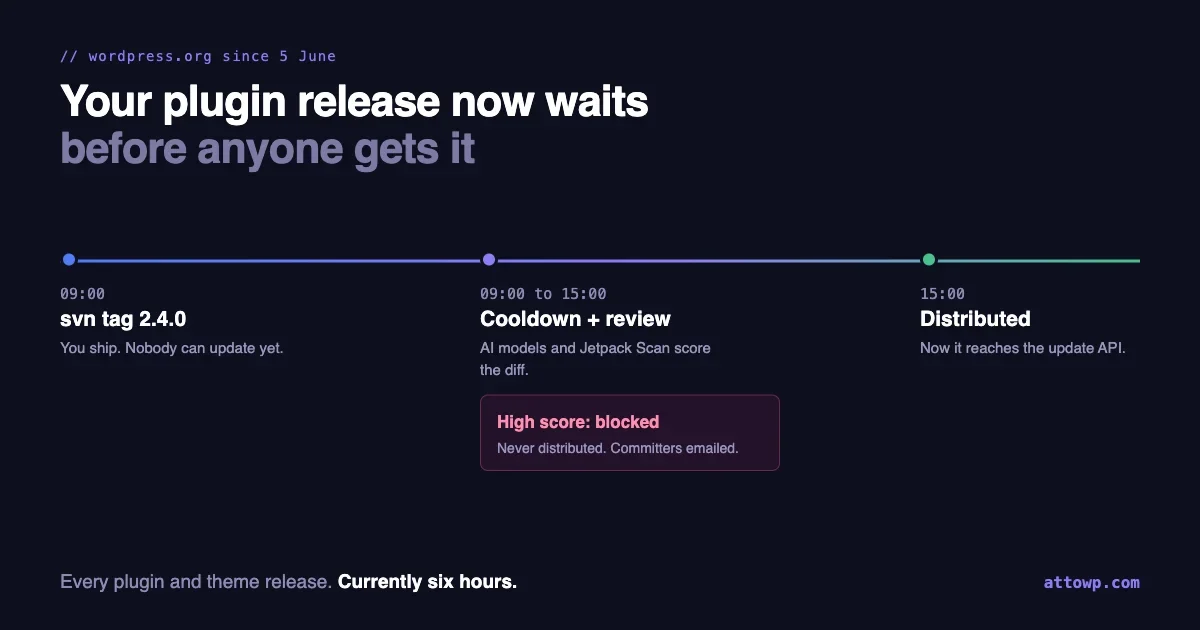
Tag a plugin release on WordPress.org today and nobody gets it for six hours.
Not the dashboard’s one-click update, not the automatic update, not WP-CLI. The release sits in a queue while it is analysed for security problems, and if it scores as high risk it never goes out at all.
This has been live since 5 June. The Plugins Team explained it publicly in a post on 9 September, three months in, which means a lot of authors have been living with a six-hour delay they did not know existed and could not explain.
Here is what the review actually does, the incident that justified it, and the changes it forces on how you release, announce and hotfix.
What happens between your tag and your users
The mechanics, as the Plugins Team describes them:
- Every plugin and theme release goes through a cooldown before it is distributed through the WordPress.org update API. Themes are included, which most coverage of this has missed.
- The cooldown applies to one-click updates from the dashboard as well, so there is no route that skips it.
- The cooldown is currently 6 hours. “Currently” is their word, so do not hard-code six into anything.
- During the cooldown, the changes in the release are analysed by several AI models together with Jetpack Scan. The results are cross-checked and combined into findings with a security score.
- Releases with a high score are blocked automatically as soon as the review finishes, and every committer on the plugin gets an email with the findings.
- Releases below the threshold continue as normal. Emails are only sent when a release is blocked, so silence means you passed.
One line from the announcement is worth pinning to the wall: “The score measures risk, not intent.” An accidental vulnerability can score as high as deliberate malware. A block is not an accusation, and the team says as much.
Why it exists: 28 July
On 28 July a backdoor was committed to a release of a plugin with around 20,000 active installations. The automated review had already been running quietly, and it caught it: the release was given a high security score, and because it was still inside the cooldown window, the compromised version was never distributed through the update API.
The plugin was closed for downloads 26 minutes after the Plugins Team was notified by Wordfence.
That is a good outcome, and the team was candid about what it also exposed. Stopping the release depended on a person from the Plugins Team being available to act on the score. The piece launched in September removes that dependency: a high score now stops distribution by itself.
We covered the attack side of that incident on tweakswp in The Backdoor Came Through the Plugin Repo, Not Around It, and the uncomfortable timeline for sites relying on free firewall rules in Your WAF Protected Paying Customers on 28 July. This post is about the other side: what the fix means if you are the one shipping releases.
What one release actually looks like now
It helps to see the whole path from a tag to a site, because the cooldown is only one of the waits involved.
09:00  You tag 2.4.0 in SVN and update Stable tag
09:00  Cooldown starts. The release is analysed.
15:00  Cooldown ends (at the current 6 hours). If it scored below
       the threshold, the update API starts offering 2.4.0.
15:00  A site owner who clicks "check again" in the dashboard can
       now update.
15:00  Sites with auto-updates enabled get it the next time their
       own update check runs, which is scheduled twice a day.
~03:00 Most auto-updating sites have picked it up.
That last step is not new, and it is easy to forget. WordPress core schedules its plugin update check with wp_schedule_event( time(), 'twicedaily', 'wp_update_plugins' ), so an auto-updating site can take up to about twelve hours after distribution to notice a release, and longer on a low-traffic site where WP-Cron only runs when someone visits.
Add the cooldown to that and the realistic answer to “when will my users have the fix” is somewhere between six and eighteen hours after you tag, for a release that passes review first time. For a security fix, that range is the number to plan around.
What changes for plugin authors
1. Announcing on tag day is now announcing too early
The habit most authors have is: tag in SVN, publish the changelog, post on social, done. Each of those used to happen within minutes of users being able to update.
Now there is a window of at least six hours where your release notes say 2.4.0 is out, a user reads them, clicks update in their dashboard, and is offered nothing. Some of them will open a support thread. A few will assume the release was pulled.
We are adjusting to this ourselves. Our habit has been to publish release announcements immediately, and for anything distributed through the directory, “immediately” now has to mean “after the cooldown”, not “after the tag”.
2. Your security fix now has a floor on how fast it can ship
This is the change with real consequences. The time between a vulnerability being fixed and that fix reaching sites used to be close to however fast you could commit and tag. It now includes the cooldown, every time.
That matters most for coordinated disclosure. If you agree a publication date with a researcher or a security vendor, the fix needs to be distributed before details go public, not merely tagged. Build six hours, plus margin for a review that takes longer than usual, into that agreement.
The review is the right trade. A malicious release reaching 20,000 sites is worse than a legitimate fix reaching them six hours later. But it is a trade, and it belongs in your incident plan rather than being discovered during an incident.
3. A hotfix to your hotfix waits again
Every release goes through the cooldown. So if you ship 2.4.0, find a fatal an hour later, and tag 2.4.1, then 2.4.1 also waits its full cooldown.
There is no expedited lane described in the announcement. The practical consequence is that the old “ship fast, patch faster” rhythm costs more than it used to, and a staging test before the tag is worth proportionally more.
4. Your support team needs a sentence ready
For the first hours after a release, “I don’t see the update” is expected behaviour, not a bug. Give whoever answers support a standard reply that says so, so nobody spends an hour debugging a caching problem that does not exist.
Confirm a release is actually being served
The reliable signal is not your SVN tag, and not the plugin page. It is a real WordPress site, running the previous version, asking the update API what is available.
Keep a small canary install for each plugin you publish, pinned to the release before the one you are shipping. Then check it from WP-CLI:
wp plugin list --name=your-plugin --fields=name,version,update,update_versionWhile the release is in cooldown, update reports none. When it is being distributed, it reports available with the new version in update_version. WordPress caches update checks, so force a fresh one first:
wp transient delete update_plugins --network 2>/dev/null || wp transient delete update_plugins
wp plugin list --name=your-plugin --fields=name,version,update,update_version
That is small enough to automate, so the announcement goes out on evidence rather than on a timer:
#!/usr/bin/env bash
# Wait until the canary site is offered the new version, then announce.
SLUG="your-plugin"
TARGET="2.4.0"

until wp plugin list --name="$SLUG" --field=update_version 2>/dev/null | grep -qx "$TARGET"; do
  wp transient delete update_plugins >/dev/null 2>&1
  echo "$(date '+%H:%M') $SLUG $TARGET not distributed yet"
  sleep 900
done

echo "$SLUG $TARGET is being served. Safe to announce."
# publish release notes, notify customers, post on social here
If six hours pass and the canary still sees nothing, check the inbox of every committer on the plugin before you check anything else. A blocked release produces an email, and it is the only thing that does.
If your release is blocked
The announcement is direct about what is fastest:
- Read the findings in the email. They describe what triggered the block.
- Fix the issue and publish a new release.
- If the new release scores below the threshold, it continues through the normal cooldown.
You can contact the Plugins Team if a finding looks wrong, and they say plainly that publishing a fixed release is almost always faster than waiting for a manual review of an appeal. Treat the appeal route as the exception.
Two practical notes on “publish a new release”. Bump the version number rather than trying to re-tag the same one, so there is no ambiguity about which build was reviewed. And update Stable tag in readme.txt to match, since that is what tells the directory which tag is current:
=== Your Plugin ===
Stable tag: 2.4.1
Then remember point 3 above: the fixed release waits its own cooldown.
Keep your release diff easy to trust
The review looks at the changes in each release. The announcement does not publish the checks it runs, and I would not guess at them. But it is fair to say that a diff which is easy for a human to trust is also a diff that is less likely to need explaining, and that is fully in your control.
Start by looking at your release the way the review does, as a set of changes between two tags:
svn diff --summarize \
  https://plugins.svn.wordpress.org/your-plugin/tags/2.3.0 \
  https://plugins.svn.wordpress.org/your-plugin/tags/2.4.0
Read that list before you tag, not after. Files you did not expect to change are the first thing worth explaining to yourself. A build step that pulled in a different vendor directory, a stray debug file, or a minified bundle that doubled in size all show up here.
Then scan the added code for the patterns any security reviewer, human or automated, reads twice:
svn diff \
  https://plugins.svn.wordpress.org/your-plugin/tags/2.3.0 \
  https://plugins.svn.wordpress.org/your-plugin/tags/2.4.0 \
  | grep -E '^\+' \
  | grep -nE 'eval\(|base64_decode\(|gzinflate\(|str_rot13\(|assert\(|create_function|file_get_contents\(.https?://|wp_remote_get\(.*\$_(GET|POST|REQUEST)'
Some of those have legitimate uses. The point is not that any match is wrong, it is that each match should be something you can explain in one sentence. If you cannot, find out why it is in your release before a scoring system asks the same question.
Three habits make your diffs consistently easier to review:
- Do not ship obfuscated or minified PHP. There is no performance reason for it, and it makes every review of your code harder.
- Keep generated files out of unrelated releases. A dependency bump and a feature change in one release produce a diff too large for anyone to reason about.
- Review lockfile changes like code. A compromised dependency arrives as a lockfile change, and it ships to users the same way your own code does.
git diff v2.3.0 v2.4.0 --stat -- composer.lock package-lock.json
git diff v2.3.0 v2.4.0 -- composer.lock | grep -E '^\+.*"(name|version)"'
Your account is the thing to protect now
The review is a check on code. What lets code into a release is an account with commit access, and that is where attention should move.
Open your plugin’s admin area on WordPress.org and look at the list of committers. Then ask of every name on it:
- Does this person still work on the plugin?
- Does this person still need to be able to publish, or only to contribute through pull requests?
- Would anyone notice if this account started committing?
Former contributors with commit access are the easiest thing on this list to fix and the easiest to forget. Remove anyone who no longer needs it. Use unique, stored passwords for every account that can publish. Turn on two-factor authentication on your WordPress.org account if you have not already.
If you deploy from CI, the credential stored in your pipeline is also an account with commit access, and it is usually the one nobody reviews. Scope it to the one plugin, store it as a protected secret, and rotate it when someone with access to the repository settings leaves.
Wiring it into a deploy pipeline
Many authors deploy with a GitHub Action that pushes a tagged release into SVN, such as 10up’s widely used deploy action. The cooldown does not change that step. It changes what should come after it.
A pipeline that finishes on “committed to SVN” is now finishing six hours before the job it represents is done. Split it into two stages:
# Stage 1: on tag
#   - run tests
#   - svn diff --summarize against the previous tag, fail on unexpected paths
#   - deploy to SVN
#
# Stage 2: scheduled every 15 minutes for 24 hours after a deploy
#   - check the canary site for update_version == tag
#   - on success: publish release notes, notify customers
#   - after 12 hours with no success: alert every committer to check email
Stage one is also the right home for the checks that make a release easier to trust in the first place. If your plugin already builds with the newer WordPress tooling, our walkthrough of @wordpress/build covers producing a clean, reproducible build directory, which is exactly what keeps an SVN diff small and explainable. And running WordPress Coding Standards with its security sniffs before the tag, as we described in our WPCS MCP server post, catches unescaped output and unchecked input in your own pipeline, long before any score is assigned to your release by someone else’s.
The alert in stage two is the important part. A blocked release sends one email to each committer, and if that mail lands in a filter, nothing else tells you. A pipeline that notices a release has not appeared is a second, independent signal that something happened.
Theme authors: the same wait, the same check
The announcement covers plugin and theme releases alike, and almost everything above applies to themes unchanged. The canary check works the same way with the theme command:
wp transient delete update_themes
wp theme list --name=your-theme --fields=name,version,update,update_version
Themes have one extra reason to care about timing. A theme update changes what every visitor sees, not only what administrators see, so a release that looks broken in the hours after it is distributed is visible to a much larger audience. Test the release on a staging copy with real content before tagging, and keep the canary pinned to the previous version so you can compare the two side by side.
What agencies and site owners should take from this
If you look after sites rather than build plugins, the review changes one decision in your favour: automatic updates for directory plugins are safer than they were before June.
Each release reaching your sites through the directory has now been through an automated security review before it could be distributed. That is not a guarantee, and the team is clear it is not, but it shifts the balance for anyone who switched off plugin auto-updates out of worry that a compromised release would install itself overnight. The 28 July release is exactly that scenario, and it never reached a single site.
What it does not change is the case for staggering. A release can be secure and still break your particular site. Letting a handful of sites take a release first, and the rest a day later, still catches the compatibility failures a security review was never designed to look for.
And audit where your plugins actually come from. The review protects what comes from the directory. Everything else on a site is protected by whatever its own vendor does, which is worth knowing plugin by plugin.
What the review does not cover
Knowing the boundary matters as much as knowing the feature.
It covers releases distributed through WordPress.org. Premium plugins and themes that update from a vendor’s own server do not pass through it. Neither does anything installed from a zip.
That includes our own work. BuddyNext and Learnomy are distributed from our own infrastructure rather than the directory, so this review does not touch them. If you run premium plugins from any vendor, including us, it is a fair question to ask what stands between a commit and your site. The WordPress.org answer, as of this month, is a six-hour review with an automatic block. Every other distribution channel has to give its own.
It also connects to a problem we wrote about for site owners on wppioneer: a plugin that will not update is often one installed from a source that has no review at all.
It is not zero false positives. The team says cross-checking keeps false positives low, “but not zero”, and explicitly asks authors to report them. If a release of yours is blocked for something you can show is benign, that feedback improves the system for everyone.
It does not replace your own review. It is a last check before distribution, run by people who do not know your codebase. Treat it as the thing that catches what slipped past you, not as the reason you can skip looking.
Release checklist, revised
If you only change three things this week, make them these: stop announcing on the tag, add a canary site that tells you when a release is really out, and prune the committer list. The rest of the list below builds on those, and most of it is work you were already doing, now in an order that matches how releases actually reach sites.
- Test on staging before tagging. Hotfixes are slower than they used to be.
svn diff --summarizeagainst the previous tag. Explain every path.- Scan added lines for code you would read twice. Explain every match.
- Review lockfile changes like code.
- Tag, and update
Stable tag. - Wait for the canary site to be offered the version. Do not announce on a timer.
- No update after twelve hours: every committer checks their inbox.
- Security fix: agree disclosure dates that allow for the cooldown.
- Quarterly: prune the committer list and rotate CI credentials.
None of this is extra work so much as work in a different order. The release is not finished when you tag it any more. It is finished when WordPress.org has decided it is safe to hand to other people’s sites, and after 28 July, that seems like the right place for the finish line to be.

No comments yet