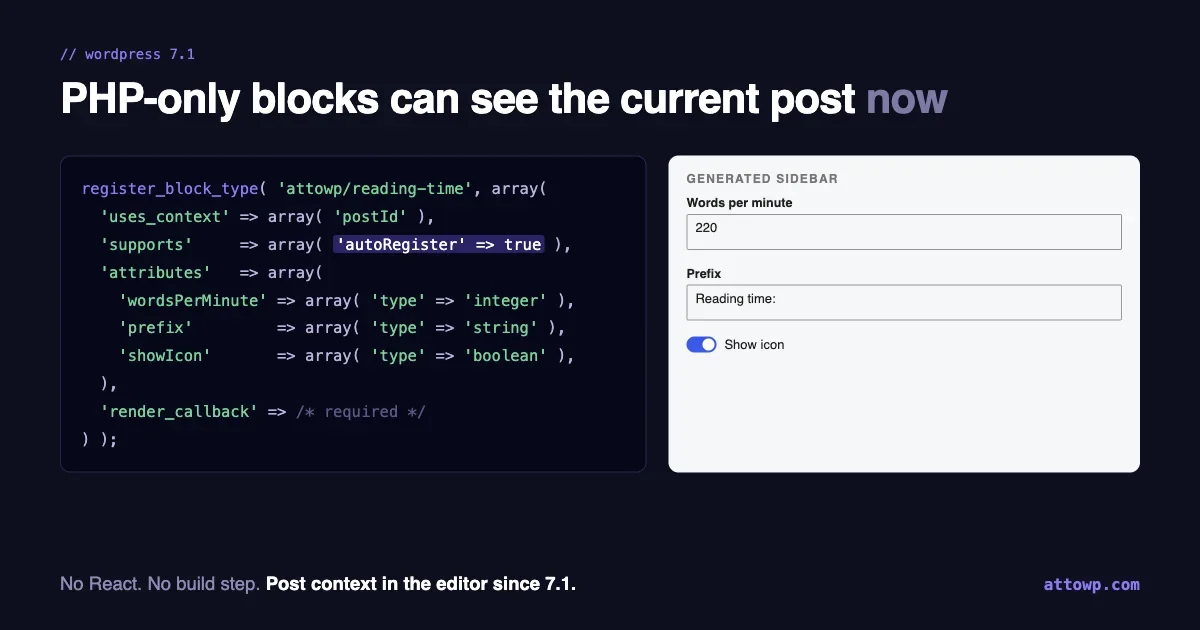
WordPress 7.0 shipped a way to build a block with no React, no block.json build step and no npm: register it in PHP, add one support flag, and the editor generates the rest.
The write-ups that followed were fair about the catch. The biggest one: in the editor, a PHP-only block did not know which post it was on. Anything that read post meta, the post title or the current post ID rendered one way on the front end and another way in the editor.
That limitation is gone in WordPress 7.1. It is not in any release notes you are likely to have read, and a lot of advice written in August is now out of date because of it.
This post covers what changed, the exact rules core applies when it builds a PHP-only block (read from the 7.1 source rather than from documentation), the failure modes that produce no error at all, and a straight answer to when you should still reach for React.
What changed between 7.0 and 7.1
When a PHP-only block renders in the editor, it does not run in the browser. The editor calls the block renderer REST endpoint, /wp/v2/block-renderer/<name>, and displays the HTML that comes back.
That endpoint has always accepted a post_id. In WP_REST_Block_Renderer_Controller::get_item():
$post_id = isset( $request['post_id'] ) ? (int) $request['post_id'] : 0;

if ( $post_id > 0 ) {
    $post = get_post( $post_id );

    // Set up postdata since this will be needed if post_id was set.
    setup_postdata( $post );
}
The problem was on the other side. In 7.0, the editor code that auto-registers PHP-only blocks did not send it. Gutenberg pull request #78909, “PHP-Only blocks: forward current post ID to server render”, fixed that in Gutenberg 23.6. The auto-registered edit component now does this:
// Always pass the postId context so the server-side render can
// reproduce the same output as the front end, while preserving
// any context declared in the block's PHP registration.
usesContext: Array.from(
    new Set( [ ...( bootstrappedBlockType?.usesContext ?? [] ), 'postId' ] )
),

// ...inside edit():
useServerSideRender( {
    block: blockName,
    attributes,
    urlQueryArgs: { post_id: context?.postId },
} );
I checked which releases carry it rather than assuming. WordPress 7.1.0 bundles a Gutenberg build that includes that change. WordPress 7.0.4 does not. So the rule is simple: on 7.1 or later, a PHP-only block in the editor knows its post. On 7.0.x, it does not.
A block that uses the current post
Here is the kind of block that was awkward in 7.0 and is straightforward now: an estimated reading time for the post it sits in.
<pre class="wp-block-code"><code>add_action( 'init', function () {
    register_block_type(
        'attowp/reading-time',
        array(
            'title'           => 'Reading time',
            'category'        => 'text',
            'uses_context'    => array( 'postId' ),
            'supports'        => array(
                'autoRegister' => true,
            ),
            'attributes'      => array(
                'wordsPerMinute' => array(
                    'type'    => 'integer',
                    'default' => 220,
                ),
                'prefix'         => array(
                    'type'    => 'string',
                    'default' => 'Reading time:',
                ),
                'showIcon'       => array(
                    'type'    => 'boolean',
                    'default' => true,
                ),
            ),
            'render_callback' => function ( $attributes, $content, $block ) {
                $post_id = $block->context['postId'] ?? get_the_ID();
                if ( ! $post_id ) {
                    return '';
                }

                $words   = str_word_count( wp_strip_all_tags( get_post_field( 'post_content', $post_id ) ) );
                $wpm     = max( 1, (int) $attributes['wordsPerMinute'] );
                $minutes = max( 1, (int) ceil( $words / $wpm ) );

                return sprintf(
                    '<p %s>%s%s %s</p>
‘,
get_block_wrapper_attributes(),
$attributes[‘showIcon’] ? ‘⏲ ‘ : ‘’,
esc_html( $attributes[‘prefix’] ),
esc_html( sprintf( _n( ‘%d minute’, ‘%d minutes’, $minutes ), $minutes ) )
);
},
)
);
} );
Three details in that code are doing real work.
uses_context is declared in PHP. The editor adds postId to the block’s context on the JavaScript side, but on the PHP side WP_Block only exposes context keys the block type declares. Leave it out and $block->context['postId'] is never set.
The fallback to get_the_ID() is not decoration. The renderer endpoint calls setup_postdata() when it receives a post ID, and render_block() derives postId context from the global post. Between the two, the value is available in the editor preview and inside the loop on the front end, but a block placed in a template outside any loop may have neither. Returning an empty string there is better than a notice.
Every attribute is a type core knows how to build a control for. That is the next section, and it is where most PHP-only blocks quietly go wrong.
The rules core applies, from the source
When you register a block with autoRegister, two pieces of core decide what the editor gets. Both are short enough to read in full, and reading them explains nearly every “why is there no control for this” question.
Which blocks get auto-registered
_wp_enqueue_auto_register_blocks() in wp-includes/blocks.php:
foreach ( $registered_blocks as $block_name => $block_type ) {
    if ( ! empty( $block_type->supports['autoRegister'] ) && ! empty( $block_type->render_callback ) ) {
        $auto_register_blocks[] = $block_name;
    }
}
Both conditions are required. A block with autoRegister but no render_callback is skipped silently. It is still registered on the server, so nothing logs a problem, but it is never registered in the editor and never appears in the inserter.
The list is handed to the editor as window.__unstableAutoRegisterBlocks. That __unstable prefix is Gutenberg’s convention for an interface without a stability promise. Do not read that global from your own code. Rely on the documented flag, not on the plumbing behind it.
Which attributes get a control
wp_mark_auto_generate_control_attributes() in wp-includes/block-supports/auto-register.php runs on register_block_type_args at priority 5 and marks the attributes that should get an inspector control. It skips an attribute if any of these are true:
// Skip HTML-derived attributes (edited inline, not via inspector).
if ( ! empty( $attr_schema['source'] ) ) { continue; }

// Skip internal attributes (not user-configurable).
if ( isset( $attr_schema['role'] ) && 'local' === $attr_schema['role'] ) { continue; }

// Skip unsupported types.
if ( ! in_array( $type, array( 'string', 'number', 'integer', 'boolean' ), true ) ) { continue; }
Read as a table:
attribute                          control?
---------------------------------  -----------------------------
type: string                       text input
type: string + enum                select, values shown as-is
type: number / integer             number input
type: boolean                      toggle
type: array / object               none
has a 'source'                     none
role: 'local'                      none
added by a block support           none (it has its own UI)
The last row is a consequence of timing. Block supports add their attributes after the block type is instantiated, and this filter runs before that, so anything present at this point is yours.
On the editor side, generateFieldsFromAttributes() turns each marked attribute into a DataForm field. A string maps to a text field, and an enum becomes the field’s list of elements, which is what renders a select.
Failures that produce no error
Every item here is a case where the block registers, the page loads, and something is just missing. They are worth knowing precisely because nothing tells you.
No render_callback. Covered above. The block exists server-side and is absent from the editor.
An array or object attribute. It is stored and passed to your render callback, and the user has no way to set it. If you need a list, you have reached the edge of PHP-only.
Forgetting uses_context. $block->context is empty for keys the block type did not declare, even though the editor sends the post ID.
An enum you wanted labels for. The select shows the stored values. There is no way to show “News” while storing 12. If the stored value is something a user renames, like a category slug, the saved blocks break when the name changes. Prefer stable values in the enum even when they read worse.
Assuming the preview is interactive. The edit component wraps the preview with useDisabled(). Links do not navigate and buttons do not click inside it. That is deliberate, and it means you cannot test front-end interactivity in the editor.
Running on 7.0.x. Everything registers, and any block that depends on post context renders without it in the editor. If your block needs the current post, declare Requires at least: 7.1 in your plugin header rather than shipping something that looks broken to half your users.
What core validates before your callback runs
Attributes on a PHP-only block come from two places: the sidebar controls, and the block comment in post content, which anyone who can edit the post can change by hand in the code editor. So it is worth knowing exactly what reaches render_callback.
WP_Block_Type::prepare_attributes_for_render() runs first, and it does more than people assume:
foreach ( $attributes as $attribute_name => $value ) {
    if ( ! isset( $this->attributes[ $attribute_name ] ) ) {
        continue; // not declared: passed through unvalidated
    }

    $is_valid = rest_validate_value_from_schema( $value, $schema, $attribute_name );
    if ( is_wp_error( $is_valid ) ) {
        unset( $attributes[ $attribute_name ] );
    }
}

// then any missing attribute with a 'default' gets that default
Three consequences follow, and each one changes how you should write the callback.
Declared attributes are type-checked, enums included. A string where you declared an integer, or a value outside an enum, is discarded before your code sees it.
A discarded value falls back to the default, only if there is one. Declare an attribute without a default, and an invalid value leaves the key unset. $attributes['number'] then raises a warning. Give every attribute a default, or read them with ?? .
Undeclared keys are not validated at all. Anything added to the block comment that the block type does not declare passes straight through. Never read an attribute you did not declare, and treat declared strings as untrusted text: validation checked the type, not the content. Escape on output, exactly as the reading time example does with esc_html().
Test what the editor will see, from WP-CLI
Because the editor preview is just a request to the renderer endpoint, you can reproduce it exactly without opening the editor. That makes debugging a preview that looks different from the front end much faster.
wp eval '
wp_set_current_user( 1 );

$request = new WP_REST_Request( "GET", "/wp/v2/block-renderer/attowp/reading-time" );
$request->set_param( "post_id", 123 );
$request->set_param( "attributes", array( "wordsPerMinute" => 200, "showIcon" => false ) );

$response = rest_do_request( $request );
echo $response->is_error()
    ? $response->as_error()->get_error_message()
    : $response->get_data()["rendered"];
'
Run it once with post_id and once without. The difference between the two outputs is precisely the difference between a 7.1 editor preview and a 7.0 one, which makes this the fastest way to confirm a block degrades sensibly for users who have not updated.
Two details about that endpoint save a confusing half hour. It checks permissions: with a post_id the user needs edit_post for that post, and without one edit_posts, which is why the example sets a user first. And it only accepts dynamic blocks, returning block_invalid with a 404 for a block that has no render callback, the same condition that keeps a block out of the editor in the first place.
The block.json route
You do not have to abandon block.json to use this. If the metadata declares a render file, core wraps that file in a render callback during registration, in register_block_type_from_metadata():
if ( ! empty( $metadata['render'] ) ) {
    // ...
    $settings['render_callback'] = static function ( $attributes, $content, $block ) use ( $template_path ) {
        // ...includes the render file
    };
}
So a block defined by metadata passes the render_callback check like any other:
{
    "$schema": "https://schemas.wp.org/trunk/block.json",
    "apiVersion": 3,
    "name": "attowp/reading-time",
    "title": "Reading time",
    "category": "text",
    "usesContext": [ "postId" ],
    "supports": {
        "autoRegister": true
    },
    "attributes": {
        "wordsPerMinute": { "type": "integer", "default": 220 },
        "prefix":         { "type": "string",  "default": "Reading time:" },
        "showIcon":       { "type": "boolean", "default": true }
    },
    "render": "file:./render.php"
}
register_block_type( __DIR__ . '/blocks/reading-time' );The schema side caught up too. Gutenberg 23.8 added autoRegister to the block.json schema, so editors that validate against it stop flagging the key as unknown.
The metadata route has one practical advantage worth taking: a block.json file gives you a clean upgrade path. If the block outgrows PHP-only and needs a JavaScript edit component, you add editorScript and remove autoRegister, and everything else in the file stays.
Turning a shortcode into a block
This is the job PHP-only blocks were made for. Most plugins with a few years behind them have shortcodes that users paste into the block editor’s shortcode block, where they get no controls and no preview. Converting one takes minutes, and the render logic is the function you already have:
<pre class="wp-block-code"><code>// The existing shortcode.
add_shortcode( 'recent_members', 'attowp_recent_members_output' );

function attowp_recent_members_output( $atts ) {
    $atts = shortcode_atts( array( 'number' => 6, 'show_avatars' => true ), $atts );
    // ...existing query and markup
}

// The same output as a block, reusing that function.
add_action( 'init', function () {
    register_block_type(
        'attowp/recent-members',
        array(
            'title'           => 'Recent members',
            'supports'        => array( 'autoRegister' => true ),
            'attributes'      => array(
                'number'      => array( 'type' => 'integer', 'default' => 6 ),
                'showAvatars' => array( 'type' => 'boolean', 'default' => true ),
            ),
            'render_callback' => function ( $attributes ) {
                return sprintf(
                    '<div %s>%s</div>
‘,
get_block_wrapper_attributes(),
attowp_recent_members_output( array(
‘number’ => $attributes[‘number’],
‘show_avatars’ => $attributes[‘showAvatars’],
) )
);
},
)
);
} );
Keep the shortcode registered. Existing content uses it, and removing it breaks every page that does. The block becomes the recommended way forward, and the shortcode keeps working for content already written.
This pattern is the right shape for most of what community and learning plugins put on a page: a list of members, a grid of courses, a count, a leaderboard. The data lives on the server, the output is server-rendered anyway, and the controls are a number and a few toggles. It is the category we work in with BuddyNext and Learnomy, and it is where PHP-only registration saves the most work for the least compromise.
What still needs React
The post context fix removed the limitation that affected the most blocks. It did not change the architecture, and several limits follow directly from that architecture.
Editing inside the block. Controls live in the sidebar, and the preview is disabled. There is an open experiment in Gutenberg to make PHP-only blocks editable in the canvas while still showing PHP output, but it has not merged. Do not plan around it.
Rich text, media, and inner blocks. There is no attribute type that produces a rich text field, a media picker, or a place to drop other blocks. A testimonial block with an image, a card with editable copy, or a container of any kind needs a JavaScript edit component.
Unsaved changes. The post ID reaches your render callback, but the render reads the database, and the database does not have what the user typed a minute ago. A block that displays the post title shows the saved title until the post is saved. That one did not change in 7.1, and cannot while the preview is rendered on the server.
Anything that needs JavaScript in the editor preview. The preview HTML is replaced on every re-render, and the whole thing is disabled. A slider, a map, or a chart can work on the front end, but you will not see them working in the editor.
Keyed choices. Covered above. When the label and the stored value need to differ, you need your own control.
Each control change is a request. Changing an attribute fetches a fresh render from the server. For a light render callback that is unnoticeable. For one that runs a heavy query, the sidebar feels slow. Cache the expensive part of the callback, keyed on the attributes that affect it.
When you do move to React
Crossing the boundary is not a failure of the approach, and it does not mean starting again. The render callback you wrote keeps rendering the front end. What changes is the editor: you replace the generated sidebar and disabled preview with an edit component you control.
If you are making that move for the first time, two earlier posts here cover the ground. React in WordPress: building interactive blocks walks through writing an edit component that handles in-place editing and editor state, which are exactly the things PHP-only cannot do. And the @wordpress/build tooling is the build step you avoided until now, set up in the way that keeps the maintenance cost low.
It is also worth knowing that 7.1 moved the line in more places than this one. Editable blocks inside the Custom HTML block is another 7.1 structural change that affects how much you can do without a custom edit component, and it is worth reading alongside this post if you are deciding how much JavaScript a block really needs.
The practical sequence we would suggest: ship the PHP-only version, watch which settings people ask for, and only build the React editor once a request needs something from the list above. Plenty of blocks never reach that point.
Choosing, quickly
Does the block need rich text, media, or inner blocks?     -> React
Does the author need to edit content inside the block?     -> React
Must it show unsaved editor state (title, excerpt)?        -> React
Is it server data shaped by a few simple settings?         -> PHP-only
Are you replacing an existing shortcode?                   -> PHP-only
Does it need the current post, on 7.1 or later?            -> PHP-only works now
A reasonable way to use this in practice is to start PHP-only whenever the answer is not obviously React. The block.json route keeps the escape hatch open, so starting simple does not cost you a rewrite later.
Checklist for a PHP-only block
supports.autoRegisterset and arender_callbackorrenderfile present.- Every user-facing attribute typed as
string,number,integerorboolean. - No
sourceorrole: localon attributes you expect a control for. uses_contextdeclarespostIdif the render needs the current post.get_block_wrapper_attributes()on the outer element, so block supports apply.Requires at least: 7.1if the editor preview depends on post context.- Expensive work in the render callback cached, since every control change re-renders.
- No code reading
window.__unstableAutoRegisterBlocks.
The August verdict on PHP-only blocks was “useful, but limited by not knowing where it is”. Half of that is no longer true. What is left is a clear boundary: server-rendered blocks with simple settings belong here, and anything the author edits in place still belongs to React. For a large share of the blocks plugins actually ship, that is the right side of the boundary to be on.

No comments yet