The Custom HTML block has always been a dead end. You paste markup into it, the editor stops caring, and everything inside becomes an opaque string that only someone comfortable with HTML can touch again. That has been the tradeoff since the block editor shipped: precise structure, at the cost of editability.
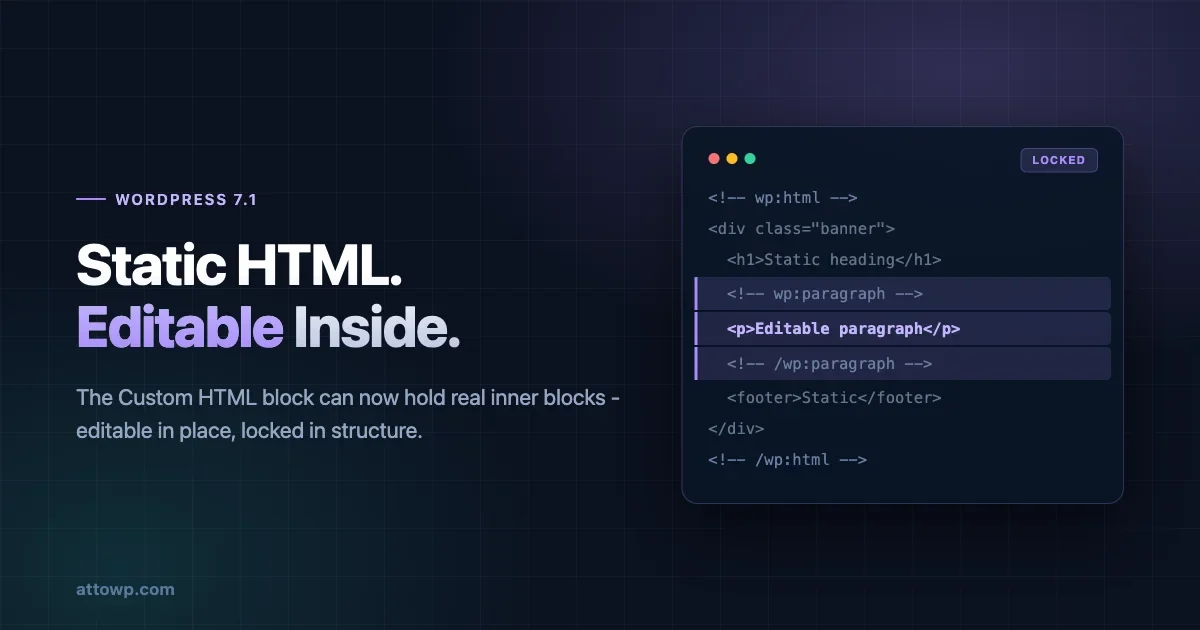
WordPress 7.1 removes the tradeoff. Gutenberg PR 79115 lets the Custom HTML block interleave static markup with real, editable inner blocks. The HTML you hand-authored stays exactly as written. The parts you mark as blocks stay editable in place, by anyone, without exposing the structure around them.
This landed with almost no coverage, and it changes the answer to a question that comes up on nearly every client build: how do you give an editor a safe box to type in without giving them the ability to dismantle the layout around it.
What the markup actually looks like
The syntax is the block delimiters you already know, nested inside the wp:html block:
<!-- wp:html -->
<div class="banner"><h1>Static heading</h1><!-- wp:paragraph -->
<p>Editable paragraph</p>
<!-- /wp:paragraph --><footer>Static footer</footer></div>
<!-- /wp:html -->
Three things are happening in those seven lines.
The , the , and the are static. They render in the editor but are inert - no selection handles, no toolbar, no way to click into them.
The paragraph between the delimiters is a real core/paragraph. It gets the normal writing experience: formatting toolbar, rich text, block inspector.
And the wrapper survives serialization untouched. The full markup remains available in the Edit HTML modal, and a round-trip through the editor returns the same string you put in. Existing Custom HTML blocks are unaffected, because a block with no inner delimiters behaves exactly as it did before.
Editable, but locked
The important half of this feature is the restriction, not the permission.
Inner blocks inside a Custom HTML block are editable in place but locked structurally. They cannot be moved. They cannot be removed. Siblings cannot be added next to them.
That constraint is what makes the feature usable. An editable region inside hand-authored markup is only safe if the editor cannot drag it out of its container, delete it and leave an empty , or append four more paragraphs that break the grid the CSS assumes. Lock those three operations and the surrounding structure is guaranteed, which means you can write CSS against it with confidence.
The result is a box with exactly one job: this text is yours, everything holding it is not.
Registering it as a variation
Hand-writing those delimiters is fine once. For anything reusable, 7.1 pairs this with a second addition (PR 79659): an innerContent field for block variations.
innerContent is an array of static HTML fragments, where each null marks the position of the corresponding entry in innerBlocks:
wp.blocks.registerBlockVariation( 'core/html', {
  name: 'testimonial-card',
  title: 'Testimonial Card',
  icon: 'format-quote',
  innerContent: [ '<div class="testimonial-card">', null, '</div>' ],
  innerBlocks: [ [ 'core/paragraph', { content: 'An inspiring quote.' } ] ],
} );
Read the array positionally. Fragment one opens the wrapper. The null says "the first entry in innerBlocks goes here." Fragment three closes it. Add a second null and a second entry in innerBlocks, and you get two editable regions inside one static shell.
One constraint worth noting before you plan around it: innerContent applies only to core/html variations. It is not a general mechanism for composing static markup into arbitrary blocks.
Where this earns its place
The obvious use is the one above - a card, a callout, a banner with fixed chrome and one or two editable slots. That pattern currently costs you a custom block: a block.json, a build step, an edit component, a save function, and a registration file, all to wrap a paragraph in a div.
The less obvious use is migrated legacy content. Anyone who has moved a site off a classic theme or a page builder has a pile of Custom HTML blocks holding markup nobody wants to re-author. Until now the only options were leave it opaque or rebuild it as blocks. Marking the text regions with delimiters converts that content into something an editor can maintain, incrementally, without touching the structure.
There is also a documentation and marketing-page case: layouts where the design is fixed and reviewed, and the copy changes weekly. Locking the design and freeing the copy is precisely the split this gives you.
Converting a legacy block, step by step
The migration is more mechanical than it sounds. Start with something typical of a page-builder export sitting in a Custom HTML block today:
<!-- wp:html -->
<section class="cta cta--dark">
  <div class="cta__inner">
    <span class="cta__eyebrow">Limited</span>
    <h2 class="cta__title">Renew before August</h2>
    <p class="cta__copy">Your licence expires soon. Renew now to keep updates.</p>
    <a class="cta__button" href="/renew">Renew</a>
  </div>
</section>
<!-- /wp:html -->
Every word in there is currently uneditable without opening the HTML view. Decide which parts change and which do not. The wrapper, the classes, the eyebrow label and the button are structural. The heading and the body copy are the parts marketing rewrites monthly. Wrap only those two:
<!-- wp:html -->
<section class="cta cta--dark">
  <div class="cta__inner">
    <span class="cta__eyebrow">Limited</span>
    <!-- wp:heading {"level":2,"className":"cta__title"} -->
    <h2 class="wp-block-heading cta__title">Renew before August</h2>
    <!-- /wp:heading -->
    <!-- wp:paragraph {"className":"cta__copy"} -->
    <p class="cta__copy">Your licence expires soon. Renew now to keep updates.</p>
    <!-- /wp:paragraph -->
    <a class="cta__button" href="/renew">Renew</a>
  </div>
</section>
<!-- /wp:html -->
Two details are doing work here. Keep your existing classes in the className attribute so the CSS you already have keeps matching - core adds its own class alongside rather than replacing yours. And leave the anchor as static markup, because a link an editor can restyle is a link an editor can break; if the destination genuinely changes, use a button block instead.
The result is a component where the heading and copy get the normal writing experience and everything else is untouchable. No custom block, no build step, and the CSS from the original build still applies unchanged.
Multiple editable slots in one shell
One null gives you one editable region. Most real components need two or three, and the mapping stays positional:
wp.blocks.registerBlockVariation( 'core/html', {
  name: 'feature-row',
  title: 'Feature Row',
  icon: 'layout',
  innerContent: [
    '<div class="feature"><div class="feature__body">',
    null,
    null,
    '</div><div class="feature__media"><img src="/wp-content/uploads/placeholder.svg" alt="" /></div></div>',
  ],
  innerBlocks: [
    [ 'core/heading', { level: 3, content: 'Feature name' } ],
    [ 'core/paragraph', { content: 'What it does, in one sentence.' } ],
  ],
} );
Two null markers, two entries in innerBlocks, matched in order. The heading lands at the first marker, the paragraph at the second, and both sit inside .feature__body while the media column stays entirely static.
Read the array as a zip: fragments and blocks alternate, and every null consumes the next innerBlocks entry. Get the counts out of sync and the variation will not behave - if you have three null markers you need three entries, in the order you want them placed.
A practical constraint worth designing around: because the inner blocks are locked, an editor cannot add a second paragraph under the first. If the component genuinely needs variable-length content in a slot, that slot is the wrong fit for this technique, and you want a group block with templateLock: 'insert' instead.
What the editor experience actually looks like
Worth setting expectations, because the behaviour differs from anything else in the editor.
Clicking into the block selects the Custom HTML block itself, as it always has. Clicking directly on an editable region selects that inner block and gives it the normal toolbar. The static markup between them does not respond to clicks at all - no hover outline, no selection, nothing.
The block toolbar for the inner blocks appears where you would expect, but the mover arrows and the option to remove the block are absent, because those operations are locked. An editor who is used to dragging blocks around will notice their absence, and it is worth a sentence in your client documentation so it reads as intentional rather than broken.
The Edit HTML view still shows the entire markup, delimiters included. That is the escape hatch: anyone with the capability to use the Custom HTML block can still open it and restructure everything. This feature constrains the visual editing experience, not permissions. If you need a genuine permission boundary, that is a capability question, not a block-locking one.
How it compares to what you already have
Three existing mechanisms overlap with this, and the boundaries matter.
Block patterns insert a starting arrangement of real blocks. Everything stays fully editable afterwards, including structure. A pattern is a starting point, not a constraint - the editor can restructure it the moment it lands. Use a pattern when you want a head start. Use Custom HTML inner blocks when you want a guarantee.
Template locking (templateLock: 'all' or 'insert') constrains structure inside a block that supports inner blocks, which is closer. The difference is what the shell is made of. Template locking still requires blocks all the way down, so a wrapper with three nested divs and a decorative SVG means three group blocks and a custom block. Custom HTML inner blocks let the shell be plain markup, which is both less work and a more accurate representation of what the shell is.
A real custom block is still the right answer when the shell needs attributes, when it needs to respond to settings, when it renders dynamically on the front end, or when you want it discoverable in the inserter with its own icon and description. Custom HTML inner blocks are static by definition. Nothing about the wrapper is configurable at insert time beyond what you hard-code into the variation.
The honest summary: this covers the case where a custom block was overkill and a pattern was too loose. That case is common enough to matter, and it has had no good answer until now.
Side by side:
Editable structure | Shell is | Build step | Discoverable in inserter | |
|---|---|---|---|---|
Block pattern | Fully editable | Blocks | No | Yes |
| Locked | Blocks | Usually | Via parent block |
Custom block | Locked by you | Your markup | Yes | Yes |
Custom HTML inner blocks | Locked | Plain HTML | No | As a variation |
The row that matters is the last column of row four. Registering a variation puts your component in the inserter without a build step, which is the combination that did not previously exist.
Migrating a site with a lot of legacy blocks
If you have inherited a site with dozens of Custom HTML blocks, do not try to convert them all. The value is concentrated in a small subset and the work is linear.
Start by finding them. A quick query tells you the scale:
SELECT ID, post_title
FROM wp_posts
WHERE post_status = 'publish'
  AND post_content LIKE '%<!-- wp:html -->%'
ORDER BY post_modified DESC;
Sort by post_modified deliberately. The blocks worth converting are the ones somebody has recently needed to change, because those are the ones where the cost of the current arrangement is being paid. A Custom HTML block untouched for three years is not causing anyone pain, and converting it is busywork.
Then triage what you find into three groups. Blocks holding content nobody edits - embeds, tracking snippets, decorative markup - stay as they are. Blocks holding a mix of structure and copy that changes are the candidates; convert those. Blocks that are really a component repeated across many pages should become a registered variation rather than being converted individually, so future instances get the pattern for free.
Convert in a staging environment and check the front end after each one. The serialization round-trip is stable by design, but "stable by design" and "stable through your particular stack of content filters" are different claims, and the second one is the one you are betting a live page on.
What to check before you rely on it
The feature is new in 7.1, which ships 19 August. A few things are worth verifying against your own setup rather than assuming.
Confirm how your theme's editor styles apply to the static portion. The inert markup renders inside the editor canvas, and if your styles are scoped to block class names rather than element selectors, hand-authored markup may look correct on the front end and wrong in the editor.
Check serialization if you run any content processing on post_content. The round trip is stable by design, but filters that rewrite block markup, sanitize HTML, or run regex over post content are exactly the kind of thing that has not been tested against this pattern yet.
And confirm behaviour for editors without unfiltered_html. The Custom HTML block has always been capability-sensitive, and a feature that puts editable regions inside it deserves a check with a non-administrator account before you ship it to a client site.
This last one deserves more than a passing mention. On a single-site install, administrators and editors have unfiltered_html; on multisite, only super admins do. That means a component you build and test as an administrator may behave differently for the editor who actually uses it daily, and the difference will surface in whether the static markup survives a save rather than in anything visible while editing. Test with the role your client actually has, on the install type they actually run.
A short testing checklist
Run these before shipping a variation to a production site.
Round-trip the content. Insert the component, save, reload, save again without touching anything, then diff post_content between the two saves. It should be byte-identical. If it is not, something in your stack is rewriting block markup and you need to find it before an editor loses a layout.
Edit and save as the target role. Log in as the actual editor role, change the text in each editable slot, save, and confirm the static markup is unchanged on the front end.
Check the editor rendering against the front end. Screenshot both. Hand-authored markup styled by front-end CSS that has not been loaded into the editor will look different in the two places, and editors reasonably read that as a bug.
Try to break the lock. Attempt to drag an inner block out, delete it, and add a sibling. All three should be unavailable. If any of them works, your delimiters are not where you think they are.
Test with a long value. Paste four paragraphs of text into a slot sized for one sentence and see what the CSS does. Locked structure does not mean locked content length, and overflow is the failure mode nobody checks.
Gotchas worth knowing up front
Three things will surprise you the first time.
Whitespace inside the delimiters matters more than you expect. Block markup is parsed from the comment delimiters outward, and stray whitespace or newlines in the wrong place between static markup and a delimiter can change how the parser reads the boundary. When hand-authoring, keep the delimiter immediately adjacent to the markup it separates, as in the core example, rather than reformatting for readability.
Your variation is a starting point, not a schema. innerContent describes what gets inserted. It does not validate what the block contains afterwards. Someone who opens Edit HTML can restructure the whole thing, and the block will happily serialize whatever they leave behind. If you are relying on the structure for downstream processing, validate on save rather than trusting the variation.
Nested blocks inside an editable slot are still bound by the lock. The locked inner block cannot gain siblings, which means an editor cannot turn a single paragraph slot into a list plus a paragraph. This is usually what you want. It occasionally is not, and when it is not, the answer is a group block with template locking rather than trying to work around it here.
Where this fits in the 7.1 picture
Most of what is landing in 7.1 for block developers takes something away or forces a migration. The permanent 40px control default makes a prop a no-op and changes layouts that assumed the old size. useResizeCanvas is gone along with the fixed device previews. Icons stopped honouring the CSS fill property. Each of those is an audit item with a deadline attached.
This is the opposite kind of change, and it is worth noticing the difference when you plan your 7.1 work. Nothing breaks if you ignore it. No existing content behaves differently - a Custom HTML block with no inner delimiters is parsed exactly as it was. There is no deprecation notice and no migration window.
That makes it easy to defer indefinitely, which would be a mistake for a specific reason: the problem it solves is one most teams have already paid to solve badly. If you have a custom block whose entire job is wrapping a paragraph in a styled div, you are maintaining a build step, a registration file, and an edit component for something that is now four comment delimiters. That maintenance cost is ongoing, and it does not stop being paid just because nothing is on fire.
Worth adding to the audit list, then, not as a compatibility item but as a simplification one. The question to ask of each custom block you maintain is whether its shell is genuinely dynamic. If the answer is no - if the wrapper is the same markup every time and only the text inside changes - it is a candidate to become a variation, and deleting a build step is a better outcome than migrating one.
Interleaved editable blocks are a small change to one block, and it would be easy to file under minor. It is worth more than that. It converts the Custom HTML block from a place content goes to be forgotten into a legitimate tool for the most common structural request in WordPress: fix this, free that.
If you are auditing your blocks ahead of 7.1, this is the rare item on the list that adds a capability rather than taking one away.
One closing caution, because it is the mistake most likely to follow from reading this. Locked inner blocks are an editing constraint, not a security boundary and not a content contract. Anyone who can open Edit HTML can still rewrite the whole block, and nothing validates that what comes back matches the shape your CSS expects. Use it to make the common path safe and obvious for the people editing your pages every day. Do not use it to make guarantees to code that runs downstream, because it does not make them.
No comments yet