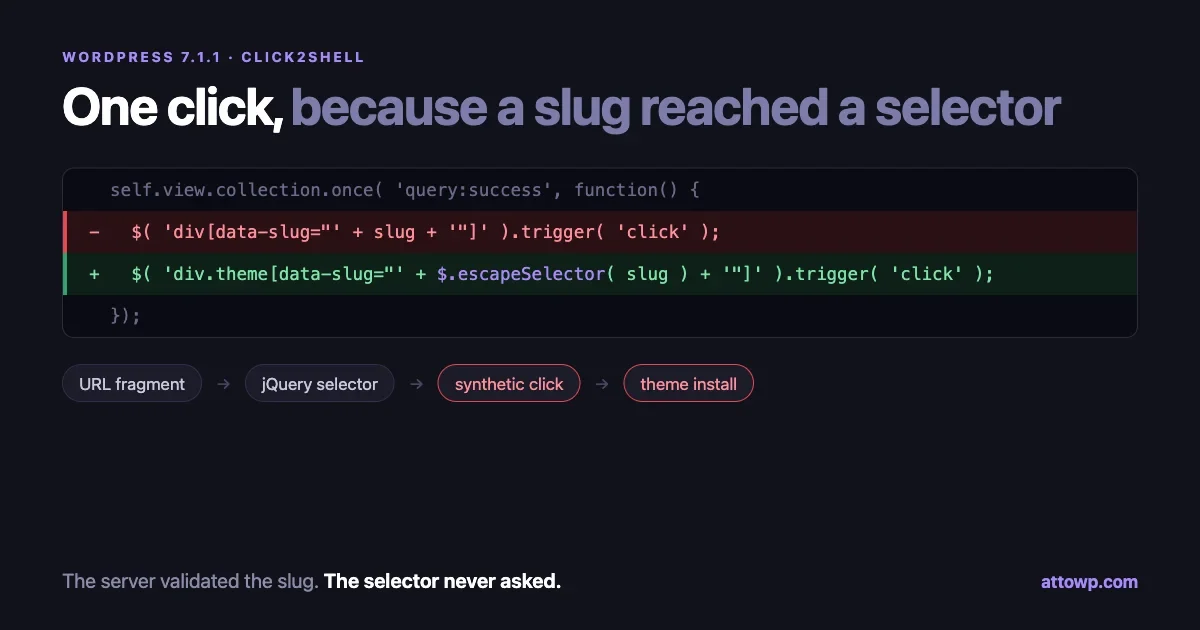
The fix that shipped in WordPress 7.1.1 on 17 September is two lines long. Here it is, from src/js/_enqueues/wp/theme.js:
-				// Open the theme preview.
+				// Open the theme preview. The slug comes from the URL, so escape it.
 				self.view.collection.once( 'query:success', function() {
-					$( 'div[data-slug="' + slug + '"]' ).trigger( 'click' );
+					$( 'div.theme[data-slug="' + $.escapeSelector( slug ) + '"]' ).trigger( 'click' );
 				});
A string from the URL was concatenated into a jQuery selector. Patchstack named the resulting chain Click2Shell, because with a CSRF in front of it, one click by a logged-in administrator was enough to end with code running on the server. It was reported responsibly by Paulos Yibelo of pwn.ai, and the core commit credits xknown, villanovachile, jorbin and jonsurrell.
The interesting part for anyone writing WordPress code is not the exploit. It is that every individual piece here was written by careful people. The slug was validated. The install action was nonce-protected. The bug lives in the gap between those two facts, in a place most of us do not think of as a sink at all: a selector string.
What the code was doing
The theme installer screen is a Backbone app. It has a router, so theme-install.php#theme/twentytwentyfive opens the preview for that theme. Here is the route handler in 7.1.0, trimmed to the parts that matter:
themes.router.on( 'route:preview', function( slug ) {
	// ...
	// Select the theme by slug.
	request.theme = slug;
	self.view.collection.query( request );
	self.view.collection.trigger( 'update' );

	// Open the theme preview.
	self.view.collection.once( 'query:success', function() {
		$( 'div[data-slug="' + slug + '"]' ).trigger( 'click' );
	});
} );
Read that last line as a template. Whatever sits in slug becomes part of a CSS selector, and then whatever that selector matches gets a synthetic click.
The intended value is something like twentytwentyfive, which produces the harmless div[data-slug="twentytwentyfive"]. But a slug that contains a quote does not stay inside the attribute value. It closes the attribute early and the rest of the string is parsed as more selector syntax: additional attribute matchers, class conditions, pseudo-classes such as :first, the lot. The author wrote one selector. The URL can turn it into a different one.
Once the selector is under an attacker’s control, so is the target of that .trigger( 'click' ). The theme installer page has real buttons on it, including the ones that install a theme from WordPress.org. That is the pivot from “text in a URL” to “an action performed with the administrator’s own session and capabilities”. Getting from an arbitrary theme install to code execution is the well-trodden part, which is why installation rights are treated as equivalent to code execution in WordPress’s own security model.
I am deliberately not publishing a working selector. The pattern is what you need to recognise in your own code.
Why server-side sanitizing did not save it
The backend does validate theme slugs. Queries go to the WordPress.org themes API, and a slug that does not exist comes back with nothing. It is reasonable to assume that a bad slug is therefore a dead end.
That assumption fails because the dangerous use of the value never reaches the server. The slug is read from the URL fragment, which browsers do not send in HTTP requests at all. The router hands it to JavaScript, JavaScript builds a selector with it, and the DOM acts on it. The API round trip happens in parallel and is irrelevant to the selector.
This is the bit worth internalising. A value can be validated in one language, at one layer, and still be raw input at another. The relevant question is never “was this sanitized” but “is it escaped for the context it is about to enter”. Query goes to SQL escaping, HTML goes to esc_html(), an attribute goes to esc_attr(), a URL goes to esc_url(), and a selector goes to $.escapeSelector() or CSS.escape(). Sanitizing at input time is a bonus. Escaping at output time is the rule, and a selector is an output.
The second half: CSRF, and why a nonce did not stop it
WordPress nonces protect actions. The theme install endpoint has one, and that check still runs and still passes, because the request is being made by the administrator’s own browser with their own session, in a tab they opened themselves.
That is what cross-site request forgery is for. The attacker never needs the nonce. They need the victim to load a URL, from a phishing email, a chat message, a comment, or a stored cross-site scripting bug somewhere else on the same site. The admin’s browser supplies the cookies, the page supplies the nonce, and the injected selector supplies the target.
Two things follow for plugin code:
- Hash-based routing has no CSRF protection at all. Nonces live in form fields and query arguments that the server can verify. A fragment never reaches the server, so nothing in it can be verified. Treat anything read from
location.hashas attacker-controlled, always. - A nonce proves intent for a request, not for a click. If your JavaScript can be steered into pressing a button, the nonce on that button is the attacker’s nonce now. The defence is to keep the steering from happening.
Core is moving in this direction more broadly: the roadmap for 7.2, due in early December, includes a “sudo mode” that gates sensitive actions behind re-authentication. That helps precisely with the case above, where a valid session is doing something the person never asked for.
Prove it to yourself in thirty seconds
The reason this class of bug survives code review is that it does not look dangerous and it does not fail loudly. Open any page with jQuery loaded, paste this into the console, and watch what does not happen:
// Two elements on the page:
// <div class="theme" data-slug="alpha">A</div>
// <div id="other">O</div>

var slug = 'alpha"], #other[x="';

// Unescaped: the string closes the attribute and adds a second matcher.
$( 'div[data-slug="' + slug + '"]' ).length;                      // 1, no error

// Escaped: the whole thing is treated as one attribute value.
$( 'div[data-slug="' + $.escapeSelector( slug ) + '"]' ).length;  // 0

// And the normal case still works.
$( 'div.theme[data-slug="' + $.escapeSelector( 'alpha' ) + '"]' ).length;  // 1
Those are the numbers we got running it against jQuery 3.7.1 in a current Chromium. The native API behaves the same way: document.querySelector() with the unescaped value throws nothing at all, and CSS.escape() turns the payload into a literal value that matches no element.
That silence is the whole problem. A malformed selector that threw a SyntaxError would show up in the console on the first test. Instead the selector stays valid, and only the set of elements it matches changes. Nothing in your test suite notices, because your tests pass real slugs.
The other jQuery sink in the same family
While you are looking at selector strings, check the other overload of the same function. jQuery decides what $( someString ) means by looking at the string: if it starts with <, it builds DOM nodes instead of querying for them.
$( '<img src=x>' ).length;              // 1
$( '<img src=x>' )[0].tagName;          // "IMG"
So a value that reaches $( value ) directly does not need to break out of a selector at all. If it starts with an angle bracket, it is markup, and markup with an event handler attribute is script execution. Any code shaped like $( params.get( 'target' ) ) is one crafted query string away from cross-site scripting, and it reads as perfectly ordinary jQuery.
Use $( document ).find( value ) when you mean “query”, which never treats the string as HTML, or skip jQuery for that call and use document.querySelector().
What this looks like in plugin code
Core’s version involved a Backbone router, which most plugins do not have. The shape survives translation anyway. Three patterns worth grepping for, all of which we have seen in real WordPress admin screens:
Settings tabs driven by the fragment. A settings page with tabbed panels, restoring the open tab after reload:
// Vulnerable: the fragment goes straight into a selector.
var tab = window.location.hash.replace( '#', '' );
$( '.tab-panel[data-tab="' + tab + '"]' ).show();

// Fixed: match against the tabs you rendered.
var tab = window.location.hash.replace( '#', '' );
$( '.tab-panel' ).each( function () {
	$( this ).toggle( $( this ).data( 'tab' ) === tab );
} );
The fixed version never builds a selector from the value. It compares the value against data already in the DOM, which is both safer and easier to read.
Highlighting a row after a redirect. An admin list table that scrolls to the item you just saved, using ?highlight=123:
// Vulnerable.
var id = new URLSearchParams( location.search ).get( 'highlight' );
$( '#the-list tr[data-id="' + id + '"]' ).addClass( 'is-highlighted' );

// Fixed: the value is numeric, so make that a rule.
var id = parseInt( new URLSearchParams( location.search ).get( 'highlight' ), 10 );

if ( id > 0 ) {
	$( '#the-list' ).find( 'tr[data-id="' + id + '"]' ).addClass( 'is-highlighted' );
}
Type coercion is a legitimate escape when the value genuinely has a type. parseInt() on a hostile string gives you NaN, and the guard drops it.
Finding a media item by name. Anything that looks up an element by a filename, title or user-entered label is the same bug with a friendlier source. Filenames can contain quotes and brackets, and on a multi-author site the person choosing that filename is not always the person clicking the button.
Audit your own JavaScript for this
The vulnerable shape is a selector built by concatenation from a value you do not control. In a WordPress plugin or theme, the usual sources are the URL, a data attribute written by another script, a REST response, or user-entered text in an admin field.
Start with a grep over your own front-end and admin scripts. Skip built bundles and vendor directories:
grep -rn --include='*.js' \
  -e '\$( *['"'"'"][^'"'"'"]*['"'"'"] *+' \
  -e 'querySelector\(.*+' \
  -e 'location\.hash' \
  -e 'location\.search' \
  src/ assets/js/ | grep -v '\.min\.js'
Every hit is a question: can the concatenated value contain a quote, a bracket or a colon? If yes, it needs escaping or a different approach entirely.
Three ways to fix a hit, best first
1. Do not build a selector. The safest version of this code never puts data into a selector string. If you already have the collection, find the model and use its view:
// Instead of selecting by a value from the URL,
// look the item up in data you already trust.
var model = collection.findWhere( { slug: slug } );

if ( model ) {
	model.trigger( 'preview' );
}
2. Escape for the selector context. If a selector really is the right tool, escape the value. jQuery has shipped $.escapeSelector() since 3.0, and the browser has CSS.escape() natively:
// jQuery
var $card = $( 'div.theme[data-slug="' + $.escapeSelector( slug ) + '"]' );

// No jQuery
var card = document.querySelector(
	'div.theme[data-slug="' + CSS.escape( slug ) + '"]'
);
3. Scope the selector as well. Notice that the core patch did two things. It escaped the slug and it changed div to div.theme. Escaping stops the string from breaking out; scoping limits the damage if something else ever does. A selector that can only match theme cards inside the grid is a much smaller target than one that can match any div on the page. Adding a container is even better:
var $card = $( '#wpbody-content .themes' ).find(
	'div.theme[data-slug="' + $.escapeSelector( slug ) + '"]'
);
The same logic applies to values you interpolate into HTML strings in JavaScript, which is the more familiar version of this mistake. If you are writing markup with +, you want wp.escapeHtml or textContent instead. Our notes on core internals not being an API make a related point about relying on markup you do not own.
A test that would have caught it
Because the failure is silent, the test has to assert the thing you never think to assert: that a hostile value matches nothing rather than something else. It is three lines, and it belongs next to any lookup helper you write.
First, put the lookup behind a function instead of inlining the selector. That alone is most of the win, because now there is one place to escape and one place to test:
export function findCard( slug ) {
	return document.querySelector(
		'#wpbody-content .themes div.theme[data-slug="' + CSS.escape( slug ) + '"]'
	);
}
Then test the shape of the input, not just the happy path:
test( 'findCard only ever matches its own card', () => {
	document.body.innerHTML =
		'<div id="wpbody-content"><div class="themes">' +
		'<div class="theme" data-slug="alpha"></div>' +
		'</div></div><div id="other"></div>';

	expect( findCard( 'alpha' ) ).not.toBeNull();
	expect( findCard( 'nope' ) ).toBeNull();

	// The one that matters: a value carrying selector syntax
	// must not reach anything, including elements outside the grid.
	expect( findCard( 'alpha"], #other[x="' ) ).toBeNull();
} );
Run that test against the unescaped version of findCard() and the third assertion fails, which is exactly the signal that was missing. Keep a copy of that hostile string in a shared fixture and use it everywhere you accept a slug, an ID or a name from outside.
If your plugin has end-to-end coverage, the equivalent check is to load your admin screen with a crafted value in the URL and assert that the element you expect to be inert is still inert. That catches the routing layer as well as the helper.
What else 7.1.1 fixed
Click2Shell got the name, but the release carried 11 security fixes. Reading the commit list on the 7.1 branch is a decent education in where authorization checks tend to be missing, so here is the security-relevant set in one place:
Area | Fix |
|---|---|
Themes | Escape the theme installer preview route value (the one above) |
Formatting | Prevent |
Comments | Enforce target post permissions when updating notes via REST |
Media | Check |
Administration | Add an authorization check to |
Posts, Post Types | Reject a supplied post ID on the create path in |
Editor | Constrain block template file resolution to the template directory |
Plugins | Require network plugin authority to Ajax-activate a network-only plugin |
XML-RPC | Reject writes to internal-only builtin post types |
Customize | Improve |
HTML API | Prevent |
The wpautop() one is the other headline: Patchstack describes it as an unauthenticated stored cross-site scripting issue in the function that turns line breaks into paragraphs on nearly every site. That is a useful pairing with Click2Shell, because a stored XSS is exactly the delivery mechanism that removes the phishing step from a one-click chain.
Four of the eleven are missing authorization checks rather than missing escaping: a REST route, an Ajax handler, a post create path, and a network activation path. If you maintain a plugin with its own Ajax or REST surface, that ratio is the thing to take away. Our jQuery UI audit for 7.1 covers the front-end library side of the same housekeeping.
If you deploy WordPress with Composer, read this before updating
There is a trap sitting in front of this update. The johnpbloch/wordpress-core package published 7.1.1 and 7.0.5 without the wp-includes directory, so a Composer deploy of the security release produces a WordPress that cannot boot: every request dies at wp-settings.php line 34. We installed both tags to confirm it, and 7.1.0 is unaffected.
Check before you deploy, and again after:
test -f wp-includes/version.php && echo present || echo MISSINGThe fastest way to be patched and online is to take core from WordPress.org directly with wp core download --version=7.1.1 --force --skip-content. Rolling back to 7.1.0 gets the site up but leaves you on the version this release fixes, so treat that as a holding position only. The full write-up, including a build-time guard that fails the pipeline instead of the site, is in our piece on the missing wp-includes fatal.
What to do on sites you run
In rough order of value:
- Update to 7.1.1. Minor releases install automatically on most sites, but “most” is not “all”, and sites with automatic updates disabled or a failed cron are the ones that stay behind. Check Dashboard > Updates on each site rather than assuming.
- Block file modification where you can. Patchstack notes the impact is reduced on sites with
DISALLOW_FILE_MODSenabled, since plugin and theme installation is blocked outright:define( 'DISALLOW_FILE_MODS', true );
On a deployed site where code arrives through git or a pipeline, this costs you nothing and removes an entire class of consequence. If that is too strict, DISALLOW_FILE_EDIT at least removes the built-in editors.
Count your administrators. Every admin account is a possible click. Downgrade the ones that do not need the role, and remove the ones nobody uses.Check what is installed. After any chain like this, the question is whether anything arrived. wp theme list and wp plugin list against a list you recognise takes a minute, and wp core verify-checksums plus wp plugin verify-checksums --all will flag modified files from the WordPress.org copies.Keep an eye on 7.2. Sudo mode changes the calculus for anything that depends on an already-authenticated admin session.
How this one got handled
The timeline is worth noting, because it is the boring version of a security story and that is the point.
When | What |
|---|---|
Before disclosure | Reported privately to the WordPress security team by Paulos Yibelo of pwn.ai |
17 September 2026 | WordPress 7.1.1 ships with the escaping fix, alongside 10 other security fixes |
18 September 2026 | Patchstack publishes the write-up, once the fix is available |
If you find something like this in core, the route is HackerOne, not a GitHub issue or a forum post. For a plugin or theme on WordPress.org, report it to the author and to the Plugin Review team, or through a coordinated programme such as Patchstack or Wordfence. The reason to do it that way is visible in the timeline above: the fix reached millions of sites before the technique was public.
If you maintain a plugin, remember that your fix now has a queue in front of it as well. WordPress.org runs an automated security review on every release before it is distributed, which we covered in the release cooldown piece. Build that delay into your disclosure planning rather than discovering it on the day.
The part that generalises
Every WordPress developer has internalised “escape late, escape for the context” for PHP output. The same discipline has not travelled to the JavaScript half of our plugins, where the contexts are less familiar and the linters say less. A selector is a context. An HTML string is a context. A URL you are about to pass to fetch() is a context. A template literal dropped into innerHTML is the most dangerous context of all.
The Click2Shell patch is two lines because the bug was small. The lesson is not: a value that has been validated somewhere else is still raw here, and the place it is about to enter decides how it must be escaped. Grep your own scripts this week, and see how many selectors you are building out of values you do not own.

No comments yet