Over the last two months, Chrome and Safari have both shipped machinery for AI agents to use websites. They did it from opposite ends, and almost nobody changed anything about how they build sites in response.
That is a reasonable reaction, because one of the two is an origin trial and origin trials die all the time. But there is a detail buried in Chrome’s documentation that is worth acting on regardless of whether any of this ships, and it reframes a pile of work most teams already treat as a compliance chore.
Here is what actually exists today, what it means for anyone shipping a site, and the one part I would act on this week.
Worth saying at the top: none of this is a reason to rebuild anything. Most of what follows is either an experiment or a measurement tool, and the useful conclusion at the end turns out to be a job that was already on your list. The value is in understanding why it moved up the list.
Chrome: let the page describe itself
In Chrome 149, Google opened an origin trial for WebMCP. The pitch is narrow and clear: instead of an agent guessing the purpose of an interface element, the page declares it.
To see the problem, look at a form field the way software has to:
<label for="n">Name</label>
<input id="n" name="name" type="text">
A person knows what to type there. An agent has to work out whether “Name” means a full name, a first name with a surname field somewhere further down, a company name, or a nickname for a booking. Chrome’s own example for the feature is exactly this: differentiating a field that wants a full name from a pair that wants first and last separately.
Autofill has been guessing at this for twenty years using heuristics over field names, labels and autocomplete attributes. It guesses well on common forms and badly on everything else, and when it guesses badly the failure is silent: the form submits, the data is wrong, and nobody finds out until an order ships to a mangled address.
WebMCP is the proposal that the page should stop making anyone guess. Rather than describing it as a shape of markup I have not written against, the accurate summary is Google’s own: it lets you provide rules for interaction between web applications and agents, declare the purpose of elements, and manage page state.
The second use case they give is more interesting than the form one, because it inverts who the feature is for. A diagnostics tool on a developer settings page, exposed so an agent can trigger a fix that would otherwise sit behind four nested menus. That is not a feature for your customers. That is a feature for the software your customers point at your site.
The status, stated plainly
An origin trial is a time-limited early-access programme with usage limits, run to gather feedback and inform future iterations of an API. It is not a shipped feature and it is not a standard. Plenty of origin trials have ended with the feature being reshaped beyond recognition or dropped.
Google states the goal is an API that any browser with agentic capabilities can implement. That is the right ambition and it is not the same thing as a commitment from anyone else.
Do not rebuild anything for WebMCP. Do read what it assumes about your markup, because that part is already true.
Chrome: measure how usable your site is by machine
The second thing Chrome shipped is less discussed and more immediately useful. From M150, Lighthouse has an Agentic browsing category: deterministic audits that assess how agent-friendly a site is.
The audits focus on a small number of areas that matter for machine interaction, and the first one is accessibility. Here is the sentence from Google’s documentation that should change how you think about this:
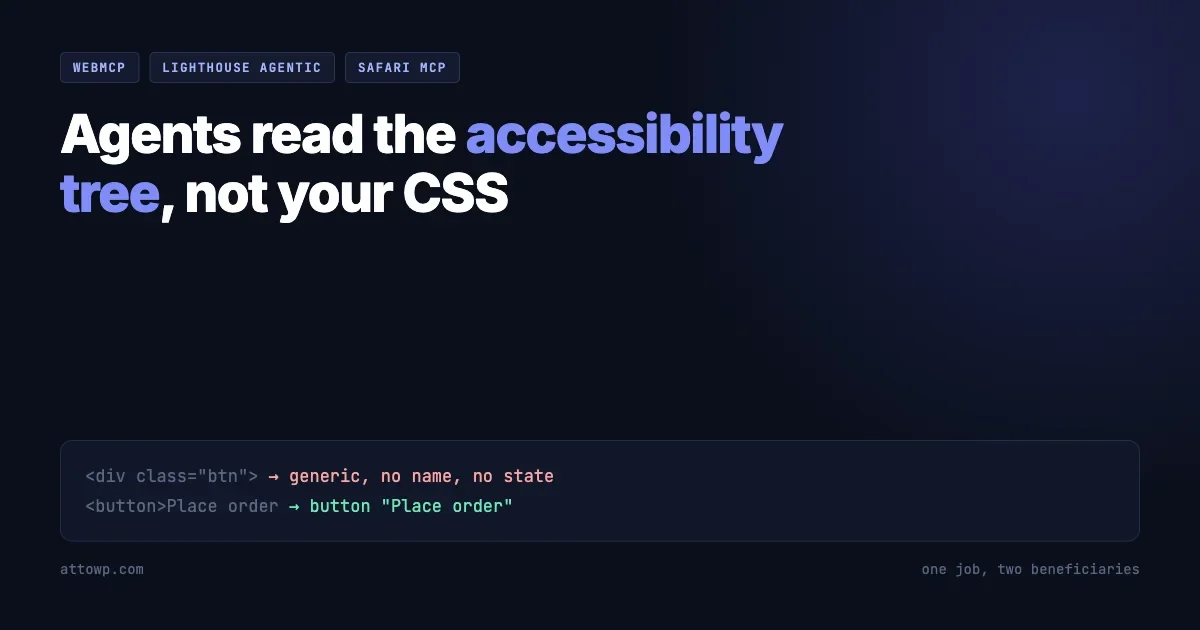
Accessibility is for humans first. Agents rely on the accessibility tree, derived from DOM, as their primary data model.
Read that twice if you have ever argued for an accessibility budget and lost.
The accessibility tree is the structure browsers build from the DOM and expose to assistive technology. It is what a screen reader reads. It carries roles, names, states and relationships: this is a button, its name is Add to basket, it is not disabled, it belongs to this form.
An agent driving a browser needs precisely the same information, for the same reason. It cannot see your interface. It has to reason about a structure, and the accessibility tree is the structure the platform already provides.
Which means the work is not two jobs. It is one job with two beneficiaries.
What that means for markup you have already shipped
Every shortcut that hurts a screen reader user degrades an agent in the same way and for the same reason.
<!-- In the accessibility tree: a group with no role, no name, no state. -->
<div class="btn" onclick="submitOrder()">
  <span class="icon"></span>
</div>

<!-- In the accessibility tree: a button named "Place order". -->
<button type="submit">Place order</button>
A person with working eyes clicks the first one without noticing anything wrong. A screen reader announces almost nothing. An agent sees a generic container and has to fall back on guesswork, or on pixels, which is worse.
The same applies to an icon-only control with no accessible name, a custom dropdown built from divs with no role or keyboard handling, a modal that does not manage focus, a form input whose only label is a placeholder, and a status message that appears visually with no live region announcing it. Each of those has been a known accessibility defect for years. Each is now also a reason an agent cannot complete a task on your site.
You can look at what a browser actually built from your markup rather than guessing. In Chrome DevTools, open the Elements panel, select a node, and use the Accessibility pane to inspect its computed role, name and state. That view is the closest thing to seeing your page the way both a screen reader and an agent see it.
Why not just read the DOM, or the pixels
It is worth asking why the accessibility tree is the chosen structure rather than the two more obvious candidates, because the answer explains why this is not going to change.
Pixels are the naive approach. Screenshot the page, work out what the boxes are, click coordinates. It works in demos and falls apart everywhere else. A layout shift moves the target. A theme change breaks the recognition. A control that looks like a button but is a div behaves differently when activated. And nothing about a rendered image tells you whether an action is destructive.
The raw DOM is the other candidate, and it is too much of the wrong thing. A modern page is tens of thousands of nodes, most of them layout scaffolding with class names that mean something only to the framework that generated them. Nothing in <div class="css-1x7ffq"> says what it is for. The DOM tells you what exists, not what any of it means.
The accessibility tree is the layer where meaning has already been resolved. The browser has computed it from the DOM, applied roles and names, worked out states and relationships, and dropped everything purely presentational. It is smaller, it is semantic, and it is standardised across engines because assistive technology has depended on it for two decades.
In other words the platform already built the machine-readable description of your interface. It just built it for a different reason, and we have spent years treating the quality of that description as optional.
Safari: point the agent at the browser
Apple’s contribution runs in the opposite direction, and it is aimed at you rather than at your visitors.
In Safari 27 beta and Safari Technology Preview 247, WebKit shipped a Safari MCP server: a Model Context Protocol server that connects an MCP-compatible client to a Safari browser window. Through it, an agent gets the DOM, network requests, screenshots and console output from a real browser.
The problem it targets is the debugging loop everyone recognises. You see something wrong. You open the console. You click into the styles tab. You go back to the code. Or you screenshot it, describe the problem to an agent, let it attempt a fix, and repeat when the fix is wrong. WebKit’s framing is that the round trip is the waste, and connecting the agent directly to the browser removes it.
Chrome has been moving the same way from its own angle, adding support for third-party developer tools inside DevTools for agents.
Two directions, one shift
Put the pieces side by side and the shape is clear.
Chrome | Safari | |
|---|---|---|
What ships | WebMCP origin trial, Lighthouse Agentic browsing audits | Safari MCP server |
Direction | The page describes itself to an agent | The browser reports itself to your agent |
Who it serves | Whoever owns the site | Whoever is debugging the site |
Status | Origin trial plus a shipped audit category | Shipped in a beta and a preview |
Two vendors who agree on very little have independently decided that agents need first-class access to what a page is and does. One is standardising how a page announces its capabilities. The other is wiring the browser into the developer’s toolchain.
Neither is finished. Both point the same way.
The WordPress version of the same problem
If this feels familiar, it should. WordPress has been solving the same problem from inside the CMS for two releases now, and the vocabulary lines up almost exactly.
The Abilities API is a registry of things a site can do, with each ability carrying a name, a description, a category, an execute callback and a permission callback. It is the server-side answer to the same question WebMCP asks on the client: what can be done here, and how does a caller that is not a human find out?
wp_register_ability(
    'my-plugin/export-users',
    array(
        'label'               => __( 'Export users', 'my-plugin' ),
        'description'         => __( 'Exports user data as CSV.', 'my-plugin' ),
        'category'            => 'data-export',
        'execute_callback'    => 'my_plugin_export_users',
        'permission_callback' => function (): bool {
            return current_user_can( 'export' );
        },
        'meta'                => array( 'public' => true ),
    )
);
That public flag is the site saying which of its capabilities are meant for outside consumption, which is the same declaration WebMCP wants for interface elements. We covered how that resolves, and why filtering is discovery and not authorisation, when it landed.
There is a real difference in level worth keeping straight. The Abilities API describes what your site can do, as operations with permissions attached. WebMCP describes what your interface means, so an agent driving the page can use it correctly. A site could plausibly end up exposing both: structured operations for callers that can authenticate, and a legible interface for agents that are driving a browser as a user.
The same is true of the schema work. Making internal schemas portable so a client can consume them, which we went through in the piece on handing schemas to an AI client, is the data-layer version of the accessibility tree argument: a structure the platform already has, exposed in a form something other than a browser can read.
For anyone building on WordPress, that produces a useful way to think about which layer a given capability belongs in. If an operation has real consequences and a caller can authenticate, it wants to be an ability with a permission callback, not a button an agent learns to click. If it is genuinely part of the interface, like a filter control or a date picker, then making it legible is a markup problem and the accessibility tree is where it gets solved.
The failure mode to avoid is doing neither and hoping. A checkout that exists only as a pile of unlabelled divs is not protected from agents by being illegible. It is just badly built, and the traffic that cannot use it includes customers.
There is a plugin-author angle here too. If you ship anything that renders front-end controls, the quality of the accessibility tree you emit is now part of your product surface. A site owner running a Lighthouse agentic audit and finding failures will not distinguish between markup their theme produced and markup your plugin produced. They will see a score.
What I would actually do
Sorting this into what is worth doing now and what is worth watching is most of the value here, because the temptation with anything labelled agentic is to do too much too early.
Worth doing now
- Fix your accessibility defects, and stop calling it a compliance task. It is now the same work as making your site usable by software. Every semantic control, accessible name and managed focus state pays twice.
- Run the Lighthouse Agentic browsing audit if you are on a recent Chrome. It is deterministic, so it gives you a list rather than an opinion.
- Read the accessibility pane in DevTools for your three most important interactions: sign up, checkout, and whatever your product’s core action is. If the computed role and name are missing, that is the whole finding.
- Connect an agent to a real browser for debugging. This is available today, it is useful today, and it commits you to nothing. Whether that is the Safari MCP server or another browser automation tool matters less than closing the screenshot-and-describe loop.
Worth watching, not building
- WebMCP itself. Origin trial. One engine. Read the documentation so you understand the model, and do not restructure a product around it.
- Whatever the other vendors say next. Google’s stated goal is an API any agentic browser can implement. Whether Apple and Mozilla implement it is the entire question, and it is not answered.
- The audit categories. If Lighthouse is scoring agent-readiness, that score will end up in procurement documents and client reports within a year, sensibly or otherwise.
A twenty minute audit
Concrete beats theoretical. Pick your site’s most important flow and walk it once, looking only at what a machine would receive.
Start by listing every interactive element that is not a real control. This finds most of it:
// Clickable things that are not buttons or links.
[...document.querySelectorAll('[onclick], [class*="btn"], [class*="button"]')]
  .filter(el => !['BUTTON', 'A', 'INPUT'].includes(el.tagName)
                && !el.getAttribute('role'))
  .forEach(el => console.warn('No role:', el));
Then the controls that exist but say nothing about themselves:
// Controls with no accessible name.
[...document.querySelectorAll('button, a, input, select, textarea')]
  .filter(el => {
    const name = (el.getAttribute('aria-label')
      || el.textContent
      || el.getAttribute('title')
      || '').trim();
    return name === '';
  })
  .forEach(el => console.warn('No accessible name:', el));
Treat both of those as a rough first pass rather than a verdict. They will miss names supplied by aria-labelledby and by an associated <label>, so check the survivors in the Accessibility pane before you file anything. The point is to get a short list to look at, not to replace the audit tools.
Then do the part no script can do for you: complete the flow using only the keyboard. Tab through it. If you cannot finish a purchase or a signup without touching the mouse, an agent driving that interface through the accessibility tree will hit the same wall, and so will a real person who cannot use a mouse.
Everything that turns up is a defect you could already have filed last year under a different heading. That is the argument of this whole article compressed into one exercise.
The part worth being uneasy about
An honest post about this needs to say the quiet part.
Making a site easier for agents to operate is not unambiguously good for the person who owns the site. An agent that completes a purchase without a human seeing the page also does not see the related products, the brand, the reassurance copy, or the offer. Publishers have spent two years watching AI answers absorb the traffic that used to arrive as clicks. Retailers are next in line with transactions.
The accessibility framing gets you out of that bind, but only partly. Semantic markup is worth shipping whether or not a single agent ever visits, because real people use screen readers and keyboards today. That justification stands on its own. Deliberately building agent affordances beyond that is a business decision about who your customer is, and it deserves to be made deliberately rather than because a Lighthouse category appeared.
There is also a security dimension that gets glossed over in every announcement. An interface that declares its capabilities clearly declares them to everyone. The lesson from the WordPress side transfers exactly: describing what can be done is discovery, and discovery is not authorisation. If your protection against an unwanted action is that the control is hard to find, an agent-legible interface removes your protection. The permission check is the thing that holds.
Where this leaves you
Two browser vendors shipped agent infrastructure this summer. One of the two things Chrome shipped is an experiment. The other is a measurement tool, and it comes with a sentence that quietly resolves an argument many teams have been having for a decade: the accessibility tree is the primary data model for agents.
So the practical answer is the least exciting one available. Do the accessibility work. It was already the right call for people, and it is now also the substrate that everything agent-shaped is being built on.
Everything else here is worth reading and too early to build against.
What makes that conclusion comfortable rather than frustrating is that it costs nothing if the agentic web stalls. Suppose WebMCP is withdrawn next year, the Lighthouse category is quietly retired, and agents turn out to be a smaller part of web traffic than anyone predicted. The work still stands: semantic controls, accessible names, managed focus, keyboard paths that complete. None of that was ever contingent on agents existing.
That is a rare shape for a bet on a new platform direction, and worth recognising when it appears. Most of them ask you to build something that is worthless if the direction changes. This one asks you to do a job you were already meant to do, and hands you a second reason to fund it.

No comments yet