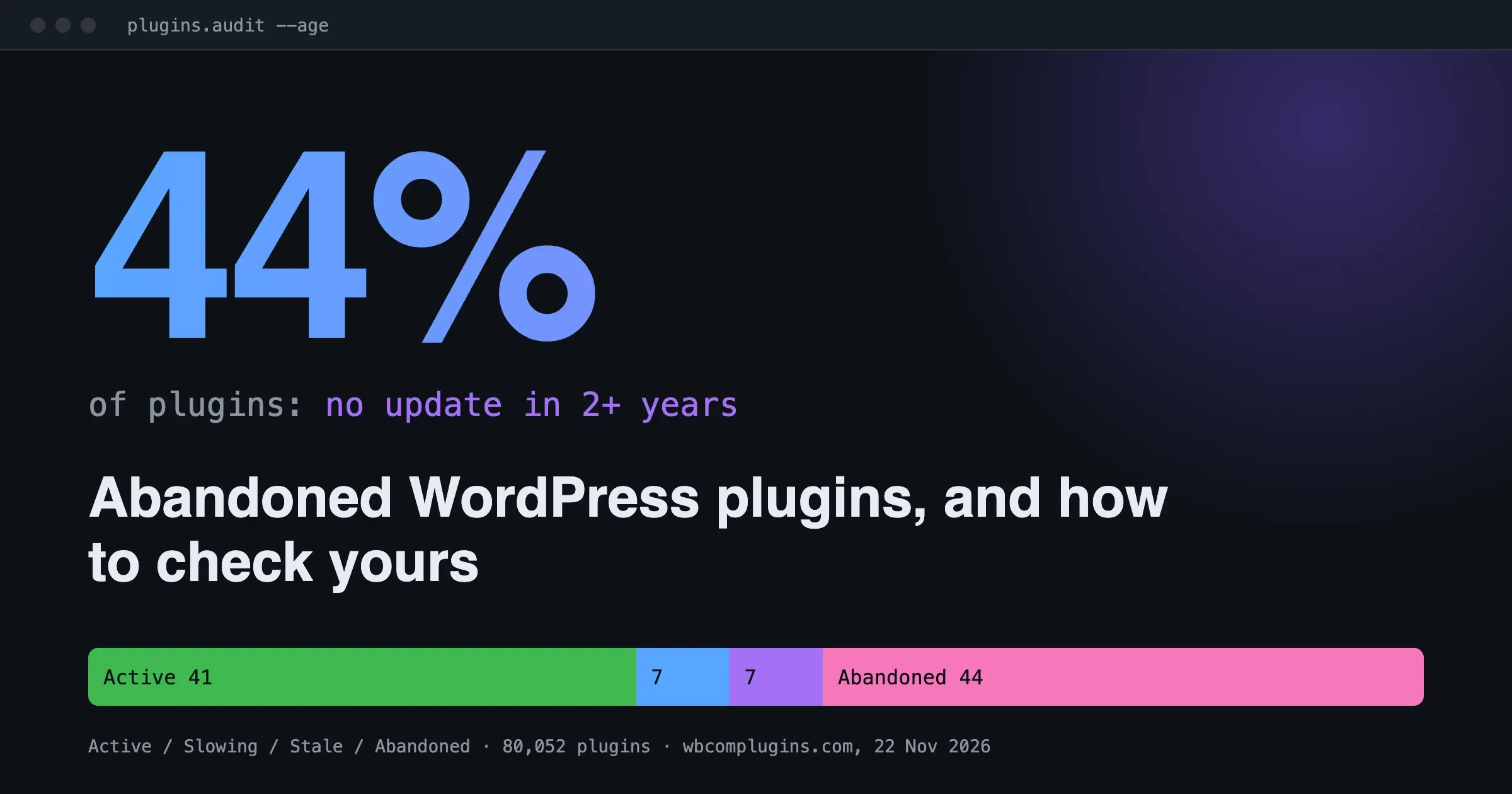
Abandoned WordPress plugins are not rare. In a snapshot of 80,052 plugins taken on 22 November 2026, 44% (35,572) had no update in two years or more. Only 41% had shipped anything in the last six months. If you run a site with a dozen plugins, the odds say one of them is already in the old pile.
That number alone does not tell you what to do, though. A plugin that has sat untouched for three years can be perfectly fine. Another one, updated last spring, can be a liability. What matters is what the plugin does, what it touches, and whether anyone is still around to fix it when something breaks.
This post covers the numbers first, then which kinds of plugins land in the abandoned pile most often, then a decision table and a short script you can run on your own site today.
Disclosure: the index behind these figures is ours. wbcomplugins.com is run by Wbcom Designs, and the data comes from the public wordpress.org plugin directory API. It is one way to look at the problem, not the only one.
The headline numbers
Here is the split from the 22 November 2026 check, taken from the WordPress page of the index:
- 80,052 WordPress plugins tracked
- 41% updated in the last six months
- 39,105 plugins maintained, meaning a release within the last year
- 35,572 plugins (44%) with no update for two years or more
The labels follow a simple age rule, documented on the data sources page. Active means an update in the last six months. Slowing means six to twelve months. Stale means one to two years. Abandoned means two years or more. Closed means the plugin has been removed from the directory.
Two years is a judgment call, not a law of nature. We picked it because it is long enough to cover a full cycle of WordPress and PHP releases. A plugin that has not moved across two years of core changes has either been finished and left alone, or it has been left behind. The date cannot tell you which.
The figure also lines up with a wider pattern. Across all 23 platforms in the same index, 44% of listed extensions are abandoned. Drupal sits at 45%. Payload is at 5% and Astro at 15%, mostly because those ecosystems are young. Gatsby is at 92%, which is what a fading platform looks like in a directory. WordPress is not unusual. It is just big, and big directories collect old code.
A few days ago a plugin maker posted a short question on X: would you install a plugin that has not been updated in two years? The post quoted a “44% of directory plugins” figure and drew a long reply thread. The replies split roughly in two. Some people said no, never. Others said it depends on what the plugin does. Both camps are right, and the rest of this post is about telling the cases apart.
Not updated does not mean unsafe
Start with the uncomfortable part. A date is a weak signal.
Take a plugin that adds a copyright year to your footer through a shortcode. It reads the clock, prints a string, and does nothing else. It takes no input from visitors, writes nothing to the database, and calls no external service. If its last update was in 2022, nothing about that has changed in a way that matters. WordPress core has not removed do_shortcode. PHP has not stopped being able to echo a number.
Now take a plugin that renders a front-end submission form, accepts file uploads, and writes to a custom table. Two years of silence there is a different story. Every one of those operations has had security guidance revised since then. Escaping rules have tightened, capability checks are expected where they used to be skipped, and PHP has deprecated functions the plugin may still call. The code was written against assumptions that have shifted underneath it.
So the working rule is this: age matters in proportion to attack surface.
Ask four questions about any old plugin:
- Does it accept input from visitors or logged-in members?
- Does it handle uploads, payments or logins?
- Does it write to the database or the filesystem?
- Does it talk to an outside service that may have changed its API?
Zero yeses means the plugin is probably fine until PHP or core removes something it relies on. One yes means you should read the code or find a maintained alternative. Three or four yeses means the date is a red flag and you should treat it as one.
There is a second reason age is a weak signal: it hides the opposite problem. A plugin updated last month by a single maintainer who is about to burn out is not healthy either. The directory shows you a date, not a bus factor. That is why the later sections lean on what the plugin touches rather than only on how old it is.
Which kinds of plugins are worst
Averages hide the shape of the problem. When we group the index by what a plugin does, the abandoned share swings from 6% to 72%. Here is the spread, using the categories on the index:
Kind of plugin | Abandoned share | Note |
|---|---|---|
Forums | 72% | 151 plugins |
Community | 67% | 620 plugins |
Content and editing | 58% | 17,802 plugins |
Media | 50% | |
Admin and developer tools | 46% | |
Directories and listings | 44% | 743 plugins |
Marketing | 38% | |
Forms | 36% | |
Security | 32% | |
SEO | 27% | |
Online store | 26% | |
Events and booking | 25% | |
Performance | 25% | |
Courses | 25% | |
Membership | 20% | |
AI | 6% | 1,860 plugins, mostly new |
Read the table from both ends. The bottom is easy to explain. AI plugins are almost all new, so they have had no time to go stale. Membership, courses and online store plugins sit near 20 to 26% because money flows through them. Someone is paid to keep the code alive, and a payment bug costs real revenue the same week it appears.
The top of the table is where the story is.
Forums and community: the add-on graveyard
Forums sit at 72% abandoned and community plugins at 67%. These two categories share a history. A large share of them were built as add-ons for BuddyPress and bbPress during the years when those two projects were the default way to add a social layer to WordPress. Each add-on bet on a host plugin. When the host slowed down, the add-ons lost their reason to be updated.
Many of these plugins also solved a narrow problem: a profile field type, a group directory tweak, an activity filter. One developer wrote it, shipped it, and moved on to client work. There was never a team behind it.
The risk profile here is poor, and that is the part worth noticing. Community plugins take input from members, render user-generated content, and often sit near login and profile data. Those are the four questions from the last section answered with a yes. A high abandoned rate in exactly the category with the largest attack surface is the combination to watch.
The category pages let you browse the individual plugins. The directories category is a good example of how the list is organised, with a status label on every entry.
Content and editing: big, and mostly old
The 58% figure for content and editing deserves a second look because it covers 17,802 plugins. That is more than a fifth of the whole index. This category holds page builders’ add-ons, block packs, shortcode collections, editor tweaks and thousands of small widgets.
Block and editor add-ons age quickly because the editor itself keeps changing. A shortcode plugin from 2018 is a different animal from a block pack that must track the block API. The first may keep working indefinitely. The second breaks when the editor moves, and it tends to break visibly, which at least means you notice.
Media and admin tools
Media sits at 50% and admin and developer tools at 46%. Media plugins that handle uploads or image processing are worth a closer look, since file handling is one of the older sources of plugin vulnerabilities. Admin tools often run with high privileges. A forgotten admin utility can be harmless or it can be the weakest door in the building, and the date will not tell you which.
Where abandonment actually concentrates
A category percentage can mislead in another way. It counts plugins, not sites. A plugin with fifty installs and a plugin with fifty thousand installs each count as one.
We ran a separate check against the WordPress.org API on 29 November 2026 to see how much this matters. We pulled every plugin tagged directory, business-directory or listings. The result was 254 plugins, and 65 of them (25.6%) had not been updated in two years or more.
Then we filtered to the plugins with 1,000 or more active installs. There were 33. Only one of them was stale.
That is the useful finding. Abandonment piles up among tiny plugins. Once a plugin has a meaningful install base, someone usually keeps it alive, because support requests and review scores create pressure to ship. Popular plugins are not immune, but the long tail is where most of the dead code lives.
A caution on method. These tag-based subsets are not the same as the category classification in the table above. A plugin can carry the listings tag without being filed under directories in our index, and the reverse. That is why 25.6% here differs from the 44% shown for directories and listings earlier. Both numbers are real. They answer slightly different questions.
What this means for you: if you picked a plugin because it solved an odd little problem, check it first. If you picked it because half the internet runs it, the odds are better.
How to check your own site
You do not need our index to do this. The wordpress.org API already exposes a last_updated field for every plugin in the directory, and WP-CLI can list what you have installed. Put the two together and you get a report in about a minute.
Run this from your WordPress root. It needs WP-CLI, curl and jq:
#!/usr/bin/env bash
# List every installed plugin with its last update date on wordpress.org.
# Oldest dates come first, so the riskiest candidates sit at the top.

wp plugin list --field=name | while read -r slug; do
  updated=$(curl -sg "https://api.wordpress.org/plugins/info/1.2/?action=plugin_information&request[slug]=${slug}&request[fields][last_updated]=1" \
    | jq -r '.last_updated // "not on wordpress.org"')
  printf '%s\t%s\n' "$updated" "$slug"
done | sort
A few notes on what it does. The -g flag stops curl from treating the square brackets in the query string as a glob. The jq fallback prints a clear label when a slug is not found, which happens for anything that does not live in the directory. Sorting on the first column puts the oldest dates at the top, since they start with the year.
Plugins that print not on wordpress.org are usually premium plugins, custom code, or plugins that were closed and removed. Premium plugins are not in the directory, so this script cannot date them. For those, open the vendor’s changelog and read the last entry. If a changelog does not exist, that is information too.
Two more commands are worth keeping next to it. The first shows what has a pending update right now:
wp plugin list --update=availableThe second prints a compact table of installed and available versions:
wp plugin list --fields=name,version,update_versionThe plugin list command takes more fields and filters than these. The WP-CLI reference for plugin list has the full set.
One more point on reading the output. A pending update is the healthy case. It means a maintainer is shipping and your site is behind. The case to worry about is the opposite: nothing pending, a version number that has not changed in years, and a last-updated date that confirms it.
What to look at once you have the list
Take the five oldest entries and open each plugin’s page on wordpress.org. Look at four things:
- The “tested up to” version. If it names a WordPress release several versions back, the author has not verified compatibility since.
- The support forum. Unanswered threads from the last six months say more than a date.
- The active install count. Small and old is the combination from the earlier section.
- Whether a closure notice sits at the top of the page.
You are not hunting for a verdict from any single signal. You are building a picture. A plugin with an old date, an old tested-up-to version and an empty support forum is abandoned. A plugin with an old date, a recent tested-up-to bump and a quiet but answered forum is probably finished software that works.
If you manage many sites, this scales. Run the script per site, collect the output into one file, and group by slug. Plugins that show up in twenty client sites and also sit in the oldest bucket are your biggest single-point risks. We covered a related technique for working out what a site is running in our guide to plugin and theme detector tools, which helps when you do not have shell access.
A decision table for old plugins
Once you know which plugins are old, you need to decide what to do about each one. This table maps what a plugin touches to the risk if it is abandoned and the sensible next step.
What the plugin touches | Risk if abandoned | What to do |
|---|---|---|
Output only (shortcode, widget, footer text) | Low. Breaks only if PHP or core removes a function it calls. | Keep it. Test after major PHP upgrades. Note it on your watch list. |
Admin screens only, no front-end | Low to medium. Exposure is limited to logged-in admins, but those accounts are high value. | Keep if it is small and read-only. Replace if it writes settings or runs remote calls. |
Front-end forms or user-submitted content | High. Input handling rules have tightened since the code was written. | Replace with a maintained plugin, or review the code for escaping and nonce checks before keeping it. |
File uploads or image processing | High. Upload handling is a classic source of plugin vulnerabilities. | Replace. If you cannot, restrict upload types and test with a hostile file. |
Logins, registration or member data | High. A flaw here exposes accounts. | Replace first. Prioritise above everything else on the list. |
Payments or order data | High, with financial impact. | Replace, and check that the payment provider has not retired the API version it uses. |
Outside API calls (maps, email, social) | Medium to high. The remote service may have changed or closed its old endpoint. | Test the feature end to end. Replace if it fails or if the provider has announced a sunset. |
Add-on for another plugin (BuddyPress, bbPress, WooCommerce) | Depends on the host. Breaks when the host changes its internals. | Check the host’s changelog. Re-test the add-on on every host update. |
The table is a triage tool, not a scoring system. When two rows apply, take the worse one. A directory plugin that takes front-end submissions and accepts image uploads is a high-risk plugin on two counts.
For the plugins that land in the high rows, you can check them against the same standards the official review process uses. We wrote about why a plugin can pass automated checks and still break in why a plugin that passed PHPCS, PHPStan and Plugin Check was still broken. The short version: tools catch syntax and known patterns. They do not catch a plugin whose logic assumptions went stale.
What to do with a plugin you decide to drop
Finding the problem is half the job. Removing a plugin from a live site has its own risks, and doing it in the wrong order is how people lose content.
Replace it
This is the default for anything in the high rows. Find a maintained alternative with a similar feature set. Install it on a staging copy of the site, migrate the data, and compare the front end before you touch production. Check how the old plugin stored its data. Some plugins keep content in custom post types and survive deactivation. Others store everything in custom tables that vanish when you run the uninstall routine.
Export before you remove. Take a database backup, then test a restore. The restore test is the step people skip.
Freeze it and limit the damage
If no alternative exists, you can reduce exposure without removing the plugin. Restrict the pages that load it to logged-in users. Put a web application firewall rule in front of its endpoints. Remove its capabilities from roles that do not need them. None of this fixes bad code. It narrows the number of people who can reach it.
Write the decision down. A note in your site’s runbook that says “plugin X is unmaintained, kept because Y, review again in March” turns a hidden risk into a managed one.
Fork it, if it earns that
For a plugin your business depends on, forking is a legitimate choice. You take on the maintenance, but you control the timeline. This only makes sense when the code is small enough to read in an afternoon and the licence allows it. WordPress plugins are GPL, so the licence is rarely the blocker. Your time usually is.
The broader picture of who is leaving and why is part of the same conversation. Our look at which sites are leaving WordPress touches on maintenance burden as one of the reasons teams give. Abandoned plugins are a visible piece of that burden.
What happens when a plugin is closed on wordpress.org
The “Closed” label in our index means the plugin has been removed from the directory. That happens for several reasons: a security issue that the author did not fix, a guideline violation, a request from the author, or an unresolved review problem.
A closed plugin keeps running on the sites that already have it. WordPress does not delete it for you. What changes is that it stops receiving updates through the dashboard, and the plugin page shows a closure notice instead of a download button. Your site will often show the plugin with no update available, which looks the same as a healthy plugin that has nothing new. The WP-CLI script above helps here, because a closed plugin returns an error from the API and shows up under the “not on wordpress.org” label.
Treat a closure as a stronger signal than age. If the reason on the plugin page mentions security, move it to the top of your replace list.
Are premium plugins better maintained?
Often, yes, with exceptions. Premium plugins have a revenue stream, and revenue pays for maintenance. The categories with the lowest abandoned share in the index are the ones where money changes hands: membership, courses, online stores.
That is a tendency, not a guarantee. A premium plugin from a one-person shop can go quiet just as a free one can. The vendor can sell the product, lose interest, or close. And because premium plugins are not in the directory, you do not have a public date to check. The only evidence is the changelog on the vendor’s site, the licence renewal terms, and how quickly support replies.
Two habits help. Read the changelog before you buy, and check that the last entry is recent. After you buy, note the renewal date and treat it as a checkpoint: if you are about to pay for another year, confirm that the plugin shipped something in the last one.
A routine that keeps this manageable
You do not need to audit every plugin every week. A light routine catches most of the trouble.
- Once a quarter, run the date script and sort by oldest.
- For each plugin older than two years, answer the four questions from earlier and place it on the decision table.
- Replace anything in a high-risk row. Log anything you keep, with a reason and a review date.
- After every major PHP upgrade, test the old low-risk plugins. They fail on removed functions, not on security.
The point of the routine is to make the question boring. Most of the time the answer is “fine, still works.” Now and then it is “this one handles uploads and nobody has touched it since 2023,” and you want to catch that before an attacker does.
FAQ
Is it safe to use a plugin not updated in 2 years?
It depends on what the plugin does. A plugin that only prints output and takes no input can run for years without trouble. A plugin that handles forms, uploads, logins or payments carries more risk the longer it goes without a patch. Use the decision table above to place it.
How do I know if a plugin is abandoned?
Look at the last update date, the “tested up to” version, the support forum and the install count together. An old date with unanswered support threads and a stale tested-up-to version is abandoned. An old date with answered questions and a recent compatibility bump is more likely finished software. The WP-CLI script gives you the date for every plugin at once.
What happens when a plugin is closed on wordpress.org?
It stays installed on sites that already have it and keeps running, but it stops receiving updates and disappears from the directory’s search and download pages. A closure often follows a security problem, so read the reason shown on the plugin page and plan a replacement.
Are premium plugins better maintained?
On average they are, because a paying customer base funds the work. The lowest abandoned rates in our index sit in categories where money changes hands. That said, premium plugins can still go quiet, and you cannot check a public date for them. Read the vendor’s changelog instead.
The short version
Forty-four percent of plugins in the directory are old by the two-year measure. That is a fact about the long tail, not a verdict on every plugin you run. The popular, money-backed and actively reviewed plugins mostly stay maintained. The risk sits with the small ones that take input and have no one watching them.
Run the script. Sort by date. Look hardest at anything old that touches visitors, uploads, logins or payments. Everything else can wait for the next quarterly pass.
If you want a second view of the same data, the wbcomplugins.com index lists every plugin with its status label, and you can filter by kind. It is one tool among several. The WordPress.org API and your own shell give you the same dates, and for a single site that is often all you need.

No comments yet