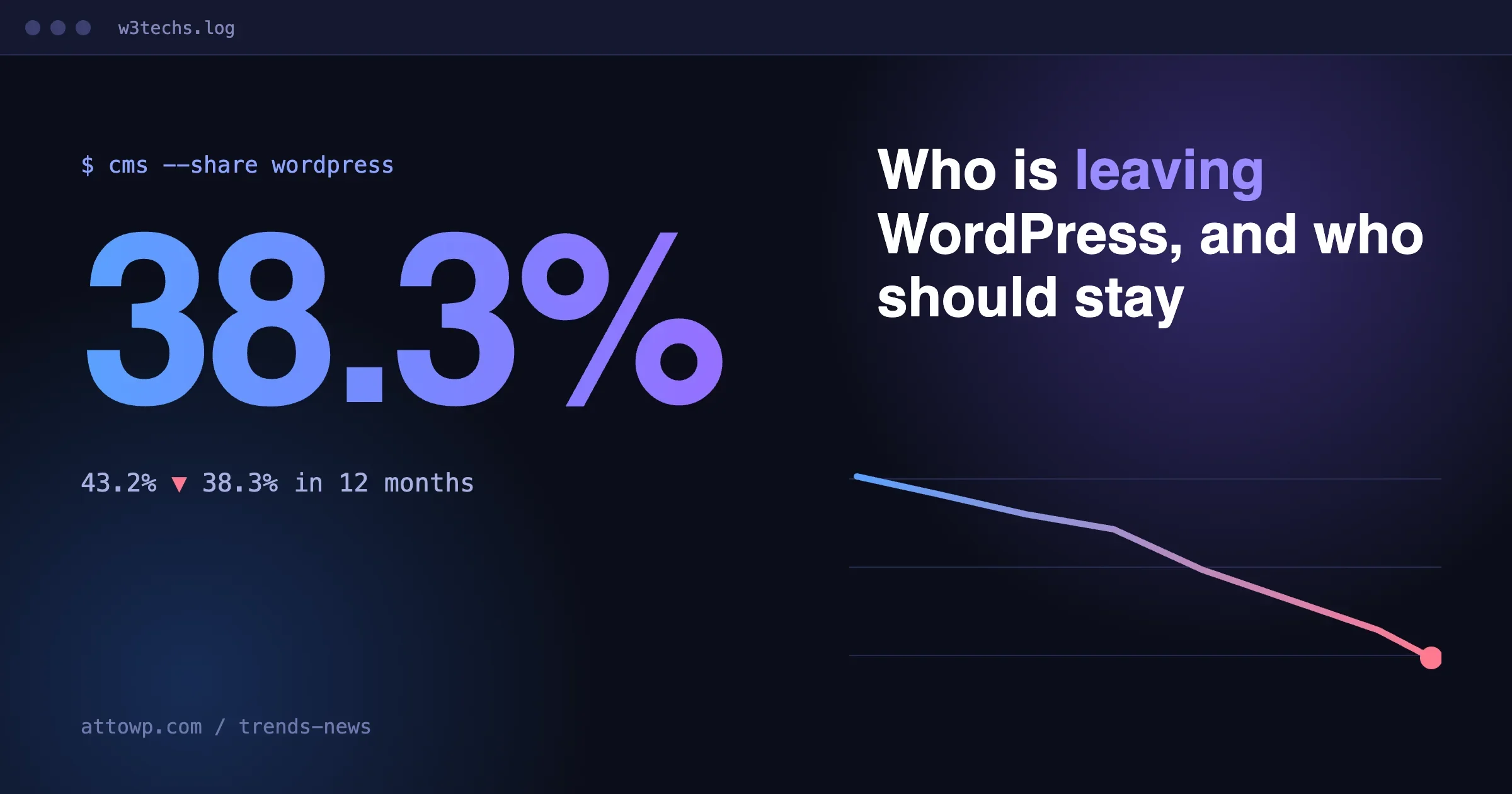
WordPress market share has dropped to 38.3% of all websites according to W3Techs (checked 29 November 2026), down from about 43% a year earlier. Most of the loss comes from small brochure-style sites moving to site builders, static generators and AI-built pages. Sites with several editors, members, bookings or a store mostly stay, because those jobs need a real CMS underneath.
That short answer hides a lot, and this week the argument got loud. A widely shared thread on X pointed at the drop and said WordPress was always overkill for brochure sites. Another popular thread listed reasons to pick Astro on Cloudflare over WordPress. In the replies, people asked why anyone needs a CMS when an AI can change a line of text from a prompt. Then agency owners who manage hundreds of client sites answered with the opposite experience: almost every client still logs into the CMS.
Both camps are describing something real. This post sorts out which is which. We look at what the numbers say, which kinds of sites are actually leaving, which should stay, and how to check your own site in about ten minutes with a few WP-CLI commands.
What does the WordPress market share number actually say?
Start with the source. W3Techs reports that WordPress is used by 38.3% of all websites it tracks, and by 57.3% of the websites whose content management system it can identify. Those are two different denominators, and mixing them up is the most common mistake in this debate.
The 38.3% figure counts every site, including the large slice with no CMS at all. W3Techs puts sites using no CMS at 33.1%. The 57.3% figure removes that slice and asks a narrower question: among sites that run a recognisable CMS, how many run WordPress? Shopify sits at 5.5% of all sites and Wix at 4.1% on the same overview page.
Measure (W3Techs, 29 Nov 2026) | Share |
|---|---|
WordPress, share of all websites | 38.3% |
WordPress, share of sites with a known CMS | 57.3% |
Sites using no CMS | 33.1% |
Shopify, share of all websites | 5.5% |
Wix, share of all websites | 4.1% |
Now the trend. Search Engine Journal, citing W3Techs, recorded 43.2% in December 2025, sliding month by month to 41.9% by late May 2026. The latest reading of 38.3% means WordPress has lost roughly five points in a year. In a market with hundreds of millions of sites, five points is a very large number of sites.
Is it a collapse? No. WordPress still runs more than a third of everything and well over half of the CMS-powered web. Is it noise? Also no. A steady monthly slide that lasts a year is a trend, and it is worth understanding rather than dismissing or cheering.
The datasets do not agree with each other
One honest caveat. Different datasets give different WordPress numbers. W3Techs scans a large list of top sites and detects technology from the page. Counts based on the HTTP Archive crawl come out lower. The two methods sample different sets of sites and detect platforms differently, so you should never put a W3Techs number next to an HTTP Archive number on one chart.
What matters is direction within a single source. Within W3Techs the direction is down. We keep a plain table of the raw figures from several sources on our CMS market share stats page, so this post stays focused on interpretation rather than repeating the table.
The 33.1% no-CMS slice matters most
A third of the web uses no CMS. That group includes hand-built sites, static output from generators, single-page apps and pages produced by newer AI site builders that export plain files. When a WordPress site gets rebuilt as static HTML, it does not move to another CMS. It moves into the no-CMS bucket, and the WordPress share drops without anyone else gaining a CMS point.
That explains something the headline hides. WordPress is not mainly losing to Wix or Shopify. A good part of the drop is sites leaving the CMS category entirely.
Why is WordPress market share dropping?
No single cause explains a five-point slide. Several forces push in the same direction at once, and they hit one type of site much harder than the rest.
- Builders got good enough. A person who wants a five-page site for a plumbing business can now publish one in an afternoon on a hosted builder, with hosting, forms and a domain bundled in.
- Static tooling got easier. Astro, Eleventy and similar generators deploy to Cloudflare or Netlify for little or nothing, and the output is fast without any caching plugin.
- AI changed the cost of editing. If a model can restructure a page or rewrite a paragraph from a plain-language request, some owners decide they do not need an admin screen at all.
- Maintenance fatigue. Updates, plugin conflicts and security patches are a real cost for someone who touches the site twice a year.
- Developers moved their own sites first. Many people who write about WordPress now run their own blogs on something else, and that visibility makes the trend feel bigger than any one chart.
Notice what these forces have in common. They all reduce the value of a database-backed CMS for a site that rarely changes and has one or two people behind it. None of them touch the case where ten people edit, a thousand members log in, or a store takes payments.
Which sites are leaving WordPress?
The sites leaving share a profile. They are small, they change rarely, and nobody on the team needs a login that does anything beyond editing a page.
Brochure sites and portfolios
A five-page business site with a services page, an about page and a contact form was the original bread and butter of WordPress agencies. It is also the easiest site to rebuild as static files. The content changes a few times a year, the contact form can post to a form service, and there is no user account anywhere. For this site, a static build is faster, cheaper to host and has a smaller attack surface. That is not hype. It is simply true.
Personal portfolios follow the same logic. A designer who updates a gallery twice a year gains almost nothing from a login system, a revisions table and a plugin stack.
Landing pages and campaign microsites
Campaign pages live for a few weeks. Many teams already build these in dedicated landing page tools or in code, and they never belonged on a long-lived CMS install. When they were on WordPress, it was often out of habit.
Sites rebuilt by AI tools
The newest group is sites generated from a prompt. An owner describes a business, an AI tool produces a layout and copy, and a one-click deploy puts it on a global edge network. For a simple presence on the web, the result is good enough, and the owner never opens an admin panel. We expect this group to keep growing, and it is the part of the shift that is genuinely new in 2026.
Developer blogs
Technical writers and developers who like Markdown files in a Git repository have moved in large numbers. They already live in an editor and a terminal, so a Git workflow beats a block editor for them. If you read developer blogs, you see this constantly, which is why the trend looks stronger from inside the developer bubble than it does across the whole web.
Which sites should stay on WordPress?
Now the other side. A CMS earns its place when the site has a job beyond showing pages. Here is where we would keep WordPress, and why.
Teams with several editors
The moment a second and third person need to publish, you need roles, drafts, scheduled posts, an approval step and a revision history. WordPress has had these for years. A static site can fake some of them with Git branches and pull requests, but that only works if every editor is comfortable with Git. Most marketing teams are not, and they should not have to be.
Membership, community and course sites
Anything with logged-in users is an application, not a page. Memberships, forums, course progress and gated content all need user accounts, permissions and a database that records what each person did. Rebuilding that on a static stack means adding an auth service, a database and an API, and you end up reinventing a CMS with more moving parts.
Stores and bookings
WooCommerce, appointment plugins and event ticketing carry years of edge cases: tax rules, refunds, stock, time zones, double-booking. You can wire a payment link into a static page and it will work for a single product. Once you have variations, coupons and order emails, the plugin ecosystem is hard to beat.
Sites the client edits every week
This is the simplest test. If the owner opens the editor weekly to change prices, post news or swap an image, they want a familiar admin screen. An AI prompt can change text, but it cannot show the owner a safe draft preview, an undo button and a clear record of who changed what. Those are CMS features, and people value them the first time something goes wrong.
Content-heavy sites
A site with thousands of posts, taxonomies, search and archives is a data problem. Static builds of very large sites get slow to generate, and every small edit means a rebuild. A CMS with a database handles it without ceremony. Hybrid setups, where WordPress stores the content and a separate front end renders it, are a fair middle ground, which we cover in our guide to headless WordPress with Astro.
What do we see in our own work?
We should be upfront that we sit on both sides of this. At Wbcom Designs, we moved attowp and four other content blogs off WordPress to EmDash in 2026. EmDash is an Astro-based CMS that runs on Cloudflare Workers. We did not drop the editing layer. We kept a CMS because we still publish weekly, we still want drafts and revisions, and we want a byline and category system we do not have to build ourselves.
So our own move was not “WordPress to static files.” It was “WordPress to a lighter CMS with the same editing habits.” For blogs that are mostly text, that trade has worked. It also has real downsides, and we wrote them down in what EmDash still needs to fix. If you are considering a similar move, read that before you commit.
On client work we see the reverse pattern often enough to mention it. A small business gets a static site because it is cheap and fast. Roughly a year later the owner wants a booking form, a members area or a small shop, and the project comes back to WordPress. We do not have a clean statistic for how common this is, so treat it as an observation from our own handovers and not as a market figure. It does match what agency owners who manage large client lists say publicly: the clients who stay are the ones who keep adding things.
How do you decide for your own site?
Opinions are cheap. Your site has data that answers the question. Run these commands on the WordPress install you are thinking about leaving. They only read data and change nothing.
# How many people can publish or edit?
wp user list --role=editor --format=count
wp user list --role=author --format=count
wp user list --role=administrator --format=count

# How much revision history is in use?
wp post list --post_type=revision --format=count

# How many published posts and pages exist?
wp post list --post_type=post,page --post_status=publish --format=count

# How many were edited in the last 90 days?
wp db query "SELECT COUNT(*) FROM $(wp db prefix)posts WHERE post_type IN ('post','page') AND post_status='publish' AND post_modified > NOW() - INTERVAL 90 DAY"

# Which active plugins run forms, members, commerce or bookings?
wp plugin list --status=active --field=name | grep -E -i 'woocommerce|memberpress|learndash|buddypress|bookly|amelia|gravityforms|events'

# Are there registered customers or members beyond staff?
wp user list --role=subscriber --format=count
wp user list --role=customer --format=count
Read the results like this. A site with one administrator, no editors, a few dozen posts, almost no edits in 90 days and no commerce plugins is a strong candidate to move. A site with several editors, active revisions, hundreds of recent edits or any plugin that handles money or memberships should stay.
Two numbers deserve extra attention. Subscriber and customer counts tell you whether real people log in. If thousands do, you have an application, and a static rebuild will cost you far more than it saves. And the 90-day edit count tells you how alive the content is. A site edited daily is a CMS site even if it looks simple.
A quick decision table
Site type | Stay or move | Why |
|---|---|---|
Five-page brochure site, rarely edited | Move is reasonable | Static or builder hosting is cheaper and has less to maintain |
Designer or developer portfolio | Move is reasonable | One editor, rare changes, Git workflow already familiar |
Campaign landing page | Move is reasonable | Short life, no need for a long-lived CMS install |
Company blog with a small team | Depends | Lighter CMS or headless setup can work if editors keep drafts and roles |
Multi-author publication | Stay | Roles, scheduling and revisions are daily needs |
Membership, forum or course site | Stay | User accounts and permissions are the product |
Store with variations and order emails | Stay | WooCommerce edge cases are already solved |
Booking or events site | Stay | Time zones, capacity and payments are hard to rebuild |
Site the client edits weekly | Stay | The admin screen is part of what they pay for |
What should agencies and developers do about this?
If you build sites for a living, the drop is information about your pipeline, not an insult to your platform. Here is how we would read it.
Price care plans by site complexity
A brochure site that costs you two hours a year to keep alive should not carry the same retainer as a membership site that needs weekly attention. Many agencies lose small clients because the monthly fee looks silly next to a builder at a few dollars a month. Offer a light plan for simple sites, or offer a static build with a clear price and an honest list of what it cannot do. Clients remember who told them the truth.
Do not fight the small-site exit
Some sites should leave. Keeping a five-page site on a full CMS because it suits your service menu is a poor reason, and the client will find out within a year. Better to build the static version well, charge fairly and be the person they call when they want a booking form. That is how the “comes back a year later” pattern turns into repeat business.
Know the middle ground
Headless and hybrid setups let a client keep the editing screen while the public site is static or edge-rendered. You keep WordPress, or another CMS, as the content store, and the front end ships plain files. It is more work than a classic theme, and you take on two systems to maintain, so it only pays off when speed or a custom front end matters. We compared a Node-based alternative in WordPress vs Payload CMS if you want to see how a code-first CMS stacks up on editing, plugins and hosting.
Ask what an AI edit really replaces
The argument that a prompt can replace a CMS is partly right. It can replace the act of typing a sentence into a field. It does not replace permissions, review, version history or a place where a non-technical person can see the result before it goes live. When a client asks to “just let AI do it,” ask who approves the change and where the previous version lives. If the answer is “nobody” and “nowhere,” that is a gap you can fill, and it is a real service.
Is this the end of the WordPress share story?
Probably not, and the 38.3% figure is not a floor or a ceiling. Three things are worth watching over the next year.
- The no-CMS share. If it keeps growing near 33.1% and above, AI builders and static tools are absorbing the small-site market, and WordPress will keep sliding at the low end.
- WordPress share among CMS sites. At 57.3% it is still a clear majority. If that number holds while the all-sites number falls, the story is about sites leaving the CMS category and not about WordPress losing to rivals.
- Complexity of what stays. A smaller, more complex WordPress base is a different market. Fewer hobby sites and more stores, communities and publications would favour plugin developers who build serious features.
For a developer, a shrinking count of easy sites and a steady count of hard ones is not bad news. The hard sites pay better, and they are the ones with long contracts.
Frequently asked questions
Is WordPress dying?
No. WordPress is used by 38.3% of all websites and 57.3% of sites with a known CMS, according to W3Techs in November 2026. It has fallen about five points in a year, which is a real decline, but it is still by far the most used CMS. A platform that runs over a third of the web is not dying. It is losing the simplest sites first.
Why is WordPress market share dropping?
Mostly because small brochure-type sites are moving to hosted builders, static site generators and AI-built pages. Those sites never needed a database-backed CMS. Some of the drop also reflects sites leaving the CMS category altogether, since W3Techs shows 33.1% of sites using no CMS.
What replaces WordPress for small sites?
It depends on who edits. For a one-person site that rarely changes, a hosted builder or a static site on a service like Cloudflare works well. For a team that still wants drafts and roles, a lighter CMS such as EmDash, or a headless setup, keeps the editing screen. For anything with members, bookings or a store, WordPress is still the practical choice.
Should I move my site off WordPress?
Run the WP-CLI self-test above. If you have one admin, almost no edits in 90 days and no commerce or membership plugins, moving is reasonable and may save money. If several people edit, users log in or the site takes payments, stay. When in doubt, build the new version beside the old one and compare before you switch.
The short version
WordPress market share fell to 38.3% because the cheapest, simplest sites found cheaper, simpler homes. The sites that still need roles, accounts, payments and a real editing screen are mostly staying put. Check your own site with the commands above, decide on the data, and ignore anyone who tells you the answer is the same for every site.
Sources: W3Techs content management overview, Search Engine Journal on WordPress market share, and our own CMS market share stats page.


No comments yet