Short answer: for an HOA, residential community, or apartment complex that wants a private, residents-only space instead of Nextdoor, BuddyNext is the strongest WordPress option because its free core covers a real activity feed, Spaces that map cleanly onto buildings or committees, and native moderation, with no ads and no visibility to anyone outside the community. Nextdoor remains the fastest way to start with zero setup, but it’s public-adjacent, ad-supported, and not actually owned or controlled by the association running it. Everything else on this list fits a narrower budget or use case.
A neighborhood community is smaller and more practical than a general social network: residents want to post a lost cat, coordinate a block party, report a suspicious car, or ask which plumber everyone actually recommends, not build a public profile. That changes what actually matters in a plugin. Privacy and moderation control matter more here than reach or discovery. This roundup covers the plugins that get that balance right, along with the honest comparison most associations are actually weighing it against.
On this page
- Quick comparison
- What a neighborhood community actually needs
- Why not just use Nextdoor
- Who actually runs a WordPress neighborhood community
- 1. BuddyNext
- 2. BuddyPress
- 3. PeepSo
- 4. Ultimate Member
- 5. Listora (for the local directory piece)
- Feature comparison: the top three
- Frequently asked questions
- Which one should you actually pick
- HOA-specific considerations worth planning for
- Getting residents to actually switch from the group chat
- Related WordPress plugin guides
Quick comparison
Plugin | Best for | Starting price | Free tier |
|---|---|---|---|
BuddyNext | Private residents-only community, full stack free | Free, Pro from $149/yr | Yes, full core |
BuddyPress | Largest ecosystem, zero cost | Free | Yes, no Pro tier |
PeepSo | Lightweight, modern out of the box | Free, paid modules | Yes |
Ultimate Member | Simple resident directory | Free, paid addons | Yes |
Listora | Local business/service directory add-on | Free core, paid add-ons | Yes |
What a neighborhood community actually needs
A neighborhood community plugin gets judged on a narrower, more practical set of criteria than a general social platform:
- Genuine privacy, not just a login wall. A neighborhood community only works if residents trust that what they post (a security concern, a personal recommendation, a complaint about a neighbor) stays inside the community and isn’t crawled by search engines or visible to the public internet.
- Sub-groups that map to real physical structure. A large HOA or apartment complex isn’t one flat group; it’s buildings, blocks, or committees (landscaping, social events, architectural review) that need their own space without needing separate sites.
- Native moderation for disputes that get personal. Neighbor disputes escalate in ways generic community drama doesn’t, since everyone involved lives near each other in real life. Real reporting and moderation tools matter more here than in most other community types.
- No ads, no algorithm deciding what residents see. A board announcement about a water shutoff needs to reach residents reliably, not get buried by an engagement algorithm optimizing for time-on-site.
- Low ongoing maintenance for volunteer board members. Most HOA boards are volunteers with limited time. A platform that mostly runs itself after setup is worth more than one with a deep feature list that needs constant hands-on management.
Why not just use Nextdoor
This deserves an honest answer, since Nextdoor is genuinely the default most residents already know and have an account on. Setup is instant, there’s no hosting to think about, and neighbors are often already using it whether the HOA officially adopts it or not.
The costs show up once an association actually needs to rely on it. Nextdoor is ad-supported, so resident attention is competing with advertising the association doesn’t control. Posts are visible within a broader neighborhood radius, not strictly confined to the actual HOA or building, which means official communications can reach people who aren’t residents and shouldn’t be part of the discussion. The association doesn’t own the member list or the platform, so there’s no way to export data, customize the experience, or guarantee the platform will still work the same way next year. And Nextdoor’s moderation policies are Nextdoor’s, not the HOA board’s, which matters when a dispute needs handling according to the community’s own rules rather than a third party’s generic policy.
A WordPress-based neighborhood community trades Nextdoor’s convenience for real ownership: every post, every member record, every announcement lives in a database the association controls, fully exportable, fully private to actual residents. For an HOA or association that expects to rely on this platform for years of official communication, votes, and record-keeping, that ownership is usually worth the extra setup effort, especially once the community wants features (member directories tied to unit numbers, private committee spaces, dues-related announcements) that a generic public platform was never built to support.
Who actually runs a WordPress neighborhood community
It’s worth being specific about who actually sets this up, since “neighborhood community” covers a range of different organizers. HOA boards wanting an official channel that’s actually theirs, not a public platform they don’t control. Apartment or condo building managers who want residents to coordinate on amenities, packages, and building announcements without exposing that traffic to the general public. Small residential developments in their early years, before a formal HOA exists, using a community site to coordinate as neighbors move in. Gated communities and co-housing developments that specifically value the privacy a closed platform provides over public reach.
Each of these has a slightly different emphasis, but they share the same core requirement: a genuinely private space that residents trust enough to actually use for real coordination, not just another app nobody opens. This is exactly why moderation and privacy controls matter more here than feed design or discovery features that dominate general community plugin comparisons.
1. BuddyNext
Disclosure: BuddyNext is built by Wbcom Designs, who we work with. We’re listing it here because its free tier genuinely covers what a neighborhood community needs without add-ons, not because of that relationship.
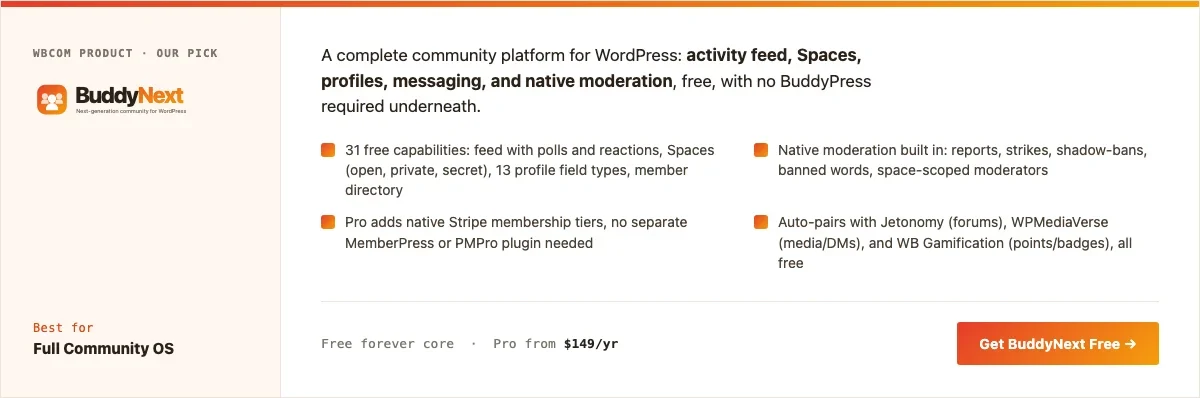
BuddyNext’s free core covers what a neighborhood community actually needs: a private activity feed, Spaces that can map onto buildings, blocks, or committees, member profiles, a directory, and native moderation, all included with no companion plugin required. Member types let a board distinguish residents, board members, and property managers without a paid upgrade.
Here’s a real BuddyNext Spaces directory from a live install, the same mechanism a community would use for building or committee sub-groups:
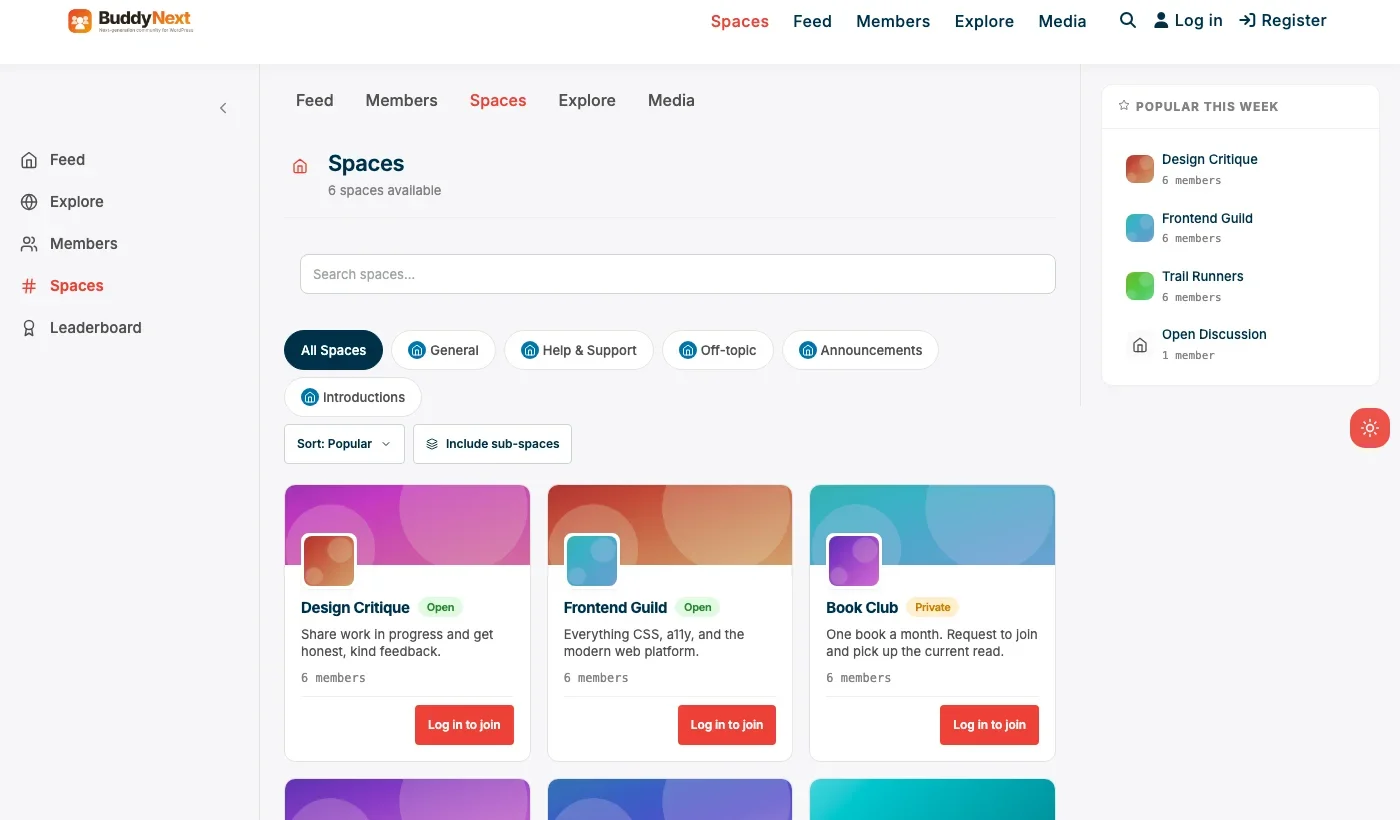
Swap the specific Space names for building numbers, blocks, or committee names (landscaping, social events, architectural review) and the underlying mechanism, a real Space with its own membership and privacy controls, is exactly what a neighborhood association needs to organize around more than one group at once.
Architecture note: we covered BuddyNext’s general positioning in our WordPress community plugin roundup. What matters specifically for a neighborhood community is that privacy is enforced at the platform level, not just the theme level: a Space set to private is genuinely invisible to non-members and to search engines, which is the trust foundation the entire use case depends on.
What we like: free core is complete enough to launch a real private community without paying anything. Native moderation matters more here than almost anywhere else, given how personal neighbor disputes can get. Spaces model fits multi-building or multi-committee associations cleanly.
Could be improved: smaller theme and third-party plugin ecosystem than BuddyPress, since it’s a newer platform. No built-in dues/payment tracking; that stays a separate HOA management tool, not something this plugin replaces.
Pricing: free core forever. Pro starts at $149/yr if the association wants gated content for paying members or a resident portal with tiered access.
2. BuddyPress
BuddyPress remains a legitimate choice for a neighborhood community specifically because of its ecosystem: more themes have been built to work with BuddyPress than any other WordPress community plugin, which matters if visual customization to match the association’s own branding is a priority and a developer is available to implement it. It’s completely free and has over a decade of documented patterns for private group communities.
The trade-off for a neighborhood community specifically is that BuddyPress alone doesn’t include native moderation, which a board relying on this for real dispute handling tends to need. Expect to add a moderation-focused plugin as the community grows past a small, low-conflict group.
What we like: zero cost forever. Largest available ecosystem of community-focused WordPress themes. Mature, well-documented architecture.
Could be improved: no native moderation suite. Needs a compatible theme to look current out of the box.
Pricing: free, always.
3. PeepSo
PeepSo is worth a look for an association that wants a clean, modern-looking community without needing a specialized theme, and without BuddyPress’s full setup overhead. Its free core covers feed, groups, and profiles, with paid modules for specific features like richer media or event coordination.
For a smaller residential community with a clear, modest feature list, PeepSo’s lighter footprint is genuinely appealing, and it’s easy for a volunteer board member to maintain without deep WordPress experience.
What we like: modern look without a special theme requirement. Lighter weight than BuddyPress plus add-ons. Easy for a non-technical volunteer to administer.
Could be improved: per-module pricing adds up if several features are needed. No native monetization as complete as BuddyNext Pro’s Stripe tiers, relevant if the association ever wants a paid resident portal.
Pricing: free core, individual modules priced separately.
4. Ultimate Member
For an association that mainly wants a simple resident directory and login-gated announcements page rather than a full activity feed and groups, Ultimate Member’s registration and profile system is a genuinely lighter path. It’s a good fit for a small HOA that mostly needs “who lives where” and a members-only bulletin board rather than an open-discussion community.
What we like: fast, light setup for a directory-first use case. Strong custom registration form builder for collecting unit numbers, emergency contacts, or vehicle information relevant to a residential community.
Could be improved: no discussion or feed layer without adding more plugins, which starts to rebuild what BuddyNext already includes natively.
Pricing: free core, paid addon bundles for directory and social features.
5. Listora (for the local directory piece)
Listora isn’t a community feed plugin, it’s a directory and listings plugin, but it earns a mention here for a specific sub-need many neighborhood communities eventually want: a searchable directory of trusted local businesses and services (plumbers, babysitters, landscapers) that neighbors actually recommend to each other. Pairing Listora with BuddyNext gives a community both the discussion layer and a structured, filterable local recommendations directory, rather than trying to make a discussion feed do a directory’s job.
What we like: purpose-built directory and listing functionality (ratings, categories, contact details) that a community feed handles poorly as scattered posts. Genuinely useful for the “who do you recommend” need every neighborhood community eventually has.
Could be improved: not a community or discussion plugin by itself; it’s additive to BuddyNext, not a replacement for it.
Pricing: free core, paid add-ons for advanced directory features.
Feature comparison: the top three
Feature | BuddyNext | BuddyPress | PeepSo |
|---|---|---|---|
Native moderation | Yes, free | No | Basic, deeper tools paid |
Building/committee sub-groups | Yes, Spaces | Yes, via Groups component | Yes, via Groups |
Truly private, non-indexed | Yes, per-Space | Yes, with setup | Yes |
Easy for a volunteer to administer | Yes | Needs more setup | Yes |
Free tier completeness | Full core free | Full core free, narrower scope | Free core, paid modules |
Frequently asked questions
Is a WordPress neighborhood community actually worth the setup effort compared to Nextdoor?
If the association expects to rely on this for years of official communication, votes, and record-keeping, yes. For a brand-new, informal group of neighbors just getting to know each other, Nextdoor’s zero-setup convenience is a reasonable starting point.
Can only verified residents join?
Yes. BuddyNext supports manual approval and invite-only Spaces, so a board can require proof of residency (a lease, a deed, an HOA account number) before granting access, keeping the community genuinely limited to actual residents.
Do I need a developer to make this look official rather than generic?
Basic branding, the association’s logo and colors, doesn’t require a developer. Deeper custom design work benefits from developer time the way it would with any WordPress plugin.
What’s the fastest way to launch a basic neighborhood community this month?
BuddyNext’s free core: install, configure basic branding, create a Space or two for buildings or committees, and invite current residents via the property manager or HOA email list. No other plugin is required to have something real to show on day one.
Can the board post official announcements that everyone actually sees?
Yes, and this is one of the strongest arguments for owning the platform: a pinned announcement or a Space dedicated to official board communications isn’t competing with an algorithm deciding whether to show it, unlike a public platform where reach depends on engagement.
How does this handle a dispute between two residents that gets heated?
BuddyNext’s native reporting and moderation tools let a board member step in, remove specific content, or issue a warning without needing a separate plugin, which matters since neighbor disputes often need faster, more direct handling than a generic community moderation queue provides.
Can residents access this from their phones easily?
Yes, BuddyNext works as a mobile-responsive site out of the box, which covers the vast majority of residents checking in from a phone. A dedicated app isn’t necessary for most neighborhood communities, unlike larger commercial communities where push notifications matter more.
How big does a community need to be before this is worth setting up?
There’s no hard minimum, but even a modest HOA of 30-50 units benefits from having an official, private channel instead of relying on a group text or an unofficial Facebook group nobody quite trusts. Larger associations and multi-building complexes see the clearest benefit from the Spaces structure.
Which one should you actually pick
If you’re launching a neighborhood community today and want to own the platform and the resident data behind it without assembling several plugins, start with BuddyNext. Its free core is complete enough to launch on, and native moderation matters more here than in almost any other community type on this site. Add Listora specifically if a local business and service recommendation directory is a real, recurring need for the community. BuddyPress remains the right call if visual customization backed by the largest available theme ecosystem matters more than native moderation out of the box. PeepSo fits a smaller, lower-maintenance community that a volunteer board member needs to administer without deep technical help, and Ultimate Member fits an association that only needs a resident directory and announcements page rather than a full discussion community.
HOA-specific considerations worth planning for
An HOA board taking on a community platform should think through a few practical questions before launch that a general community plugin comparison wouldn’t normally cover. Who has admin access, and what happens when board membership turns over each year? Building admin handoff into the board’s annual transition checklist avoids the common failure mode where the only person with admin credentials moves away or steps down without passing them on. Does the community need to tie into official HOA records (unit ownership, dues status) for verification purposes, and if so, is that reconciled manually or does it need a lightweight integration with the HOA’s existing management software? Most smaller associations handle this manually at first, verifying new members against a resident list the property manager maintains separately, which is perfectly workable at the scale most HOAs operate at.
It’s also worth deciding upfront whether the community platform is the official system of record for HOA communications (meaning formal notices, like assessment changes, get posted there) or purely a supplementary social space, since that decision affects what level of reliability and redundancy the board needs to guarantee. A platform used only for optional, informal neighbor coordination has a lower bar to clear than one the board is relying on to satisfy formal notice requirements under the association’s governing documents.
Getting residents to actually switch from the group chat
The hardest part of launching a neighborhood community usually isn’t the plugin setup, it’s convincing residents already comfortable with a group text or an existing Facebook group to actually move over. A new platform with no content and no habit behind it loses to whatever residents are already using, even if the new platform is genuinely better designed for the purpose.
The most effective approach most associations land on: don’t try to force an abrupt full migration. Announce the new platform with a clear, specific reason residents will actually care about (official notices will only be posted here going forward, or the group text has gotten too noisy and this replaces it for non-urgent items), seed it with real content from the board for the first few weeks, and let the old informal channel wind down naturally rather than declaring it closed on day one. A community that earns the switch through genuine usefulness holds onto residents better than one that mandates it and hopes compliance follows.
Keeping the community active between disputes and dues notices
A neighborhood community that only ever posts official notices and dispute resolutions starts to feel like a compliance tool rather than somewhere residents actually want to check in. The associations that get the most genuine adoption treat the platform as a real community space, not just a notice board, by seeding lighter content alongside the official business.
A monthly photo thread for a shared amenity, a seasonal reminder about a neighborhood tradition, or a simple “recommend a local business” post costs a board member a few minutes and gives residents a reason to open the app beyond checking for bad news. Communities that balance official communication with this kind of lightweight, genuinely social content tend to see residents check in more consistently, which matters directly for the official notices too, since a resident who checks the platform regularly out of habit is far more likely to actually see an important announcement than one who only opens it when specifically told to.
Related WordPress plugin guides
- Best WordPress Community Plugins: the general roundup this HOA-specific guide builds on
- Best WordPress Support Group Community Plugins: another niche where privacy and off-the-radar visibility matter more than reach
- Best WordPress Nonprofit Community Plugins: a similarly volunteer-run, budget-constrained community type
- Best Free WordPress Community Plugins: the full list of genuinely free options across this series
Last reviewed: September 2026.




No comments yet