Short answer: if you’re building a self-hosted community for illustrators, painters, or digital artists, pairing MediaVerse (Wbcom’s media-first gallery and feed product) with BuddyNext (free profiles, follows, and Spaces) is the strongest WordPress combination, because it gives artists a real gallery, a critique-friendly comment thread, and a discovery feed under your own domain instead of a third-party platform’s algorithm. A lighter BuddyPress-plus-gallery-plugin combination is the free DIY route. DeviantArt and ArtStation remain the fastest way to reach an audience that already exists there, and we’ll be honest about when that trade-off still wins.
An art community is a specific kind of media community: the artwork itself is the product, feedback and critique are a large part of why members show up, and a gallery that looks and feels like a stock photo-sharing plugin undercuts the whole point. This roundup covers the plugins that get that balance right, and the honest comparison against the hosted platforms most artists already know.
On this page
- Quick comparison
- What an art community actually needs
- Why not just use DeviantArt or ArtStation
- Who actually runs a self-hosted art community
- 1. MediaVerse + BuddyNext
- 2. BuddyPress + a gallery plugin
- 3. PeepSo
- 4. Ultimate Member
- Feature comparison: owned versus hosted
- Frequently asked questions
- Which one should you actually pick
- Building a critique culture that doesn’t drive artists away
Quick comparison
Option | Best for | Starting price | Free tier |
|---|---|---|---|
MediaVerse + BuddyNext | Owned gallery, critique, and follower feed | BuddyNext core free, MediaVerse priced separately | BuddyNext core yes |
BuddyPress + gallery plugin | Free DIY combination | Free | Yes, both free |
PeepSo | Lightweight community feel | Free, paid modules | Yes |
Ultimate Member | Simple artist directory, lighter weight | Free, paid addons | Yes |
DeviantArt / ArtStation | Instant access to an existing audience | Free to join | Yes, but no ownership |
What an art community actually needs
An art community gets judged on a narrower, more specific set of criteria than a general social community:
- Real galleries, not a photo-sharing afterthought. Artists expect organized portfolios, multiple pieces grouped by series or medium, not a single flat activity feed where a finished painting sits next to a random status update.
- Critique that feels structured, not just a comment box. The best art communities make it easy to leave specific, constructive feedback (on composition, color, technique) rather than a generic reaction button, since critique is often the actual reason serious artists participate.
- A follow and discovery mechanism. Members want to build an audience for their own work and find other artists whose style they like. A community with no following or discovery feed feels static after the first browse.
- Image quality that respects the work. Heavy recompression or tiny thumbnail-only display undersells visual art in a way it wouldn’t undersell a text post. This is a real technical requirement, not a nice-to-have.
Why not just use DeviantArt or ArtStation
This deserves an honest answer, since DeviantArt and ArtStation are genuinely the default for most artists, and for good reason: a built-in audience already exists there, discovery tools are mature, and there’s zero setup or hosting to think about.
The real limitation is one a new self-hosted community can’t paper over: a brand-new WordPress art community starts with zero of DeviantArt’s built-in discovery traffic. Anyone telling you self-hosting beats DeviantArt for reaching new viewers on day one isn’t being straight with you. What self-hosting genuinely wins on is ownership and control: no ads next to the work, no platform-wide policy or algorithm change affecting visibility overnight, and a member list and following graph that belongs to the community’s owner, not a third-party platform.
That trade-off matters most to a specific group: an art school or organization with its own existing following, an established artist migrating a following built elsewhere, or a niche art community (a specific medium, a specific fandom, a specific style) where the value is curation and belonging rather than maximum discovery reach. For someone starting completely from zero with no existing audience to bring, DeviantArt’s built-in reach is a genuinely hard advantage to give up.
Who actually runs a self-hosted art community
It’s worth being specific about who this fits. Art schools and workshops running a student gallery and critique space as part of the curriculum. Independent artist collectives who’ve built an audience elsewhere (a newsletter, a following on another platform) and want a home base they control. Niche fandom or medium-specific communities (a particular game’s fan art, a specific traditional-media technique) where curation and belonging matter more than maximizing reach. Galleries or art organizations wanting a community layer alongside their existing institutional website.
Each of these groups already has a reason to want ownership beyond what a hosted platform offers, which is exactly why a self-hosted option makes sense for them specifically, rather than as a universal recommendation for every individual artist.
1. MediaVerse + BuddyNext
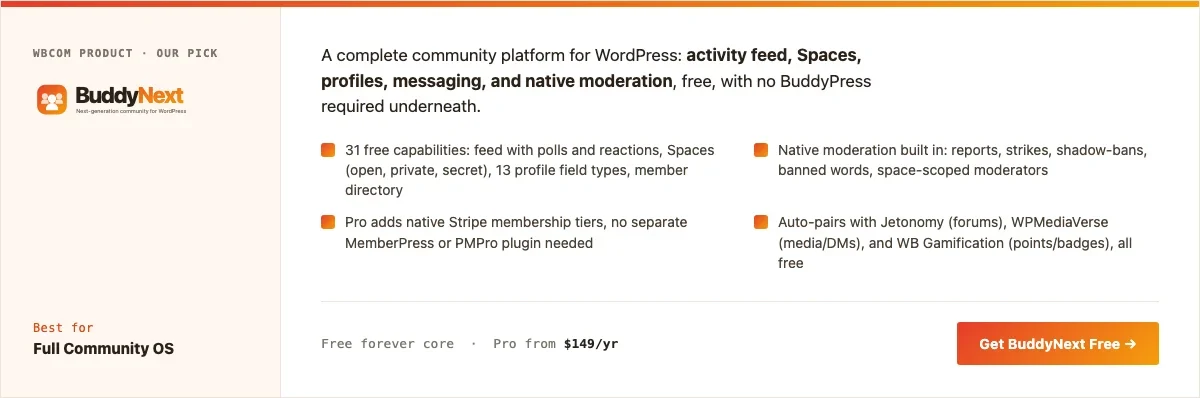
Disclosure: BuddyNext and MediaVerse are built by Wbcom Designs, who we work with. We’re recommending this pairing because the gallery-plus-community combination genuinely fits an art community’s needs, not because of that relationship.
MediaVerse handles the gallery and media-feed side (organized uploads, a media-first feed built for visual content rather than text), while BuddyNext supplies the community layer: member profiles, follows, Spaces that can map to mediums or genres, and native moderation, all part of its free core. Together they cover both halves of what an art community needs without stitching together several unrelated plugins.
Here’s a real BuddyNext Spaces directory from a live install, the same mechanism an art community would use to organize by medium or genre:
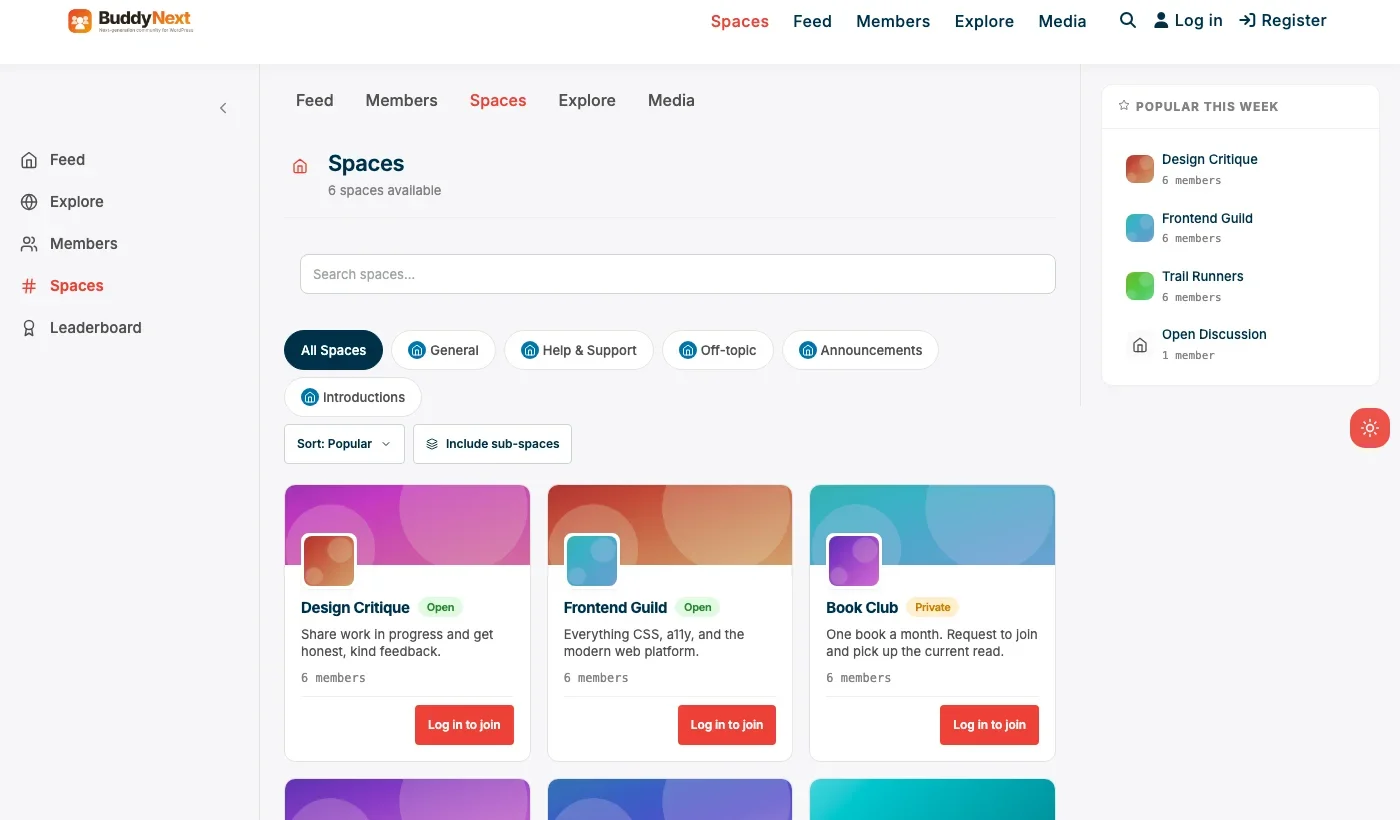
Architecture note: we covered BuddyNext’s general community positioning in our WordPress community plugin roundup. What’s specific to an art community is that the gallery layer (MediaVerse) and the social layer (BuddyNext) are separate products that work together rather than one plugin trying to do both jobs at once, which tends to produce a stronger result than an all-in-one plugin where the gallery experience is clearly secondary to the feed.
What we like: real gallery and media-feed experience instead of a bolted-on photo attachment. BuddyNext’s free core covers profiles, follows, and moderation at no cost. Spaces map naturally onto mediums, genres, or skill levels.
Could be improved: two products to configure instead of one, real setup time compared to a single hosted platform. No built-in audience the way DeviantArt has on day one.
Pricing: BuddyNext core free forever. MediaVerse priced separately; check current pricing on the product page.
2. BuddyPress + a gallery plugin
The free DIY version of the same idea: BuddyPress supplies profiles, follows, and groups, paired with any WordPress gallery plugin for organized image display. Every piece is free, but nothing auto-integrates, so expect real setup time connecting gallery uploads to member profiles and activity feeds.
What we like: completely free stack. Largest available ecosystem of BuddyPress-compatible themes and plugins if a developer is available to wire things together.
Could be improved: no native moderation suite in BuddyPress itself. Real integration work required between the gallery plugin and the community layer.
Pricing: BuddyPress free; gallery plugin cost varies by choice.
3. PeepSo
PeepSo’s lightweight, modern feed works for an art community that wants a social feel without BuddyPress’s full setup overhead. Its free core covers feed, groups, and profiles, with paid modules available for richer media handling.
What we like: modern look without a special theme requirement. Lighter weight than a full BuddyPress stack.
Could be improved: gallery and portfolio organization is less purpose-built than a dedicated media plugin; expect to budget for media-focused modules.
Pricing: free core, individual modules priced separately.
4. Ultimate Member
For a community that mainly wants a searchable artist directory rather than a full feed and critique system, Ultimate Member’s registration and profile system, paired with a directory add-on, is a genuinely lighter path. It fits an art school or organization that wants a public-facing roster of student or member work rather than an open-discussion community.
What we like: fast, light setup for a directory-first use case. Strong custom registration form builder for collecting artist details (medium, portfolio link, bio).
Could be improved: no discussion, critique thread, or feed layer without adding more plugins.
Pricing: free core, paid addon bundles for directory and social features.
Feature comparison: owned versus hosted
Factor | MediaVerse + BuddyNext (owned) | DeviantArt / ArtStation (hosted) |
|---|---|---|
Built-in audience on day one | None, starts from zero | Large, existing |
Ownership of member data | Full, exportable | Limited, platform-controlled |
Ads next to your work | None | Platform-dependent |
Branding and design control | Full | Limited to profile customization |
Setup time | Real, hours to days | Minutes |
Frequently asked questions
Should a new, unknown artist start with a self-hosted community or DeviantArt?
Start on DeviantArt or ArtStation if building an audience from zero is the immediate goal, since a brand-new self-hosted community has no built-in discovery. Self-hosting makes more sense once there’s an existing following to bring over, or when the goal is a curated space (a school, a collective) rather than maximum public reach.
Can members control who sees their gallery, or is everything public?
BuddyNext’s privacy controls let a member set visibility on their profile and activity, which matters for artists who want work-in-progress visible only to a small circle before a public post.
Do I need a developer to set this up?
Basic setup (installing BuddyNext, configuring MediaVerse, creating a few Spaces) doesn’t require a developer. Deep custom gallery layouts or unusual display requirements benefit from developer time, as they would with any of the plugins on this list.
What’s the fastest way to launch a basic art community this month?
BuddyNext’s free core alone, with a simple gallery approach, gets a real community launched. Add MediaVerse’s fuller media-feed experience once the core community is proven and worth the additional investment.
How is this different from a general photo-sharing community?
The mechanics overlap, but an art community leans harder on structured critique and portfolio organization than a general photo-sharing feed does, since the goal is feedback and skill-building, not just casual sharing.
Can an art community charge for premium access or a paid critique tier?
Yes, with BuddyNext Pro’s native Stripe tiers, a community can gate a premium critique circle or early-access Space behind a paid membership tier without a separate membership plugin.
How big does an art community need to be before this makes sense?
There’s no hard minimum, but a few dozen genuinely active contributing artists is a reasonable floor for a critique culture to feel alive. A smaller, tightly focused niche community can work at lower numbers than a broad, generic art category.
Which one should you actually pick
If you’re building an art community around an existing audience, an institution, or a niche that values curation over reach, start with MediaVerse paired with BuddyNext for a real gallery and community layer you own outright. If budget is the main constraint and a developer is available, BuddyPress plus a gallery plugin gets most of the way there for free. PeepSo fits a community that wants a modern, lighter-weight social feel, and Ultimate Member fits an organization that only needs a searchable artist directory rather than a full community experience. If you’re starting from zero with no existing following, be honest with yourself that DeviantArt or ArtStation’s built-in audience is a real advantage worth using first.
Building a critique culture that doesn’t drive artists away
No plugin builds a healthy critique culture on its own, and it’s worth naming that directly rather than implying the technology handles it. Unmoderated, purely negative feedback drives contributing artists away faster than almost anything else in a community like this. A stated house standard, specific and constructive feedback over vague negativity, moderated consistently, matters more to whether an art community thrives than any single feature on this list.
A practical pattern that works well: require or strongly encourage that critique include at least one specific, actionable point alongside anything critical, and have moderators model that standard visibly in their own comments early on. New members take cues from what they see other people doing, so the first few weeks of visible critique behavior tend to set the tone for everything that follows. Treat the plugin choice as the foundation, and treat the actual moderation and culture-setting work as the part that determines whether the foundation gets used well.
Handling AI-generated art in a human-artist community
This is worth addressing directly rather than avoiding, since it has become one of the most common sources of real conflict in art communities launched in the last few years. Many communities built specifically for illustrators and painters have a strong, often near-universal preference for human-made original work, and a gallery that quietly fills with AI-generated pieces without disclosure tends to alienate exactly the contributing artists a community depends on to stay alive.
The plugins on this list don’t solve this for you; it’s a moderation and policy decision, not a technical feature. What does help is deciding the community’s stance explicitly before launch (allowed with mandatory disclosure, allowed in a separate clearly-labeled space, or not allowed at all) and stating it plainly in the community rules rather than leaving it ambiguous until the first dispute forces the issue. BuddyNext’s tagging and Space structure can support whichever policy is chosen, a dedicated Space for AI-assisted work, or a required tag on any submission, but the policy itself has to come from the community’s own values, not from the plugin.
Growing the community without diluting quality
A common failure mode for art communities that do gain traction is losing what made them good in the first place once growth accelerates. A small, tightly curated gallery with genuinely engaged critique can turn into a much larger, much noisier feed where quality submissions get buried under volume and critique quality drops as newer members outnumber the founding group that set the tone.
A few practical choices help manage this transition deliberately rather than letting it happen by accident. Keeping an application or light vetting step for new members, even something as simple as a short bio and a link to existing work, filters out low-effort signups without meaningfully slowing genuine artists. Maintaining separate Spaces by skill level or medium keeps beginner-friendly encouragement-focused feedback from crowding out the more technical critique advanced members are looking for. And explicitly recognizing long-standing contributors, through a visible badge, a featured-artist rotation, or simply consistent moderator engagement with their work, helps retain the members whose presence made the community worth joining in the first place, even as the total membership grows well past its original founding group.
Monetization paths beyond a paid membership tier
A paid membership tier is the most obvious monetization path for an art community, but it is worth knowing it is not the only one, and for many communities it is not even the best fit. A commission board, where members can advertise availability for paid commission work and buyers can browse by style or medium, turns the community into a real marketplace function rather than just a gallery, and tends to generate genuine member enthusiasm since it directly supports artists financially rather than asking them to pay for access.
Print-on-demand integrations, affiliate links to art supplies relevant to the community’s medium, and sponsored features (a paid spotlight slot for a featured artist, clearly labeled as such) are other paths worth considering depending on the community’s specific niche and size. None of these require a different plugin than the MediaVerse-plus-BuddyNext core recommended above; they are additive revenue layers a community can build on top once the core gallery and critique experience is proven and has real, engaged membership to build a marketplace or sponsorship program around.
Why the mobile experience matters more than it might seem
A meaningful share of art community engagement, browsing new submissions, leaving quick reactions, checking notifications, happens from a phone rather than a desktop, even though the actual artwork itself is often created and uploaded from a larger screen. A community whose mobile browsing experience is an afterthought loses a real slice of the casual, frequent engagement that keeps members coming back between their own posting sessions. Testing the gallery browsing and critique-reading experience specifically on mobile, not just confirming the upload flow works, is worth doing before launch rather than discovering the gap after members start complaining.
Backing up original artwork files, not just the display copies
It’s worth setting up a real backup strategy for uploaded artwork before the community grows large enough that losing files would be a genuine disaster for members who trusted the platform with original work. Standard WordPress database and media backups cover this at a basic level, but a community handling potentially thousands of high-resolution original files benefits from a dedicated media backup solution with versioning, separate from whatever backup the hosting provider runs by default, since a single hosting-level backup failure at the wrong moment could mean real, irreplaceable creative work is gone. This is worth treating as a launch-week task, not something to configure after the community already has meaningful content in it.
Making sure attribution stays attached to the work
Art communities that allow reposting, sharing a piece to another Space, featuring it on a front page, need a clear technical and cultural norm that attribution travels with the work automatically, not by convention that depends on individual members remembering to credit correctly. A platform where a featured piece can lose its original artist’s name through a share or repost is a real, recurring source of frustration in art communities specifically, since credit is often the entire point of participating for an artist building a reputation. Confirming that MediaVerse’s sharing and feature mechanisms preserve original attribution by default, rather than assuming it does, is worth testing directly before relying on the feature at any scale.
A final note before opening the doors
Once the plugin setup, the moderation policy, and the founding gallery content are all genuinely in place, resist the temptation to keep polishing indefinitely before the first public announcement. A community with real, if imperfect, activity and a clear sense of what it stands for will always beat a perfectly configured but empty one, and most of the refinements that matter most only become obvious once real artists are actually using the space and telling you, directly or through their behavior, what is and isn’t working for them.
Related WordPress plugin guides
- Best WordPress Photo Community Plugins, the same MediaVerse-led approach, built for photography clubs sharing photographs rather than original artwork
- Best WordPress Photography Portfolio Community Plugins, the photographer-specific equivalent, with individual portfolios and structured critique
- Best WordPress Video Community Plugins, a better fit for communities built around motion and footage instead of static artwork
Last reviewed: September 2026.




No comments yet