Short answer: if you’re running a multi-session conference or a recurring meetup group, pairing Eventonomy with BuddyNext is the strongest WordPress approach because Eventonomy handles the event mechanics (listings, RSVP, registration) while BuddyNext gives attendees a real place to network before, during, and after the event, something a pure calendar plugin doesn’t provide. Meetup.com remains the fastest way to start with zero setup, at the cost of a monthly fee and no control over the attendee relationship between events. Everything else on this list fits a specific budget or feature need.
A conference or recurring meetup is a different problem than a single one-off event. Attendees need a session schedule, sometimes across multiple tracks, speaker information, and a way to find each other, not just an RSVP button. This roundup covers the plugins that handle that structure, along with the honest comparison most organizers are actually weighing it against.
On this page
- Quick comparison
- What a conference or meetup plugin actually needs
- Why not just use Meetup.com or a conference SaaS
- Who actually runs these
- 1. Eventonomy + BuddyNext
- 2. Modern Events Calendar
- 3. The Events Calendar + Pro
- Feature comparison
- Frequently asked questions
- Which one should you actually pick
- Keeping the community alive between events
Quick comparison
Option | Best for | Starting price | Year-round community |
|---|---|---|---|
Eventonomy + BuddyNext | Multi-session events with attendee networking | Community core free, Eventonomy pricing varies | Yes, native Spaces |
Modern Events Calendar | Multi-day, multi-track scheduling | Free core, paid Pro tiers | No, needs a separate plugin |
The Events Calendar + Pro | Established ecosystem, recurring events | Free core, Pro from a paid tier | No, needs a separate plugin |
Meetup.com | Fastest possible start | Monthly organizer fee | Limited, platform-owned |
What a conference or meetup plugin actually needs
A conference or recurring meetup gets judged on a different set of criteria than a single simple event listing:
- A real session schedule, not just one date. Multiple tracks, session times, and room or location assignments need to be genuinely structured, not crammed into a single event description field.
- Speaker information as a real content type. A speaker bio, headshot, and their session list should be browsable on its own, since attendees plan their day around speakers as much as topics.
- A way for attendees to actually meet each other. A conference is often as much about the hallway conversations as the sessions themselves. A plugin that only handles registration misses this entirely.
- Something that persists between events. A recurring meetup or annual conference benefits enormously from a community that stays active year-round, not one that resets to zero every time registration reopens.
Why not just use Meetup.com or a conference SaaS
This deserves an honest answer, since Meetup.com and dedicated conference platforms like Sessionize or Whova are genuinely well-built and purpose-made for exactly this use case. Setup is fast, discovery is built in (people already browsing Meetup for groups in their area), and speaker/session management tools on a platform like Whova are mature and specific to conferences.
The cost is a recurring fee, either a monthly organizer subscription on Meetup or a per-event or per-attendee charge on a conference SaaS, and the organizer doesn’t own the attendee relationship the way a self-hosted approach does. Meetup in particular limits how directly an organizer can reach their own group members outside the platform’s own notification system. For a single annual conference, a SaaS tool’s convenience is often worth the cost. For an organization running a recurring meetup or an annual conference it expects to keep running for years, owning the platform and the attendee community starts to matter more with each passing year.
A WordPress-based approach trades that convenience for ownership: the event data, the registration list, and the community discussion all live in a database the organizer controls, exportable and independent of any platform’s pricing changes or feature removals.
Who actually runs these
This category covers a wider range of organizers than it might first appear. Local tech meetups and user groups running monthly sessions with a rotating set of speakers. Industry conferences bringing together a few hundred to a few thousand attendees once a year, with multiple tracks running in parallel. Church and nonprofit organizations running annual gatherings or training conferences for their broader network. Professional associations running a members-only annual conference as one of their core membership benefits.
Each of these shares the same underlying need: real session structure plus a way for the audience to connect with each other, not just a signup form. The specific scale differs enormously, a monthly meetup with thirty regulars and an annual industry conference with two thousand attendees are different operational problems, but the plugin requirements overlap more than the scale difference might suggest.
Hybrid and fully virtual conferences deserve a specific mention here, since they’ve become common enough that a plugin choice genuinely needs to account for them rather than assuming every attendee is physically present. A hybrid event needs the schedule and speaker information to work identically well for someone watching a livestream as for someone in the room, and the community Space becomes even more important for virtual attendees specifically, since they miss the informal hallway conversations that in-person attendees get for free. An organizer running a hybrid event should weight the community-networking half of this decision more heavily, not less, precisely because the plugin has to substitute for interactions that would otherwise happen naturally.
Budget realism is worth naming directly too. A volunteer-run monthly meetup and a well-funded annual industry conference are working with genuinely different budgets, and the right answer differs accordingly. A free-core stack (Eventonomy’s community tier paired with BuddyNext’s free core) is a completely reasonable permanent home for a meetup that will never have budget for a paid conference SaaS. A funded annual conference with real sponsorship revenue can more easily absorb a premium scheduling plugin’s cost if the feature depth genuinely justifies it, since the platform cost is a small fraction of the event’s total budget at that scale.
1. Eventonomy + BuddyNext
Disclosure: BuddyNext is built by Wbcom Designs, who we work with. We’re listing this pairing here because it genuinely solves both halves of the conference problem, not because of that relationship.
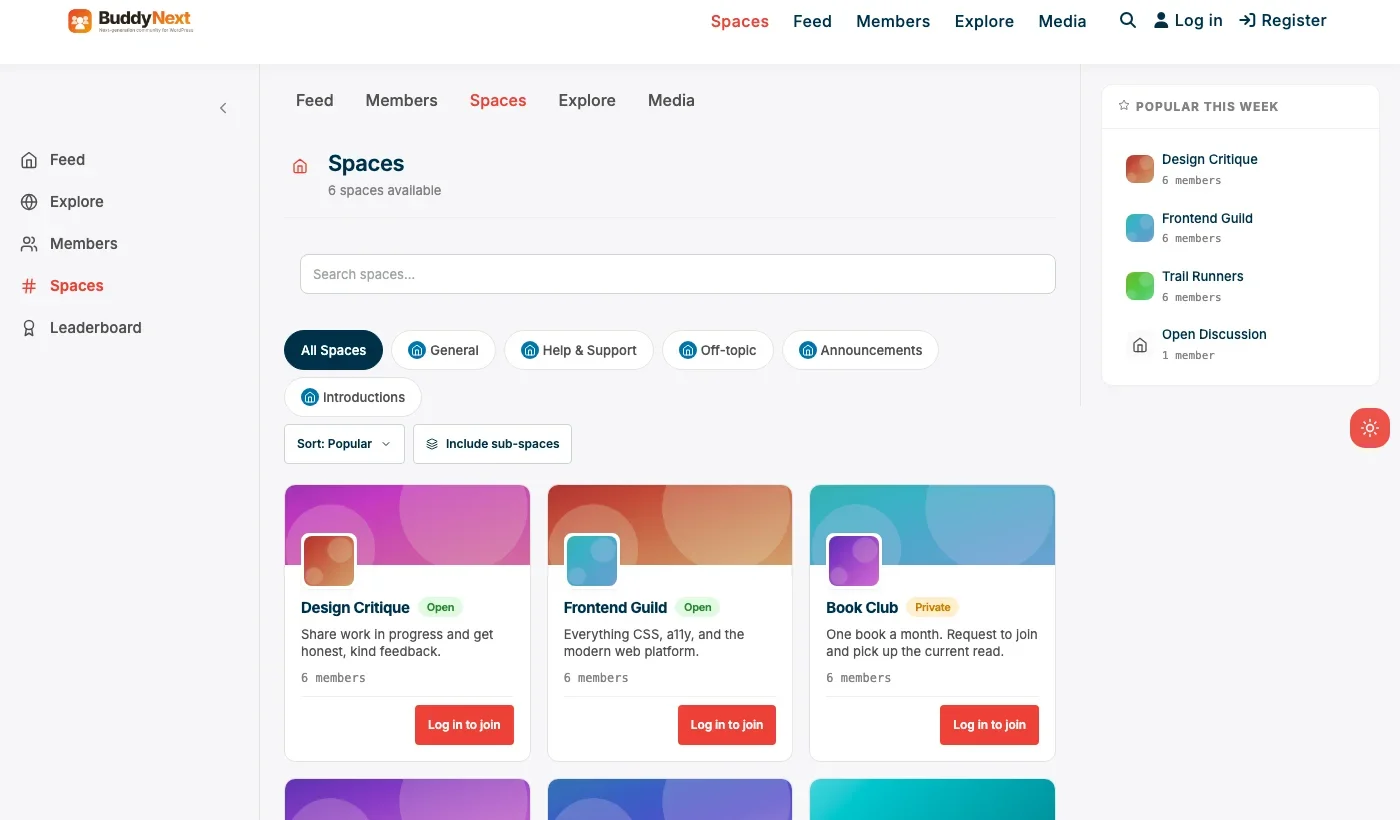
Eventonomy handles the event side: listings, RSVP, and registration for the conference or meetup itself. BuddyNext handles the part a pure event plugin doesn’t: a real community around the event. A Space per conference track lets attendees discuss sessions as they happen, a general Space keeps the community active in the months between an annual event, and attendee profiles let people find each other before the event starts rather than only meeting by chance in a hallway.
Architecture note: this is the same pairing pattern we’ve used elsewhere in this series, most directly in our developer community roundup, where a single plugin covering one half of a problem (structured content or, here, event logistics) genuinely benefits from a community layer covering the other half. Speaker bios and session schedules are Eventonomy’s job; making sure attendees actually talk to each other is BuddyNext’s.
What we like: covers both event logistics and year-round community in one WordPress-native stack. BuddyNext’s Spaces map cleanly onto conference tracks. No recurring per-attendee platform fee the way Meetup or a conference SaaS charges.
Could be improved: requires configuring two plugins rather than one all-in-one tool. Speaker/session schedule depth should be tested against your specific conference format before committing, since exact scheduling features vary by version and configuration.
Pricing: BuddyNext’s community core is free forever, Pro starts at $149/yr for paid tiers if needed. Check current Eventonomy pricing on the product page.
2. Modern Events Calendar
Modern Events Calendar is a genuinely well-known WordPress events plugin with real multi-day and multi-track scheduling support, which makes it a solid choice for a conference that needs serious schedule complexity handled by one plugin. It doesn’t include a community layer natively, so pairing it with a separate community plugin is worth considering if year-round attendee interaction matters to your event.
What we like: mature multi-day, multi-track scheduling built specifically for complex events. Established plugin with a real feature history in this exact use case.
Could be improved: no native community or networking layer; attendee interaction has to be added separately if that matters for your event.
Pricing: free core, paid Pro tiers for advanced scheduling features.
3. The Events Calendar + Pro
The Events Calendar is one of the most established WordPress event plugins by ecosystem size, with a large free core and Pro addons covering recurring events and more advanced scheduling. For an organizer who values a large plugin ecosystem and long track record over the newest feature set, it’s a dependable choice.
What we like: large, mature ecosystem and long track record. Strong recurring-event handling, useful for a monthly meetup format specifically.
Could be improved: multi-track conference scheduling isn’t as purpose-built as Modern Events Calendar’s; no native community layer.
Pricing: free core, Pro tiers priced for advanced features.
Feature comparison
Feature | Eventonomy + BuddyNext | Modern Events Calendar | The Events Calendar |
|---|---|---|---|
Multi-track scheduling | Via Eventonomy | Yes, purpose-built | Via Pro addons |
Native attendee community | Yes, BuddyNext Spaces | No | No |
Recurring event support | Via Eventonomy | Yes | Yes, strong |
Year-round engagement | Yes, native | Needs separate plugin | Needs separate plugin |
Frequently asked questions
Do I need both Eventonomy and BuddyNext, or can I use just one?
For a single simple event, Eventonomy alone covers the logistics. The BuddyNext pairing earns its place specifically for multi-session conferences or recurring meetups where attendee networking and between-event engagement genuinely add value.
Can attendees see the session schedule and RSVP to individual sessions?
Session-level RSVP depth varies by plugin and configuration; verify this against your specific conference format during setup rather than assuming it out of the box.
What’s the fastest way to launch a basic conference site this month?
Eventonomy’s core event listing and registration, with a single BuddyNext Space for general attendee discussion, is a real, launchable starting point without configuring full multi-track scheduling on day one.
Should a monthly meetup use the same setup as an annual conference?
The same underlying stack works for both, but a monthly meetup usually needs less schedule complexity and more emphasis on the recurring, always-on community Space, since the meetup format depends on people returning month after month.
How does this compare to just using Zoom webinar registration for a virtual conference?
Zoom’s registration is fine for the logistics of a single virtual session, but it has no session schedule structure or attendee networking layer at all. A virtual conference with multiple sessions and any networking ambition needs more than Zoom’s registration form alone provides.
Can speakers have their own profile pages?
Whether speaker profiles are a first-class content type depends on the specific event plugin and its configuration; this is worth confirming directly against Eventonomy’s or Modern Events Calendar’s current feature set before committing to a specific setup.
Is it worth building a community around a one-time-only event?
Generally no. The community-pairing approach earns its cost specifically when there’s a recurring cadence, monthly meetups or an annual conference, since the value of a persistent Space comes from people returning to it between events.
How far in advance should registration open for a conference like this?
There’s no universal answer, but opening registration three to six months ahead for an annual conference gives enough runway for early-bird pricing tiers and speaker-announcement marketing to actually work, while keeping the wait short enough that early registrants don’t lose interest before the event happens. A monthly meetup obviously works on a much shorter cycle, often just two to four weeks of visible signup.
Should the call for speakers happen inside the community Space or through a separate form?
A separate structured form is worth keeping for the actual submission (title, abstract, speaker bio, in a consistent format organizers can review efficiently), but announcing that the call is open, and building anticipation around it, works well inside the community Space where past attendees and previous speakers are already paying attention. Treating the Space as the announcement channel and the form as the intake mechanism gets the benefit of both.
Can sponsors get a dedicated presence in the community Space, not just a logo on the event page?
Yes, this is one of the genuine advantages of pairing a real community layer with the event itself. A sponsor-specific Space or a pinned sponsor post gives sponsors a more substantial presence than a static logo, which can be a real differentiator when selling sponsorship packages against a competing conference that only offers logo placement.
What happens to the community Space if the conference takes a year off?
A well-maintained Space can survive a gap year better than most organizers expect, provided someone keeps posting occasionally rather than going completely silent. Announcing the gap year directly to the community, rather than letting members wonder whether the event quietly ended, does more to preserve engagement than anything about the plugin choice itself.
Which one should you actually pick
If year-round attendee community matters to your conference or meetup, and it usually does more than organizers initially expect, pair Eventonomy with BuddyNext and treat the community layer as a real feature, not an afterthought. If your event’s scheduling complexity is the harder problem and community is a secondary concern, Modern Events Calendar’s purpose-built multi-track scheduling is worth a close look. The Events Calendar remains a solid, dependable choice for an organizer who values ecosystem maturity and strong recurring-event support over the newest scheduling features.
Keeping the community alive between events
The biggest mistake conference and meetup organizers make isn’t choosing the wrong plugin, it’s treating the community Space as something that only matters during the event itself. A Space that goes silent the day after the conference ends loses most of the compounding value a year-round presence would provide. A monthly thread recapping something relevant to the community, an early call for next year’s speaker proposals, or simply organizers staying visible and responsive between events keeps the Space feeling alive rather than abandoned.
This matters most for annual conferences specifically, where the gap between events is long enough that a dormant community effectively resets to zero by the time registration reopens. A recurring monthly meetup has a natural rhythm that keeps engagement fresh on its own; an annual conference has to work harder and more deliberately to keep its community Space from going quiet for eleven months out of twelve.
A note for volunteer-run organizing teams
Many of the recurring meetups and even a fair number of smaller conferences covered by this comparison are run by volunteers on top of a full-time job, not by paid event-operations staff. This changes what “best” actually means in practice. A plugin combination that requires constant hands-on maintenance to keep working is a worse fit for a volunteer organizer than a plugin that’s slightly less feature-complete but genuinely runs itself between the organizer’s occasional check-ins.
This is part of why the Eventonomy-plus-BuddyNext pairing is worth considering even for a modest meetup: once the initial setup is done, a community Space mostly moderates and sustains itself through member activity, rather than requiring an organizer to manually curate content the way a bare event calendar with no community layer would. A volunteer team’s real bottleneck is usually time, not budget, and a setup that reduces ongoing maintenance burden is often worth more to that team than one with a longer feature list they’ll never fully use.
A practical recommendation for a volunteer-run group considering this stack for the first time: start with the free tiers of both plugins, run one real event through the full setup, and only evaluate paid upgrades after seeing what the free tier genuinely can’t do for your specific format. Committing to a paid scheduling tool before running a single event through the free version tends to lock in assumptions about what’s needed that don’t always survive contact with the first real event.
Planning for organizer turnover
Volunteer-run meetups and conferences have a real, recurring problem that plugin comparisons rarely address: the person who set everything up eventually moves on, and someone else has to take over running it. A setup that only one person fully understands is a fragile setup, regardless of how good the plugin choice was. Documenting the basics, admin access, how to create a new event, where the community Space settings live, in a shared document the whole organizing team can access, is a small amount of upfront work that prevents a genuine crisis when the founding organizer steps back.
This is a real argument in favor of a WordPress-based stack over a hosted SaaS platform for a long-running community, ironically the opposite of the usual argument. A hosted platform’s admin panel is at least standardized, anyone who’s used it before can generally find their way around a new instance. A WordPress site’s specific plugin configuration is unique to that install, and losing the one person who understood it can genuinely stall an organization’s ability to run its next event until someone rebuilds that institutional knowledge. Treat onboarding documentation as part of the setup work, not an optional extra to get to later.
The organizations that handle this well tend to build a habit of co-running events with at least two people who both understand the admin side, well before any transition is actually needed, rather than waiting until one organizer is already stepping away to start training a replacement. A stack that’s simple enough for a second volunteer to learn in an afternoon, which both Eventonomy and BuddyNext’s core admin screens generally are, makes that kind of shared ownership realistic rather than aspirational.
Related WordPress plugin guides
- Best WordPress Event RSVP Plugins: for a single free event that just needs an accurate headcount, not a full session schedule
- Best WordPress Ticketing Plugins: the paid-checkout half of this comparison if your conference charges for admission
- Best WordPress Community Plugins: our general roundup for the year-round community layer this pairing builds on
Last reviewed: September 2026.




No comments yet