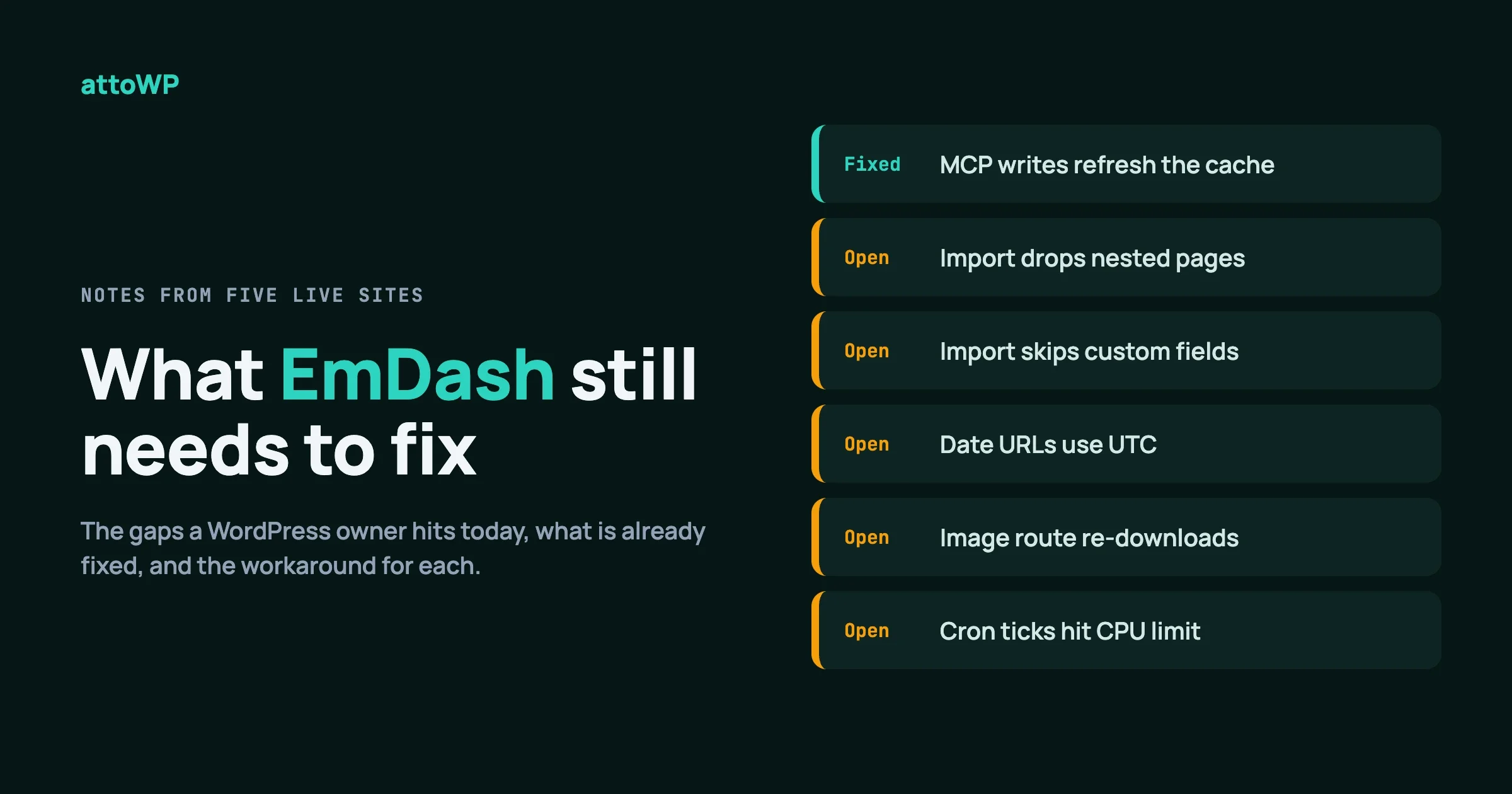
EmDash is ready for a WordPress site if you have a developer, a plan for the import, and the patience to check the result page by page. It is not yet ready for an owner who wants to press one button and be done, mostly because the WordPress importer can lose content without telling you.
This EmDash CMS review comes from running five live sites on it: attowp, wppioneer, woocustomdev, bpcustomdev and tweakswp. This is our honest list of what still needs to improve, with each upstream issue checked against GitHub on 5 October 2026 and each claim limited to what plausibly applies to EmDash 1.1.0. Where something got fixed, we say so.
In this guide
- Where EmDash already wins
- The WordPress import: what it still gets wrong
- Caching traps that cost us time
- Images
- Speed edges and the free-plan cron problem
- Developer tooling gaps
- What we tell a WordPress owner today
- How you can help
Where does EmDash already win in our review?
It is fast, and its updates are calm. Those two things are why we stayed with it after finding the rough edges below.
When we benchmarked the same post in the same browser, attowp on EmDash answered with a first byte in 145 ms and loaded fully in 706 ms with 7 requests. The WordPress version of the same page took 1,201 ms for the first byte, 7,740 ms to load and 57 requests. Those are our own measurements from after the migration, on one page, so treat them as an example and not a promise.
The release rules help too. From 1.0 on, breaking changes only come in a new major version, so a ^1.x pin can take minor releases. Before 1.0, our pin on 0.38 never moved, and every site sat on 0.38 while newer versions shipped. We moved all five to 1.0.1 in one pass and then to 1.1.0 a few days later. Our full routine is in How We Update Five Live Sites Without Breaking Them.
Core database changes now run from the command line before you deploy, so no visitor waits on them. And 1.1.0 itself added useful things: a publishing calendar in the admin, an iframe block, HTML blocks that can carry their own CSS and JavaScript, and a Microsoft sign-in provider.
None of that cancels the problems below. A fast site that lost a third of its pages on the way in is still a bad migration.
Is the WordPress importer safe to trust? An EmDash CMS review of its biggest gap
No, not without checking. It is the weakest part of the story, and it is where we spent most of our time. In any EmDash CMS review, this is the section that matters most. The importer rarely fails loudly. It finishes, says it succeeded, and leaves you to discover what is missing.
What is still broken in the importer
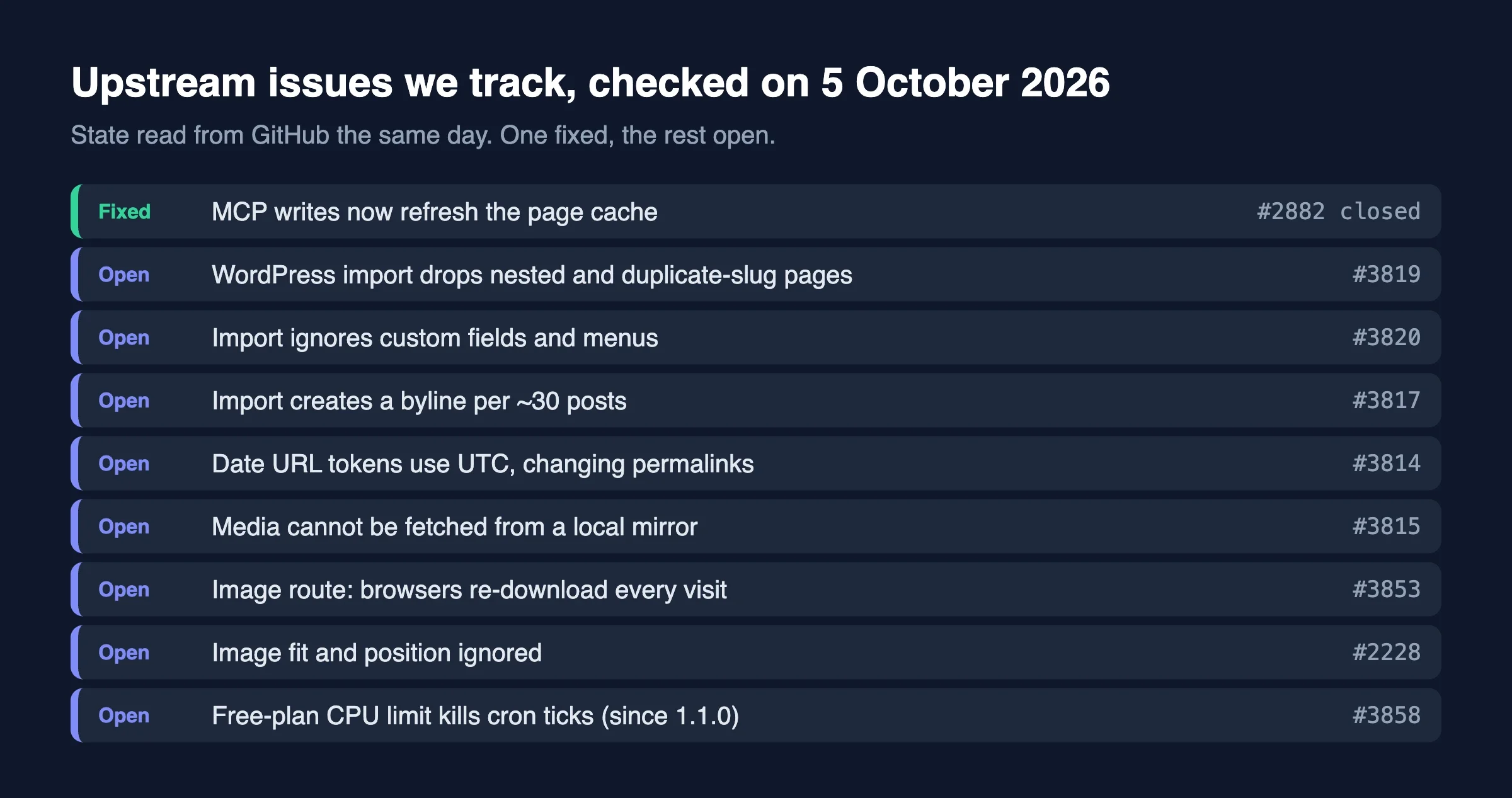
These upstream issues were open on 5 October 2026:
Issue | What happens | State |
|---|---|---|
#3819 | Nested pages and pages with a duplicate slug are dropped, and the hierarchy is flattened | Open |
#3820 | Custom fields and menus in the export are ignored | Open |
#3817 | A new byline is created for about every 30 posts per author | Open |
#3814 | Date URL tokens use UTC, so permalinks of imported posts can change | Open |
#3815 | Media cannot be fetched from a local mirror | Open |
Here is what each one means in practice.
Dropped and flattened pages (#3819). If your WordPress site has a page tree, such as /services/ with children, check every child after the import. Pages that share a slug with another page can vanish without an error.
Ignored custom fields and menus (#3820). Data stored as post meta does not come across, and neither do your navigation menus. You rebuild both by hand or with a script.
Duplicate bylines (#3817). We saw guest authors appear as name, name-2 and so on after re-running an import. The fix on our side is to rename the extra bylines, not to reassign every post.
Changed permalinks (#3814). If your WordPress URLs include the year, month and day, EmDash builds them from UTC dates. A post published in the early morning in a UTC+5:30 time zone falls on the previous day in UTC, which changes its URL. Compare every imported URL with the live one before you switch domains.
No local media mirror (#3815). The importer cannot be pointed at a local copy of your uploads folder, because its safety check against private addresses has no development override. Bulk imports of a big media library are slower and harder to repeat than they should be.
What we found on our own, and not in an issue
Some losses are not on that list, because they come from how WordPress themes store content, not from a single bug.
- Theme and plugin blocks vanish. Many theme blocks are self-closing, with their data in the block comment. The importer’s fallback returns nothing for an empty block, so the page arrives as a few stray paragraphs. Nothing reports it. We rebuilt those pages from the raw post content with custom transformers.
- Category hierarchy is not kept. On attowp, none of the 70 categories kept a parent. Child-category archive URLs cannot be built without it, so we restored the parents afterwards through the API.
- Featured images arrive as external links. They point at the old WordPress URLs and carry no width or height until you run the media and rewrite steps. Without dimensions, the page shifts as images load.
- Primary categories are not imported, from either Yoast or Rank Math. This matters when your WordPress permalink uses the category, because the primary one decides the path.
What got fixed
Credit where it is due. Several things we hit earlier are now closed upstream:
- #3210: the WXR import was capped at about 35 posts per request by D1’s query limit. It was closed on 27 September 2026. We have not re-run a large import since, so we cannot say how far the cap has moved.
- #2566: classic-editor tables were flattened into one paragraph on import. It was closed on 4 October 2026, three days after 1.1.0 was released, so we expect it in the next release and have not tested it.
- #3787: a table with unclosed tags made the import take quadratic time. It was closed on 4 October 2026, with the same caveat.
Tip: After any import, compare counts first (posts, pages, categories, media), then compare a sample page by page against the live site. Counts catch dropped content. A sample catches content that arrived but changed shape.
What goes wrong with caching?
Caching is where good sites turn into confusing ones. Two of the traps below are really about how a Worker and a CDN fit together, not about one bug, so we call them traps and not defects.
The Worker cache does not know which host it is serving
In our setup, the cache keys on the path and query string only. If one Worker answers on two hostnames, such as your real domain and a workers.dev address, whatever the first host rendered is served to the other.
We saw attowp.com serve canonical links that pointed at the workers.dev host. Worse, a cached 301 from plain HTTP to HTTPS was replayed to every HTTPS visitor as a redirect to itself, and the home page looped. It happened because one plain HTTP request, like the one a speed test sends, filled the cache.
Our fixes are small. Build every absolute URL from the site origin, turn caching off for host-specific responses, mark the HTTP redirect as not cacheable, and never test redirects with a plain HTTP request on a live site. Use a cache-busting query string instead, because a new key cannot poison the real one.
// Opt a host-specific response out of the route cache
context.cache.set(false);

// Mark a response as never cacheable at the edge
headers.set("Cloudflare-CDN-Cache-Control", "no-store");
Cache rules left over from your WordPress days can also hurt you. Our zone had a rule that cached all HTML for an hour unless a WordPress login cookie was present. EmDash’s login cookie is different, so admin and API responses could have been cached and served to other visitors. Switch such rules off at cutover.
Media is revalidated on every visit
Issue #3853 is still open. The media route sends must-revalidate but no validator, so a browser has nothing to ask “has this changed?” with. It downloads each image again on every visit. The header exists on purpose, because replacing a file can overwrite its key in place, so we left it alone. Giving the response an ETag or a version in the URL would fix it, and that has to come from upstream.
What was fixed
Issue #2882 is closed as of 16 September 2026. Before it, writes made through the MCP interface never refreshed the page cache, though REST and command-line writes did. That made content changes through an AI assistant look like they had not saved. If you saw that, update. For more on sites that AI agents write to and read from, see webMCP: When Your Website’s Next Visitor Is an AI Agent.
What is wrong with images?
Images are the second biggest source of surprise after the importer. Three open issues and one finding of our own make up the list.
Issue | What happens | State |
|---|---|---|
#2228 | The image endpoint ignores Astro’s | Open |
#3507 | The template serves full-size originals instead of requesting sized versions | Open |
#3853 | Browsers re-download media on every visit | Open |
On #3507, we worked around it. EmDash addresses media by absolute URL, which Astro treats as a remote image and passes through untouched. The fix is to allow your own hosts in image.remotePatterns. On our site this took a hero image from 686 KB to 80 KB at 640 pixels wide. Check that the hero image source starts with /_image?href=, or it is not being resized.
// astro.config.mjs
image: {
  remotePatterns: [
    { protocol: "https", hostname: "yoursite.com", pathname: "/_emdash/api/media/file/**" },
  ],
},
Images inside imported HTML blocks never go through that pipeline, so we override the HTML block component to run each local image through getImage. That override is exactly why the 1.1.0 change to isolated HTML blocks needed our attention.
We also have an older image issue that our browser check surfaced on two sites: some resized images return a server error. It was there before the latest upgrade. We are still investigating it and we will not call it an EmDash bug, or ours, until we can prove which.
Does EmDash have slow spots?
Yes, three. All three are edges, and one has a free-plan sting.
Uncached pages need read replication
Since 1.0, a render that may fill the route cache skips the key-value object cache, so every render that reaches the Worker runs all of its database queries. Pages served from the edge cache are unaffected. Our databases have their primary in Asia-Pacific, and from our location traffic was being served from Europe, at 200 to 400 ms per query.
Turning on D1 read replication brought it down to 12 to 80 ms per query. The wppioneer home page went from 10 to 13 seconds uncached to 0.5 to 0.95 seconds. The setting in our code, d1({ session: "auto" }), does nothing until replication is on in Cloudflare. We would like the starter to mention this next to the setting, because the code looks finished when it is not.
The first request on a new site can time out
An empty database runs about 89 core migrations on its first request. Past 100 seconds, the edge returns a 524 while the Worker keeps migrating. If you retry, you can make it worse. Send one request, then poll the migrations table and the lock row. The better path is the command line. Run emdash migrate before the first visit. We have not re-timed an empty database on 1.1.0.
The every-minute cron job on the Free plan (#3858)
This one is new and it matters. Issue #3858 is open: since 1.1.0, every-minute cron ticks are killed by the Workers Free plan’s 10 ms CPU limit on cold isolates, so scheduled work is lost overnight. If you publish on a schedule and run on the Free plan, check that scheduled posts actually go out. A paid Workers plan has a much higher CPU limit.
There is also #3313, open, which says the middleware’s import closure grew in 0.39 and startup got slower. We have not measured it on 1.1.0, so treat it as unconfirmed for us.
What is missing for developers?
The developer tools work, but a few sharp edges cost us hours. These come from our own notes on 1.0.x. We have not retested each on 1.1.0, apart from the redirect one.
- The redirect manager skips paths with a file extension. We confirmed this in the 1.1.0 source: the middleware returns early when the path ends in a dot and one to ten word characters. Old WordPress sitemap URLs like
/post-sitemap1.xmlcannot go in the manager. They must live in site code. A related issue, #3822, says redirect patterns with[param]do not match a trailing slash, while exact and splat rules do. - Token scopes are strict. A token with only
content:writegets a 403 on its first read. Write does not imply read. Grant content and media read and write together. - The types command output is not a usable types file. It lacked the imports and the module augmentation, and two of our sites carried 107 type errors from a committed copy until we rewrote it.
- Passkeys belong to one hostname family. A passkey made on the
workers.devaddress does not work on your production domain. Multi-subdomain setups were fixed in #799, closed on 29 April 2026, and EmDash has anallowedOriginssetting for subdomains under one parent. A separate custom domain still cannot share a passkey withworkers.dev, as far as we can tell.
One more fix to credit: MCP sign-in used to fail because discovery advertised the wrong scheme behind Cloudflare. Issue #2016 was closed on 20 July 2026.
How do you check an import before you trust it?
Check it in four passes: counts, URLs, content and behaviour. Each pass catches a different kind of loss, and none of them takes long once you have a script.
- Counts. Compare posts, pages, categories, tags and media between the old and new site. A count that is off by even one is worth a look.
- URLs. Compare the sitemap of the old site with the sitemap of the new one. A missing or changed URL is a lost page or a lost ranking.
- Content. Open ten pages that use your theme’s custom blocks, your tables and your galleries. Dropped blocks show up here and nowhere else.
- Behaviour. Test the contact form, search, the menus and the admin login on a phone-sized window.
The URL pass is the easiest to script. This works for a single flat sitemap on each site. If your sitemap is an index of sitemaps, run it once per child file.
curl -s https://old.example.com/sitemap.xml | grep -o '<loc>[^<]*' | sort > old.txt
curl -s https://new.example.com/sitemap.xml | grep -o '<loc>[^<]*' | sort > new.txt
diff old.txt new.txt
Expect noise from the hostname, so replace it in one file before you diff. What is left is your to-do list.
If you could fix five things first, what would they be?
This is our order, from the point of view of someone moving a real WordPress site. It is a wish list for the project, not a complaint.
- Report what the importer skipped. A summary at the end of the import (“12 pages skipped, 3 blocks dropped”) would turn silent loss into a task list. This is the single change that would save us the most time.
- Keep page hierarchy and duplicate slugs (#3819). A site’s structure is part of its content.
- Import custom fields and menus (#3820). Both are common, and both are slow to rebuild by hand.
- Give media a validator (#3853). An ETag turns a re-download on every visit into a quick “not modified”.
- Honour image fit and position, and request sized originals (#2228, #3507). Pages should not need a workaround to avoid shipping full-size photos.
The cron limit on the Free plan (#3858) is the sixth, and it is urgent for anyone affected. We list it separately because it is about a plan limit as much as about code, and the project may choose to document it instead of changing it.
What is our EmDash CMS review verdict for a WordPress owner today?
Here is the short version of our EmDash CMS review. Use it as a decision table.
Your situation | Our advice |
|---|---|
Blog with simple posts, a developer on hand | Ready. Budget a day to check the import. |
Site with a page tree, menus or custom fields | Ready with scripts. Plan to rebuild some parts. |
Store, membership or heavy plugin data | Not yet. Keep it on WordPress. |
Owner who edits alone, no developer | Not yet. The import is too quiet about losses. |
We keep some sites on WordPress on purpose. Our headless CMS versus WordPress comparison covers how to choose. The migration itself is told in We Moved Five WordPress Sites to EmDash the Week 1.0 Shipped.
Verified against EmDash 1.1.0, GitHub issue states on 5 October 2026, and the 1.1.0 release notes. Behaviours we have not retested on 1.1.0 are marked above.
When don’t you need to worry about any of this?
You can ignore most of this list if you are starting a new site on EmDash with no WordPress history. The importer, the permalink tokens and the category issues all disappear. What remains are the caching and cron points, and they are manageable.
You also can ignore it if your WordPress site is small and you are happy with it. Moving is a choice, not a deadline.
FAQ
Is EmDash ready to replace WordPress?
For many content sites, yes, with a developer. For stores, memberships and sites that depend on plugins, no. It is a different kind of system and it does not run WordPress plugins.
Will my URLs and SEO survive the move?
They can, if you check. Compare every URL, canonical, title and schema block against the live site, and fix date-based permalinks first. The importer will not warn you.
Is the cron problem a reason to avoid 1.1.0?
Only if you rely on scheduled work and run the Free plan. Check that a scheduled post publishes, and move to a paid plan if it does not. We have not yet checked whether it affects our own sites.
Should we wait for 1.2?
If your site is mostly pages and posts, no. If it has a deep page tree or many custom fields, waiting for importer fixes saves you scripting. Watch #3819 and #3820.
Where do we report a new problem?
On the EmDash repository on GitHub. Search first, because most of what we found already has an issue. A reaction on an existing issue helps its priority.
What should you do next?
If you are weighing a move, start with a test import of a copy of your site, and list what changed before you decide. If you want help with that, our team builds and maintains these migrations in-house at Wbcom Designs.
You can help EmDash directly. Add a reaction or a reproduction to #3819, #3820, #3817, #3814, #3815, #3853, #2228, #3507 and #3858 if you hit them too. A fix to #3819 would remove the biggest cost we had.

No comments yet