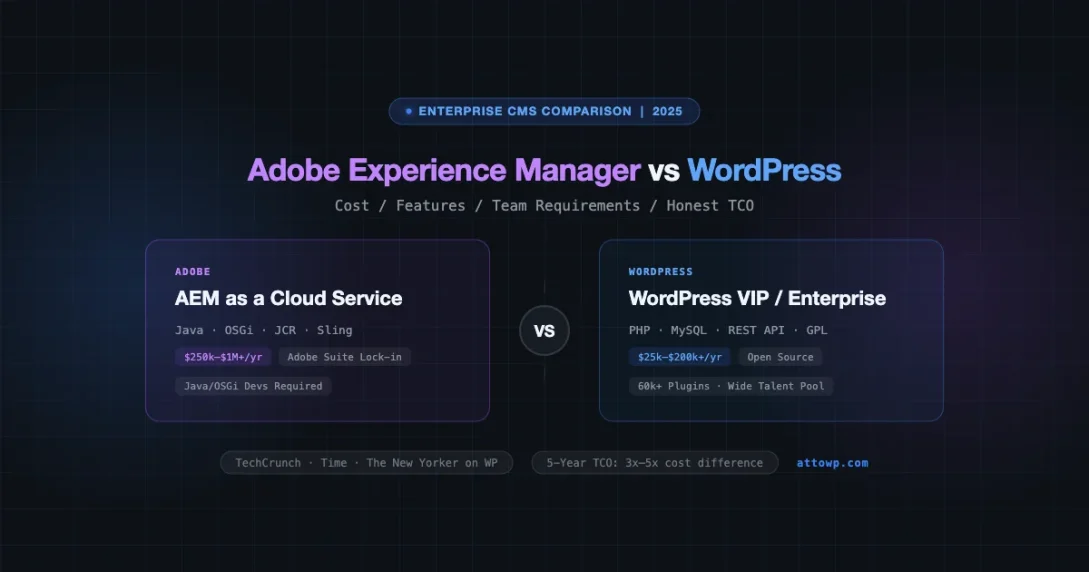
When enterprise IT directors and digital experience teams sit down to evaluate a CMS, Adobe Experience Manager and WordPress appear at opposite ends of almost every axis that matters: price, team requirements, integration depth, and operational overhead. This comparison cuts through the vendor positioning and looks at the actual numbers, real-world performance data, and the specific scenarios where each platform wins.
What Each Platform Actually Is
Adobe Experience Manager (AEM)
AEM is a Java-based content management platform that ships as part of Adobe’s Experience Cloud. It bundles a content management system (Sites), a digital asset manager (Assets), a cloud delivery network (CDN), personalization tools, and deep integrations with Adobe Analytics, Target, Campaign, and Commerce. AEM runs on OSGi container architecture (Apache Felix), uses the Java Content Repository (JCR/Apache Jackrabbit Oak) as its data store, and delivers content through Sling request processing.
AEM is available in two deployment models: AEM as a Cloud Service (AEMaaCS), which is the current default, and AEM 6.5 on-premises or managed services. AEMaaCS auto-scales via Adobe’s cloud infrastructure and ships continuous updates rather than major version releases.
WordPress
WordPress is an open-source PHP application with a MySQL/MariaDB backend. It powers roughly 43% of all websites globally. The platform ships with a block editor (Gutenberg), a REST API, and a plugin ecosystem exceeding 60,000 extensions. At scale, WordPress runs in configurations ranging from single-server shared hosting to horizontally scaled clusters behind load balancers, object caches (Redis, Memcached), and CDNs.
Enterprise WordPress deployments typically run on WordPress VIP, Pantheon, WP Engine, or self-managed infrastructure. The platform itself is free; costs come from hosting, plugins, development, and support.
The Real Cost Picture
Cost is where AEM vs WordPress conversations get uncomfortable fast. Let’s put actual numbers on the table.
AEM Licensing and Total Cost of Ownership
Adobe does not publish AEM list prices publicly. Based on independent analyst reports (Forrester, Gartner), industry procurement data, and publicly available RFP responses from US government agencies that have conducted open bidding processes, AEM licensing falls in these ranges:
- AEM Sites (mid-market entry): $250,000 to $350,000 per year for organizations with moderate traffic and a limited number of sites
- AEM Sites + Assets (enterprise tier): $500,000 to $1,000,000+ per year for large organizations with multiple brand sites, heavy DAM usage, and personalization requirements
- Implementation costs: Adobe-certified partner implementations typically run $300,000 to $800,000 for initial deployment, with complex multi-site, multi-region projects reaching $1.5M to $2M+
- Ongoing development: AEM developers (Java/OSGi/Sling specialists) bill at $150 to $250+ per hour in North American markets. Retaining two to three senior AEM developers runs $400,000 to $600,000 per year in fully-loaded costs
These are estimates. Adobe’s actual pricing is negotiated per contract and varies significantly by organization size, use case, and bargaining leverage. Organizations evaluating AEM should issue an RFP and get competing quotes from multiple Adobe partners.
WordPress Hosting Costs at Scale
WordPress hosting costs span a huge range depending on the managed platform and traffic requirements:
- WordPress VIP: Starting at approximately $25,000 per year for the entry tier, scaling to $200,000+ per year for high-traffic enterprise accounts with advanced support, custom infrastructure, and multi-site management. VIP is the hosting platform used by large media companies, Fortune 500 marketing sites, and government agencies.
- WP Engine Enterprise: Custom pricing, typically $15,000 to $75,000 per year for enterprise contracts with dedicated infrastructure
- Pantheon Enterprise: Similar range to WP Engine, with strong CI/CD tooling and multidev environments
- Self-managed AWS/GCP/Azure: Infrastructure costs for a properly architected high-availability WordPress stack (load balancer, multiple app servers, RDS, ElastiCache, CloudFront) typically run $3,000 to $15,000 per month depending on traffic and redundancy requirements. Add DevOps/SRE overhead on top.
Total annual cost for a mid-size enterprise WordPress deployment (VIP or equivalent managed host + 1-2 WordPress developers + plugins) typically runs $100,000 to $300,000 per year. That is a substantial investment, but still well below the floor for AEM.
Feature Comparison: The Honest Version
| Capability | AEM | WordPress |
|---|---|---|
| Content Authoring | Touch UI, experience fragments, editable templates | Block editor (Gutenberg), FSE, classic editor |
| Digital Asset Management | Built-in AEM Assets (DAM) with AI tagging, renditions, metadata schemas | Basic media library; full DAM requires third-party (Bynder, Cloudinary, etc.) |
| Personalization | Native A/B testing via Adobe Target, context hub rules, launch segments | Requires plugins or headless + external personalization layer |
| Multi-site / Multi-language | Live Copy, MSM (Multi-Site Manager), language copy workflows | WordPress Multisite, WPML, TranslatePress, Polylang |
| Content Delivery | Dispatcher (reverse proxy + cache), Fastly CDN on AEMaaCS | Any CDN; full-page caching via Varnish, WP Super Cache, W3TC, or host-level |
| API / Headless | Content Fragments + GraphQL, Sling endpoints, OpenAPI model | REST API, WPGraphQL, native block data model |
| Analytics Integration | Native Adobe Analytics via Experience Cloud; deep data layer | Google Analytics, Matomo, Segment via plugins; custom data layer with GTM |
| Workflow / Approvals | Built-in workflow engine with DAM + Sites workflows, inbox, delegation | Editorial workflow plugins (PublishPress, Oasis Workflow); or custom post statuses |
| Commerce | Adobe Commerce (Magento) integration, CIF framework | WooCommerce (43M+ installs), or headless commerce via REST/GraphQL |
| Developer Experience | Maven builds, OSGi bundles, Sling models, HTL (Handlebars Template Language) | PHP hooks/filters, block development (React/JS), WP-CLI, Composer |
| Plugin/Extension Ecosystem | AEM Marketplace (limited, commercial); partner integrations | 60,000+ free plugins on WordPress.org; thousands of commercial plugins |
| Open Source | No (proprietary) | Yes (GPL) |
Team Skills Required
Building and Running an AEM Team
AEM development is Java-centric. A functioning AEM development team needs:
- Senior Java developers with OSGi/Felix experience (these are not standard Spring Boot developers; OSGi bundle lifecycle, declarative services, and Sling resource resolution are specialist knowledge)
- AEM-specific front-end developers who understand HTL (formerly Sightly), Client Libraries (clientlibs), and AEM’s component model
- Infrastructure engineers familiar with Adobe Dispatcher configuration, replication agents, and (for on-prem/managed services) JVM tuning
- A content architect who understands JCR node structures, content fragment models, and editable template policies
Finding AEM-certified developers takes longer and costs more than finding WordPress or general web developers. The AEM talent pool is considerably smaller. This matters for hiring timelines and team continuity.
Here is a simplified AEM Sling Model for context on the developer experience:
@Model(adaptables = Resource.class, defaultInjectionStrategy = DefaultInjectionStrategy.OPTIONAL)
public class HeroModel {

    @Inject
    @Via("resource")
    private String title;

    @Inject
    @Via("resource")
    private String subtitle;

    @Inject
    @Via("resource")
    @Default(values = "/content/dam/brand/hero-default.jpg")
    private String backgroundImage;

    public String getTitle() { return title; }
    public String getSubtitle() { return subtitle; }
    public String getBackgroundImage() { return backgroundImage; }
}
Building and Running a WordPress Team
WordPress development runs on PHP, JavaScript (React for blocks), and MySQL. The developer pool is orders of magnitude larger. A capable enterprise WordPress team needs:
- Senior PHP developers with WordPress internals knowledge (hooks, filters, custom post types, REST API extension)
- JavaScript/React developers for block development and custom Gutenberg components
- DevOps/infrastructure engineers for server configuration, caching layers, and CDN management
- A WordPress performance specialist for database optimization, query tuning, and object cache configuration
Equivalent WordPress code for a hero component shows the contrast clearly:
// block.json
{
  "name": "theme/hero",
  "title": "Hero",
  "attributes": {
    "title": { "type": "string" },
    "subtitle": { "type": "string" },
    "backgroundImage": {
      "type": "object",
      "default": {}
    }
  },
  "supports": { "html": false }
}

// edit.js (simplified)
export default function Edit({ attributes, setAttributes }) {
  const { title, subtitle, backgroundImage } = attributes;
  return (
    <div className="hero-block">
      <RichText
        tagName="h1"
        value={title}
        onChange={(val) => setAttributes({ title: val })}
        placeholder="Hero title..."
      />
      <MediaUploadCheck>
        <MediaUpload
          onSelect={(media) => setAttributes({ backgroundImage: media })}
          allowedTypes={['image']}
          value={backgroundImage.id}
          render={({ open }) => (
            <Button onClick={open}>Set Background Image</Button>
          )}
        />
      </MediaUploadCheck>
    </div>
  );
}
The React-based block API is familiar to any JavaScript developer. The hiring surface is dramatically wider.
Adobe Marketing Cloud Lock-in: What It Really Means
AEM’s deepest value proposition is its integration with the rest of Adobe Experience Cloud: Analytics, Target, Campaign, Audience Manager, Commerce (Magento), and Marketo. For organizations already running these tools, AEM’s native connectors and shared data layer are genuinely useful. Audience segments from Analytics flow into Target for personalization. Launch tags deploy across Sites pages without code deploys. Campaign connects editorial workflows to email sends.
The flip side is real: once your content model, DAM metadata schemas, personalization rules, and workflow configurations live inside AEM, migrating to another platform is a multi-year, multi-million-dollar project. The JCR data model does not map cleanly to any other CMS. Content Fragments export as JSON, but the structural complexity of a mature AEM implementation does not move easily.
This is not a criticism specific to Adobe. Any deeply integrated platform creates exit costs. The question is whether the integration value you get today justifies the migration cost you would face in five to ten years if the relationship changes.
WordPress’s GPL license and open data format (MySQL tables, standard REST API) make data portability far simpler. Exporting content, migrating to a different host, or switching front-end frameworks does not require vendor permission or specialized tooling. The lock-in risk is much lower.
WordPress Performance at Scale: Real Examples
A common enterprise objection to WordPress is that it cannot handle serious traffic. The evidence does not support this.
- TechCrunch runs on WordPress VIP and handles millions of monthly visitors. Breaking news events drive spikes that would flatten most CMS installations; VIP’s infrastructure handles these without manual intervention.
- The New Yorker, Time, Fortune, and USA Today run on WordPress VIP. These are not small publications.
- The BBC uses WordPress for some of its digital properties alongside other platforms. BBC America has run on WordPress.
- WhiteHouse.gov switched to WordPress in 2017 (hosted on Acquia, which also hosts Drupal, but the CMS is WordPress). High-traffic government sites require uptime guarantees and security audits that commodity hosting cannot provide.
- Sony Music, Microsoft’s blog network, and various Fortune 500 marketing sites run on WordPress with managed hosting at scale.
The pattern at scale is consistent: WordPress itself scales fine; the limiting factor is usually the hosting architecture and caching configuration. A properly configured stack with full-page caching, object caching, and CDN in front can serve hundreds of millions of requests per month from relatively modest infrastructure. For teams building production-grade WordPress stacks, our WordPress Performance Monitoring guide covers New Relic APM, Datadog distributed tracing, and Query Monitor for identifying slow queries before they become problems.
Here is the caching layer configuration pattern used in high-traffic WordPress deployments:
# Object cache configuration (wp-config.php)
define('WP_CACHE', true);
define('WP_REDIS_HOST', 'redis-cluster.internal');
define('WP_REDIS_PORT', 6379);
define('WP_REDIS_DATABASE', 0);
define('WP_REDIS_PREFIX', 'site_v2_');

# Redis connection is persistent across PHP-FPM processes
define('WP_REDIS_CLIENT', 'phpredis');

# Full-page cache TTL for non-authenticated traffic
# Handled by Nginx or Varnish upstream - WordPress itself
# only executes for cache misses and authenticated users
AEM’s performance at scale is also strong, but the Dispatcher caching layer is less flexible than commodity CDN/Varnish configurations, and cache invalidation (flush) behavior in AEM requires careful Dispatcher configuration to avoid stale content issues at scale.
When AEM Actually Wins
AEM is not the wrong choice in every situation. There are specific scenarios where it genuinely outperforms WordPress:
Heavy Digital Asset Management Requirements
If your organization manages hundreds of thousands of assets, needs automated rendition generation, requires complex metadata schemas with workflow-driven tagging, and wants AI-powered smart tags and similar features, AEM Assets is a full enterprise DAM. WordPress’s media library is not. WordPress can integrate with external DAMs (Bynder, Cloudinary, Canto), but that is an additional integration layer with additional cost and complexity. If DAM is the primary requirement and the budget exists, AEM Assets solves problems that WordPress’s media library was never designed to handle.
All-In Adobe Suite Organizations
If the organization already uses Adobe Analytics, Adobe Target, and Adobe Audience Manager as its analytics and personalization infrastructure, AEM’s native integration is genuinely valuable. Data flows between tools without custom connectors. Launch tags deploy centrally. Audience segments built in Analytics are immediately available in Target for site personalization without data warehouse intermediaries. Organizations that have already made this investment in the Adobe ecosystem get real leverage from adding AEM.
Regulated Industries with Specific Compliance Requirements
Financial services and pharmaceutical organizations sometimes require vendor-managed security patching, guaranteed SLA infrastructure, and audit trails that AEMaaCS provides as part of its cloud service contract. Adobe’s enterprise agreement structure can satisfy procurement and legal requirements that a self-managed WordPress installation makes harder to document. WordPress VIP and Pantheon have compliance certifications, but AEM’s enterprise contract structure is more familiar to large legal and compliance departments.
Complex Multi-Brand, Multi-Region Content Operations
AEM’s Multi-Site Manager (MSM) with Live Copy is a genuinely powerful tool for organizations managing dozens or hundreds of brand sites with shared content at different levels of localization. Content architects can define which components are locked, which are editable per locale, and how content inheritance flows through site hierarchy. WordPress Multisite handles simpler multi-site scenarios well, but AEM MSM is more sophisticated for complex inheritance requirements.
When WordPress Wins
The Ecosystem Advantage
60,000+ plugins covering almost every conceivable use case. WooCommerce for commerce. Advanced Custom Fields for flexible content modeling. Yoast or RankMath for SEO. Gravity Forms for complex form workflows. The plugin ecosystem means that most requirements have a tested, maintained solution that costs hundreds of dollars per year rather than custom development at enterprise rates.
AEM has a marketplace, but it is small. Most AEM capabilities require custom development or expensive partner integrations.
Faster Time to Value
An AEM implementation project measured in months is considered fast. Six to twelve months for a typical enterprise AEM deployment is normal. Two years is not unusual for complex implementations. WordPress enterprise projects can ship meaningful functionality in weeks to months. The development iteration loop is faster, the tooling is more mature for web developers at large, and the infrastructure provisioning is simpler.
Headless and Composable Architecture
WordPress’s REST API and WPGraphQL make it a solid headless CMS backend. Organizations building Next.js, Astro, Nuxt, or other frontend frameworks on top of a WordPress content backend get the WordPress authoring experience (which content teams know and like) with complete front-end flexibility. The block data model in WordPress 6.x is increasingly composable for headless use cases.
AEM Content Fragments with GraphQL also support headless, but the operational overhead and cost of the platform remain the same regardless of delivery model. You pay AEM prices whether you use it for traditional server-rendered pages or headless API delivery.
Content Team Adoption
WordPress’s block editor is familiar to content teams. Training time is short. AEM’s Touch UI has improved significantly, but it remains a more complex authoring environment with steeper learning curves for non-technical content editors. When content team productivity matters, WordPress wins on usability.
Migration Considerations
Organizations migrating from AEM to WordPress (a path that more mid-market companies take as AEM costs escalate) should account for:
- Content extraction: AEM content can be exported via the Package Manager or via the Content Fragment API. Transforming JCR node structures to WordPress post/meta/taxonomy structures requires custom ETL scripts.
- DAM migration: AEM Assets renditions, metadata schemas, and smart tags do not map directly to WordPress media. A DAM migration plan needs to account for asset re-tagging, metadata field mapping, and potential quality loss in automated renditions.
- URL structure: AEM uses JCR path-based URLs by default. WordPress slugs are configurable but structurally different. A redirect map is mandatory to preserve SEO equity.
- Workflow migration: AEM’s built-in workflow engine has no direct equivalent in WordPress. Editorial workflows need to be rebuilt in PublishPress, custom post statuses, or an external workflow tool.
The reverse migration (WordPress to AEM) is less common but follows similar challenges in the opposite direction: WordPress’s relational post/meta model does not map naturally to JCR, and component structure needs a full rebuild.
The Decision Framework
Use this framework to pressure-test which platform fits your situation:
| Signal | Favors |
|---|---|
| Annual digital budget > $1M, Adobe suite already in use | AEM |
| Heavy DAM requirements (100K+ assets, complex metadata) | AEM |
| Complex multi-brand MSM inheritance requirements | AEM |
| Regulated industry with vendor-managed compliance requirements | AEM (consider) |
| Annual digital budget under $500K total | WordPress |
| Content-heavy publishing, media, or editorial organizations | WordPress |
| WooCommerce or composable commerce requirements | WordPress |
| Headless delivery with Next.js/Astro frontend | WordPress |
| Fast iteration, frequent content experimentation | WordPress |
| Need to hire developers quickly from available talent pool | WordPress |
| Existing Google Analytics / non-Adobe marketing stack | WordPress |
Total Cost Over Five Years: A Realistic Model
Running a five-year cost model for a mid-large enterprise with significant content operations and 10-20 million monthly page views:
| Cost Category | AEM (5-Year Estimate) | WordPress VIP (5-Year Estimate) |
|---|---|---|
| Platform licensing / hosting | $1,750,000 to $2,500,000 | $125,000 to $250,000 |
| Initial implementation | $500,000 to $1,500,000 | $150,000 to $400,000 |
| Ongoing development team | $2,000,000 to $3,000,000 | $800,000 to $1,500,000 |
| Plugin / integration costs | $200,000 to $500,000 (custom builds) | $50,000 to $150,000 (commercial plugins) |
| Total 5-Year TCO (estimate) | $4,450,000 to $7,500,000 | $1,125,000 to $2,300,000 |
These figures are illustrative estimates based on publicly available market data and should not be taken as binding quotes. Organizations should build their own TCO models based on actual vendor quotes, team size, and scope. The point is directional: AEM’s five-year cost is typically three to five times higher than a comparable WordPress deployment.
The Bottom Line
AEM is a legitimate enterprise platform for organizations deep in the Adobe Experience Cloud ecosystem, with serious DAM requirements, complex multi-brand content operations, and budgets to match. For those organizations, the integration depth and native Adobe suite connections deliver real value that justifies the cost. If you are also evaluating other enterprise CMS options, see our Contentful vs WordPress comparison for a look at the API-first headless space, and our Joomla vs WordPress breakdown for the open-source CMS market.
For the majority of enterprises evaluating CMS platforms, WordPress at scale is the more rational choice. The talent pool is larger, the ecosystem is vastly richer, the time-to-value is shorter, and the five-year TCO is typically one-third to one-fifth of AEM. The performance objection has been answered by TechCrunch, Time, The New Yorker, and dozens of other high-traffic publishers running WordPress at scale.
The honest recommendation: if your organization does not already have a deep Adobe Experience Cloud investment and a budget north of $500,000 per year for the CMS platform alone, AEM is not the right tool. Build on WordPress, invest in proper infrastructure and a strong development team, and put the cost difference toward product and content quality.
If you are already running AEM and the integration value is real, the migration cost may outweigh the savings. Run the numbers on your actual usage and do not migrate just because WordPress is cheaper in the abstract.
Adobe Experience Cloud Adobe Experience Manager AEM CMS Comparison Enterprise CMS WordPress Enterprise
Last modified: April 30, 2026