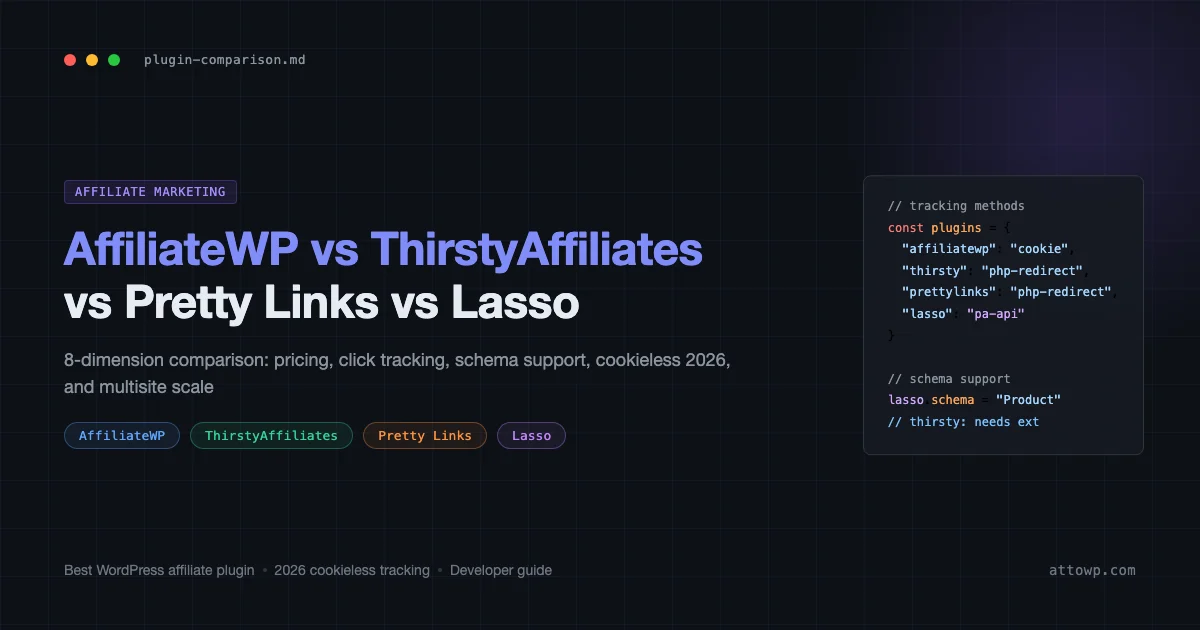
If you are building affiliate revenue into a WordPress site, the plugin you choose shapes everything downstream: how links get tracked, whether your cloaked URLs survive a Chrome update, how much PHP overhead lands on every page load, and whether structured data fires correctly for your review pages. This post compares the four plugins that come up in every “best wordpress affiliate plugin” discussion - AffiliateWP, ThirstyAffiliates, Pretty Links, and Lasso - across eight dimensions that actually matter to developers and serious affiliates. For the full walkthrough on building the review site structure itself, start with WordPress Affiliate Marketing: Build a Revenue-Generating Review Site, then return here to make the plugin decision.
What These Four Plugins Actually Do
Before the comparison matrix, a framing point: these tools solve different problems, and two of them (AffiliateWP and the others) are not even in the same category despite sharing shelf space in “affiliate plugin” listicles.
- AffiliateWP – A full affiliate program manager. You recruit affiliates, generate referral links for them, track their conversions, and pay them. You are the merchant, not the affiliate.
- ThirstyAffiliates – A link management and cloaking tool. You are the affiliate. You store third-party affiliate URLs in WordPress, serve them from your own domain, and track clicks.
- Pretty Links – A URL shortener and redirect manager with affiliate link features grafted on. Lighter feature set than ThirstyAffiliates but covers the 80% case.
- Lasso – A link management tool built specifically around visual display boxes (product cards) and Amazon API integration, with a focus on conversion-optimized layouts.
If you want to run your own affiliate program and pay other people commissions, AffiliateWP is the correct product. If you are the person collecting commissions from Amazon, ShareASale, or direct partnerships, you want one of the other three. This post covers both scenarios but calls out which dimension applies to which use case.
The 8-Dimension Comparison
Dimension 1: Pricing Model
Plugin | Entry price (annual) | Mid tier | Unlimited / agency |
|---|---|---|---|
AffiliateWP | $149 (Personal, 1 site) | $199 (Plus, 3 sites) | $299 (Professional, unlimited) |
ThirstyAffiliates | Free (limited) / $79 (Starter, 1 site) | $129 (Pro, 5 sites) | $199 (Super Affiliate, 10 sites) |
Pretty Links | Free (limited) / $99 (Beginner, 1 site) | $149 (Marketer, 2 sites) | $199 (Super Affiliate, 5 sites) |
Lasso | $39/month (Essential) | $99/month (Advanced) | $199/month (Portfolio) |
Lasso’s monthly pricing model stands out. At $39/month ($468/year), the Essential plan is significantly more expensive than ThirstyAffiliates Pro at $129/year for the same link count. You are paying for the product display boxes and the Amazon API sync, which justify the price if those features drive conversions on your site. If you primarily manage text links and do not need product cards, ThirstyAffiliates or Pretty Links gives you the same cloaking and tracking at a fraction of the cost.
AffiliateWP pricing reflects its different audience: you are building infrastructure for other affiliates, not just managing your own links. The $149 entry price is reasonable for a merchant running an affiliate program on a single property.
Dimension 2: Click-Tracking Method
Click tracking is where the technical differences matter most. The approaches fall into two buckets: server-side PHP redirect with a database write on every click, or a lighter redirect with asynchronous tracking.
- ThirstyAffiliates – PHP redirect handler intercepts requests to your cloaked URLs (e.g.,
/recommends/toolname), logs the click to a custom database table, then issues a 301 or 302 to the affiliate URL. Every click = one DB write before the redirect fires. On high-traffic sites this creates measurable latency. - Pretty Links – Similar PHP redirect model with a database write per click. The free version limits reporting; Pro adds click counts, unique visitor tracking, and referrer logging.
- Lasso – By default uses a PHP redirect + click log. The Enterprise plan (add-on) supports Lasso Analytics, which uses JavaScript beacon tracking to reduce server-side overhead. The Amazon API integration checks prices server-side on a schedule rather than per-click.
- AffiliateWP – Tracks referral conversions via a JavaScript pixel or a cookie set when an affiliate link is clicked, then fires on the WooCommerce or EDD order event. The tracking pixel is optional and can be replaced by server-side cookie inspection, which is important for the 2026 cookieless changes covered below.
Dimension 3: Link Cloaking vs API-Based Retrieval
Link cloaking serves /recommends/productname from your domain and redirects to the affiliate URL. API-based retrieval pulls the canonical affiliate URL at render time and serves it directly, often with real-time price data.
- ThirstyAffiliates – Pure link cloaking. URLs are stored in the database, served from your domain, redirected server-side. No API sync. Good for all networks.
- Pretty Links – Pure link cloaking, same architecture. Supports a broader redirect type list (301, 302, 307, 308, JavaScript, cloaked iframe). The iframe cloak option displays the destination site inside your domain’s frame, which is against most affiliate network terms of service - avoid it.
- Lasso – Hybrid model. Lasso stores the affiliate URL and cloaks it, but its product boxes can pull real-time pricing via the Amazon PA API or manual price overrides for other networks. This is the key differentiator: product cards stay current without manual edits.
- AffiliateWP – Not applicable to outbound cloaking. It generates inbound referral links that point to your own site (e.g.,
yoursite.com/?ref=affiliate-username). The tracking is handled by cookie + server-side conversion event, not a link redirect.
For Amazon Associates specifically: Amazon’s operating agreement permits link cloaking as long as the destination is clearly disclosed and no frames are used. ThirstyAffiliates and Lasso are both explicitly designed for Amazon compliance. Pretty Links’ iframe mode is non-compliant.
Dimension 4: Performance Impact
Every PHP redirect adds a small amount of overhead. On a cached WordPress site, cloaked links are the only requests hitting PHP on the page - everything else is served statically. This means the performance story depends heavily on how many cloaked links appear per page and whether your caching layer handles redirect URLs.
Plugin | Redirect type | DB hit per click | Caching behavior |
|---|---|---|---|
ThirstyAffiliates | PHP 301/302 | Yes (click log write) | Redirect is not cacheable by default; must exclude from object cache |
Pretty Links | PHP 301/302/307/308 | Yes (click log write) | Same as above |
Lasso | PHP 301 + optional JS beacon | Yes; JS beacon reduces server load on Advanced plan | Product boxes are rendered in shortcode; caching plugins must exclude product card pages if prices sync |
AffiliateWP | PHP query var + cookie set | No direct hit; conversion tracked at order event | Referral cookie landing pages must bypass full-page cache |
In practice, the database write per click is rarely a bottleneck unless you are getting thousands of link clicks per minute. The more common issue is cache misconfiguration: if your caching plugin caches the /recommends/ path, clicks are never logged. Both ThirstyAffiliates and Pretty Links document their recommended cache exclusions, but these must be configured manually in WP Rocket, LiteSpeed Cache, or Cloudflare.
For sites that are already performance-sensitive, the complete guide to WordPress performance optimization covers the object cache and page cache configuration patterns that make affiliate link tracking reliable without adding latency.
Dimension 5: Schema Support
Schema markup matters for affiliate sites because Product, Review, and ItemList structured data directly influence rich results in search. A review site without schema is competing on SERP without the star ratings and price data that schema-enabled pages get.
- ThirstyAffiliates – Does not generate schema natively. You need a separate schema plugin (RankMath, Yoast with the Product add-on, or Schema Pro) to add
ProductorReviewmarkup. ThirstyAffiliates stores product data (name, price, image) but does not expose it as JSON-LD. - Pretty Links – No native schema output. Same dependency on external schema tools.
- Lasso – Lasso Pro outputs
Productschema JSON-LD automatically for each display box, includingoffers.price,offers.priceCurrency, andname. If you are managing Amazon product pages at scale, this is a meaningful differentiator - you do not need a separate schema plugin for the affiliate product markup. - AffiliateWP – Not applicable to outbound product schema. If you are building a WooCommerce product with an affiliate redirect, WooCommerce handles
Productschema. AffiliateWP does not interact with schema generation.
For a deeper look at how schema markup integrates with WordPress, the Schema Markup for WordPress: Complete Technical SEO Guide covers JSON-LD implementation, RankMath vs Yoast schema output, and testing with the Rich Results Test.
Dimension 6: 2026 Cookieless Tracking Changes
Third-party cookies are effectively dead in Safari and Firefox, and while Chrome’s Privacy Sandbox has been delayed repeatedly, the direction is clear: cross-site tracking via third-party cookies is being phased out. This has specific implications for affiliate tracking.
Most affiliate networks (ShareASale, Impact, CJ) use a first-party cookie approach when publishers implement their tracking correctly: the affiliate click lands on the merchant’s domain, the network’s tracking script sets a first-party cookie on that domain, and the conversion fires when the user purchases. This model survives cookieless changes because the tracking cookie is set on the merchant’s domain, not a third-party domain.
Where cookieless changes create problems:
- Amazon Associates – Amazon’s tracking relies on the
tagquery parameter being passed through to Amazon’s domain on the same click. This is a URL parameter approach, not a cookie, so it is not affected by third-party cookie restrictions. However, Amazon’s 24-hour cookie (which persists attribution after the first visit) is a first-party cookie on amazon.com and survives current restrictions. - ThirstyAffiliates and Pretty Links – These tools are first-party click loggers on your own domain, then redirect to the affiliate network. The tracking they do (click counts, unique visitors) is first-party and is unaffected by cookieless changes. The downstream attribution at the network level depends on the network’s own tracking, not on these plugins.
- AffiliateWP – This is where the 2026 changes have real impact. AffiliateWP’s default referral tracking sets a cookie on your site when an affiliate link is clicked, then reads that cookie at conversion. If your affiliate program runs across multiple domains (affiliate links that send users to a different domain before conversion), third-party cookie restrictions can break attribution. AffiliateWP 2.x added first-party subdomain tracking as a mitigation. If your affiliate program is on the same domain as checkout, you are not affected.
- Lasso – Lasso’s own click tracking is first-party. Amazon API attribution goes through Amazon’s URL parameter model. No material change from cookieless transitions for standard Lasso use cases.
The practical takeaway: for outbound affiliate link management (ThirstyAffiliates, Pretty Links, Lasso), cookieless changes do not disrupt your click tracking or your earnings attribution at Amazon or most major networks. For AffiliateWP running a cross-domain affiliate program, verify your subdomain configuration and consider adding server-side conversion tracking via the REST API integration available in AffiliateWP Pro.
Dimension 7: Developer Extensibility
- AffiliateWP – The most extensible of the four. Exposes a REST API for affiliate management, registration, and reporting. Has an add-on ecosystem with 20+ official extensions. Fires PHP action hooks on every key event: affiliate registration, referral creation, referral rejection, payout. The API is well-documented and used by agencies building custom affiliate portals.
- ThirstyAffiliates – Offers PHP filters and actions for link insertion, click logging, and category management. No REST API. Extensibility is adequate for custom integrations but limited compared to AffiliateWP.
- Pretty Links – Similar hook coverage to ThirstyAffiliates. The Pro version adds scripting capabilities (inject scripts on specific link clicks) which is useful for firing custom analytics events.
- Lasso – The least extensible. Limited hooks exposed, no REST API, designed as a managed SaaS product. If you need to programmatically create or update Lasso links via code, the options are minimal.
For teams building custom affiliate dashboards or integrating affiliate data into other systems, AffiliateWP’s REST API is the clear choice. The WordPress Plugin Development guide covers the hooks and REST API patterns used throughout the WordPress ecosystem, which apply directly to extending these plugins.
Dimension 8: Multisite and Scale Considerations
- AffiliateWP – Supports WordPress Multisite network activation. Each subsite can have its own affiliate program, or a network-wide program can span subsites. Professional plan covers unlimited sites.
- ThirstyAffiliates – Works on Multisite but links are not shared across subsites by default. Each subsite maintains its own link library. If you are managing 50 affiliate sites with shared link sets, this creates duplication overhead.
- Pretty Links – Same Multisite behavior as ThirstyAffiliates: per-subsite link management without cross-site sync.
- Lasso – Multisite is supported but the pricing model (per-site monthly billing) makes it expensive at scale. Portfolio plan at $199/month covers multiple sites, but the total cost of ownership at 10+ properties is significantly higher than the alternatives.
Head-to-Head Summary Table
Dimension | AffiliateWP | ThirstyAffiliates | Pretty Links | Lasso |
|---|---|---|---|---|
Use case | Run your own affiliate program (merchant) | Manage outbound affiliate links (affiliate) | Manage outbound affiliate links (affiliate) | Manage outbound links + product cards (affiliate) |
Pricing (entry) | $149/yr | Free / $79/yr | Free / $99/yr | $468/yr |
Click tracking | Cookie + conversion event | PHP redirect + DB write | PHP redirect + DB write | PHP redirect + optional JS beacon |
Link cloaking | No (inbound referral links) | Yes | Yes | Yes |
API integration | REST API (affiliate management) | None | None | Amazon PA API (price sync) |
Schema output | None | None (needs external plugin) | None (needs external plugin) | Product schema JSON-LD |
Cookieless 2026 | Impact if cross-domain; add server-side tracking | Not affected (first-party) | Not affected (first-party) | Not affected |
Developer extensibility | High (REST API + hooks) | Medium (hooks only) | Medium (hooks + script injection) | Low |
Multisite | Yes, network-wide program | Per-subsite only | Per-subsite only | Portfolio plan required |
Decision Guide: Which Plugin to Choose
Choose AffiliateWP if:
- You are selling products (WooCommerce, EDD, MemberPress) and want to recruit affiliates to promote your business
- You need REST API access to integrate affiliate data into a custom dashboard or CRM
- You are running a Multisite network and want a single affiliate program spanning multiple properties
Choose ThirstyAffiliates if:
- You are the affiliate managing links from Amazon, ShareASale, or direct partnerships
- You want a mature, developer-friendly link cloaking tool with solid click reporting
- Budget matters and you want full functionality under $130/year
- You manage affiliate links across multiple niches and need category organization
Choose Pretty Links if:
- You want outbound link cloaking and click tracking but do not need the full ThirstyAffiliates feature set
- You have an existing Pretty Links installation and the feature set covers your use case
- You want the script injection feature to fire custom analytics events on link clicks
Choose Lasso if:
- Your primary revenue is Amazon Associates and you want auto-updating product cards with real-time pricing
- You are building a review site where visual product comparison tables and buy boxes are central to the layout
- You can justify the monthly subscription cost against conversion rate lift from better product displays
- You do not need custom code extensibility and prefer a managed tool
Integration Patterns Worth Knowing
ThirstyAffiliates + RankMath Schema
ThirstyAffiliates does not output schema, but its Product data fields (name, price, image URL) can be pulled into RankMath’s Product schema via a custom integration. Store the affiliate product data in ThirstyAffiliates, then reference it in RankMath’s schema fields for the post. This avoids entering the same product data twice.
AffiliateWP + WooCommerce REST API
AffiliateWP’s REST API exposes /wp-json/affwp/v1/ endpoints for affiliates, referrals, and payouts. Custom reporting dashboards can pull referral data by affiliate, date range, or campaign. The REST API requires an AffiliateWP API key passed as a header, separate from the WordPress Application Password system.
Pretty Links + Google Analytics 4 Event Tracking
Pretty Links Pro’s script injection feature fires arbitrary JavaScript on link click. You can use this to send GA4 custom events:
This pattern requires a GitHub Gist for the actual code snippet. The relevant GA4 measurement protocol endpoint is https://www.google-analytics.com/mp/collect, and the event schema follows the standard GA4 custom event format with event_name and event_params.
Lasso + WordPress Performance
Lasso’s product cards are rendered via shortcodes, which bypass full-page cache by default in most caching setups. If you have a caching plugin configured to serve pages statically, Lasso cards will still render, but Amazon price syncs run via WP-Cron and can add to scheduled task overhead. For high-traffic sites using object caching, the WordPress Performance Monitoring guide covering New Relic, Datadog, and Query Monitor provides the profiling setup needed to isolate whether Lasso’s background jobs are contributing to server load.
What the Comparison Does Not Cover
A few items that deserve a separate treatment:
- Network compatibility – Each plugin’s behavior varies with specific affiliate networks. Amazon Associates, ShareASale, Impact, CJ, and Rakuten each have their own cookie handling and deep linking requirements. Testing with your specific network matters more than any general comparison.
- GDPR compliance and disclosure – All four plugins help you manage links but none of them automatically add the FTC-required affiliate disclosures. That is a theme or plugin concern handled separately. See your legal counsel on disclosure placement requirements.
- Caching plugin-specific configuration – The configuration required to ensure affiliate link tracking fires correctly varies by caching stack. WP Rocket, LiteSpeed Cache, W3 Total Cache, and Cloudflare each have different exclusion rule patterns. This warrants its own post rather than a footnote here.
Conclusion
The “best wordpress affiliate plugin” question has a correct answer only when you specify your role. AffiliateWP is the right tool if you are the merchant running a program. ThirstyAffiliates is the right tool if you are the affiliate managing outbound links and want a mature, cost-effective solution with solid developer hooks. Pretty Links covers the same ground with a lighter feature set and a useful script injection capability. Lasso justifies its monthly pricing if your Amazon-focused review site benefits from auto-syncing product cards and you do not need custom code extensibility.
If you have already decided on your affiliate stack and are ready to build the review site structure around it, the WordPress Affiliate Marketing: Build a Revenue-Generating Review Site companion post covers the full implementation: category taxonomy, review post type, WooCommerce integration options, and the content architecture that turns traffic into commissions. The plugin decision and the site architecture decision are separate - make the right one first, then build.
For monetization beyond affiliate marketing, the Complete Guide to Monetizing WordPress by Selling Services covers the service marketplace model that pairs well with an affiliate content site at scale.
Frequently Asked Questions
Can I use ThirstyAffiliates and AffiliateWP on the same site?
Yes. They serve different functions and do not conflict. ThirstyAffiliates manages your outbound affiliate links to other merchants; AffiliateWP manages inbound referral links from your own affiliates. Many publishers run both: they earn commissions from networks while also running their own affiliate program for their own products.
Does link cloaking hurt SEO?
No, when implemented correctly. A 301 redirect from /recommends/toolname to the affiliate URL passes link equity in the same way any 301 does. Google’s crawlers follow redirects. The rel=”nofollow” or rel=”sponsored” attribute on the link in your content is what matters for link equity - add it regardless of whether you cloak. ThirstyAffiliates and Pretty Links both support adding link attributes automatically.
Will my affiliate links stop working when third-party cookies are blocked?
For most affiliate networks, no. Third-party cookie restrictions affect cross-site tracking scripts, not server-side redirects with URL parameters. The Amazon Associates tag parameter, ShareASale’s tracking link structure, and Impact’s click tracking all use URL parameters or first-party cookies set on the merchant’s domain. Your clicks will continue to track. The exception is if you are running AffiliateWP across different domains - review the subdomain tracking configuration in that scenario.
Which plugin is best for Amazon Associates specifically?
ThirstyAffiliates and Lasso are both designed with Amazon compliance in mind. Lasso adds the product card layer with auto-updating prices via the PA API, which is worth the premium if product cards are central to your conversion strategy. ThirstyAffiliates is the better choice if you manage links across multiple networks and Amazon is one of several, not the primary program.
Does Lasso work without the Amazon PA API?
Yes. Lasso’s product boxes work with manually entered prices and product data from any network. The PA API integration is an enhancement for auto-syncing Amazon pricing, not a requirement. If you do not have PA API access (which requires meeting Amazon’s qualifying sales threshold), you can still use Lasso with manual product data entry.

No comments yet