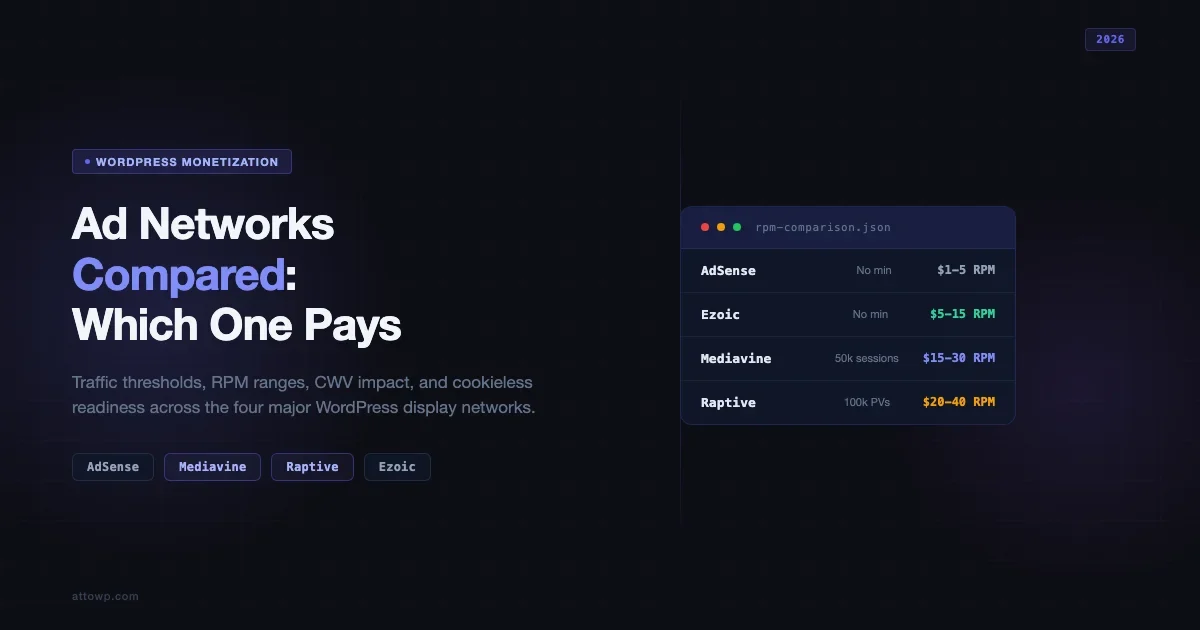
Choosing the best ad network for WordPress is one of those decisions that looks simple until you start pulling numbers. AdSense lets anyone in. Mediavine wants 50,000 sessions per month. Raptive (formerly AdThrive) wants 100,000. Ezoic sits somewhere in between with an AI-driven pitch. Each network makes different promises about RPM, page speed, and hands-off management. This guide cuts through the marketing and gives you the traffic thresholds, realistic RPM ranges, Core Web Vitals impact data, and 2026 cookieless-readiness score for each one so you can make the call with actual numbers.
Why Your Ad Network Choice Is a WordPress Performance Decision
Display ads load third-party JavaScript. That JavaScript requests bidders, bidders return creative, creative renders. Every step adds latency. On a WordPress site, that latency shows up as degraded Largest Contentful Paint (LCP), Cumulative Layout Shift (CLS), and Interaction to Next Paint (INP). These are not abstract metrics - Google’s Page Experience signals use them directly. A network with poor implementation standards will hurt your search rankings, which then hurts the traffic that qualifies you to stay on that network.
This is why the comparison below is not just about RPM. It covers which network gives you the best revenue per visitor while keeping your CWV scores in the green range - including lazy loading, reserved ad space, ads.txt setup, and cookieless readiness for 2026.
Traffic Thresholds: What Each Network Actually Requires
The entry gates are the first filter. There is no point optimizing for Mediavine RPM if you have 20,000 monthly sessions.
Network | Minimum Traffic Threshold | Traffic Metric | Notes |
|---|---|---|---|
Google AdSense | No minimum | N/A | Open to all. Approved per site, not per traffic level. |
Ezoic | No minimum (Access Now) | Pageviews or sessions | Ezoic dropped its 10k/month floor in 2021. Quality review still applies. |
Mediavine | 50,000 sessions/month | Sessions (not pageviews) | Measured via Google Analytics. RPM jumps significantly after 100k. |
Raptive (AdThrive) | 100,000 pageviews/month | Pageviews | Majority of traffic must come from US, CA, UK, AU, or NZ. |
The Mediavine and Raptive thresholds are published on their respective application pages. The Raptive 100,000 pageview requirement is geography-weighted - if most of your traffic is from South or Southeast Asia, expect a rejection even at higher raw numbers. Mediavine’s 50,000-session floor was confirmed in their publisher documentation as of Q1 2025 and has not changed for 2026.
AdSense has no traffic threshold but enforces quality reviews. Sites with thin content, high bounce rates, or too many ad units relative to content get restricted. The practical floor for meaningful AdSense revenue on a WordPress blog is 10,000 to 20,000 monthly pageviews - below that, the monthly payout rarely exceeds the $100 payment threshold. Ezoic’s “Access Now” tier uses server-side integration via Cloudflare or name-server changes rather than a JavaScript snippet, which has a different CWV footprint worth testing before committing.
RPM Ranges: What Publishers Actually Earn
RPM (revenue per mille, or per 1,000 pageviews) is the number every publisher wants to compare, and the number every network is reluctant to publish. The ranges below are drawn from publicly available publisher case studies, community data from the Mediavine and Raptive Facebook groups, and AdSense’s own published benchmark data. Treat these as realistic bands, not guarantees - niche, audience geography, and seasonality move RPM significantly.
Network | Typical RPM Range | Best-Case Niche RPM | Geography Factor |
|---|---|---|---|
Google AdSense | $1 - $5 | $8 - $15 (finance, legal) | US/UK traffic can 3-5x RPM vs global average |
Ezoic | $5 - $15 | $20 - $30 (tech, personal finance) | Similar US/UK premium; AI testing can boost or hurt depending on layout |
Mediavine | $15 - $30 | $40 - $60 (food, lifestyle, personal finance) | Requires US-heavy traffic for upper-band numbers |
Raptive | $20 - $40 | $50 - $80 (food, travel, parenting) | Strict geo requirement means US traffic is built into entry bar |
The RPM gap between AdSense and a premium network like Raptive can be 10x to 20x. A WordPress tutorial site at 150,000 monthly pageviews earning $2 RPM on AdSense generates roughly $300/month. The same site on Raptive at a conservative $25 RPM generates $3,750/month. Ezoic’s optimizer runs multivariate testing on placement, density, and format, which sounds good in principle - but new publishers often see a 2 to 4 week dip in both UX metrics and RPM during the learning phase. Factor that into your migration timeline.
Core Web Vitals Impact: Which Networks Hurt Your Scores
Every display ad tag you add to a WordPress site is a third-party resource request. The question is how much each network’s implementation degrades your Core Web Vitals and what mitigation tools they provide. WordPress performance optimization at the hosting and caching layer can absorb some of this, but it cannot eliminate the JavaScript load from demand partners - that is network-level behavior you do not control.
All four networks load asynchronously by default, but the downstream bid requests each tag fires vary significantly. LCP: Raptive and Mediavine have made CWV compliance a formal publisher requirement - both will reach out to publishers with failures and provide optimization guidance, because Google’s CWV signals directly affect the CPMs advertisers bid. CLS: When ad slots load and push content down the page, CLS spikes. Mediavine and Raptive provide explicit reserved-space implementations. Ezoic’s auto-placement mode does not always reserve space by default, particularly in aggressive optimization phases. INP: INP replaced First Input Delay as a Core Web Vital in March 2024. Heavy ad JavaScript on the main thread delays interaction response. Premium networks have invested in off-main-thread ad loading, but publisher INP scores can still suffer with many concurrent active ad slots.
Network | Async Loading | Reserved Space Support | CWV Publisher Tools |
|---|---|---|---|
AdSense | Yes | Manual CSS required | Basic; no dedicated CWV dashboard |
Ezoic | Yes | Partial (auto-placement dependent) | Ezoic Speed provides Cloudflare CDN + basic CWV tools |
Mediavine | Yes | Built-in via Trellis theme / plugin settings | Dedicated CWV dashboard; publisher support on failures |
Raptive | Yes | Built-in; documented in publisher portal | CWV monitoring; proactive outreach on failures |
Lazy Loading and Reserved Space: How to Implement Both
Two tactics cut ad-related CWV damage without reducing fill rate: lazy loading out-of-viewport ad slots and reserving space for every ad unit. These apply regardless of which network you use, and both Mediavine and Raptive provide native support for them.
Lazy loading means the ad tag only fires when the ad slot is about to enter the viewport. For a 2,500-word article with sidebar, in-content, and footer ads, the footer ad does not bid until the user scrolls near it. Fewer concurrent bid requests on page load reduces main thread blocking time and improves LCP and INP. Mediavine enables this by default. Raptive allows publishers to configure it in their dashboard. For AdSense, lazy loading requires custom JavaScript using IntersectionObserver.
Reserved space means defining the height of an ad container in CSS before the ad renders. When the ad loads, no reflow occurs because the browser has already allocated that space. The CSS pattern for leaderboard and rectangle slots:
Mediavine’s Trellis theme includes this by default. Raptive’s publisher portal has a documented guide. For AdSense Auto Ads, you need to apply this manually - Auto Ads does not reserve space the same way, which is why it consistently produces higher CLS scores than manual placements with reserved space. The WordPress speed optimization guide covers the hosting, caching, and image delivery layer that should be baseline-clean before you add any ad network on top.
ads.txt Setup and Automation
ads.txt (Authorized Digital Sellers) is a plain-text file at your domain root that lists the ad networks and resellers authorized to sell your ad inventory. Without a valid ads.txt file, premium demand partners cannot bid on your inventory and your effective RPM drops. A missing or incorrectly configured file is one of the most common reasons publishers on Mediavine and Raptive see lower-than-expected earnings in the first month.
The file must be publicly accessible at https://yourdomain.com/ads.txt - the root of your domain, not a subfolder. The file content is provided by your ad network during onboarding. Ad exchanges and demand partners update their entries regularly, so a static file requires periodic manual updates. The automation options for WordPress publishers:
- Mediavine and Raptive both host your ads.txt on their CDN and provide a redirect rule or plugin that points
/ads.txtto their hosted version. New demand partners are added automatically - no action required on your end. - Ezoic’s ads.txt manager is integrated into their publisher dashboard. Nameserver integration manages ads.txt at the DNS level. JavaScript snippet integration uses their plugin for the redirect.
- AdSense Ads.txt Plugin - the official Google plugin creates and maintains the file from your publisher ID. It does not automate third-party entry updates, so manual review every 60 to 90 days is needed for AdSense-only publishers.
2026 Cookieless Changes: How Each Network Is Positioned
Third-party cookies enable cross-site audience targeting. Without them, advertisers rely on contextual signals and first-party data. Industry data from the IAB suggests cookieless impressions clear at 30 to 60 percent lower CPM than cookied impressions, depending on niche. Finance and healthcare - where advertiser intent can be inferred from context - are less affected than general lifestyle content. Google has moved away from a binary Chrome phase-out toward a user-choice prompt, but Safari, Firefox, and Brave have blocked third-party cookies by default for years. The cookieless impact is already real for most publishers.
Network | Cookieless Approach | First-Party Data Tool | Expected RPM Impact |
|---|---|---|---|
AdSense / GAM | Privacy Sandbox APIs (Topics, PAAPI) | None for publishers directly | Moderate; depends on Topics API adoption by buyers |
Ezoic | Tyche platform + contextual ML | Ezoic Humix + first-party signals | Variable; optimization lag during transition |
Mediavine | Journey first-party platform + contextual | Journey (email/newsletter opt-in) | Lower impact; direct buyer relationships buffer it |
Raptive | Contextual targeting + direct buyers | Content-category direct deals | Lower impact; strong content categories help |
Raptive’s advantage here is structural: its publisher network skews toward US lifestyle content (food, parenting, travel) where contextual signals map directly to advertiser categories - CPG for food, baby/child brands for parenting, hotel/airline for travel. Mediavine’s Journey platform collects first-party newsletter data from publisher audiences, providing a supplemental signal layer. Ezoic’s Tyche platform bets on its scale across thousands of sites for contextual inference. AdSense publishers get Privacy Sandbox treatments automatically for eligible Chrome users, but the practical RPM impact depends on how quickly the Topics API is adopted by demand partners.
Which Network Should You Use at Each Traffic Stage
Use the highest-tier network you qualify for, and build toward the next tier. Here is the decision map.
Under 10,000 Monthly Pageviews: AdSense Only
AdSense is the right call. Revenue will be small regardless of network. Keep ad units to one or two manual placements with reserved space - Auto Ads at this stage hurts CWV scores without meaningful RPM gain. Focus on content quality and organic growth.
10,000 to 50,000 Monthly Pageviews: AdSense or Ezoic
Ezoic is worth testing if your niche has decent programmatic demand (tech, finance, SaaS tools). The RPM uplift over AdSense is typically 2 to 4x for comparable content. Run both in parallel using Ezoic’s A/B split testing before committing. If your content is affiliate-driven and display is supplemental income, the WordPress affiliate marketing guide covers the case for prioritizing affiliate programs over display at this traffic level.
50,000 to 100,000 Monthly Sessions: Mediavine
If you hit Mediavine’s 50,000-session threshold and your content fits their publisher community (food, lifestyle, personal finance, parenting, travel, increasingly tech), apply immediately. The RPM jump is typically significant. Mediavine’s publisher support and CWV tooling are class-leading at this tier. The exclusivity requirement on display advertising is a non-issue given the RPM difference.
Over 100,000 Monthly Pageviews (US-Heavy): Raptive
Publishers who qualify for Raptive typically see RPMs at or above Mediavine for US-centric content. Raptive’s more sophisticated revenue diversification tools - newsletter monetization, video ad products - make it the right choice for publishers at scale who want to build multiple revenue streams beyond standard display.
Implementation Checklist Before Joining Any Network
- CWV baseline clean: Run Google Search Console’s Core Web Vitals report. Every page that serves ads should be in “Good” range before adding ad scripts.
- HTTPS everywhere: Insecure ad requests on HTTP pages degrade fill rates. Confirm SSL is valid and all internal links resolve to HTTPS.
- ads.txt live and correct: The file at your domain root must contain the publisher ID the network provides during onboarding. A missing ads.txt suppresses demand immediately.
- Content quality audit: Networks check content quality on application. Thin content, excessive affiliate links with little editorial context, or auto-generated text will get flagged.
- Reserved space implemented: Define min-height on every ad container before the network goes live.
- Lazy loading configured: Set up lazy loading for below-the-fold ad slots before the first ad tag fires.
- Page speed re-tested post-integration: After adding the network’s tags, re-run CWV tests. If LCP or INP regresses, investigate before scaling the number of ad units.
The Honest Trade-Offs
Higher RPM almost always comes with more JavaScript on the page. The goal is to earn that trade-off with reserved space and lazy loading so the user never feels it.
AdSense: Low RPM, full control, no traffic minimum, no exclusivity, minimal support. Right for small sites and mixed-revenue models where display is not the primary income source.
Ezoic: Middle-tier RPM, complex implementation, variable CWV impact, AI testing that requires patience. Right for publishers who want more than AdSense but cannot yet qualify for premium networks.
Mediavine: Strong RPM, excellent support, strong CWV tooling, exclusivity required, content-type preferences (lifestyle over pure-technical). Right for publishers at 50k+ sessions who fit the lifestyle/food/parenting/finance content profile.
Raptive: Highest RPM potential, geography-gated, strong tooling and direct buyer relationships, scale features for large publishers. Right for publishers at 100k+ pageviews with a US-heavy audience.
Migrating Between Networks: What to Expect
Moving from one ad network to another is not a same-day switch. Each migration has a revenue dip period, a technical cutover, and an optimization phase. Understanding the timeline prevents panicking when RPM drops in week one.
AdSense to Ezoic
The Ezoic integration method you choose determines the CWV impact. Nameserver integration routes all traffic through Ezoic’s CDN and gives their optimizer the most data to work with, but it also means all your HTTP requests pass through an additional network hop. The Cloudflare app integration is lighter but requires a paid Cloudflare plan. The WordPress plugin snippet is the simplest but gives Ezoic less control over ad delivery optimization.
Expect 2 to 4 weeks of suboptimal RPM while Ezoic’s machine learning tests placement configurations. Publishers who bail out during this window almost always report that Ezoic “did not work” - the test period needs to complete. Set a calendar reminder and commit to 30 days before evaluating.
Ezoic or AdSense to Mediavine
Mediavine sends an onboarding email with a Go Live date. The cutover typically happens on a specific day and Mediavine’s ad manager takes over all display inventory. Remove Ezoic’s JavaScript or nameserver configuration before the Mediavine go-live date - running both simultaneously causes conflicts. Revenue for the first 3 to 7 days post-launch may be lower than expected as Mediavine’s demand partners build frequency data for your audience segments. RPM typically stabilizes and climbs over the first 30 to 60 days.
Mediavine to Raptive
Both networks handle the full programmatic stack, so the migration is primarily a tag swap and contract transition. The 30-day exclusivity clause in Mediavine’s publisher agreement means you cannot run Raptive ads while still under Mediavine’s terms. Give proper notice and time the switch to avoid any contract overlap. Once live on Raptive, the optimization timeline is similar - 30 to 60 days for demand to calibrate to your audience.
One practical consideration during any network migration: if you run Mediavine or Raptive alongside email monetization or sponsored content, those revenue streams are unaffected by display exclusivity clauses. Only programmatic display inventory is covered. The affiliate marketing strategy covered in the WordPress affiliate marketing guide runs completely independently.
Frequently Asked Questions
Can I use multiple ad networks at the same time?
AdSense and Ezoic can be used alongside other networks or affiliate programs. Mediavine and Raptive both require exclusivity for display advertising - you cannot run another display network alongside them. You can still run affiliate links, sponsored content, or email sponsorships independently of those exclusivity clauses.
How long does it take to get approved by Mediavine or Raptive?
Mediavine’s application review typically takes 2 to 4 weeks from submission. Raptive’s review is similar. Both networks review content quality, traffic source legitimacy (they check for bot traffic), and whether the site meets their content guidelines. Applications submitted without clean Google Analytics data or with traffic primarily from social media referrals are often delayed or rejected.
Does switching ad networks affect my SEO rankings?
Switching networks does not directly affect rankings. The indirect effect comes through CWV score changes during the switch. If the new network’s JavaScript load degrades your LCP or CLS scores, rankings can soften over the following Core Web Vitals assessment cycle (which runs quarterly). CWV baseline testing before and after any network switch is worth doing systematically.
What is a good RPM benchmark for a WordPress tutorial site?
A WordPress tutorial site with predominantly US developer traffic typically earns $8 to $18 RPM on Ezoic, $18 to $35 RPM on Mediavine (if approved, tech content approval varies), and $22 to $45 RPM on Raptive. The tech vertical sits between finance (high RPM) and general lifestyle (moderate RPM) in advertiser demand. Developer-focused content with high-income reader demographics commands better CPMs than beginner-level how-to content. Geography matters more than topic in many cases: 80 percent US traffic on a tech site will outperform 80 percent global traffic on a finance site at most RPM tiers.
Next Steps
The decision tree is straightforward: find your traffic number, match it to the threshold table above, apply for the highest network you qualify for, and implement reserved space and lazy loading before the first ad tag goes live. For the underlying WordPress performance work that makes any ad network viable, WordPress Performance Optimization: The Complete Guide covers caching, server configuration, and image delivery at the stack level where the heaviest gains are made.
If display revenue is one part of a broader monetization strategy and you want the full picture on combining affiliate income with ad revenue, see the guide to building a revenue-generating WordPress review site through affiliate marketing. The two models are complementary at the right traffic levels and content types.

No comments yet