If you have ever wondered how to contribute to WordPress core and whether it is worth the investment of your time, the answer depends almost entirely on what you are trying to get out of it. Contributing to WordPress core is one of the clearest signals you can send to the market as a developer, but the path from “I want to help” to having your name in the props credits is not always obvious. This guide covers the entire landscape: the contribution areas available in 2026, how to set up a working environment, the first-bug workflow that actually works, how the props economy functions, and a realistic assessment of what this activity buys you depending on whether you are a solo freelancer, an agency developer, or part of a product company.
Why Contributing to WordPress Core Matters in 2026
WordPress powers over 43% of the web. That number has stayed roughly stable for three years, but the project’s internal trajectory has shifted significantly. The Gutenberg project has moved from “full site editing” into Phase 3 territory, involving collaboration workflows. The REST API is being extended for headless and decoupled architectures. PHP 8.4 support landed in WordPress 6.8. The Interactivity API is now stable. The codebase in 2026 is genuinely interesting to work on.
For developers, contributing carries three distinct benefits. First, influence: the direction of WordPress is shaped by people who show up. If REST API authentication, block editor DX, or multisite scaling matters to your business, participating in the Make WordPress process is the lever for that. Second, career signal: a props credit in a WordPress release or a sustained presence on a Make team is visible in a way that a portfolio entry is not. Third, the Five for the Future program, introduced by Automattic and now adopted by agencies like 10up, Pagely, and WP Engine, has made contributor time a recognized professional cost center rather than a hobby.
The WordPress project tracks ongoing development toward WP 7.0, and the roadmap discussions happening on Make/Core in 2026 center on the Connectors API, Pattern Overrides, and the AI hooks layer. Getting familiar with these areas now, before they ship, is an advantage.
The Contribution Areas: What Is Actually Available
WordPress is not a single project, it is an ecosystem with roughly a dozen active contributor teams, each with its own Slack channel, meeting cadence, and onboarding path. Here is what each area involves and where the time investment goes.
Contribution Area | Primary Tool | Time Investment | Payoff (Career) | Best For |
|---|---|---|---|---|
Core Code (PHP) | Trac + GitHub | High (5-15h/patch) | Release props, committer visibility | Senior PHP devs, plugin authors |
Gutenberg (JS/React) | GitHub | High (3-10h/PR) | FSE influence, React WP credits | Frontend/JS devs |
Documentation | GitHub (DevHub) | Medium (1-4h/doc) | Props credit, community presence | Technical writers, beginner devs |
Support Forums | WordPress.org forums | Low-Medium (30m-2h) | Community standing, badge | All experience levels |
Polyglots (Translation) | GlotPress | Low-Medium | Locale-specific influence | Multilingual developers |
Testing | WordPress Beta Tester | Low (30m-2h) | Props in release notes | QA engineers, any dev |
Accessibility | Trac + GitHub | Medium-High | Specialized expertise signal | Frontend, UX devs |
Security | HackerOne + private | Variable | CVE credit, bounty | Security researchers |
The core code track is the highest-prestige route but also the most time-intensive. The Gutenberg track moves faster because it runs on GitHub with standard PR workflows and has a larger review pool. Documentation and testing are the fastest ways to get your first props credit, which matters if you are building a contribution track record from scratch.
Trac vs GitHub: Understanding Where the Work Happens
WordPress core PHP code lives in Subversion and is mirrored to GitHub at WordPress/wordpress-develop. Bug tracking for core happens on Trac at core.trac.wordpress.org. This dual-system setup confuses a lot of developers who come from modern open source projects. Here is how it works in practice.
Trac is the canonical issue tracker for core. Tickets are filed there, discussed there, and closed there. GitHub PRs against wordpress-develop are reviewed and, if accepted, land as Subversion commits. You do not need to learn Subversion yourself, but you need to understand that a GitHub PR does not automatically merge the way it does on a typical OSS project. A committer reviews, tests, and commits it to SVN. The GitHub PR is then automatically closed by a bot.
For Gutenberg, the workflow is entirely on GitHub at WordPress/gutenberg. Standard PR workflow applies: fork, branch, PR, review, merge. Gutenberg uses a different release cadence from core, shipping every two weeks. Features from Gutenberg backport into WordPress core at major releases.
How to Use Trac Effectively
- Use the good-first-bug keyword filter to find tickets scoped for newcomers
- Look for tickets in the needs-patch workflow state, these are confirmed bugs waiting for code
- The dev-feedback state means the patch exists but needs a second opinion, a low-effort way to get involved through code review
- Tickets with the has-patch keyword but no recent activity are often stalled because no one has tested the patch. Testing and leaving a note with your environment details is a genuine contribution.
Setting Up Your Contributor Environment with wp-env
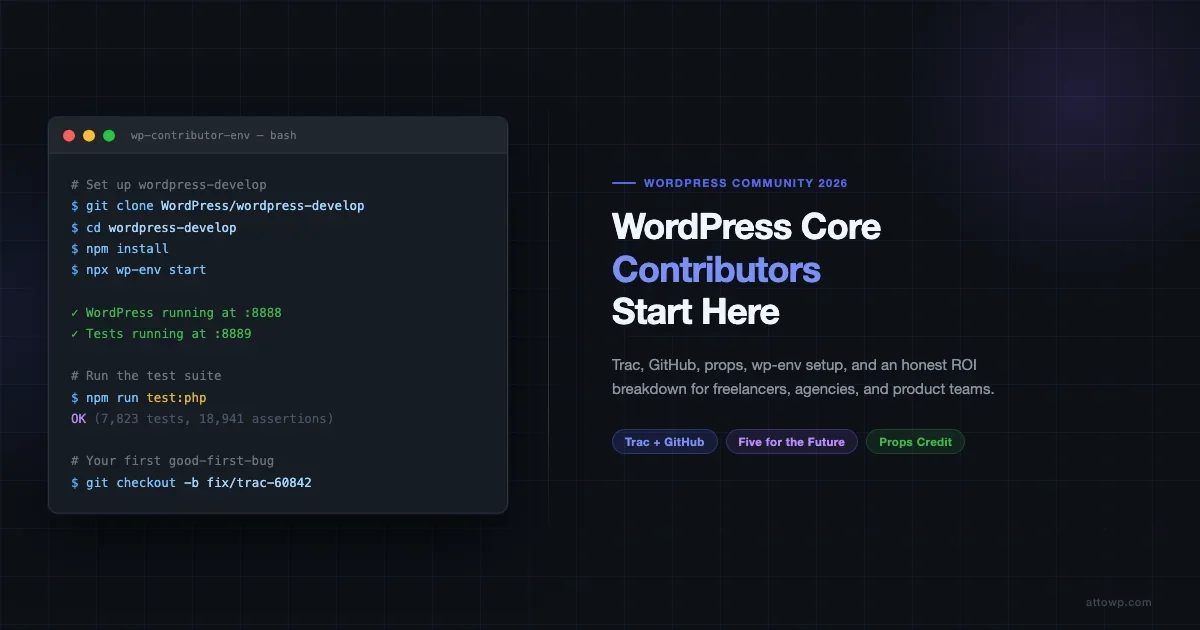
The WordPress contributor environment has improved substantially since 2023. The recommended local setup is wp-env, which ships as part of the @wordpress/env package. You need Docker, Node.js, and npm. The setup for wordpress-develop is the following.
Clone the repo, install dependencies, and start the environment:
The wp-env setup script above runs three containers: a WordPress instance at port 8888, a test instance at port 8889, and the MySQL database. The test instance is used for PHPUnit integration tests. You do not need to configure either manually.
After starting, visit http://localhost:8888 for your development WordPress and http://localhost:8889 for the test environment. To run the PHP unit tests:
- Run
npm run test:phpfrom the wordpress-develop root - For a specific test file, use the
-- --filter TestClassNamesyntax - JavaScript tests use
npm run test:unit - End-to-end tests use Playwright via
npm run test:e2e
The entire setup takes about 15 minutes on a modern machine with a decent internet connection. Once you are running, you can make changes to PHP files under src/ and see them reflected in your local instance immediately.
Your First Good-First-Bug Workflow
Finding your first bug to work on is the step where most would-be contributors stall. The search interface on Trac is not intuitive, and the ticket volume is high enough that filtering matters. Here is the workflow that works.
Finding the Right Ticket
Go to core.trac.wordpress.org/query and apply these filters simultaneously:
- Keywords: contains
good-first-bug - Status:
neworassigned - Milestone: the current active milestone (e.g., 6.8 or 6.9)
Read through five to ten tickets before picking one. Look for a ticket where the expected behavior is clearly described, someone has confirmed the bug exists, and there is no patch yet. Tickets with recent discussion (within 30 days) are more likely to result in a merged patch because committers are paying attention to them.
The Patch Submission Process
- Fork
WordPress/wordpress-developon GitHub - Create a branch named after the Trac ticket number:
fix/trac-NNNNN - Write the fix in
src/and the corresponding unit test intests/phpunit/ - Run the test suite locally to confirm it passes
- Open a PR on GitHub against the
trunkbranch - Add a comment on the Trac ticket with the GitHub PR link and the words “has-patch” in your comment - this helps watchers find the patch
The review cycle for good-first-bug patches is typically two to six weeks. If you see no activity after three weeks, ping the Trac ticket directly. Patches do not automatically get reviewed on any schedule; they depend on a committer noticing. The #core-committers channel on Make Slack is appropriate for a gentle follow-up, not a demand for action.
Props and How Credit Works
When a WordPress release ships, the release post on WordPress.org includes a list of contributors who receive “props.” A props credit means your WordPress.org username appears in the release announcement. This is the currency of the contributor economy.
Props are given for code patches, documentation edits, design work, testing, translations, and participation in discussions that meaningfully shaped a decision. They are not automatic. The committer who lands your patch adds your WordPress.org username to the props list in the commit message. If they forget (which happens), you can ask them to add it after the fact.
Your contributor profile at profiles.wordpress.org accumulates badges over time. The “Core Contributor” badge appears after your first props credit. Sustained contribution across releases builds a history that is visible to anyone doing due diligence on a candidate or partner.
Slack Channels That Matter
Make WordPress runs on a Slack instance at make.wordpress.org/chat. The channels you need to join depend on which team you are contributing to, but the foundational channels are:
- #core - Main core development channel, weekly dev chat on Wednesdays
- #core-editor - Gutenberg and block editor development
- #docs - Documentation team, quickest path to a props credit
- #core-test - Testing team, beta testing coordination
- #forums - Support team coordination
- #polyglots - Translation team
- #contributor-day - Active around WordCamps, useful for introductions
The weekly dev chat in #core follows a structured agenda posted in advance on the Make/Core blog. Attending the chat, even silently, gives you a fast read on what the committers are prioritizing that week.
What Is Actually Worth Your Time: Freelancer vs Agency vs Product Company
The ROI of contributing to WordPress core is not uniform across business models. Here is an honest breakdown.
Solo Freelancer
For a solo freelancer, time spent on core contribution is time not spent on client work. The calculus has to account for that directly. That said, a core contributor profile is a genuine differentiator when you are pitching clients who care about technical depth. A props credit in a major WordPress release is harder to fake than a blog post, and it surfaces in Google searches on your name.
The most time-efficient entry points for freelancers are:
- Beta testing new WordPress releases, approximately two hours per release cycle
- Answering support forum questions in your area of expertise, 30 minutes a week adds up
- Documentation edits, one or two per month, especially for developer docs that you use yourself and find incomplete
A realistic contribution level for a solo freelancer who wants visible results without derailing client work is roughly two to four hours per month. That is enough to earn props credits across two or three release cycles per year if the activity is consistent. As you grow your WordPress freelance practice, the contributor profile compounds in value as your rates and client caliber rise.
Agency Developer
Agency developers have a stronger case for deeper contribution, because the agency can absorb the cost more easily, and the agency itself benefits from the reputation signal. Several notable WordPress agencies allocate one day per month of developer time for community contribution, and they list their team’s props credits on their website.
For agency devs, the higher-value contribution tracks are the ones that directly intersect with agency work: Gutenberg stability, REST API behavior, multisite edge cases, performance benchmarks. Contributing to a bug that you actually hit on a client project is efficient because the context is free.
The coordination overhead at an agency is also worth acknowledging. If you are working on a client deadline and you have a Trac patch waiting for review, it is easy for that to get deprioritized. The teams that contribute most consistently are the ones where contribution time is blocked in the calendar rather than treated as leftover time.
Product Company (Plugin/Theme Developer)
For a product company building on WordPress, Five for the Future is relevant beyond its PR function. Pledging a percentage of your team’s time to contribution is a formal public commitment that signals stability and investment in the ecosystem. Companies like Automattic (55%), Yoast (now Newfold), and WooCommerce (part of Automattic) have historically been the largest single contributors, but mid-size plugin companies that publicly track their contribution percentage are treated differently by the WordPress.org directory and by enterprise buyers who vet their vendors.
If your product depends on a specific area of WordPress core, contributing to that area is also a hedge. If your plugin relies on the block editor’s data layer, having a developer who knows that codebase deeply and is present in the #core-editor discussions means you hear about breaking changes before they ship rather than after.
Five for the Future: What It Means and How to Pledge
Five for the Future is a WordPress initiative asking companies to donate 5% of their resources to contributing back to WordPress. Matt Mullenweg introduced it in 2014, and it has gained formal structure since, with a pledge page at wordpress.org/five-for-the-future where companies list their contribution commitments.
The pledge is not a financial donation. It is a public commitment of developer time. The page shows which companies are contributing, in which areas, and for how many hours per week. It is searchable by company and contribution type.
Making a pledge is straightforward. Any company with a WordPress.org profile can submit a pledge listing their team members, contribution areas, and hours per week. The form is at wordpress.org/five-for-the-future/pledge. The listing goes live once reviewed by the Five for the Future team.
For smaller companies, even a pledge of two hours per week per developer is visible and meaningful. The number of active pledges from companies with fewer than ten employees is lower than it should be, which means standing out in that tier is relatively easy.
Realistic Expectations: Review Latency, the CLA, and How Long Until Your First Commit
The most common frustration for new contributors is review latency. WordPress has a small number of active committers for core, and the queue of patches waiting for review is always longer than the bandwidth to review them. Here is what to expect.
Good-first-bug patches typically wait two to eight weeks for initial review. This is faster than patches for complex features or architectural changes, which can wait months or be declined after extended discussion.
The CLA (Contributor License Agreement) is required before any code can land. You sign it once via your WordPress.org profile. It is a standard open source CLA granting WordPress the right to distribute your contribution. Without a signed CLA, a committer cannot merge your patch regardless of quality. Sign it before you submit anything.
The first merged patch for a new contributor typically takes one to three months from the moment you start seriously engaging with the process. This accounts for finding the right ticket, writing a patch, the review cycle, and any revisions requested. The documentation team moves faster; the first accepted doc edit can happen within a week.
What can slow you down:
- Patches without unit tests are frequently sent back for revision
- Code that does not follow WordPress Coding Standards triggers CI failures that delay review
- Picking a ticket that is already being worked on privately by a committer means you may write a duplicate patch
- The release freeze period (the six weeks before a major release) is a bad time to introduce new patches for features, though bug fixes are still welcome
Following the WordPress release cycle helps you understand when the development window is open and when to focus on testing and documentation instead of new patches.
Contributor Days: The Fast Track to Your First Props
Contributor days are one-day events held alongside WordCamps where contributors work together in person. They are the fastest way to get onboarded because experienced contributors and committers are physically present to answer questions, pair on patches, and help newcomers navigate Trac and Slack.
At a typical WordCamp contributor day, you can:
- Set up your local development environment with help from someone who has done it before
- Submit your first documentation edit or forum answer before the day ends
- Get introduced to a team lead who can point you to the right tickets
- Walk out with a concrete follow-up task and a Slack connection to someone who will answer your questions
WordCamp contributor days are listed at events.wordpress.org. If there is no WordCamp in your region, the Make/Core team runs virtual contributor days around each major release beta period. These are announced in the #core channel and on the Make/Core blog.
What to Avoid: Common Mistakes That Stall New Contributors
A few patterns reliably stall new contributors before they get traction.
- Starting with a feature proposal. New contributors who open feature requests as their first ticket are usually ignored. The expectation in the WordPress community is that you demonstrate you can follow the existing process before proposing changes to it. Start with a bug fix.
- Skipping the unit test. Patches without accompanying tests are considered incomplete. A committer reviewing a bare code patch has to write the test themselves before they can land it, which adds work they are unlikely to take on for an unknown contributor’s patch.
- Ignoring Coding Standards. WordPress has its own coding standards for PHP, JavaScript, and HTML/CSS. The CI system runs checks automatically. Familiarize yourself with them at
developer.wordpress.org/coding-standardsbefore writing any patch. - Over-scoping your first contribution. A patch that touches fifteen files for a systemic improvement is a high-risk first contribution. A patch that fixes one small, clearly described bug in two or three files has a much higher chance of landing.
- Being absent from Slack. Patches do not review themselves. The contributors who get patches reviewed faster are the ones who are present in the relevant Slack channels, attending dev chats, and building familiarity with committers over time.
Concrete First Steps to Start Today
If you want to start contributing to WordPress core, here is the sequence that minimizes time waste and maximizes the chance of a successful first contribution.
- Create or update your WordPress.org profile at
profiles.wordpress.org. This is your identity in the contributor ecosystem. - Sign the CLA at
developer.wordpress.org/contributor-guide/cla. You cannot contribute code without this. Do it before anything else. - Join Make Slack at
make.wordpress.org/chat. Join#core,#docs, and whichever team channel matches your interest. - Set up wp-env for
wordpress-developfollowing the steps above. Confirm that the test suite passes on your machine before you pick a ticket. - Find a good-first-bug ticket on Trac using the filter above. Read ten, pick one with recent activity and no existing patch.
- Attend one dev chat in
#corebefore submitting anything. You will hear which areas have committer bandwidth and which are backlogged. - Write the patch and the unit test. Run the test suite. Submit the GitHub PR. Comment on the Trac ticket.
- Follow up once after three weeks if there is no activity. Once is professional; more than once is considered pestering.
The path to contributing to WordPress core is not short, but it is clear. The people who succeed are the ones who start small, stay consistent, and build relationships in the community over time rather than expecting a single patch to establish them. The props economy rewards persistence more than brilliance.
Further Resources
make.wordpress.org/core- The primary Make/Core blog with dev notes, roadmap posts, and contributor day announcementscore.trac.wordpress.org- Bug tracker with the full ticket queuegithub.com/WordPress/wordpress-develop- The GitHub mirror for PRsgithub.com/WordPress/gutenberg- Full GitHub workflow for block editor contributionswordpress.org/five-for-the-future- Company pledge directorydeveloper.wordpress.org/coding-standards- Coding standards reference
Contributing to WordPress core is one of the highest-leverage things you can do as a WordPress developer, if you approach it with realistic expectations about the timeline and the process. The props economy is real, the career signal is durable, and the influence over a platform that runs 43% of the web is worth having. Start with one good-first-bug ticket, stay consistent, and build from there.



No comments yet