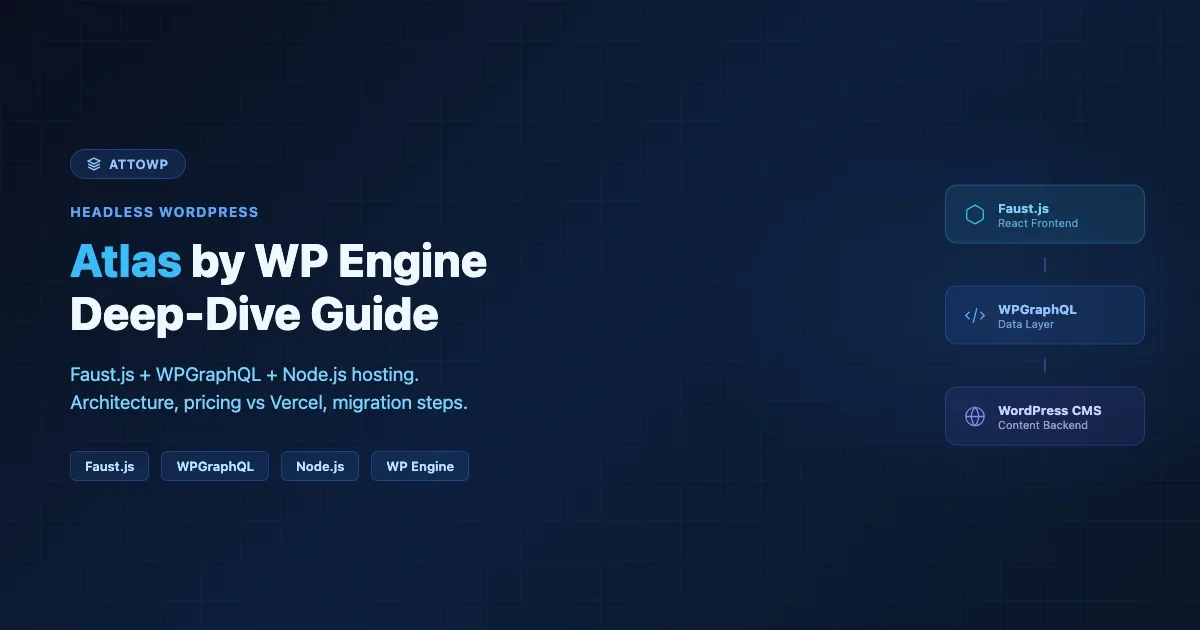
WP Engine built Atlas to solve a problem most headless WordPress setups create: you get the decoupled architecture, but you also get a full DevOps plate you never wanted. Atlas bundles a managed Node.js runtime, Faust.js, and WP GraphQL into one hosted platform so the decoupled layer runs alongside your WordPress instance without you provisioning servers. This guide covers what Atlas actually is under the hood, how pricing stacks up against self-hosting on Vercel or Railway, when Atlas is the right call, and how to migrate an existing WordPress site onto it.
What WP Engine Atlas Actually Is
Atlas is WP Engine’s headless platform product. It is not a new hosting plan for standard WordPress. It is a two-part infrastructure stack: your WordPress instance lives on WP Engine’s standard managed hosting layer, and the front-end application runs on Atlas’s Node.js hosting layer. The two talk to each other via WP GraphQL. Both sides are managed, monitored, and deployed from a single control plane in the WP Engine User Portal.
The Atlas control plane handles environment variables, branch-to-environment mapping, build logs, and deployment webhooks. When you push to your connected Git repository, Atlas pulls the code, runs your build command, and serves the output from their CDN edge. You do not manage a separate Vercel project, a Railway service, or any other compute layer. It is all inside one WP Engine account.
The Three Components You Actually Install
Atlas is built on three open-source components that WP Engine maintains. Understanding each one matters before you commit to the platform.
- FaustWP (the WordPress plugin): Installed on the WordPress side. Handles authentication for post previews, redirects headless front-end routes to your Node.js URL, and provides the REST-based secret key handshake. Without FaustWP active, Atlas previews in the WordPress editor will not work.
- Faust.js (the Node.js framework): A Next.js-based framework built on top of WPGraphQL. It ships with a template hierarchy system that mirrors WordPress’s own template hierarchy - single.js, archive.js, front-page.js - but in React. You can swap Faust.js for a plain Next.js app, but you lose the template system and the preview integration.
- WP GraphQL: Exposes your WordPress data as a GraphQL API. Atlas requires it. You can extend the schema with WPGraphQL for Advanced Custom Fields, WPGraphQL Content Blocks, and similar add-ons.
The Atlas Blueprint spec (a JSON file in your repository root) tells the Atlas build system which Node.js version to use, what build command to run, and which environment variables to expose at build time. It is optional but recommended for production deployments.
Atlas Architecture: How the Data Flow Actually Works
Here is what happens from browser request to rendered page on a production Atlas setup.
A visitor hits your Atlas CDN edge. If the page is cached, it serves from cache. If not, the request goes to your Node.js application running on Atlas infrastructure. Faust.js calls WPGraphQL on your WordPress instance to fetch the page data - post content, ACF fields, navigation menus, site settings. It renders the React component tree server-side (via Next.js SSR or ISR), and the HTML is returned to the visitor. Atlas caches the rendered output at the edge for subsequent requests.
WordPress itself handles only authenticated operations: the editor, media uploads, user management, plugin settings, and REST API calls that require auth. It never serves a public-facing page. The WordPress URL can be on a subdomain like cms.yourdomain.com or even a WP Engine staging URL - it does not need to be public-facing.
ISR vs SSR vs Static: What Atlas Supports
Atlas supports all three Next.js rendering modes because it runs standard Next.js under the hood.
Mode | How it works on Atlas | Best for |
|---|---|---|
Static (SSG) | Pages generated at build time. Atlas serves from CDN. Rebuild triggers via webhook on publish. | Marketing pages, documentation, rarely-updated content |
ISR (Incremental) | Pages regenerate on-demand after a set revalidation window. No full rebuild needed. | News sites, blogs with frequent updates, WooCommerce product pages |
SSR | Rendered per request on Atlas Node.js layer. Higher compute cost. | Personalized pages, real-time inventory, user-specific content |
For most WordPress content sites, ISR with a 60-second revalidation window hits the right balance: content updates propagate quickly without the cost of SSR on every request.
Atlas Pricing vs Self-Hosting Headless WordPress
This is the question most teams get wrong because they compare Atlas’s published price against the Vercel free tier. The right comparison is Atlas against a production-grade self-hosted stack that includes monitoring, a CDN, and the engineering time to maintain it.
WP Engine Atlas Pricing (as of early 2026)
WP Engine does not publish Atlas pricing as a standalone product. Atlas is bundled into WP Engine’s managed WordPress hosting plans at the higher tiers. The dedicated Atlas-branded plans start at the Scale plan range and go up from there. Expect the entry-level Atlas setup to cost between $290 and $400 per month depending on site count and traffic. WP Engine’s pricing page has the current figures - use that as your source, not any number written here that may be out of date.
What is included: WordPress managed hosting, Atlas Node.js hosting, CDN, automated backups, staging environments, SSL, and support. You are not paying separately for Vercel, Cloudflare Workers, or any Node.js hosting.
Self-Hosted Alternative Cost Breakdown
A comparable self-hosted stack: WordPress on a managed host like Cloudways or Kinsta ($30-100/month depending on size), Next.js frontend on Vercel Pro ($20/month, though at scale Vercel function costs escalate fast), Cloudflare for CDN and WAF ($20+/month for Pro), Datadog or Better Uptime for monitoring ($15-30/month). Add up to 2 hours of DevOps time per month at $100/hour for maintenance and incident response. You are at $200-350/month before engineering time, and that assumes nothing breaks.
The gap closes quickly. Atlas is expensive if you are a solo developer who is comfortable managing infrastructure. It starts to look reasonable for teams where engineering time costs more than the platform fee, or for agencies running multiple client sites where per-site Atlas bundles are available.
The honest Atlas value prop is not cost savings. It is operational simplicity: one control plane, one support ticket, one deployment pipeline for both the CMS and the front-end.
Faust.js Deep Dive: What You Actually Get
Faust.js is not just a Next.js starter kit with a WordPress connection. It ships with a template hierarchy system, a client-side authentication layer, and a preview mode that works from the WordPress editor without exposing your Node.js URL to the public.
Template Hierarchy in Faust.js
Standard Next.js maps URLs to files in the pages/ directory. Faust.js adds a second routing layer that mirrors WordPress’s template hierarchy. When a request comes in, Faust.js queries WPGraphQL to identify the content type and then selects the matching template from your wp-templates/ directory. You write a React component for each template type – SinglePost.js, PageTemplate.js, Category.js – and Faust.js handles the routing automatically.
This is the architectural decision that makes Faust.js different from rolling your own Next.js + WPGraphQL setup. You lose flexibility in exchange for a template system that WordPress developers find familiar. If your team comes from a WordPress background and is learning React, Faust.js template hierarchy lowers the learning curve significantly.
Environment Configuration and the Atlas Blueprint
The environment setup is straightforward. Your Faust.js project needs two variables at minimum: your WordPress GraphQL endpoint and the Faust.js secret key. The secret key is generated in the FaustWP WordPress plugin settings and used to sign preview tokens.
The Atlas Blueprint JSON lives in your repository root and tells the Atlas build system how to deploy your application. Specify your Node.js version, build command, and any environment variables that need to be available at build time (for static pages that call GraphQL during build).
The Catch-All Page Router
The Faust.js catch-all page file handles all WordPress content URLs. It calls getWordPressProps at the Next.js data-fetching level, which queries WPGraphQL and returns the correct template props.
When Atlas Makes Sense (and When It Does Not)
Atlas is not the right tool for every headless WordPress project. Here is a framework for making the call.
Atlas Is a Good Fit When
- Your team is not a DevOps team. If you are a WordPress agency or a small engineering team without dedicated infrastructure people, managed Node.js hosting removes a real maintenance burden.
- You are already on WP Engine. If your WordPress site is on WP Engine, adding Atlas does not require migrating the CMS. You add the Atlas application layer to an existing WP Engine site.
- You need preview support out of the box. Atlas and Faust.js give you authenticated preview links that work from the WordPress editor without custom engineering. This is a non-trivial problem to solve on a DIY stack.
- You are running multiple client sites on one contract. WP Engine’s agency pricing and Atlas multi-site bundles can make per-site costs workable for agencies.
- Your content team lives in WordPress. Faust.js keeps the WordPress editing experience intact. The content team uses the same Gutenberg editor, media library, and workflow. The front-end is decoupled but the back-end is not replaced.
Atlas Is Not a Good Fit When
- You want full framework control. Atlas runs your Next.js app but you are constrained to WP Engine’s infrastructure. You cannot swap to Bun, use Edge Runtime freely, or deploy to a specific cloud region.
- You have a small or static site. Atlas pricing is overkill for a five-page marketing site. Vercel free + a cheap managed WordPress host is the better economic call.
- Your front-end team uses a framework other than React/Next.js. Faust.js is React-only. Atlas can technically serve any Node.js app, but the tooling and support are built around Faust.js. SvelteKit, Astro, and Nuxt projects work on the platform but without the same level of first-party support.
- You are moving away from WordPress entirely. If the goal is replacing WordPress with a different CMS, Atlas is not the right move. It is built to keep WordPress at the center.
Migrating an Existing WordPress Site to Atlas
Migration to Atlas has two distinct phases: migrating the WordPress CMS to WP Engine (if it is not already there), and building the Faust.js front-end application to replace the existing theme. The second phase is always a new build, not a conversion of your existing theme.
Phase 1: WordPress Migration to WP Engine
If your site is on another host, use WP Engine’s Automated Migration plugin or manual export/import. The WP Engine migration process is well-documented and similar to any host-to-host migration: export content, move uploads, migrate the database, update URLs via WP-CLI. No Atlas-specific steps are needed here.
Once on WP Engine, install the required plugins: FaustWP, WP GraphQL, and any WPGraphQL extension plugins your site needs (WPGraphQL for ACF if you use Advanced Custom Fields, WPGraphQL Content Blocks if you use Gutenberg blocks). Generate the Faust.js secret key in the FaustWP settings.
Phase 2: Building the Faust.js Front-End
This is where most of the work lives. Your existing WordPress theme is effectively retired - you are building a React application that replicates its visual design and functionality. The scope depends heavily on your site’s complexity.
Scaffold a Faust.js project from the WP Engine starter template. Connect it to your WordPress GraphQL endpoint. Build out template components for the content types your site uses - posts, pages, custom post types. Port your CSS and design system into the React component layer. Test preview mode, authentication, and navigation menu rendering before going to production.
The hardest parts of any headless WordPress migration are: replicating complex WooCommerce checkout flows (WooCommerce is not GraphQL-native), handling authenticated content like members-only posts, and replicating plugin-provided functionality that assumed a traditional PHP front-end. Plan extra time for each of these if they apply to your site.
For detailed steps on running the WordPress side in a local Docker environment during development - useful when you do not want to develop against a live WP Engine instance - see the Headless WordPress with Docker setup guide. It covers how to run WP GraphQL locally so your Faust.js development environment has a real GraphQL endpoint to query.
DNS Cutover
Point your root domain to the Atlas CDN endpoint. Your WordPress admin lives on a separate URL (the WP Engine subdomain or a custom cms. subdomain). The Atlas app handles all public-facing routes. Set up 301 redirects on the WordPress side for any URL structure changes between your old theme and the new Faust.js app.
Atlas vs Self-Hosted Headless: Vercel + Next.js + WP Engine
The most common alternative to Atlas is keeping WordPress on WP Engine but running the Next.js front-end on Vercel. This is a popular architecture and works well. Here is the honest comparison.
Dimension | Atlas (WP Engine) | Vercel + WP Engine |
|---|---|---|
Deployment | Single control plane, one Git connection | Two control planes (WP Engine + Vercel), separate Git connections |
Preview support | Built-in via Faust.js + FaustWP | Requires custom implementation or Faust.js on Vercel |
Node.js control | Limited - WP Engine managed | Full Vercel runtime options including Edge Functions |
Cost at low traffic | Higher (bundled managed hosting) | Lower (Vercel free tier + cheaper WP host possible) |
Cost at high traffic | Predictable (flat rate) | Vercel function costs can spike on traffic spikes |
Support | Single vendor for full stack | Split between WP Engine support and Vercel support |
Framework choice | Next.js recommended (Faust.js) | Any framework Vercel supports |
If you want full control over your Node.js runtime and are comfortable managing two platforms, Vercel + WP Engine is the more flexible option. If you want a single vendor relationship and managed deployment pipelines, Atlas wins on operational simplicity. For a broader comparison of hosting options including traditional managed WordPress, the WordPress hosting comparison covering Cloudways, Kinsta, and WP Engine covers the non-headless side in depth.
What About Self-Hosting the Entire Stack?
Running WordPress on a VPS or Docker container alongside a self-hosted Node.js process is another option. It gives you maximum cost efficiency and full infrastructure control, but it puts full operational responsibility on your team. If you go this route, WP GraphQL still works, and you can use Faust.js on a self-hosted Node.js process. You just lose Atlas’s managed deployment and edge CDN layer.
The headless WordPress step-by-step guide at Building a Headless WordPress Site for 2026 walks through this self-managed architecture if you want to compare it against the Atlas approach before committing.
Gotchas and Limitations to Know Before You Commit
WooCommerce Is a Problem
WooCommerce’s checkout, cart, and payment processing are built for server-side PHP rendering. WPGraphQL has a WooCommerce extension (WPGraphQL WooCommerce) that exposes product and order data via GraphQL, but the checkout flow requires significant custom engineering to replicate in React. Atlas does not solve this for you. If WooCommerce is a core part of your site, factor in substantial development time or consider whether a headless architecture is the right call for the commerce portion.
Plugin Compatibility
WordPress plugins that render PHP output directly - contact forms, sliders, page builders - do not work on the headless front-end. You need to replicate their functionality in React, use JavaScript-native alternatives, or embed their output via iframes. Most contact forms have JavaScript-native versions. Gravity Forms, for example, has a REST API. Page builder output can usually be queried via WPGraphQL Content Blocks if you use Gutenberg blocks. Builder plugins like Divi and Elementor have no clean GraphQL output path and require a full replacement.
Build Times on Large Sites
If you use static generation (SSG), Atlas has to build every public page during deployment. On a site with thousands of posts, this can mean 10-20 minute build times. Use ISR instead of SSG for large content archives. With ISR, you generate a minimal set of pages at build time and regenerate the rest on first request with a revalidation window. Build times drop from 20 minutes to under 2 minutes.
GraphQL Schema Knowledge Required
WPGraphQL works well, but you need to understand GraphQL query syntax to fetch data correctly. If your team is PHP-native and new to GraphQL, budget time for the learning curve. The WPGraphQL documentation and the Headless CMS vs WordPress comparison are both good starting points for understanding where GraphQL fits into a decoupled WordPress architecture.
Faust.js vs Plain Next.js for Atlas: Which One to Use
You can deploy a plain Next.js application on Atlas without Faust.js. The question is whether the Faust.js layer adds enough value for your project to justify the additional dependency.
Use Faust.js when: your team comes from a WordPress background and benefits from the familiar template hierarchy, you need working post preview from the WP editor on day one, and your site uses mostly standard WordPress content types (posts, pages, categories).
Use plain Next.js when: you have strong React experience and prefer to structure the data layer yourself, you are working with heavily customized content types where the Faust.js template hierarchy adds friction, or you want more control over data fetching patterns (React Query, SWR, or custom GraphQL clients).
If you are evaluating where Next.js fits into your stack more broadly, the Next.js vs Nuxt vs SvelteKit comparison covers the framework decision at a higher level, which is useful context if your team has not already committed to a React-based stack.
Summary: What Atlas Is and Is Not
Atlas is a managed platform that removes the infrastructure work from headless WordPress projects. You get managed WordPress, managed Node.js hosting, CDN, Faust.js integration, and editor preview support in one product with one vendor. The trade-offs are real: higher cost than DIY alternatives, limited runtime control, and a strong dependency on WP Engine’s platform decisions.
For agencies and teams where engineering time is expensive and operational simplicity is worth paying for, Atlas is a well-engineered product that does what it promises. For solo developers and small sites where cost efficiency is the priority, a self-hosted stack or Vercel plus a cheaper managed WordPress host will serve you better. The right answer depends on where your bottleneck is: compute cost or engineering time.
Quick Decision Checklist
- Already on WP Engine and want headless? Add Atlas.
- Small site, tight budget? Vercel free tier + Cloudways WordPress.
- Agency running multiple client headless projects? Evaluate Atlas multi-site pricing.
- Need full Next.js runtime control (Edge, Bun, custom regions)? Use Vercel + WP Engine.
- WooCommerce-heavy site? Headless adds significant complexity regardless of platform - validate the ROI first.
- Team is PHP-native, new to React? Faust.js template hierarchy will feel familiar. Atlas makes sense here.
Atlas is a product with a clear and honest use case. Knowing that use case before you evaluate pricing is what makes the evaluation worth running. If you are weighing whether to build or commission a headless WordPress with Astro builds instead of the Atlas route, the team at Wbcom Designs works on both architectures.

No comments yet