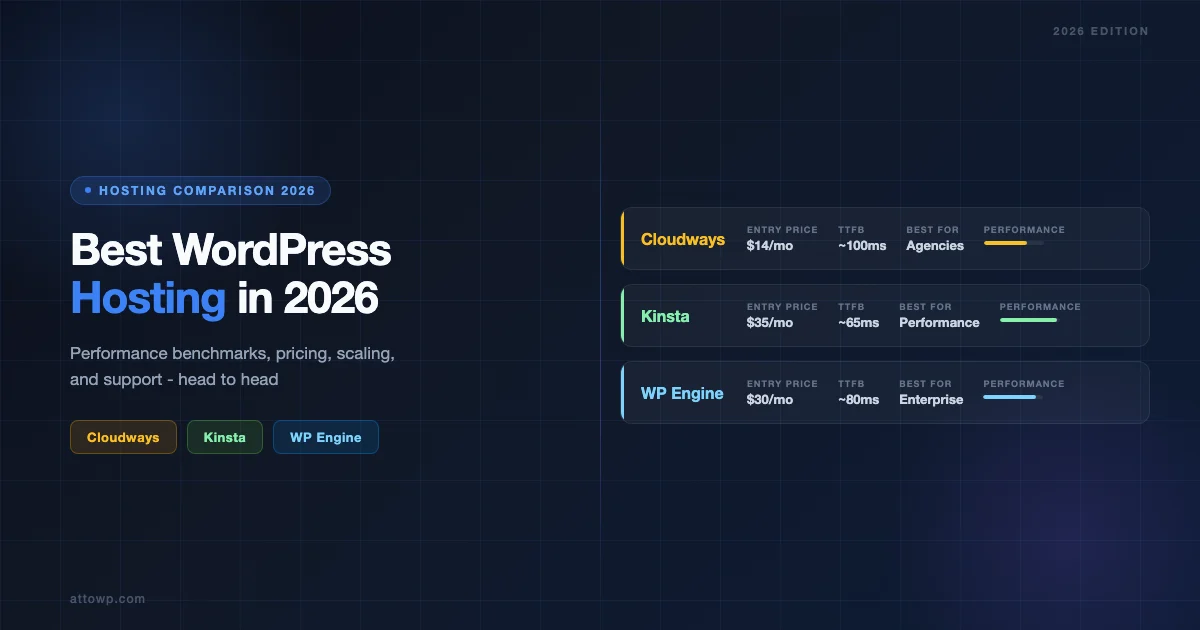
Choosing the right WordPress host shapes everything - your site speed, your monthly bill, and how many late-night headaches you endure when traffic spikes. Cloudways, Kinsta, and WP Engine are the three names that come up in every serious conversation about managed WordPress hosting. Each one is excellent. Each one is also wrong for somebody. This guide cuts through the marketing and gives you the straight comparison you need to pick the right one for your situation.
Why These Three? A Quick Overview
There are hundreds of WordPress hosts. Most of them are the same shared hosting product with a different logo. Cloudways, Kinsta, and WP Engine sit in a completely different category - they are purpose-built managed platforms where WordPress performance is the core product, not an afterthought.
Here is the positioning at a glance:
- Cloudways - Cloud infrastructure reseller. You pick a cloud provider (DigitalOcean, AWS, GCP, Vultr, Linode) and Cloudways layers managed WordPress on top. Most flexible, most affordable at scale.
- Kinsta - Premium Google Cloud Platform hosting with a polished dashboard and concierge-level support. Best performance per dollar for high-traffic sites.
- WP Engine - The original managed WordPress host (founded 2010). Enterprise-focused with deep WordPress tooling, Genesis themes, and a large partner ecosystem.
Performance Benchmarks: TTFB, Load Times, and Real-World Speed
Performance is the most important factor for most site owners, and it is also the most misunderstood. Raw server speed matters, but so does caching architecture, CDN coverage, and how the platform handles PHP.
Time to First Byte (TTFB)
TTFB measures how fast the server responds before any content loads. Lower is better. Real-world data from third-party monitoring services consistently shows:
Host | Average TTFB (cached) | Average TTFB (uncached) | PHP Version Support |
|---|---|---|---|
Kinsta | ~50-80ms | ~200-350ms | PHP 8.0 - 8.3 |
Cloudways | ~80-150ms | ~300-500ms | PHP 7.4 - 8.3 |
WP Engine | ~60-100ms | ~250-400ms | PHP 8.0 - 8.3 |
Kinsta edges ahead on raw TTFB because every site runs on Google Cloud’s premium tier network with N2 compute instances. WP Engine is close, especially on their newer plans that use AWS or Google Cloud. Cloudways performance varies more because it depends heavily on which cloud provider you pick and which data center region you choose.
Caching Architecture
All three platforms use full-page caching, but the implementation differs significantly:
- Kinsta uses a custom Nginx-based full-page cache with automatic invalidation. No plugin required. The cache is bypassed automatically for logged-in users and cart pages.
- WP Engine uses their proprietary EverCache technology built on Nginx. Also plugin-free. WP Engine actually bans most caching plugins because their stack handles it natively.
- Cloudways uses Varnish cache plus Redis object cache. You get more control and can configure cache expiry times, but you also have more to manage.
The fastest host is not always the one with the best benchmark numbers - it is the one whose caching strategy matches your site’s traffic patterns and update frequency.
CDN Integration
A CDN (Content Delivery Network) distributes your static assets from data centers close to your visitors. This is table stakes in 2026.
- Kinsta includes Cloudflare CDN on all plans with 260+ data centers globally. No extra cost.
- WP Engine includes their own CDN (built on Cloudflare) on all plans. Global Edge Security (WAF + DDoS protection) is available as an add-on.
- Cloudways offers Cloudflare CDN integration but charges for it - $4.99/month for the basic tier. You can also bring your own Cloudflare account and connect it for free.
Pricing: What You Actually Pay
Pricing is where these three platforms diverge most dramatically. The sticker prices look similar at entry level but scale very differently.
Tier | Cloudways (DO 1GB) | Kinsta (Starter) | WP Engine (Starter) |
|---|---|---|---|
Entry price | $14/mo | $35/mo | $30/mo |
Sites included | Unlimited | 1 | 1 |
Visits/month | No hard limit | 25,000 | 25,000 |
Storage | 25 GB SSD | 10 GB | 10 GB |
CDN bandwidth | Extra ($4.99+) | 100 GB included | Included |
Staging | Included | Included (premium) | Included |
Backups | Daily (extra cost) | Daily (included) | Daily (included) |
Cloudways looks cheapest until you add backups ($0.033/GB/month), CDN, and consider that DigitalOcean’s 1GB droplet is undersized for anything beyond a basic brochure site. A realistic Cloudways setup for a production site with backups and CDN runs $25-40/month - roughly comparable to Kinsta Starter.
Multi-Site Pricing
This is where Cloudways becomes significantly cheaper. If you run an agency or manage multiple client sites:
- Cloudways - Host unlimited WordPress installs on a single server. A $100/month DigitalOcean 4GB server can comfortably run 15-25 medium-traffic sites.
- Kinsta - Each additional site costs money. The Business 1 plan ($115/month) covers 5 sites. The Pro plan ($115/month) covers 5 sites with 50K visits each. Agency plans start at $600+/month for 20+ sites.
- WP Engine - Professional plan ($59/month) covers 3 sites. Growth plan ($115/month) covers 10 sites. They also offer agency partners pricing.
For agencies managing 10+ client sites, Cloudways can be 3-5x cheaper than Kinsta or WP Engine for equivalent resources.
Staging Environments
Staging is a non-negotiable for any serious WordPress workflow. All three platforms include it, but the implementation quality varies.
Kinsta Staging
Kinsta offers premium staging environments that are functionally identical to production - same server, same resources. The push-to-live feature lets you selectively push files, database, or both. Higher plans include multiple staging environments. Search and replace for URLs happens automatically during push.
WP Engine Staging
WP Engine was among the first managed hosts to offer one-click staging. Their system has matured considerably - you get a clean staging URL, easy push-to-production, and the ability to pull production down to staging for testing. All plans include at least one staging environment.
Cloudways Staging
Cloudways staging works differently. Instead of a separate staging environment, you clone your entire server or application. This means staging uses server resources and costs money if you want a truly isolated environment. The workaround most Cloudways users adopt is deploying a second low-cost server for staging. It is more work but gives you complete environment parity.
Scaling: Handling Traffic Spikes
How a host handles sudden traffic increases - whether from a viral post, a product launch, or a seasonal spike - reveals a lot about its architecture.
Kinsta Auto-Scaling
Kinsta runs on Google Cloud’s autoscaling infrastructure. When your site gets hit with a traffic spike, additional compute resources spin up automatically without manual intervention. This is handled at the container level using their custom implementation of LXC containers. Most users never need to manually scale - the platform handles it.
WP Engine Scaling
WP Engine uses a combination of their EverCache layer and AWS/Google Cloud infrastructure to absorb traffic spikes. Higher-tier plans include dedicated resources. Their Smart Plugin Manager and platform architecture are tuned specifically for WordPress request patterns. They have handled the WordPress.com migration traffic and major product launches - scaling is a core competency.
Cloudways Scaling
Cloudways gives you manual vertical scaling - you can resize your server from the dashboard in about 5-10 minutes with no downtime (downscaling does require a restart). There is no autoscaling. If you expect a traffic spike, you need to proactively scale up, then scale back down afterward. For predictable traffic, this is fine. For unpredictable viral traffic, it is a risk. Cloudways does have a “Horizontal Scaling” add-on for load-balanced multi-server setups, but it is a manual configuration process.
Customer Support Quality
Support quality is often the deciding factor for teams that do not have in-house WordPress infrastructure expertise. There is a significant gap between these three platforms.
Metric | Cloudways | Kinsta | WP Engine |
|---|---|---|---|
Support channels | Live chat, tickets | Live chat, tickets | Live chat, phone (enterprise), tickets |
24/7 availability | Yes | Yes | Yes |
Average first response | 5-10 min (chat) | 2-5 min (chat) | 3-8 min (chat) |
WordPress expertise | Good | Excellent | Excellent |
Hands-on help | Limited to platform issues | Will debug WordPress issues | Will debug WordPress issues |
Kinsta and WP Engine staff are typically deeper WordPress experts - they will dig into plugin conflicts, debug slow queries, and help with migration issues beyond just the hosting platform. Cloudways support is responsive but tends to draw a harder line at “we support the server infrastructure, not your WordPress installation.” This is fine if you have WordPress expertise in-house; it is frustrating if you do not.
Developer Features and Tooling
Modern WordPress development workflows require SSH access, WP-CLI, Git integration, and fast local-to-production deployment. Here is how each platform serves developers.
Cloudways Developer Tools
- Full SSH access on all plans
- WP-CLI installed and ready
- SFTP access
- Git deployment via SSH
- No built-in CI/CD - you configure your own pipeline
- Full server access (PHP settings, MySQL config, Nginx/Apache config)
- New Relic APM integration available
Kinsta Developer Tools
- SSH on all plans
- WP-CLI built in
- Kinsta DevKinsta for local development (free tool, excellent)
- Push-to-staging/production from DevKinsta
- PHP version selector per site
- PHP error logging in dashboard
- APM tool built directly into MyKinsta dashboard (no extra cost)
- SSH Gateway for running CLI commands without direct server access
WP Engine Developer Tools
- SSH and SFTP on all plans
- WP-CLI available
- Local by WP Engine - the industry-standard local development tool
- Git-based deployment workflows
- Blueprints for site templates
- Genesis Framework and over 35 premium StudioPress themes included
- Smart Plugin Manager - automated plugin updates with visual regression testing
Security Features
Security at the hosting layer is foundational - it is everything that protects your site below the WordPress application level.
- Cloudways - Dedicated firewalls, IP whitelisting, free SSL (Let’s Encrypt), bot protection via Cloudflare, automated security patches for server OS. Malware scanning is available via add-on. No built-in WAF unless you use Cloudflare add-on.
- Kinsta - Google Cloud security infrastructure, DDoS protection, two-factor authentication, Cloudflare WAF on all plans since 2022, free malware removal (they will clean a hacked site once per plan year), IP blocking in dashboard, uptime monitoring.
- WP Engine - Proprietary threat detection system, managed SSL, Cloudflare enterprise-tier CDN and WAF available as add-on (Global Edge Security), automated WordPress core updates, free SSL. They will also fix malware on compromised sites.
Cloudways vs Kinsta vs WP Engine: Direct Comparison Summary
Category | Cloudways | Kinsta | WP Engine |
|---|---|---|---|
Best for | Agencies, multi-site, cost-conscious power users | High-traffic sites, performance-first teams | Enterprise WordPress, digital agencies with WP focus |
Price (entry) | $14/mo | $35/mo | $30/mo |
Performance | Good (varies by provider) | Excellent | Excellent |
Ease of use | Moderate | High | High |
Auto-scaling | No (manual) | Yes | Yes (limited) |
Support depth | Good | Excellent | Excellent |
Dev tooling | Excellent (full server access) | Excellent (managed) | Excellent (ecosystem) |
CDN included | Extra cost | Yes | Yes |
Backups | Extra cost | Included | Included |
Staging | Manual clone | One-click | One-click |
When to Choose Cloudways
Cloudways is the right choice when you need maximum flexibility and cost efficiency over convenience. Choose Cloudways if:
- You are an agency managing 10+ client sites and need to keep hosting costs under control
- You have server administration skills (or someone on your team does) and want full control over server configuration
- You need to run non-WordPress workloads alongside WordPress (Node.js apps, custom databases, etc.)
- You want to pick your own cloud infrastructure (AWS, GCP, DigitalOcean) based on existing agreements or data residency requirements
- Your traffic patterns are predictable and you are comfortable scaling manually
- You need to run WooCommerce stores at scale without paying per-site fees
When to Choose Kinsta
Kinsta is the best choice when performance is your primary concern and you want a polished, low-maintenance hosting experience. Choose Kinsta if:
- You have a high-traffic WordPress site (25,000+ monthly visits) and need reliable performance
- You want the best possible TTFB and page load times without managing infrastructure
- Your team values an excellent dashboard and clean user experience over raw server access
- You want built-in APM tools to diagnose performance issues without third-party integrations
- You run a WooCommerce store where performance directly impacts conversion rates
- You want proactive support that understands WordPress deeply, not just the server
When to Choose WP Engine
WP Engine is the best fit for enterprise WordPress deployments and agencies with an established WordPress-first workflow. Choose WP Engine if:
- You are building enterprise or mission-critical WordPress sites where platform stability and support SLAs matter
- Your team uses Local by WP Engine for local development and values tight local-to-production integration
- You want the Genesis Framework and premium StudioPress themes included in your plan
- You need Smart Plugin Manager to automate plugin updates with regression testing across dozens of sites
- Your clients require enterprise-grade security and compliance (GDPR, SOC 2 readiness)
- You want a platform with the largest WordPress partner and developer ecosystem
Migration: How Hard Is It to Switch?
Migrating to any of these hosts is straightforward if you approach it correctly. All three offer free migration assistance.
- Kinsta - Free migrations handled by their team. You submit a request, they schedule it, and it happens with minimal downtime. Premium migration service for complex multi-site setups.
- WP Engine - Free migrations via their automated migration plugin or by their team. The Automated Migration plugin works well for most standard WordPress sites.
- Cloudways - Free migration for the first application using their Cloudways Migrator plugin or team assistance. Clean and reliable for standard WordPress installs.
Uptime and Reliability
All three platforms advertise 99.9% uptime. Real-world performance, based on public incident reports and third-party monitoring:
- Kinsta - Consistently achieves 99.9%+ uptime in independent monitoring. Google Cloud infrastructure is the backbone here.
- WP Engine - Strong uptime record with transparent status page. Occasional incidents are typically short-duration and communicated clearly.
- Cloudways - Uptime depends partly on your chosen cloud provider. AWS and GCP-backed servers are most reliable. DigitalOcean is solid but has had more regional incidents historically.
The Bottom Line: Which WordPress Host Is Right for You?
There is no universally “best” WordPress host among these three. The right choice depends on your priorities:
- Best for agencies and multi-site operators: Cloudways - lower cost per site, flexible server configurations, full access
- Best for performance-first single sites: Kinsta - Google Cloud backbone, auto-scaling, excellent APM, cleanest dashboard
- Best for enterprise and WP-ecosystem teams: WP Engine - deepest WordPress tooling, Local by WP Engine, Smart Plugin Manager, premium themes
If you are just starting out and have one site, Kinsta Starter or WP Engine Starter is the easiest on-ramp with the least operational burden. If you are managing multiple client sites and want to control costs, Cloudways on a mid-tier DigitalOcean or Vultr server is the most economical path.
The most expensive mistake is over-optimizing on price at the cost of your team’s time. If you spend 5 hours a year fighting a cheap host, you have already lost the price advantage.
Frequently Asked Questions
Can I run WooCommerce on all three hosts?
Yes. All three support WooCommerce. Kinsta and WP Engine have WooCommerce-specific caching rules built in (bypassing cache on cart, checkout, and account pages). Cloudways requires manual cache exclusion rules for WooCommerce dynamic pages, which is a one-time configuration step.
Which is cheapest for a single site?
WP Engine Starter at $30/month is the lowest fixed cost for a single production site with backups and CDN included. Cloudways at $14/month appears cheaper but requires add-ons for backups ($3-8/month) and CDN ($4.99/month), bringing the real cost to $22-27/month.
Does Kinsta offer a free trial?
Kinsta offers a 30-day money-back guarantee. WP Engine also offers a 60-day money-back guarantee on most plans. Cloudways offers a 3-day free trial with no credit card required.
Which host handles the most traffic?
All three scale to very high traffic, but Kinsta’s auto-scaling Google Cloud architecture handles unpredictable spikes most gracefully. WP Engine is excellent for sustained high traffic on enterprise plans. Cloudways can scale large but requires manual intervention and is better for predictable traffic patterns.
Ready to Pick Your WordPress Host?
If you are still not sure which platform is right for your WordPress stack, the right answer is usually Kinsta for performance-first teams, Cloudways for agencies and cost-conscious multi-site operators, and WP Engine for enterprise and WordPress-ecosystem-heavy workflows.
At AttoWP, we help teams make exactly these kinds of infrastructure decisions - from initial host selection to full server configuration and WordPress performance optimization. If you want a recommendation tailored to your specific site and traffic profile, get in touch with our team.


No comments yet