The contentful vs wordpress 2026 question comes up in every enterprise content platform evaluation. Both platforms have matured, both have enterprise customers, and both have genuine weaknesses. This comparison cuts through the marketing claims and gives you the data points that actually matter for enterprise content teams.
Architecture: API-First vs Monolithic
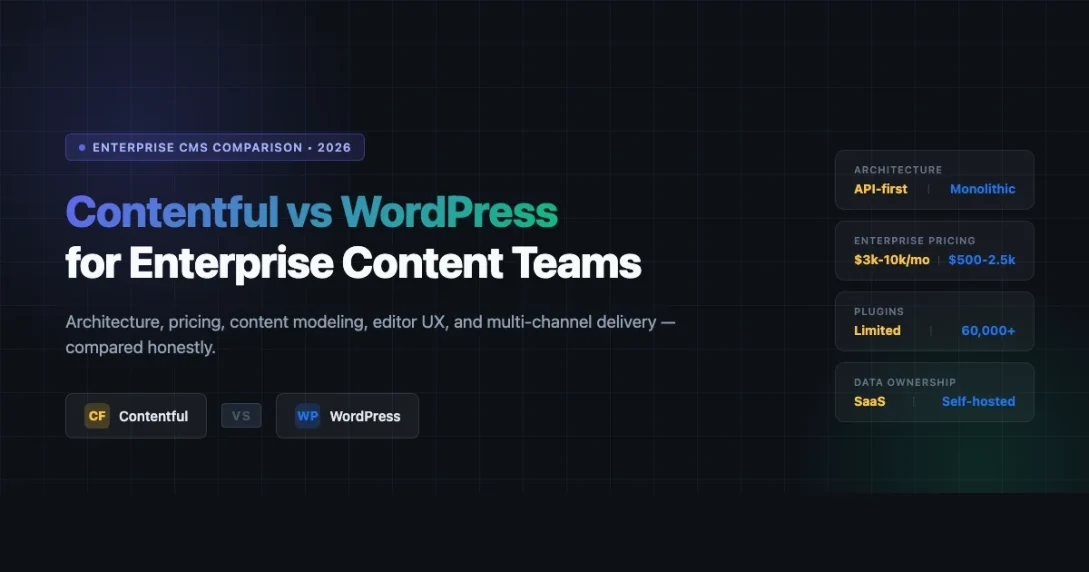
Contentful is a headless CMS built from the ground up as an API-first platform. Your content lives in Contentful’s cloud, and you fetch it via REST or GraphQL. WordPress started as a monolithic PHP application where the database, backend logic, and frontend theme all run on the same server. That architectural gap defines almost every trade-off you will make downstream.
Contentful architecture
Every content operation in Contentful runs through its Content Delivery API (CDA) or Content Management API (CMA). A basic REST request to pull a blog post looks like this:
GET https://cdn.contentful.com/spaces/{space_id}/entries?content_type=blogPost
Authorization: Bearer {access_token}
The same query via Contentful’s GraphQL endpoint:
query {
  blogPostCollection(limit: 10) {
    items {
      title
      slug
      publishedDate
      author {
        name
      }
    }
  }
}
This makes Contentful a strong fit for teams delivering content to mobile apps, IoT surfaces, kiosks, and web simultaneously. The API is the only interface, which means every channel is treated equally.
WordPress architecture
WordPress ships with the WP REST API enabled by default. You can query posts with:
GET https://yoursite.com/wp-json/wp/v2/posts?per_page=10&status=publishWPGraphQL (a popular plugin) extends WordPress into a full GraphQL server. Teams running headless WordPress on frameworks like Next.js or Astro use this pattern regularly. If you are considering that path, our guide on building interactive blocks and admin interfaces with React in WordPress shows how the frontend integration layer actually works in practice. However, WordPress was not designed API-first, and that shows. Core features like the Gutenberg editor, plugin compatibility, and theme functions are tightly coupled to the PHP render layer. Going headless in WordPress requires deliberate decoupling work.
Content Modeling: Content Types vs CPTs and ACF
How each platform handles structured content is one of the sharpest differences in any contentful vs wordpress 2026 evaluation.
Contentful content types
Contentful’s content model is built in the web UI or via the CMA. You define fields, field types (text, rich text, reference, media, boolean, JSON, etc.), and validations. Relationships between content types are first-class: a “Product” type can reference an “Author” type natively, with both sides understood by the API. Changes to the content model are versioned and environments-aware. You can test model changes in a sandbox environment before promoting to production. This is a feature WordPress cannot match without significant custom tooling.
This is a clean developer experience, but the content type limit on lower tiers is real. The Basic plan caps you at 48 content types. Enterprise plans have higher (negotiable) limits.
WordPress CPTs and ACF
WordPress custom content modeling relies on Custom Post Types (registered via code or a plugin like CPT UI) and custom fields via Advanced Custom Fields (ACF) or the newer native block metadata approach. The combination is powerful and flexible. An enterprise team can model Products, Events, Courses, and Case Studies as separate CPTs with their own field groups.
The downside is that content model management lives across multiple tools: theme functions, plugin settings, and database meta tables. This makes versioning and team collaboration on model changes harder. ACF Pro adds some synchronization via JSON sync files, which helps, but it is not as clean as Contentful’s environments model. For teams with a dedicated DevOps workflow, the gap is manageable. For teams without one, it is a real operational pain point.
Pricing: Real Numbers for 2026
This is where the comparison gets uncomfortable for Contentful advocates.
Contentful pricing tiers (2026)
| Plan | Price | Users | Locales | API calls/month |
|---|---|---|---|---|
| Free | $0 | 5 | 2 | 1M CDN |
| Basic | ~$300/month | 10 | 5 | 5M CDN |
| Professional | ~$800/month | Unlimited | 10 | 15M CDN |
| Enterprise | Custom ($3,000-$10,000+/month) | Unlimited | Unlimited | Custom SLA |
Note: Contentful moved to seat-based pricing with bandwidth overages. A 20-person content team on the Professional plan is looking at ~$800/month base, plus any overage charges. Enterprise contracts are negotiated and commonly land between $3,000 and $10,000 per month depending on API volume, locales, and support tier.
WordPress hosting cost comparison
| Hosting tier | Example providers | Monthly cost | Suitable for |
|---|---|---|---|
| Managed WordPress (SMB) | Kinsta, WP Engine | $30 to $300 | Up to 500K visits/month |
| Managed WordPress (Enterprise) | Kinsta Enterprise, Pantheon | $500 to $2,500 | High-traffic, multi-environment |
| Self-managed cloud | AWS, GCP, DigitalOcean | $200 to $2,000+ | Full control, DevOps team required |
| Headless WordPress + CDN | WP Engine Atlas, Vercel + WP API | $500 to $3,000 | Decoupled frontend teams |
The software itself is free. Hosting at enterprise scale costs money, but even at $2,500/month on managed enterprise hosting, WordPress often undercuts Contentful Enterprise significantly. The real cost comparison must include developer hours for setup, ongoing maintenance, and the WordPress ecosystem’s plugin costs (ACF Pro is $149/year, WP All Import for migrations, etc.).
Editor UX: Who Wins the Day-to-Day?
Non-technical content editors care less about architecture and more about whether they can update a page without filing a ticket.
Contentful editor experience
Contentful’s web app gives editors a structured form-based interface. Each content type renders as a form with labeled fields. Rich text editing is handled by a WYSIWYG with limited formatting options (no tables natively in older plan tiers). Editors cannot accidentally break the page layout because there is no layout concept in the CMS. Layout lives in the frontend code.
This separation is good for consistency but frustrating for editors who want to control visual presentation. Adding a new section to a landing page often requires a developer to add a new field or content type first. For high-volume content operations with a predictable structure, this constraint is acceptable. For marketing teams that need to iterate quickly on landing page layout, it is a bottleneck.
WordPress Gutenberg editor experience
The Gutenberg block editor gives editors direct visual control. Drag-and-drop blocks, real-time preview, reusable block patterns, and the full-site editor (FSE) in block themes give editorial teams significant autonomy. Editors can build complex page layouts without developer involvement. WordPress also functions well as a community CMS for forum and social publishing workflows, which is a dimension Contentful does not address at all.
The trade-off is that editors can also break things. An untrained editor can insert arbitrary HTML, override spacing, or create inaccessible color combinations. Governance requires deliberate configuration: locking blocks, using block templates, restricting capabilities by role.
Multi-Channel Content Delivery
For teams publishing content across web, mobile app, email, digital signage, and voice interfaces, the delivery model matters as much as the authoring experience.
- Contentful: Every channel hits the same API. The content model is channel-agnostic by design. Mobile apps, SPAs, and server-rendered sites all consume the same JSON responses. Localization is built into the API: pass a locale parameter, get localized content back.
- WordPress REST API: Works for web and mobile, but multi-channel delivery requires deliberate API design work. The default REST API responses are verbose and include data your mobile app does not need. Custom endpoint registration or WPGraphQL with field selection solves this, but it adds development overhead.
- WordPress headless with a dedicated frontend: Teams using Next.js or Astro with WPGraphQL get close to Contentful’s multi-channel flexibility, but they own the infrastructure and integration layer entirely.
Team Workflow: Roles, Environments, and Collaboration
Enterprise content teams are not just editors and developers. They include translators, marketers, legal reviewers, and executives who need different levels of access and different approval flows.
Contentful workflow features
- Environments: test content model changes in a sandbox before pushing to production
- Roles and permissions: granular field-level permissions on higher-tier plans
- Launch (paid add-on): multi-step approval workflows with scheduling
- Scheduled publishing: built-in on Professional and Enterprise plans
- Branching: environments can be branched for parallel workflow tracks
WordPress workflow features
- User roles: Author, Editor, Administrator (extensible via plugins)
- Revisions: full revision history with diff view per post
- PublishPress or WP Editorial Calendar: third-party workflow plugins add approval flows and editorial calendars
- Scheduled publishing: built-in since WordPress 2.5
- Staging environments: depends on host (WP Engine, Kinsta, and Pantheon all provide staging)
Contentful’s built-in environment management is cleaner for content model versioning. WordPress leans on the hosting provider and plugin ecosystem for workflow tooling, which means quality varies by host and plugin combination.
When Contentful Wins
In any honest contentful vs wordpress 2026 comparison, Contentful is the stronger choice when:
- Your team is publishing content to three or more channels (web, mobile app, kiosk, voice) and needs a single source of truth with no channel-specific markup in the content
- Your content model is complex, versioned, and changes frequently. Contentful’s environment branching is genuinely better than what WordPress offers out of the box
- You have a dedicated frontend engineering team and the budget to absorb $3,000+ per month for content infrastructure
- You need guaranteed SLAs with contractual uptime commitments. Contentful Enterprise includes 99.9% uptime SLA and dedicated support
- Your organization operates across 10+ locales and needs locale-aware content relationships at the API level
When WordPress Wins
WordPress is the stronger choice when:
- Your primary channel is a website and editorial teams need layout control without developer involvement on every page update
- Budget is a constraint. Even managed enterprise WordPress at $2,500/month is cheaper than most Contentful Enterprise contracts
- Your team is already running WordPress and the switching cost (data migration, training, frontend rebuild) is not justified by the workflow gains
- You need a large plugin ecosystem. WooCommerce, membership plugins, LMS platforms, and marketing integrations are deeper on WordPress than Contentful
- You want to own your data and infrastructure. WordPress gives you full database access, export control, and hosting portability that a SaaS CMS cannot match
- Your content team needs SEO tools, A/B testing, caching, and performance plugins that are mature in the WordPress ecosystem (RankMath, Cloudflare APO, etc.)
Migration Considerations
If you are currently on WordPress and considering Contentful, budget for these migration costs:
- Content migration: WordPress-to-Contentful migration requires mapping CPT fields to Contentful content type fields, converting Gutenberg block HTML to Contentful rich text format, and re-uploading media to Contentful’s asset service. For large sites (5,000+ posts), this is a multi-week engineering project.
- Frontend rebuild: Your existing PHP theme or WordPress-specific React components will not work against the Contentful API. Plan for a frontend rebuild from scratch.
- Plugin replacement: Every WordPress plugin that extends editorial functionality (forms, SEO, e-commerce) will need a Contentful-compatible replacement or custom integration.
Going the other direction (Contentful to WordPress) is also non-trivial. Contentful’s CMA export gives you JSON, which needs to be mapped to WordPress post types, taxonomies, and meta fields. The typical approach uses WP All Import or a custom migration script. Expect to spend at least two to four weeks on a migration of any meaningful scale.
Quick Comparison: Contentful vs WordPress 2026
| Dimension | Contentful | WordPress |
|---|---|---|
| Architecture | API-first headless | Monolithic (headless via plugin) |
| Content modeling | Structured types, environments | CPTs + ACF, less versioning |
| Editor UX | Structured forms, no layout control | Block editor, full layout control |
| Pricing entry point | ~$300/month (Basic) | $0 software, ~$30+ hosting |
| Enterprise pricing | $3,000 to $10,000+/month | $500 to $2,500/month hosting |
| Multi-channel delivery | Native, consistent API | Requires decoupled setup |
| Localization | Built-in, API-level | Via plugin (WPML, Polylang) |
| Plugin ecosystem | Limited integrations | 60,000+ plugins |
| Data ownership | SaaS (vendor-hosted) | Self-hosted, full control |
| Developer onboarding | API docs, SDKs | Massive community, decades of docs |
The Honest Take
There is no universally correct answer in the contentful vs wordpress 2026 debate. Contentful is a better fit for multi-channel content infrastructure with well-funded engineering teams. WordPress is a better fit for web-primary content operations that need editorial autonomy, plugin depth, and cost efficiency.
The worst outcome is picking Contentful because it sounds modern without having the frontend team and budget to support it, or staying on monolithic WordPress when your content strategy genuinely requires a proper headless CMS. Evaluate against your actual channels, team composition, and total cost of ownership rather than demo videos or analyst reports.
Need help evaluating headless WordPress vs a headless CMS?
The attowp blog covers the WordPress REST API, WPGraphQL, block development, and practical guides for developers building on top of WordPress. Browse the REST API category or read our deep dive on setting up headless WordPress for a real-world architecture walkthrough.
api-first architecture Block Editor Content Planning contentful Custom Post Types
Last modified: April 24, 2026