The architectural question nobody asks before picking a community platform
When a client tells me they want to “add a community” to their project, the first thing they usually ask is “which plugin should I use?”
That’s the wrong question. The right question is: what shape is this community, and where should it live?
Over the last eight years I’ve architected community stacks on top of WordPress, Discourse, Circle, Mighty Networks, custom Laravel builds, and one particularly regrettable Ghost integration. They all work. They all fail in different ways. And the failure mode is almost always architectural, not feature-related, the team picked a platform that didn’t match the shape of their community, and three years later they’re paying for a migration that should never have been necessary.
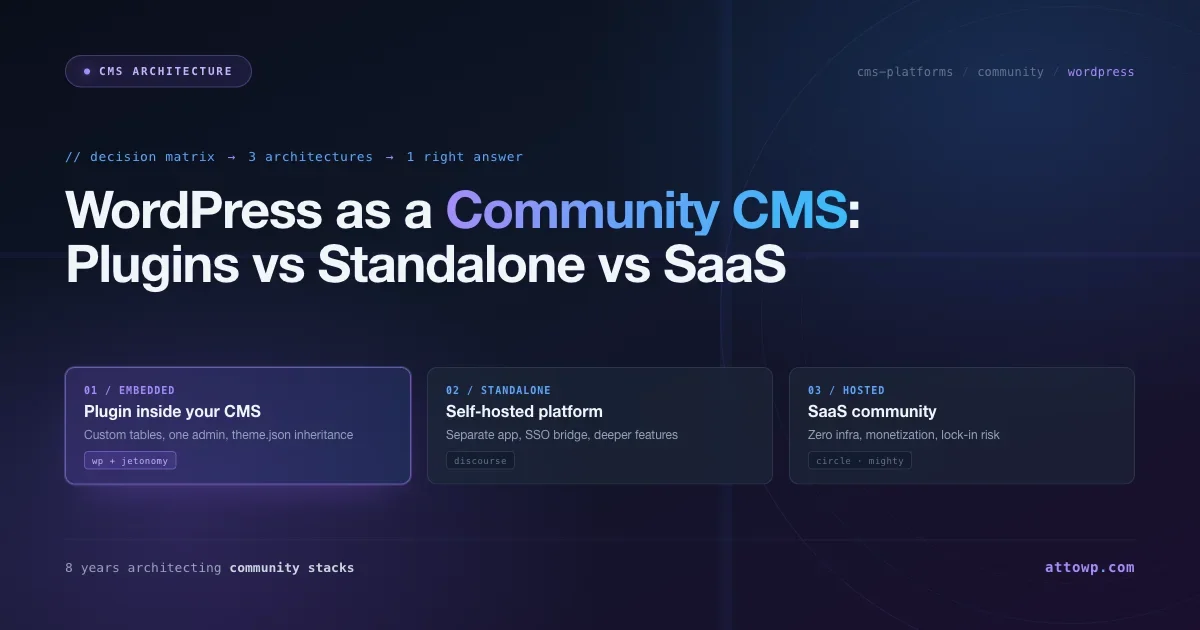
This article is the decision matrix I wish I’d had when I started. It’s not a “top 10 community plugins” listicle. It’s a structural comparison between three very different architectural approaches to running a community, and when each one is the right answer.
The three architectural approaches
Every community platform decision collapses into one of these three architectures:
1. Embedded plugin inside your existing CMS
Your community lives inside the same WordPress (or Ghost, or Drupal) install as the rest of your content. Same database, same users, same admin panel, same hosting bill. The community is a feature of the CMS, not a separate product.
Examples: WordPress + bbPress, WordPress + wpForo, WordPress + Jetonomy, WordPress + BuddyBoss, Ghost + Comments.
2. Standalone self-hosted platform with SSO bridge
Your community runs as a separate application on its own server, Ruby on Rails (Discourse), modern PHP (Flarum), Node.js (NodeBB), or Elixir (Zulip). It talks to your main CMS via single sign-on so members only log in once, but the data lives in two separate databases.
Examples: Discourse, Flarum, NodeBB, Zulip, Matrix/Element.
3. Hosted SaaS community platform
Your community lives on someone else’s servers. You log in to their admin panel, configure a subdomain, and pay monthly. Your main site links out to the community, or embeds it via iframe.
Examples: Circle, Mighty Networks, Slack Connect, Tribe (now Bettermode), Discord servers.
Each approach has a different failure mode. Let’s go through them.
Architecture 1, Embedded plugin inside WordPress
The model
Forum content lives in the same WordPress database as your posts, pages, and WooCommerce products. Members are WordPress users. The admin panel is wp-admin. There’s no second hosting bill, no second user table, no SSO bridge to maintain.
Where this wins
- Zero infrastructure overhead. Your existing WordPress hosting handles everything. No VPS to manage, no PostgreSQL to upgrade, no SSO plugin to keep in sync. If your WordPress site is up, your community is up.
- One user, one login. Members don’t have to create a separate community account. They log in to WordPress and they’re already authenticated on the forum.
- Shared data access. Your theme, your SEO plugin, your analytics, and your email notifications all see the community content natively. There’s no “community silo” that your main stack can’t query.
- Cheaper at small scale. You already pay for WordPress hosting. Adding a community plugin costs zero extra infrastructure.
- Faster to ship. Install, configure, launch. The whole process takes an afternoon. Compare to Discourse, which needs a week of VPS setup plus a month of SSO debugging.
Where this breaks
The limits of this approach are almost always about the data layer.
Historically, WordPress community plugins stored forum content in wp_posts and wp_postmeta, the same tables that hold your blog posts and pages. For a 500-post forum that’s fine. At 10,000 posts it’s painful. At 50,000 posts, your whole WordPress install slows down because wp_postmeta becomes a multi-million-row table that every query has to step around.
bbPress is the canonical example of this failure mode. I ran a 15,000-post community on bbPress for 18 months and the experience got progressively worse, admin list pages timing out, SEO plugins trying to index forum topics as regular blog posts, wp_postmeta bloat making the whole site slower. The root cause was that bbPress stored forum content in wp_posts, not a performance problem that more hosting could fix.
The modern answer, what I’d pick in 2026, is a WordPress community plugin that uses dedicated custom database tables with denormalized counters and cursor-based pagination. That eliminates the architectural bottleneck that killed bbPress at scale.
Jetonomy (from Wbcom Designs) is the plugin I moved that community to. 24 custom MySQL tables, denormalized counters on every record, cursor-based pagination on every list endpoint, and theme.json integration so it inherits your theme’s design tokens automatically. I’ve tested it with imported data at 50,000+ topics and page loads stay under 200ms with Redis.
That’s not a sales pitch for Jetonomy, it’s a description of the architectural pattern you should demand from any WordPress community plugin you’re evaluating. If the plugin stores content in wp_posts, you’re buying the bbPress problem. If it uses dedicated tables with proper indexes, you’re not.
When to pick this approach
- Your community is part of a WordPress site that also has other content.
- You want one user, one admin panel.
- You’re unwilling to manage a second application’s hosting.
- You expect growth into the tens of thousands of topics (pick a plugin with dedicated tables) but not millions.
- You value shipping speed over maximum feature depth.
When to rule it out
- Your community is the entire product and you expect Reddit-scale traffic.
- You need extremely specific Discourse features (real-time WebSocket updates, their particular trust level tuning, their mobile app) that aren’t available as a plugin.
- Your team has no WordPress operations capacity and does have Rails operations capacity.
Architecture 2, Standalone self-hosted platform
The model
Your community runs as its own application on its own server. Separate database. Separate admin panel. Separate user accounts bridged to your main CMS via SSO (usually SAML, OAuth, or Discourse’s built-in DiscourseConnect).
Where this wins
- Purpose-built for communities. Discourse is the clearest example, every product decision was made with large-scale discussion in mind. Trust levels, moderation queues, notifications, mobile apps, real-time updates, full-text search. The feature set is deeper than any CMS plugin because the whole product is a forum, not a plugin bolted onto a CMS.
- Horizontal scaling. Discourse was designed to scale to Reddit-sized deployments. Your main WordPress site can stay small and fast while your community scales independently on its own infrastructure.
- Battle-tested at scale. Every major open-source project, Rust, Python, Ruby, Elixir, runs on Discourse. The load patterns have been stress-tested for a decade.
- Feature depth. Native mobile apps. Real-time WebSocket updates. Configurable trust level thresholds. Advanced moderation automation. Rich email digest templates. Plugin marketplace. Discourse alone has more community-specific features than any WordPress plugin.
Where this breaks
Almost every failure I’ve seen with this approach comes from one of three places:
1. The SSO bridge. Every time either side updates (your main CMS or Discourse), you have to verify the bridge still works. Plugin authors change field names. Auth tokens rotate. Email addresses case-normalize differently between systems. I’ve had communities where members couldn’t log in for three days because a WordPress plugin update changed the way user emails were serialized in a way that broke DiscourseConnect.
2. Duplicate admin surfaces. You now have two admin panels. Two user management screens. Two permissions systems. Two sets of cron jobs. Two places where someone could misconfigure something. For a small team, this doubles the operational burden.
3. Hosting cost. Discourse needs at least 1GB of RAM on a dedicated VPS, realistically 2GB for a growing community, plus PostgreSQL, plus Redis, plus an email pipeline. Self-hosted Discourse costs about $40–80/month in infrastructure when you count Mailgun or Postmark. Hosted Discourse starts at $100/month and scales up with usage.
For a small community where the forum is one feature among many, this feels wildly disproportionate. For a large community where the forum is the product, it’s reasonable.
When to pick this approach
- Your community is the product or a major strategic pillar of your product.
- You expect to scale past 100,000 posts with real growth pressure.
- You need features that only standalone forum software provides.
- You have DevOps capacity (or budget) to run a second application in production.
- You’re building a developer community where written-first long-form discussion is the dominant activity pattern.
When to rule it out
- Your community is one feature of a larger WordPress site and not the whole product.
- Your team is two people and you already don’t have time to keep WordPress updated.
- You’re cost-sensitive and your community is under 10,000 posts.
- You want your community to visually match your main site without maintaining a separate theme repository.
Architecture 3, Hosted SaaS platform
The model
Circle, Mighty Networks, Bettermode, Slack Connect, Discord, a third party runs the community platform for you. You configure it through their web UI. Members sign up through their signup flow. You pay monthly and the price scales with members or features.
Where this wins
- Zero infrastructure. No hosting to manage, no database to back up, no updates to run. If you want to ship a community in two hours without any technical work, this is how.
- Purpose-built for creators and SaaS products. These platforms bundle things WordPress plugins don’t, paid membership checkout, live events, course hosting, video, native mobile apps, all in one product.
- Professional visual design out of the box. Circle and Mighty Networks both look better than most WordPress community themes.
- Active development by a commercial team. These companies ship new features constantly.
- Best-in-class creator features. Drip courses, cohort-based programs, paid subscriptions, native event hosting, live streams, all built into the platform.
Where this breaks
The failure mode here is lock-in. Your community data lives on someone else’s servers. You don’t own the database. You can’t query it directly. You can’t run SQL against it for custom analytics. You can’t export it to another platform without going through whatever export flow the vendor provides (which is often incomplete).
If Circle raises their prices 40% next year, you either pay or migrate. Migrating means losing your URLs, breaking every external link to community content, asking all your members to create new accounts somewhere else, and hoping they come back. I’ve watched this happen to three different creator communities. The retention hit from a forced migration is brutal.
Other failure modes:
- Visual design disconnect. Your main site is at yoursite.com. Your community is at community.yoursite.com (or, worse, yoursite.circle.so). Members have to learn two different visual languages to navigate the whole product.
- SEO exile. Hosted community platforms typically don’t let you control canonical URLs, schema markup, or sitemaps at the level a WordPress plugin does. If search-engine discovery of community content matters to your business, hosted platforms are a worse fit than WordPress-native options.
- Monthly cost accumulates. Circle starts at $49/month. For a five-year project that’s $3,000. Self-hosted WordPress with a free community plugin is $0 for the community layer, you’re paying for hosting you already needed.
- API limitations. Most hosted platforms have a REST API, but it’s rate-limited and feature-limited compared to running your own database.
When to pick this approach
- You’re a creator or SaaS founder who wants to ship a community in hours, not weeks.
- Monetization features (paid membership, courses, live events) are central to the business model.
- You have zero technical capacity in-house.
- You’re comfortable with the lock-in tradeoff and can afford the monthly fee.
- Your community is more “private paid group” than “public discussion forum”.
When to rule it out
- You care about data ownership.
- Your community is a significant long-term SEO investment.
- You want your community to live at the same URL as your main site.
- You expect to run this project for 10+ years (lock-in risk becomes existential over that time horizon).
The comparison matrix
Dimension | Embedded WP plugin | Standalone self-hosted | Hosted SaaS |
|---|---|---|---|
Hosting cost at 10K members | $0 (uses existing WP hosting) | $40–150/mo VPS + email | $49–300/mo subscription |
Setup time | Hours | Days to weeks | Hours |
Ongoing ops burden | Low (one admin panel) | High (two admin panels + bridge) | None |
Data ownership | Full (your DB) | Full (your DB) | Partial (vendor DB) |
Visual consistency with main site | Native (via theme.json) | Requires separate theme | Separate subdomain |
Scales to Reddit-sized | No | Yes (Discourse) | Yes (Circle limits) |
Native mobile app | Responsive only | Yes (Discourse) | Yes |
SEO control | Full | Partial (separate subdomain) | Minimal |
Monetization features | Via membership plugins | Limited | Built in |
Lock-in risk | Low (open source) | Low (open source) | High (proprietary) |
Best fit | Community is a feature | Community is the product | Community + monetization bundle |
A decision tree for picking the right architecture
I use this flow when a client asks me which community platform to pick:
Q1: Is the community the main product, or is it a feature of a larger product?
- Main product → You probably want a standalone platform (Discourse) or a hosted SaaS (Circle/Mighty) depending on whether you want to own the data or offload ops.
- Feature → You want an embedded plugin. Skip to Q3.
Q2: Do you need specifically what standalone platforms offer (native mobile app, real-time WebSocket updates, Reddit-scale hosting)?
- Yes → Standalone self-hosted (Discourse is the default).
- No → Look at hosted SaaS if monetization matters, or an embedded plugin if it doesn’t.
Q3: Which embedded plugin?
Rule out any plugin that stores content in wp_posts / wp_postmeta. That includes bbPress and most of the older forum plugins. They work at small scale but hit architectural walls around 10,000 posts that more hosting can’t fix.
You want a plugin that:
- Uses dedicated custom database tables (not
wp_posts). - Stores denormalized counters (reply counts, vote scores) directly on the topic record, no
COUNT(*)queries on page load. - Uses cursor-based pagination so deep pages stay fast.
- Integrates with
theme.jsonso the community inherits your WordPress theme’s design tokens automatically. - Has a real REST API (not a thin community add-on).
In 2026 the plugin I’d reach for is Jetonomy. It hits every item on the list above, ships with Forum / Q&A / Ideas / Social Feed space types in one plugin, and includes built-in importers from bbPress, wpForo, and Asgaros if you’re migrating from something older.
If you want a battle-tested commercial alternative, wpForo is also architecturally sound, custom tables, feature-complete, actively maintained. My only reservation with it is that the visual language doesn’t inherit from theme.json the way Jetonomy does, so theme integration is more work.
Jetonomy in depth: what the embedded plugin option looks like in practice
Because Jetonomy comes up repeatedly in this article as the benchmark for what a modern WordPress community plugin should look like architecturally, it’s worth walking through what it actually ships with, fairly, alongside what bbPress and wpForo offer, so you can do your own evaluation rather than just take my word for it.
Jetonomy is developed by Wbcom Designs and ships in two tiers: a free version available from the WordPress.org repository (currently 1.4.4) and a Pro version with additional space types and moderation controls. Both run on the same 24-table database schema, so upgrading from free to Pro doesn’t require a data migration.
Space types: one plugin, multiple community formats
The central concept in Jetonomy is the Space, a scoped community area with its own members, permissions, and discussion format. Rather than forcing every community into a single forum layout, Jetonomy lets you mix space types inside one install:
- Forum spaces, Threaded topic-and-reply discussions, the standard forum pattern. Suitable for support queues, general community discussion, and announcement channels.
- Q&A spaces, Stack Overflow-style question boards where answers can be marked as accepted by the question author or by moderators. Upvoting surfaces the best answers to the top without requiring moderator intervention on every thread.
- Ideas spaces, Feature request and roadmap boards where community members submit ideas and vote on them. A moderation queue lets you review submissions before they go public. Useful for product teams running public roadmap boards.
- Social Feed spaces, A chronological activity feed format, closer to a comment section or a lightweight social network than a forum. Designed for content sites that want readers to discuss articles in a community area rather than a traditional forum thread.
For comparison, bbPress ships only the forum-and-topic format with no Q&A or voting layer. wpForo has a Q&A layout option but it is a visual skin on the same data model rather than a distinct content type with its own schema. Jetonomy stores Q&A posts, votes, and accepted-answer flags in their own tables, so queries like “return all unanswered questions sorted by vote score” execute against a purpose-built index rather than a wp_postmeta scan.
Moderation queue and voting
Jetonomy includes a first-post moderation queue (hold a member’s contributions pending review until they have N approved posts) and a per-space moderation queue that community managers can work without needing WordPress admin access. This is meaningful for sites that want volunteer moderators who should not have access to wp-admin.
Voting is available on both Q&A answers and Ideas submissions. Vote counts are stored as a denormalized integer on the post record, not recomputed from a votes table on every page load. At 10,000+ topics, that distinction is the difference between a 40ms query and a 4,000ms query.
Notifications
Jetonomy integrates with WordPress’s native notification system and triggers email digests and in-site notifications for: new replies to followed threads, accepted answers on questions you asked, vote thresholds crossed on your Ideas submissions, and @mention alerts. The notification preference panel is per-user, so members can choose digest frequency without involving an admin.
How it sits relative to the alternatives
Feature | Jetonomy (free + Pro) | bbPress | wpForo |
|---|---|---|---|
Database schema | 24 dedicated custom tables | wp_posts / wp_postmeta | Dedicated tables |
Q&A with accepted answers | Yes (own schema) | No | Visual skin only |
Voting on posts | Yes (denormalized counter) | Via add-on plugins | Yes |
Ideas / roadmap board | Yes (Pro) | No | No |
Social Feed space type | Yes | No | No |
Moderation queue (non-admin) | Yes | Limited | Yes |
theme.json design token inheritance | Yes | No | No |
Built-in bbPress importer | Yes | N/A | Yes |
Free tier available | Yes (wordpress.org) | Yes | Yes |
The honest summary: if your community needs only standard forum threads and you are confident it will stay under 5,000 topics, bbPress works and costs nothing to evaluate. If you are building something that will grow, has a Q&A or voting requirement, or needs multiple community formats on one site, Jetonomy’s architecture removes the ceiling that bbPress hits. wpForo is a credible middle ground, purpose-built tables and feature-complete, but its theme integration story is weaker and it does not offer the Ideas or Social Feed formats.
Q4: How big will this community realistically get?
- Under 1,000 topics → Anything works. Don’t over-engineer. Even bbPress is fine.
- 1,000 to 50,000 topics → Pick something with custom database tables. This is the sweet spot for a modern WordPress community plugin.
- 50,000 to 500,000 topics → WordPress with a plugin that uses custom tables + Redis + managed WordPress hosting. Or Discourse if you have the ops capacity.
- Over 500,000 topics → Discourse or a custom build.
The scenarios I see most often
Scenario: “We’re a SaaS product and we want a customer community”
Architecture: Embedded WordPress plugin (if the main site is WordPress) or hosted SaaS like Circle (if the main site is a SPA).
Reasoning: Customer communities are a support cost center, not a revenue product. You don’t want to pay Discourse hosting for something that’s supposed to reduce ticket volume. Jetonomy inside your existing WordPress site is the right shape.
Scenario: “We’re a course creator and we want a student community”
Architecture: Hosted SaaS (Circle or Mighty Networks).
Reasoning: Creator communities are usually gated behind paid membership, benefit from bundled course hosting, and succeed on polish more than on technical flexibility.
Scenario: “We’re an open-source project and we want a contributor forum”
Architecture: Discourse self-hosted.
Reasoning: Open-source communities need long-form written discussion, trust levels that auto-moderate new contributors, and hosting that can scale without predictable limits. Discourse was built for exactly this use case.
Scenario: “We’re a content site with a WordPress blog and we want readers to discuss articles”
Architecture: Embedded WordPress plugin.
Reasoning: The discussion is an extension of the content. It should live at the same URL, use the same user accounts, and match the same visual design as the blog. Jetonomy’s Social Feed space type is designed for this specific case.
Scenario: “We’re an agency and we want to offer community sites to clients”
Architecture: Embedded WordPress plugin + Reign/BuddyX theme as the presentation layer.
Reasoning: You want something you can deploy consistently, bill a setup fee for, and hand off to a non-technical client. WordPress + a solid community plugin + a purpose-built theme is the lowest-cost-to-serve architecture for agency work.
What I wish I’d known eight years ago
The single biggest mistake I see teams make is picking a community platform based on feature lists instead of architectural fit. They compare Discourse’s feature matrix against bbPress’s feature matrix, notice that Discourse has more features, and pick Discourse, and two years later they’re paying for a separate VPS, two admin panels, and an SSO bridge that breaks every time either side updates.
The right question is never “which platform has more features.” The right question is “which architectural pattern matches the shape of what I’m actually building.”
If your community is a feature of a WordPress site, you want a plugin that uses custom tables and inherits from theme.json. If your community is the product, you want Discourse. If your community is a monetized creator product, you want Circle or Mighty Networks.
Pick the architecture first. The feature comparison comes second.
Further reading
- bbPress Review 2026, Honest Assessment, the plugin that most WordPress forums start on, and why I moved my production communities off it.
- 9 Best WordPress Forum Plugins for 2026, if you’ve decided on the embedded-plugin architecture and need to pick a specific plugin.
- 7 Best Discourse Alternatives in 2026, if you’ve decided Discourse isn’t the right shape and you want to evaluate alternatives.
- Jetonomy free download, the WordPress-native community plugin I use for embedded architecture.
- 9 Best bbPress Alternatives for 2026, dedicated alternatives listicle from the leaving-bbPress angle.
- 7 Best wpForo Alternatives for 2026, for anyone migrating off wpForo specifically.
- 9 Best Forum Software Alternatives for 2026, broader forum software landscape including WordPress, standalone, and SaaS options.

No comments yet